
1. Introduction
Thank you for choosing the JESLED Solar Security Light. This manual provides detailed instructions for the installation, operation, and maintenance of your new solar-powered outdoor light. Designed for efficiency and convenience, this light features 104 high-efficiency LEDs, a sensitive motion sensor, remote control functionality, and multiple lighting modes to enhance security and illumination in your yard, garage, or garden.
2. Product Overview
The JESLED Solar Security Light (Model: SW-SWL104-02) is an advanced outdoor lighting solution. It integrates a solar panel, LED light array, motion sensor, and a rechargeable battery within a durable, weather-resistant housing. A remote control is included for convenient operation.

Figure 2.1: JESLED Solar Security Light and Remote Control.
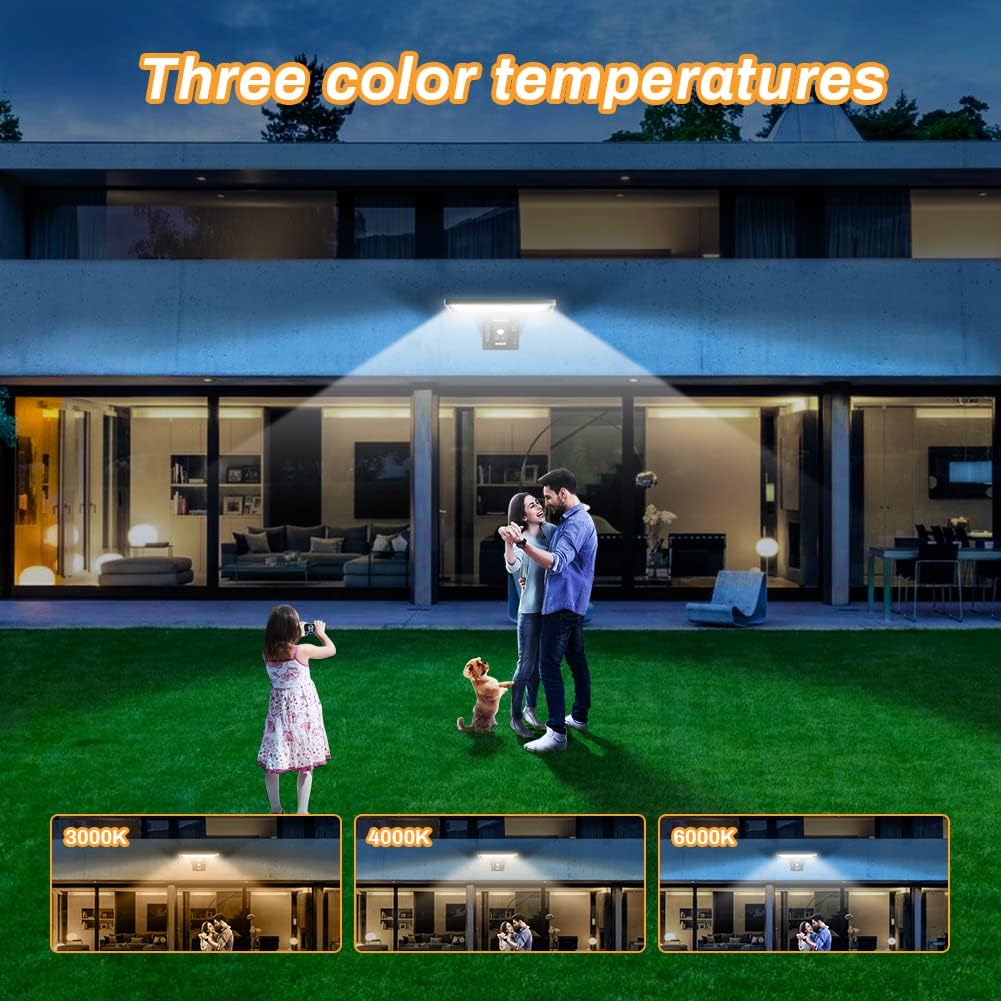
Figure 2.2: Detail of 104 High-Efficiency LEDs and Optical Lens, providing 1050 lumens output.

Figure 2.3: High-Quality Crystalline Silicon Solar Panel and 5200mAh Large Capacity Battery.

Figure 2.4: Weather Resistance: Heat-Resisting, Cold-Resistant, Waterproof (IP65), and Windbreak design.
Key Features:
- 104 High-Efficiency LED Beads: Provides excellent illumination with 1050 lumens output.
- Sensitive PIR Motion Sensor: Detects motion up to 3 meters with a 120° sensing angle.
- Remote Control: Allows easy selection of modes and color temperatures without needing to access the light directly.
- 3 Color Temperatures: Choose between Warm white (3000K), Natural white (4000K), and Cool white (6000K).
- 4 Adjustable Lighting Modes: Sensor Mode, Sensor & Dim Mode, Dim Mode, and Emergency Mode.
- USB Charging Port: Provides an alternative charging method for special circumstances like prolonged rainy weather.
- IP65 Waterproof Rating: Ensures durability and reliable operation in various weather conditions.
- Replaceable Battery: Enhances product longevity and ease of maintenance.
3. Setup and Installation
Before installation, ensure the solar light is fully charged. It is recommended to charge the light for 7-8 hours under direct sunlight before first use. Select an installation location that receives ample direct sunlight throughout the day for optimal charging performance.

Figure 3.1: Installation Steps.
- Step 1: Position and Drill Holes
Choose your desired installation spot on a wall. Use the provided mounting template (if applicable) or measure the distance between the mounting holes on the light. Mark the positions on the wall and use a drill to create the necessary holes. - Step 2: Insert Wall Plugs
Open the accessory package and take out the screws and raw plugs. Insert the raw plugs into the drilled holes in the wall. - Step 3: Mount the Light
Align the light with the installed raw plugs. The LED Solar Light has snap holes at the end for easy mounting. Gently hang the product onto the screws and secure it. After mounting, you can select your preferred lighting mode using the remote control.
Important Note: For optimal solar charging, ensure the solar panel faces direct sunlight as much as possible. The optimum installation height is approximately 3 meters.
4. Operating Instructions
The JESLED Solar Security Light offers versatile operation through its remote control and intelligent sensing capabilities. Before using the remote control, ensure you press the power button on the light itself to activate it.
4.1 Lighting Modes:

Figure 4.1: Overview of the Four Adjustable Lighting Modes.
- Mode 1 (Sensor Mode): The light remains off when no motion is detected. It illuminates with strong brightness when motion is detected and turns off after a set period of no motion.
- Mode 2 (Sensor & Dim Mode): The light stays on at a dim level when no motion is detected. It switches to strong brightness when motion is detected and returns to dim after a set period of no motion.
- Mode 3 (Dim Mode): The light stays on at a dim state throughout the night. The infrared sensor is inactive in this mode. This mode is controlled by the dusk-to-dawn photocell.
- Mode 4 (Emergency Mode): To activate, press and hold the ON button on the remote control for 5 seconds without moving. The solar light will enter an emergency lighting mode, providing continuous light. This mode can be used for emergency situations like outdoor hiking or camping.
4.2 Color Temperature Adjustment:

Figure 4.2: Three Available Color Temperatures (3000K, 4000K, 6000K).
The light offers three color temperature options (Warm white, Natural white, Cool white) ranging from 3000K to 6000K. Use the "COLOR TEMPERATURE" buttons on the remote control to cycle through these options and select the one that best suits your needs.
5. Charging
The JESLED Solar Security Light is primarily powered by its integrated solar panel. For optimal performance, ensure the solar panel is exposed to direct sunlight for at least 7-8 hours before initial use and regularly thereafter.
5.1 Solar Charging:
The high-efficiency crystalline silicon solar panel absorbs sunlight during the day and converts it into electrical energy, which is stored in the internal 5200mAh rechargeable Lithium Polymer battery. A fully charged light can operate for 4-5 nights even during rainy weather.
5.2 USB Charging:
In situations with prolonged cloudy or rainy weather, or if the battery level is critically low, the light can be charged via its USB charging port. Connect a standard USB cable (not included) to the light's USB port and a compatible USB power source. This ensures continuous operation even when solar charging is insufficient.
6. Maintenance
To ensure the longevity and optimal performance of your JESLED Solar Security Light, follow these maintenance guidelines:
- Clean the Solar Panel: Regularly wipe the solar panel with a soft, damp cloth to remove dust, dirt, leaves, or snow. A clean panel ensures maximum sunlight absorption and efficient charging.
- Check Mounting: Periodically inspect the mounting screws and ensure the light is securely attached to the wall.
- Battery Replacement: The battery is replaceable. If you notice a significant decrease in performance over time, consult the manufacturer for guidance on battery replacement.
- Weather Protection: The light is IP65 waterproof, designed to withstand rain and splashes. However, avoid submerging the unit in water.
7. Troubleshooting
If you encounter issues with your JESLED Solar Security Light, please refer to the following common problems and solutions:
| Problem | Possible Cause | Solution |
|---|---|---|
| Light does not turn on at night. |
|
|
| Light blinks or is dim. |
|
|
| Motion sensor not working effectively. |
|
|
| Remote control not responding. |
|
|
Kindly Note: The lamp will not work in daylight. If you need to test it during the day, please do so in a dark room or by covering the solar panel completely.
8. Specifications
| Feature | Detail |
|---|---|
| Brand | JESLED |
| Model Number | SW-SWL104-02 |
| Product Dimensions | 25 x 24.3 x 7.5 cm |
| Item Weight | 720 g |
| Batteries | 1 Lithium Polymer battery (included) |
| Battery Capacity | 5200 mAh |
| Style | Modern |
| Colour | 104led |
| Material | Stainless Steel, Polypropylene, Glass, Silicone, Aluminium, Acrylonitrile Butadiene Styrene, Polycarbonate |
| Number of Lights | 104 |
| Included Components | Remote Control, Mounting Hardware, Instruction Manual |
| Voltage | 3.7 Volts |
| Specific Uses | Garden, Yard, Pathway, Patio, Walkway |
| Special Features | Energy Efficient, Waterproof, Low Voltage, Motion Sensor, Adjustable Colour Temperature |
| Shade Colour | Warm white (adjustable to Natural white, Cool white) |
| Shade Material | Plastic |
| Light Direction | Adjustable |
| Power Source | Solar Powered |
| Switch Style | Remote Control |
| Type of Bulb | LED |
| Luminous Flux | 1050 Lumen |
| Wattage | 8 watts |
| IP Rating | IP65 |
9. Warranty and Support
JESLED is committed to providing high-quality products and excellent customer service.
- Warranty: This product comes with a 2-year warranty. The battery is covered by a 1-year warranty.
- Return Policy: JESLED offers a 60-day full refund policy and a 30-day free return.
- Customer Service: We provide 24/7 after-sale customer service. If you have any questions, concerns, or require assistance, please do not hesitate to contact us.
For further support, please visit the official JESLED store or contact their customer service department.


