
Sussex Multi-Function Table Lamp with Alarm Clock and Charging Station
Sussex Multi-Function Table Lamp User Manual
Model: Multi-Function Table Lamp with Alarm Clock and Charging Station
1. Product Overview
The Sussex Multi-Function Table Lamp is designed to enhance your bedside or desk area with versatile features. It combines a dimmable lamp, a dual alarm clock, a charging station with USB and AC outlets, and a Bluetooth speaker. This manual provides detailed instructions for safe and efficient use.

Figure 1: Sussex Multi-Function Table Lamp with its integrated features.
2. Safety Instructions
- Read all instructions carefully before use.
- Do not expose the device to water or excessive moisture.
- Ensure the power cord is fully inserted into the wall outlet.
- Do not attempt to disassemble or repair the unit yourself. Contact qualified service personnel.
- Keep away from heat sources and direct sunlight.
- Use only the specified power supply.
- Unplug the lamp during lightning storms or when unused for long periods.
3. Package Contents
- Sussex Multi-Function Table Lamp (1 unit)
- Power Cord (1 unit)
- User Manual (1 unit)
- LED Bulb (1 unit)

Figure 2: Included components for the table lamp.
4. Setup
- Assemble the Lampshade: Carefully place the lampshade onto the lamp holder. Secure it with the fixing ring by screwing it clockwise until tight.
- Install the LED Bulb: Screw the provided LED bulb into the lamp holder socket.
- Connect Power: Insert the power cord into the lamp's power input, then plug the other end into a standard AC wall outlet.
- Battery Backup (Optional): For time memory during power interruptions, insert 2 AAA batteries (not included) into the battery compartment located at the bottom of the unit.
Video 1: Installation and basic usage guide for the alarm clock table lamp.
5. Operating Instructions
5.1 Lamp Operation
The lamp features 3-level dimmable lighting controlled by touch. To adjust the brightness:
- Turn On/Low Brightness: Touch the lamp pole once.
- Medium Brightness: Touch the lamp pole a second time.
- High Brightness: Touch the lamp pole a third time.
- Turn Off: Touch the lamp pole a fourth time.

Figure 3: Demonstrating the 3-level dimmable touch control lighting.
5.2 Charging Station
The lamp base includes integrated charging options:
- USB-A Ports: Two USB-A ports (5V/1A) are available for charging smartphones, tablets, and other USB-powered devices.
- USB-C Port: One USB-C port (5V/2A) provides faster charging for compatible devices.
- AC Outlets: Two standard AC power outlets (1250W max) are provided for plugging in laptops or other small appliances.

Figure 4: Integrated charging station with USB and AC ports.
5.3 Alarm Clock
The lamp features a dual alarm clock with a large digital display and 4-way brightness adjustment for the display itself.
- Setting Time: Press the clock button. Use the arrow buttons to adjust hours, then press the clock button again to adjust minutes. Press the clock button once more to confirm.
- Setting Alarms (AL1/AL2): Press the AL1 or AL2 button. Use the arrow buttons to set the desired alarm time. Press the AL1/AL2 button again to confirm.
- Snooze Function: When an alarm sounds, press the "DIMMER/SNOOZE" button to activate a 9-minute snooze.
- Alarm Volume: Press the volume button to cycle through 3 levels of alarm volume.
- Display Brightness: Use the dimmer button to adjust the brightness of the digital clock display (4 levels).
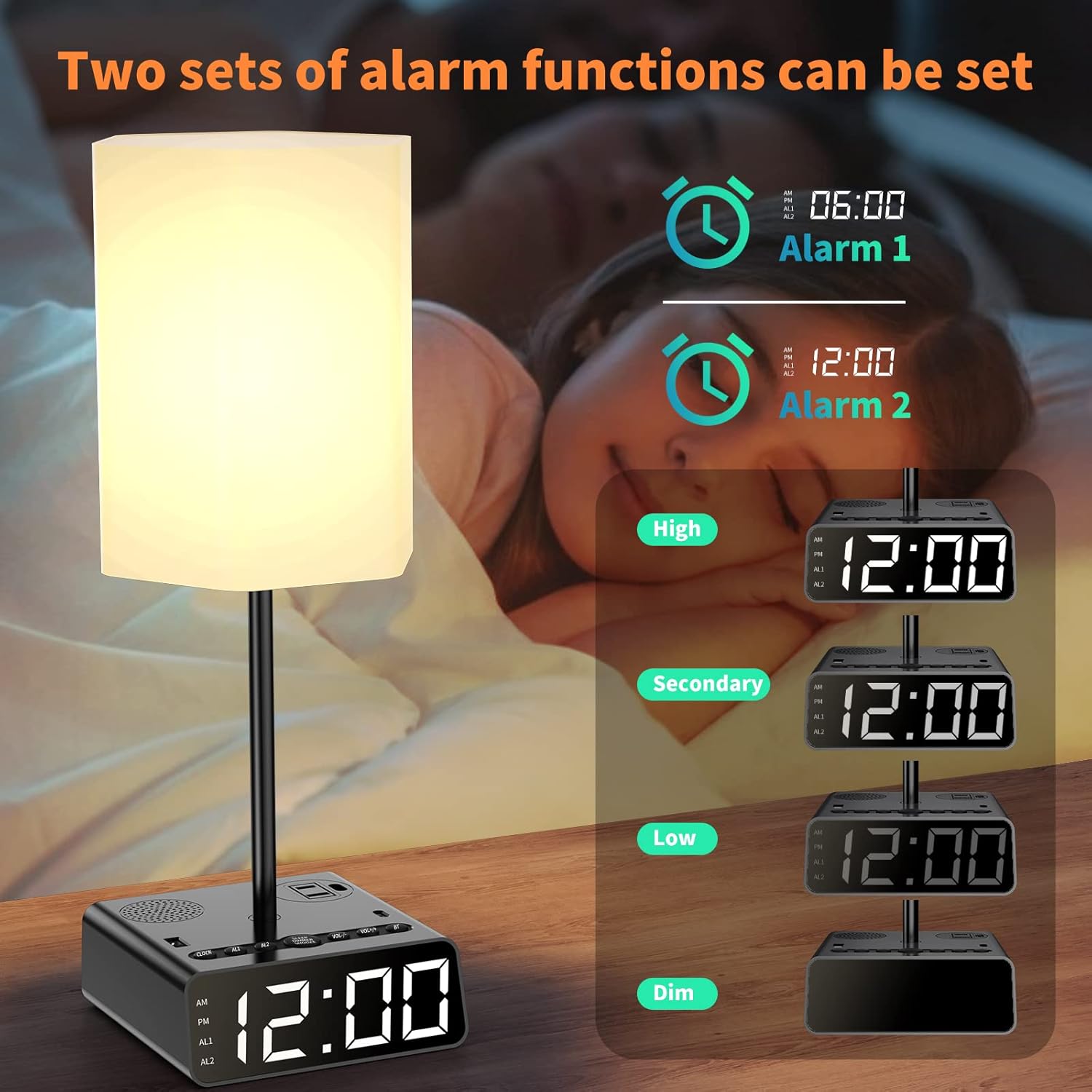
Figure 5: Dual alarm clock with adjustable display brightness.
5.4 Bluetooth Speaker & Radio
The lamp includes a built-in speaker for audio playback.
- Bluetooth Connection: Search for "BT500" on your device's Bluetooth settings to connect.
- Audio Playback: Play music or other audio from your connected Bluetooth device.
- Radio Function: The device also supports radio functionality. Refer to the specific controls on the unit for tuning and station selection.
- Timer Function: Speaker audio can be timed for 30, 60, or 90 minutes, or turned off manually.

Figure 6: Speaker audio function with Bluetooth connectivity.
6. Maintenance
- Cleaning: Unplug the lamp before cleaning. Use a soft, dry cloth to wipe the surfaces. Do not use abrasive cleaners or solvents.
- Bulb Replacement: Ensure the lamp is unplugged and the bulb is cool before replacing. Use a GU10 LED bulb.
- Cord Care: Regularly inspect the power cord for any damage. Do not use if the cord is frayed or damaged.
7. Troubleshooting
| Problem | Possible Cause | Solution |
|---|---|---|
| Lamp does not turn on. | Power cord not connected; Bulb loose or faulty. | Ensure power cord is securely plugged in. Check and tighten the bulb, or replace if faulty. |
| Charging ports not working. | Lamp not powered; Device cable faulty. | Verify the lamp is powered. Try a different charging cable or device. |
| Alarm clock display is off or incorrect. | Power interruption; Batteries not installed or drained. | Reset the time. Install or replace AAA batteries for backup. |
| Bluetooth speaker not connecting. | Device not in pairing mode; Incorrect device selected. | Ensure your device's Bluetooth is on and searching for "BT500". Try restarting both devices. |
8. Specifications
- Product Dimensions: 15D x 15W x 35.1H Centimetres
- Item Weight: 0.89 Kilograms
- Material: Metal, Plastic
- Light Source Type: LED
- Bulb Base: GU10
- Switch Type: Touch Control
- Power Source: Corded Electric
- Wattage: 1250 watts (AC outlets)
- USB-A Output: 5V/1A
- USB-C Output: 5V/2A
- Connectivity: Bluetooth
- Alarm Clock: Dual alarm, 4-way display brightness, 9-min snooze, 12/24-hour system
- Battery Backup: Requires 2 AAA Batteries (not included) for time memory
9. Warranty and Support
For warranty information or technical support, please refer to the contact details provided on the product packaging or contact your retailer. Keep your purchase receipt for warranty claims.
Ask a question about this manual
Ask about setup, troubleshooting, compatibility, parts, safety, or missing instructions. Manuals+ will review the question and use this page’s manual context to help answer it.