
1. Introduction
Thank you for choosing the GANA HDMI Switch 5 in 1 Out 4K@60Hz. This device allows you to connect up to five HDMI source devices to a single HDMI display, such as a TV or monitor. It supports high-resolution video up to 4K@60Hz, including 3D, UHD, HDCP2.2, and HDR signals, providing a clear and immersive viewing experience. This manual provides detailed instructions for setup, operation, and troubleshooting.
Package Contents:
- 1 x GANA HDMI Switch 5 in 1 Out
- 1 x IR Remote Control
- 1 x Micro USB Power Cable
- 1 x User Guide (This Manual)

Image: The GANA HDMI Switch 5 in 1 Out device shown with its included remote control.
2. Product Features
- 5 HDMI Inputs, 1 HDMI Output: Connect multiple source devices to a single display.
- High Resolution Support: Supports 4K@60Hz, 4K@30Hz, 2560x1440@120Hz, and 1920x1080@240Hz.
- Advanced Video Technologies: Compatible with 3D, UHD, HDCP2.2, and HDR.
- Dual Switching Methods: Switch inputs using the manual button on the device or the included IR remote control.
- Fast and Stable Transmission: 18Gbps bandwidth for smooth video without loss.
- USB Powered: Ensures stable performance (USB cable included, power adapter not included).
- Wide Compatibility: Works with various HDMI source devices (PC, gaming consoles, streaming devices) and displays (TVs, monitors, projectors).

Image: A diagram illustrating the input ports, output port, power indicator, input signal indicators, IR receiver, and switch button on the GANA HDMI Switch.
3. Setup Instructions
Follow these steps to connect your GANA HDMI Switch:
- Connect HDMI Output: Connect one end of an HDMI cable (not included) to the 'Output' port on the GANA HDMI Switch and the other end to the HDMI input on your display (TV, monitor, or projector).
- Connect HDMI Inputs: Connect up to five HDMI source devices (e.g., gaming console, Blu-ray player, streaming stick, PC) to the 'Input 1' through 'Input 5' ports on the GANA HDMI Switch using HDMI cables (not included).
- Connect Power: Connect the Micro USB power cable to the 'DC 5V' port on the HDMI Switch and the other end to a 5V USB power source (e.g., a USB port on your TV, a USB wall adapter, or a power bank). Note: A power adapter is not included. Ensure the switch is always connected to a power source for stable operation.
- Power On Devices: Power on your HDMI source devices and your display.
- Select Input: Use the manual 'Select' button on the switch or the remote control to choose the desired input source. The corresponding LED indicator will light up.
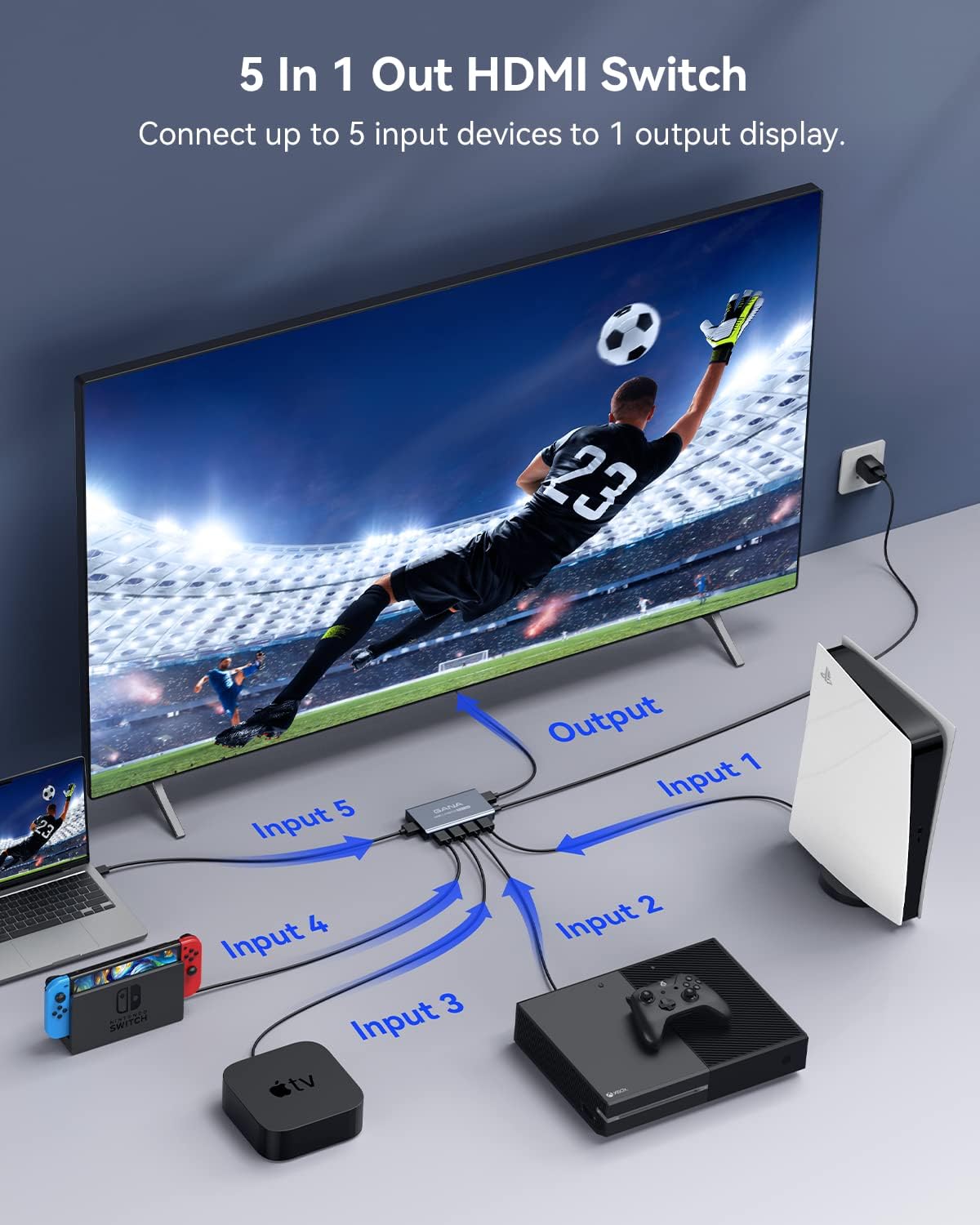
Image: A visual representation of connecting multiple input devices (laptop, Nintendo Switch, Apple TV, Xbox, PlayStation) to the GANA HDMI Switch, which then connects to a single display.

Image: A close-up view of the Micro USB power port (DC 5V) on the GANA HDMI Switch, indicating where the power cable should be connected.
4. Operating Instructions
Switching Input Sources:
There are two methods to switch between your connected HDMI devices:
- Manual Button: Press the 'Select' button on the front panel of the GANA HDMI Switch to cycle through the input sources (Input 1 to Input 5).
- IR Remote Control: Use the included remote control to directly select the desired input (buttons 1-5) or cycle through inputs using the 'Next' button. The remote control has an effective range of up to 33 feet (10 meters).
LED Indicators:
The front panel features LED indicators to show the status of the switch:
- Power LED: Indicates if the device is powered on.
- Input LEDs (1-5): The LED corresponding to the currently active HDMI input will illuminate.
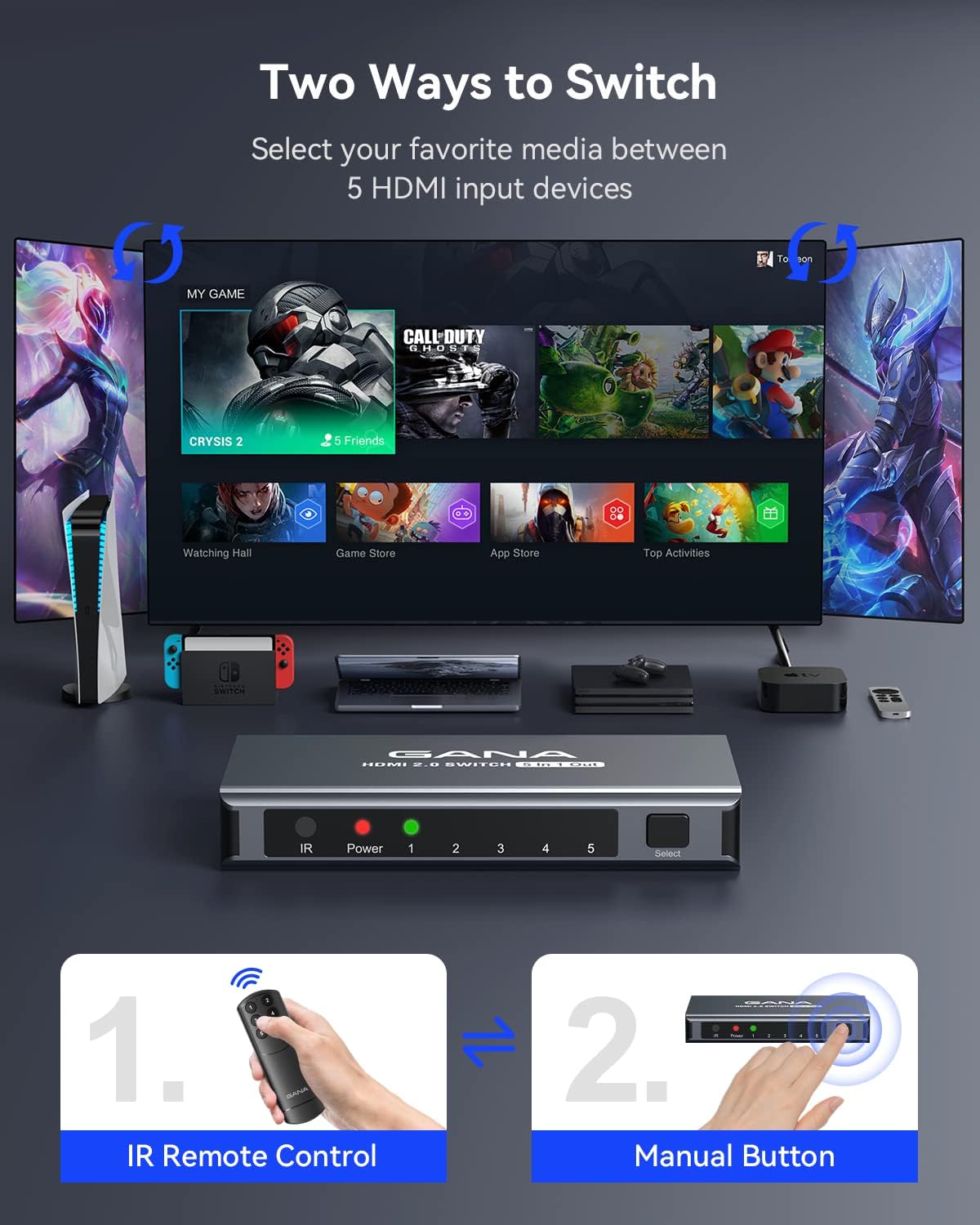
Image: Illustration showing both the IR remote control and the manual button on the GANA HDMI Switch as methods for selecting input sources.

Image: A close-up of the GANA HDMI Switch remote control, highlighting its buttons for input selection.

Image: A close-up of the GANA HDMI Switch's front panel, showing the Power, IR, and Input (1-5) LED indicators.
5. Specifications
| Feature | Description |
|---|---|
| Model Number | IT-IG-5IN1 |
| HDMI Version | HDMI 2.0 |
| Max Resolution | 4K@60Hz |
| Bandwidth | 18Gbps |
| Color Depth | 12-bit deep color per channel |
| Supported Technologies | 3D, UHD, HDCP2.2, HDR |
| Audio Support | DTS Digital, Dolby Digital (compressed audio) |
| Input Ports | 5 x HDMI |
| Output Ports | 1 x HDMI |
| Power Supply | Micro USB 5V (USB cable included, adapter not included) |
| Dimensions | 6.8 x 5.05 x 0.85 inches |
| Item Weight | 6.7 ounces |
| Housing Material | Aluminum |
6. Troubleshooting
If you encounter issues with your GANA HDMI Switch, please refer to the following common problems and solutions:
- No Signal or Flickering Screen:
- Ensure all HDMI cables are securely connected to both the switch and your devices/display.
- Verify that the Micro USB power cable is connected and the switch's power LED is on. A stable power supply is crucial.
- Try using shorter, high-quality HDMI 2.0 cables, especially for 4K@60Hz content.
- Test with different HDMI cables to rule out cable issues.
- Ensure your display is set to the correct HDMI input.
- Restart all connected devices (source, switch, display).
- Remote Control Not Working:
- Ensure there are no obstructions between the remote and the IR receiver on the switch.
- Check if the remote control's battery needs replacement.
- Confirm you are within the effective range (up to 33 feet).
- Audio Issues (No Sound or Distorted Audio):
- Check audio settings on your source device and display.
- Ensure HDMI cables support audio transmission.
- Resolution or Refresh Rate Problems:
- Confirm your display and source devices support the desired resolution and refresh rate (e.g., 4K@60Hz).
- Use HDMI 2.0 compliant cables for 4K@60Hz and HDR content.
7. Maintenance
To ensure the longevity and optimal performance of your GANA HDMI Switch, follow these maintenance guidelines:
- Cleaning: Use a soft, dry cloth to clean the device. Do not use liquid cleaners or aerosols.
- Storage: Store the device in a cool, dry place away from direct sunlight and extreme temperatures.
- Handling: Avoid dropping or subjecting the device to strong impacts.
- Ventilation: Ensure the device has adequate ventilation and is not covered, to prevent overheating.
8. Warranty and Support
GANA provides lifetime technical support and friendly customer service for this product. If you encounter any issues or have questions, please contact GANA customer support. We are committed to resolving your problem within 24 hours.
For support, please refer to the contact information provided with your purchase or visit the official GANA website.
