
RETROSUN FR1 DSB1 RE9520-1 D581 RE95201
Contents
RETROSUN Replacement Remote Control for Polk Audio Soundbar User Manual
Model: FR1, DSB1, D581, RE95201, RE9520-1
1. Introduction
This manual provides instructions for the RETROSUN Replacement Remote Control, designed for use with various Polk Audio Soundbar Speaker Systems. This remote control is ready to use out of the box, requiring no programming or pairing.
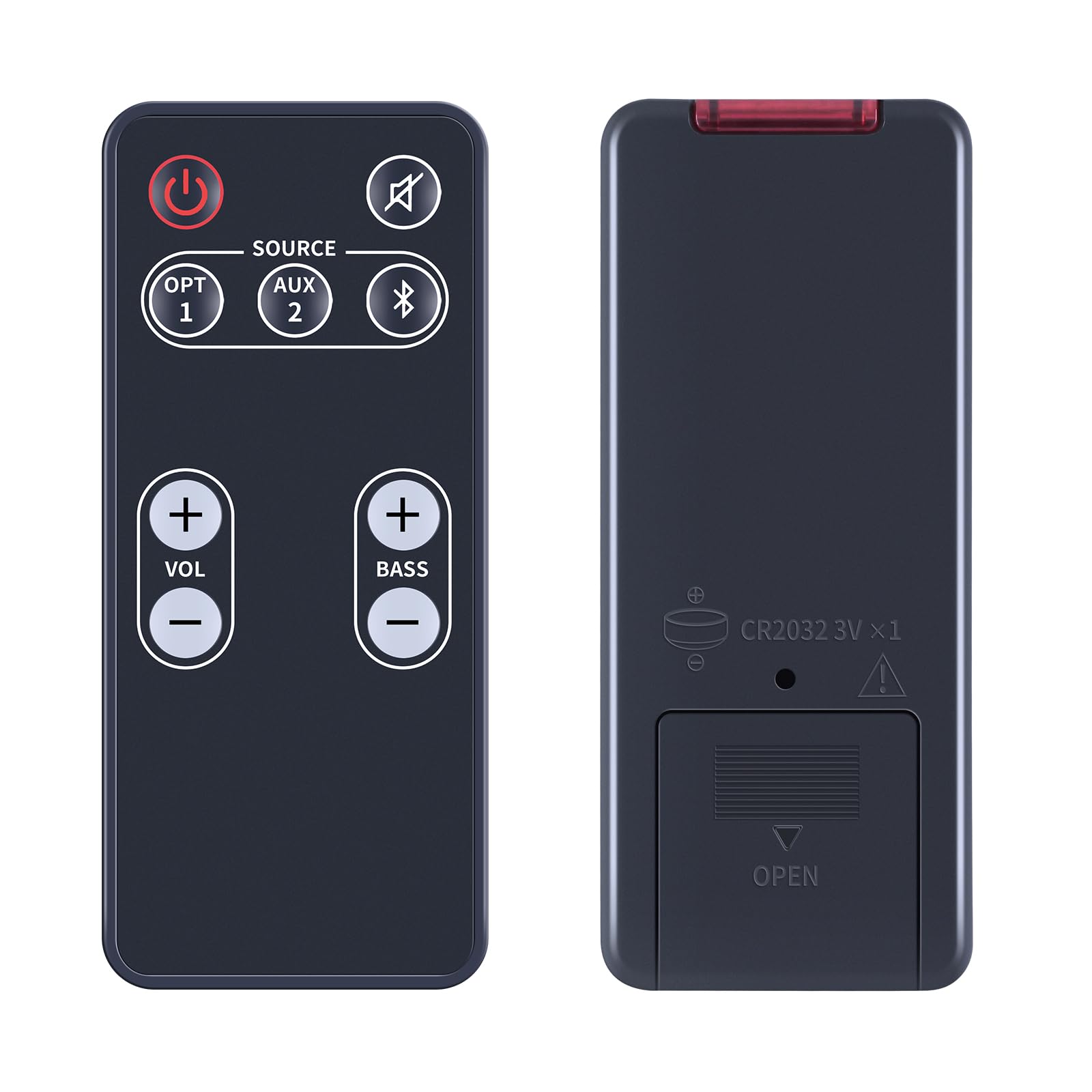
Image 1.1: The RETROSUN Replacement Remote Control shown with a Polk Audio Soundbar setup, illustrating its compatibility.
2. Compatibility
This replacement remote control is compatible with the following Polk Audio Video Soundbar Speaker System models:
- FR1
- DSB1
- D581
- RE95201
- RE9520-1
And other compatible Polk Audio Soundbar models.
3. Setup
3.1 Battery Installation
The remote control requires one (1) CR2032 3V button cell battery (not included). Follow these steps to install the battery:
- Locate the battery compartment on the back of the remote control.
- Gently slide the battery cover in the direction indicated by the "OPEN" arrow to remove it.
- Insert one CR2032 battery with the positive (+) side facing upwards, as shown in the diagram.
- Replace the battery cover by sliding it back until it clicks into place.

Image 3.1: Diagram showing the correct orientation for inserting the CR2032 battery into the remote control.
Important: Ensure the battery is inserted with the correct polarity. Incorrect installation may damage the remote control.
4. Operating Instructions
This RETROSUN remote control is designed for immediate use with compatible Polk Audio Soundbar systems without any programming or setup. Simply install the battery, point the remote at your soundbar, and begin operation.

Image 4.1: A user demonstrating the direct use of the remote control with a soundbar, highlighting its plug-and-play functionality.
4.1 Button Functions
The remote control features an ergonomic design with clearly labeled buttons for essential soundbar functions:

Image 4.2: Detailed view of the remote control's buttons, indicating their sensitive and responsive design.
- Power Button (⏻): Turns the soundbar on or off.
- Mute Button (🔇): Mutes or unmutes the sound.
- Source Button: Cycles through available input sources (e.g., OPT 1, AUX 2, Bluetooth).
- Volume Up/Down (+ VOL -): Adjusts the main volume level.
- Bass Up/Down (+ BASS -): Adjusts the bass level.
4.2 Optimal Performance
For stable and smart signal transmission, ensure there are no obstructions between the remote control and the soundbar's infrared receiver. The remote operates effectively up to a maximum range of 10 meters (approximately 33 feet).

Image 4.3: Visual representation of the remote's stable and smart signal transmission for an optimal user experience.
5. Maintenance
To ensure the longevity and proper functioning of your remote control, follow these maintenance guidelines:
- Cleaning: Wipe the remote with a soft, dry cloth. Do not use liquid cleaners or abrasive materials.
- Battery Replacement: Replace the CR2032 battery when the remote's response becomes sluggish or it stops functioning. Always dispose of used batteries responsibly.
- Storage: Store the remote in a cool, dry place away from direct sunlight and extreme temperatures.
- Material Quality: The remote is constructed from durable ABS materials, designed for reliability.
6. Troubleshooting
If you encounter issues with your remote control, please refer to the following common solutions:
| Problem | Possible Cause | Solution |
|---|---|---|
| Remote not working | Dead or incorrectly installed battery. | Check battery polarity and replace with a new CR2032 battery. |
| Limited range or intermittent response | Obstruction between remote and soundbar; weak battery. | Ensure a clear line of sight to the soundbar's IR receiver. Replace battery if needed. |
| Specific buttons not responding | Dust or debris under the button; remote malfunction. | Clean the remote surface. If the issue persists after battery replacement, contact customer support. |
| Remote does not control soundbar | Soundbar model is not compatible. | Verify your soundbar model against the compatibility list in Section 2. |
7. Specifications
| Feature | Detail |
|---|---|
| Brand | RETROSUN |
| Model Name | FR1 DSB1 RE9520-1 D581 RE95201 polk |
| Connectivity Technology | Infrared (IR) |
| Compatible Devices | Polk Audio Soundbar Speaker Systems |
| Max Number of Supported Devices | 1 |
| Controller Type | Button Control |
| Maximum Range | 10 meters (approx. 33 feet) |
| Battery Type | 1 x CR2032 3V (not included) |
| Item Weight | 0.01 kg |
| Material | ABS |
7.1 Dimensions

Image 7.1: Front, side, and back views of the remote control with approximate dimensions.
8. Warranty and Support
RETROSUN is committed to providing quality products and customer satisfaction. While specific warranty details are not provided, we offer comprehensive customer support.
8.1 Customer Support
If you have any questions, encounter issues during use, or require assistance, please contact us through the Amazon messaging tool. We are dedicated to helping you and aim to respond to all inquiries within 24 hours.

Image 8.1: Illustration of customer support availability for assistance.
Ask a question about this manual
Ask about setup, troubleshooting, compatibility, parts, safety, or missing instructions. Manuals+ will review the question and use this page’s manual context to help answer it.