1. Introduction
The RovyVon Angel Eyes E5 is a compact and versatile keychain flashlight designed for everyday carry. It features a powerful 700-lumen primary light and practical auxiliary lights, including white and UV LEDs. The E5 offers a unique dual power source system, allowing it to be powered by either its built-in rechargeable battery or a replaceable AAA battery. Its glow-in-the-dark (GITD) shell enhances visibility in low-light conditions.

Image 1.1: The RovyVon Angel Eyes E5 flashlight, showcasing its compact design and USB-C charging port.
2. Setup
2.1. Initial Charging
The RovyVon E5 features a built-in 330mAh Li-po battery. Before first use, fully charge the device.
- Locate the USB-C charging port on the side of the flashlight.
- Connect the flashlight to a power source using a USB-C cable (not included).
- The charging indicator light will show charging status. A full charge typically takes 1 hour.
2.2. AAA Battery Installation (Optional)
The E5 can also be powered by a single AAA battery (not included) as an alternative power source.
- Gently pull the head of the flashlight to detach it from the main body.
- Insert a fresh AAA battery into the compartment with the positive (+) end facing towards the head of the flashlight.
- Reattach the head securely to the main body.
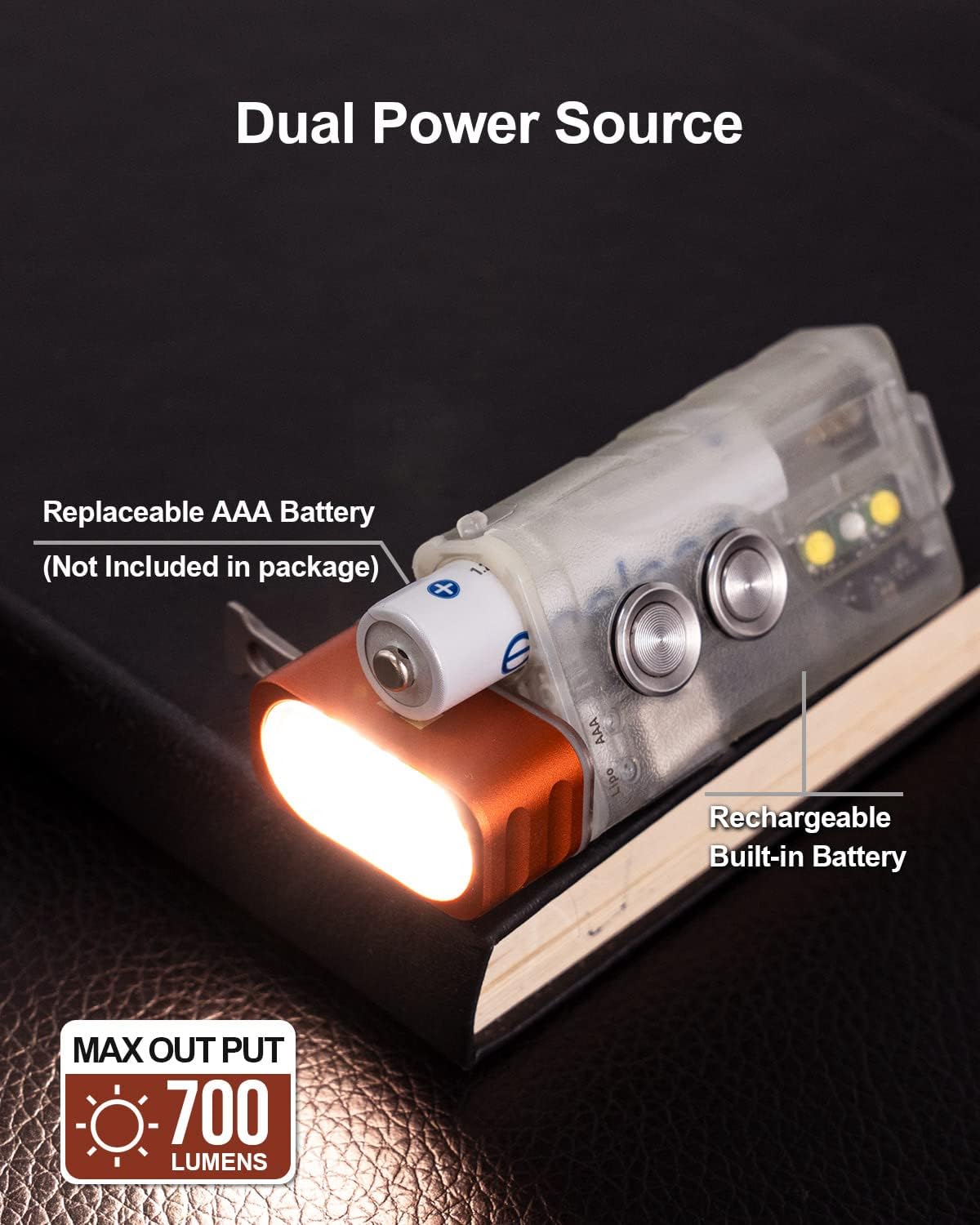
Image 2.1: The RovyVon E5 demonstrating its dual power source capability with an AAA battery inserted.
2.3. Activating Glow-in-the-Dark (GITD) Feature
The E5's green fluorescent shell glows in the dark after exposure to light. To activate this feature:
- Expose the flashlight to direct sunlight or a 365nm UV light source.
- The UV sidelight on the E5 can be used to charge the fluorescent shell. Quickly double-click Button 2 to turn on the UV light for this purpose.

Image 2.2: The RovyVon E5 glowing green in a dark environment after being charged by light.
3. Operating Instructions
The RovyVon E5 features two main buttons for control:
- Button 1: Controls the front primary light.
- Button 2: Controls the side auxiliary lights.
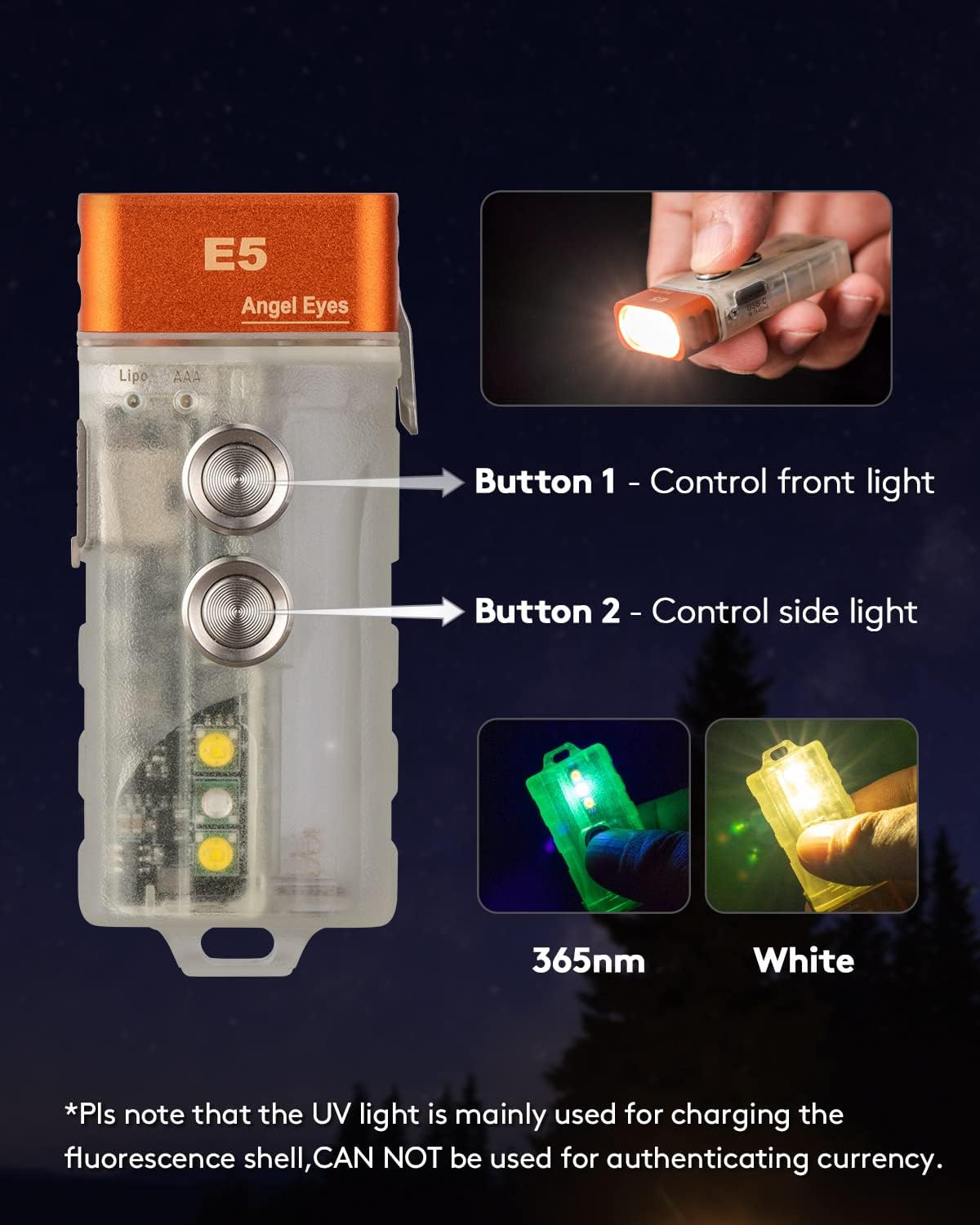
Image 3.1: Diagram illustrating the functions of Button 1 (front light) and Button 2 (side light) on the RovyVon E5.
3.1. Front Primary Light Operation
The front light offers five modes: Moonlight, Low, Medium, High, and Strobe.
- Turn On/Off: Rapidly double-click Button 1 to turn the front light on or off.
- Change Brightness: While the front light is on, single-click Button 1 to cycle through Moonlight → Low → Medium → High.
- Strobe Mode: Rapidly triple-click Button 1 to activate Strobe mode. Single-click to exit Strobe mode and return to the previously used brightness level.
- Momentary High: Press and hold Button 1 for momentary access to High mode. Release to turn off.
3.2. Side Auxiliary Lights Operation
The side lights include White and UV LEDs.
- Turn On/Off: Rapidly double-click Button 2 to turn the side light on or off.
- Change Mode: While the side light is on, single-click Button 2 to cycle through White Low → White High → UV.

Image 3.2: Close-up view of the RovyVon E5 sidelights, highlighting the White LED and UV LED functions.
3.3. Lockout Function
To prevent accidental activation, the E5 features a lockout function.
- Activate Lockout: Rapidly four-click Button 1. The blue indicator light will flash for 3 seconds, confirming lockout.
- Deactivate Lockout: Rapidly four-click Button 1 again. The green indicator light will flash for 2 seconds, indicating the flashlight is unlocked.
3.4. Using the Reversible Pocket Clip
The included reversible pocket clip offers versatile carrying options.
- Attach the clip to your hat brim to use the flashlight as a headlamp.
- Attach the clip to a wristband or clothing for hands-free illumination.
4. Maintenance
4.1. General Care
- Keep the flashlight clean and dry. Wipe with a soft, damp cloth if necessary.
- Avoid dropping the flashlight or subjecting it to strong impacts.
- Store in a cool, dry place when not in use for extended periods.
4.2. Water Resistance
The RovyVon E5 is rated IPX6 water-resistant, meaning it is protected against powerful water jets. It is suitable for use in rain or wet conditions but should not be submerged in water.
5. Troubleshooting
- Flashlight not turning on:
- Ensure the flashlight is not in lockout mode. Deactivate by rapidly four-clicking Button 1.
- Check the battery level. Recharge the built-in battery via USB-C or replace the AAA battery if using.
- Ensure the AAA battery is inserted with correct polarity.
- Charging issues:
- Verify the USB-C cable and power adapter are functioning correctly.
- Ensure the USB-C port is clean and free of debris.
- Glow-in-the-dark feature not working:
- Ensure the flashlight has been sufficiently exposed to light (sunlight or UV light) to charge the fluorescent material.
6. Specifications
| Feature | Detail |
|---|---|
| Model | E5 |
| Primary Light Output | Up to 700 Lumens |
| Beam Distance | 220 ft |
| Light Source Type | Cool White LEDs (Front), White LED, UV LED (Side) |
| Color Temperature | 6500 Kelvin |
| Power Source | Built-in 330mAh Lithium Polymer (Li-Po) battery, 1x AAA battery (Ni-MH or Alkaline) |
| Charging Port | USB-C |
| Charging Time | Approx. 1 hour (for built-in battery) |
| Max Runtime (Moonlight) | Up to 62 hours |
| Material | Aluminum, Polycarbonate |
| Dimensions | 2.6"D x 1.08"W x 0.53"H (66.1mm x 27.5mm x 13.5mm) |
| Item Weight | 1.45 ounces (41 Grams) |
| Water Resistance | IPX6 |
| Special Features | Adjustable Light Modes, Dual Source, GITD Shell, Lockout Function, Reversible Pocket Clip |

Image 6.1: Size comparison of the RovyVon E5 flashlight, showing its compact dimensions relative to a quarter.
7. Warranty and Support
7.1. Warranty Information
The RovyVon Angel Eyes E5 comes with a full warranty. Please refer to the included Warranty Card in your product packaging for specific terms and conditions.
7.2. Customer Support
For further assistance, technical support, or warranty claims, please contact RovyVon customer service. You can find contact information on the official RovyVon website or through your retailer.
Visit the official RovyVon Store: RovyVon Direct Store


