Important Safety Information
Please read all instructions carefully before using the Lexibook Paw Patrol Karaoke CD Player. Keep this manual for future reference.
- Do not expose the unit to rain or moisture.
- Do not block any ventilation openings.
- Use only attachments/accessories specified by the manufacturer.
- Disconnect the apparatus during lightning storms or when unused for long periods.
- Ensure proper battery installation and disposal.
Package Contents
Verify that all items are present in the package:
- Lexibook Paw Patrol Karaoke CD Player
- 2 Microphones
- Power Adapter
- Instruction Manual
Product Overview
The Lexibook Paw Patrol Karaoke CD Player is designed for children to enjoy music and sing along with their favorite characters. It features a front-load CD player, two microphones, an LED display, and a headphone jack for private listening.

Image 1: The Lexibook Paw Patrol Karaoke CD Player, featuring a blue and red design with Paw Patrol characters, and two attached red microphones.
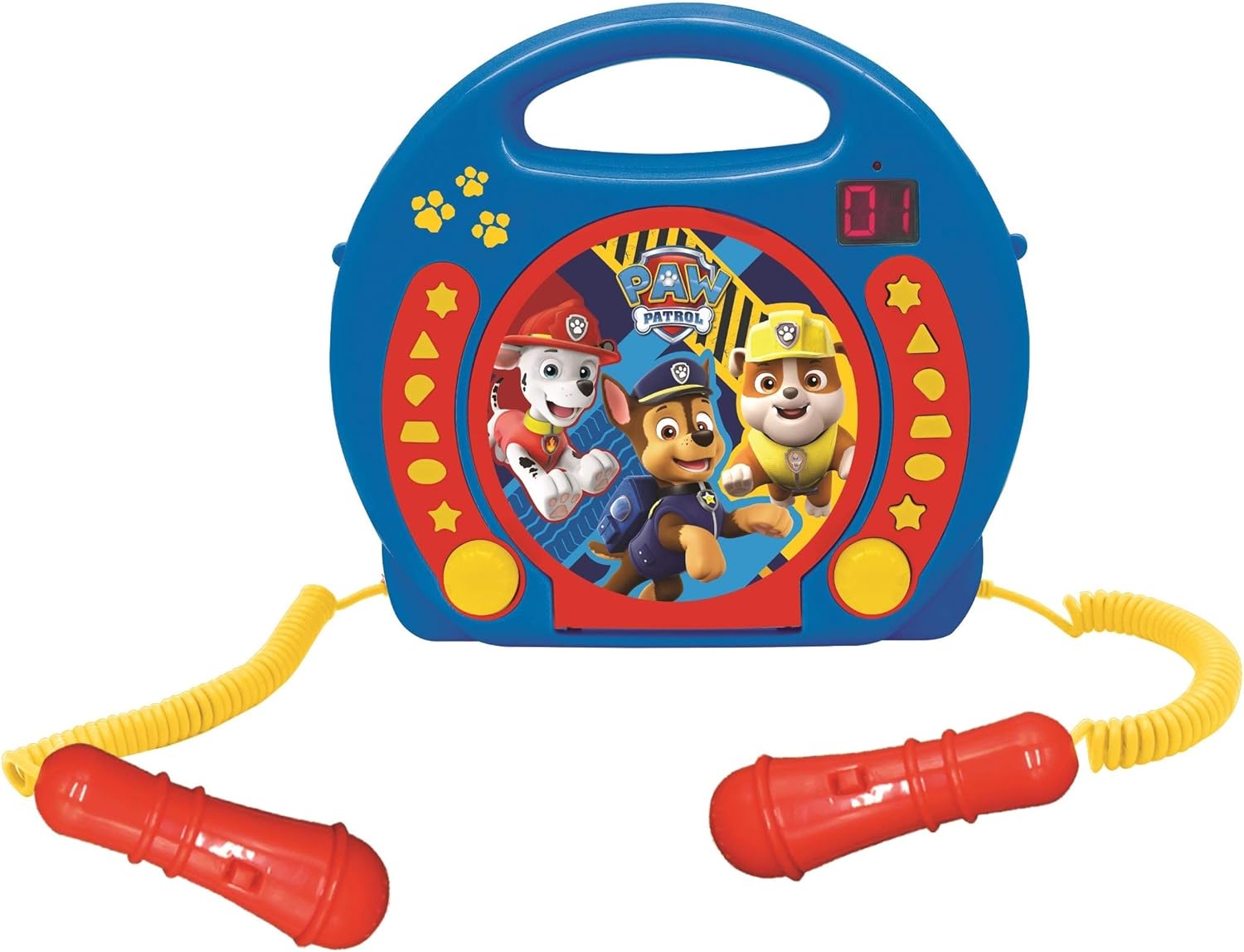
Image 2: A top-down perspective of the karaoke CD player, showing the central Paw Patrol shield design, control buttons, and the two microphones.
Video 1: A product overview video demonstrating the features and design of the Lexibook Paw Patrol Karaoke CD Player.
Setup
Power Supply Connection
- Locate the DC IN jack on the back of the unit.
- Insert the small plug of the provided power adapter into the DC IN jack.
- Plug the other end of the power adapter into a standard wall outlet.
Battery Installation
For portable use, the unit requires 4 'C' batteries (not included).
- Locate the battery compartment on the bottom of the unit.
- Using a screwdriver, open the battery compartment cover.
- Insert 4 'C' batteries, ensuring correct polarity (+/-).
- Replace the battery compartment cover and secure it with the screw.
Operating Instructions
CD Playback
- Open the CD compartment cover located on the top of the unit.
- Place a CD onto the spindle with the label side facing up.
- Close the CD compartment cover securely.
- Press the 'PLAY/PAUSE' button to start playback.
- Use the 'SKIP' buttons (forward/backward) to navigate between tracks.
- Press the 'STOP' button to end CD playback.
Using the Microphones
- Ensure the microphones are securely plugged into their respective jacks.
- During CD playback, speak or sing into the microphones.
- Adjust the microphone volume using the dedicated volume control (if available) or the main volume control.
Programming Function
The programming function allows you to create a custom playlist of tracks.
- With the CD stopped, press the 'PROGRAM' button.
- Use the 'SKIP' buttons to select the desired track.
- Press 'PROGRAM' again to add the track to the playlist.
- Repeat steps 2 and 3 to add more tracks.
- Press 'PLAY' to start playing your programmed sequence.
Headphone Use
- Plug standard 3.5mm headphones (not included) into the headphone jack.
- Adjust the volume to a comfortable listening level.
- Note: Using headphones will mute the main speakers.
Maintenance
- Clean the unit with a soft, dry cloth. Do not use abrasive cleaners or solvents.
- Keep the CD compartment free of dust and debris.
- Store the unit in a cool, dry place when not in use.
Troubleshooting
| Problem | Solution |
|---|---|
| Unit does not power on. | Check power adapter connection or ensure batteries are correctly installed and not depleted. |
| CD does not play. | Ensure the CD is clean, not scratched, and correctly placed in the compartment. Close the compartment lid completely. |
| Microphones are not working. | Verify microphones are securely plugged in. Check microphone volume levels. |
| Sound is distorted or too low. | Adjust the main volume control. Ensure the CD is not damaged. |
Specifications
| Feature | Detail |
|---|---|
| Product Dimensions | 10.35 x 3.98 x 8.27 inches |
| Item Weight | 1.63 pounds |
| Manufacturer Recommended Age | 3 years and up |
| Batteries | 4 C batteries required (not included) |
| Special Feature | LED Display |
| Color | Blue / Red |
| Included Components | Power adapter, CD player, handle, 2 microphones |
| Release Date | April 11, 2023 |
Warranty and Support
This product comes with a 2 Year Limited Warranty from the manufacturer, Lexibook.
For technical support, warranty claims, or further assistance, please contact Lexibook customer service. Refer to the product packaging or the official Lexibook website for the most current contact information.