
1. Introduction
Thank you for choosing the FSQWUR 9V 1A AC Adapter. This power supply is designed to provide stable 9V DC power to a variety of electronic devices requiring 100mA to 1000mA, featuring 8 interchangeable DC plugs for broad compatibility. Please read this manual carefully before use to ensure proper operation and safety.
What's in the Box:
- 1 x FSQWUR 9V 1A Power Supply (Center Positive)
- 8 x Interchangeable DC Plug Adapters
2. Safety Information
Always follow these safety guidelines to prevent damage to the adapter or connected devices, and to ensure personal safety:
- Ensure the input voltage of your device matches the adapter's output (9V).
- Verify the polarity of your device. This adapter is center positive. Connecting to a center negative device can cause damage.
- Confirm your device's current requirement (Amperage) is within the adapter's range (0.1A to 1A). Do not exceed 1A.
- This adapter is not waterproof. Avoid exposure to water, rain, or high humidity.
- Do not use in extreme temperatures or near open flames.
- Do not disassemble or modify the adapter.
- Keep out of reach of children.

Image: The FSQWUR 9V 1A AC Adapter features built-in protections including short circuit, over current, over voltage, over charge, over temperature, and overload protection.
3. Setup
Follow these steps to correctly set up your FSQWUR 9V 1A AC Adapter:
3.1. Verify Device Compatibility
Before connecting, it is crucial to verify that your electronic device is compatible with this power adapter. This adapter provides 9V DC power with a center positive polarity and supports current draws from 100mA up to 1000mA (1A).
- Voltage: Your device must require 9V.
- Current: Your device's current draw must be 1A or less.
- Polarity: Your device must require center positive polarity. This is indicated by a symbol with a dot in the center and a plus sign next to it, and a C-shaped line with a minus sign next to it.

Image: This diagram illustrates devices compatible with center positive polarity, such as baby monitors, routers, Arduino boards, speakers, CCTV cameras, and light strips. It also shows incompatible devices like guitar pedals, keyboard pianos, and label makers, which typically use center negative polarity.
3.2. Select the Correct DC Plug
The adapter comes with 8 interchangeable DC plugs to fit various devices. Carefully select the plug that matches your device's power input port. The available sizes are:
- 6.0*4.4mm (with pin inside)
- 6.0*3.0mm
- 4.0*1.7mm
- 4.8*1.7mm
- 3.0*1.1mm
- 3.5*1.35mm
- 2.5*0.7mm
- LED Terminal Connector
Attach the selected plug firmly to the adapter's cable end.

Image: A visual guide to the 8 interchangeable DC jacks, demonstrating their various sizes and how they connect to the main power cable, ensuring a secure fit for different devices.
3.3. Connect the Adapter
- Insert the chosen DC plug into your electronic device's power input port.
- Plug the AC adapter into a standard 100-240V AC wall outlet.
- Your device should now receive power.
Video: This video demonstrates the FSQWUR 9V 1A AC DC Power Supply, showcasing its features and how to connect it to various devices using the interchangeable DC plugs. It highlights the product's versatility and ease of use.
4. Operating Instructions
Once connected, the FSQWUR 9V 1A AC Adapter will provide continuous power to your compatible device. The intelligent identification output ensures that the adapter delivers the correct current (up to 1A) required by your device, preventing overcurrent situations for lower-amperage devices.

Image: The FSQWUR 9V 1A AC Adapter is shown plugged into a power strip, providing power to a device, illustrating typical usage in a home or office environment.
5. Maintenance
To ensure the longevity and optimal performance of your FSQWUR 9V 1A AC Adapter, follow these simple maintenance guidelines:
- Cleaning: Disconnect the adapter from the power outlet and your device before cleaning. Use a soft, dry cloth to wipe the surface. Do not use liquid cleaners or solvents.
- Storage: Store the adapter in a cool, dry place away from direct sunlight and extreme temperatures when not in use.
- Cable Care: Avoid bending or crimping the power cord excessively. Do not place heavy objects on the cable.
- Inspection: Periodically inspect the adapter and cable for any signs of damage, such as frayed wires or cracked casing. If damage is found, discontinue use immediately.
6. Troubleshooting
If you encounter issues with your FSQWUR 9V 1A AC Adapter, please refer to the following common problems and solutions:
| Problem | Possible Cause | Solution |
|---|---|---|
| Device not powering on. | Incorrect voltage, current, or polarity. Loose connection. Faulty outlet. | 1. Double-check device's power requirements (9V, center positive, max 1A). 2. Ensure the DC plug is fully inserted into the device and the adapter is firmly plugged into the wall. 3. Test the wall outlet with another device. |
| Adapter feels hot during use. | Normal operation (slight warmth). Overload. Poor ventilation. | 1. A slight warmth is normal. If it's excessively hot, disconnect immediately. 2. Ensure the device's current draw does not exceed 1A. 3. Ensure the adapter has adequate ventilation and is not covered. |
| Device is damaged after using adapter. | Incorrect polarity (center negative device). Incorrect voltage. | 1. Immediately discontinue use. 2. This adapter is center positive. Ensure your device requires center positive power. Connecting to a center negative device will cause damage. 3. Verify your device requires exactly 9V. |

Image: This image provides a detailed view of the 5.5mm x 2.1mm and 5.5mm x 2.5mm DC plug sizes and illustrates the center positive polarity. It includes a crucial reminder that the adapter does not fit pedals or piano keyboards with negative-tip power ports.
7. Specifications
Key technical specifications for the FSQWUR 9V 1A AC Adapter:
| Feature | Detail |
|---|---|
| AC Input | 100-240V, 50-60Hz |
| DC Output | 9V 1A (1000mA) |
| Output Wattage | 9 Watts (Max) |
| DC Plug Polarity | Center Positive (+) |
| Cable Length | 5.9 feet (approx. 1.8 meters) |
| Included Plugs | 8 Interchangeable DC Plugs (various sizes including 6.0*4.4mm, 6.0*3.0mm, 4.0*1.7mm, 4.8*1.7mm, 3.0*1.1mm, 3.5*1.35mm, 2.5*0.7mm, LED Terminal Connector) |
| Safety Features | Short Circuit Protection, Over Current Protection, Over Voltage Protection, Over Temperature Protection, Over Charge Protection, Overload Protection |
| Material | Plastic |
| Weight | 0.13 Kilograms |
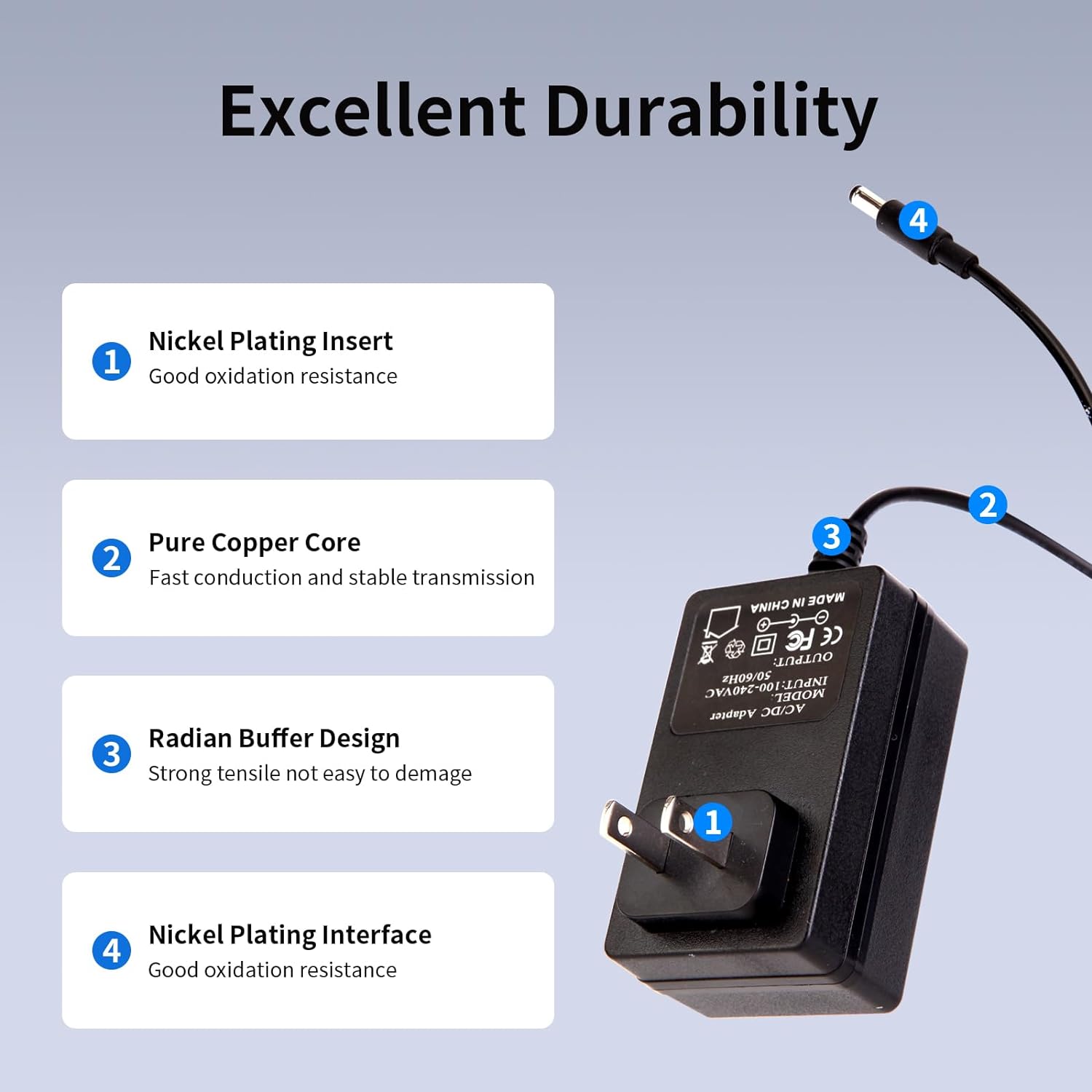
Image: This image details the internal and external durability features of the adapter, including nickel plating for oxidation resistance, a pure copper core for stable transmission, and a radian buffer design for cable protection.
8. Warranty & Support
FSQWUR products undergo strict quality control and repeated testing to ensure reliability. If you encounter any problems or have questions regarding your 9V 1A AC Adapter, please contact our customer support for assistance.
For further information or support, please visit the FSQWUR Store on Amazon.