
INVOLLY BM8216
INVOLLY 15-in-1 Bread Maker User Manual
Model: BM8216
Product Overview
The INVOLLY 15-in-1 Automatic Bread Maker is a versatile kitchen appliance designed to simplify your baking process. It offers 15 preset programs, including options for gluten-free bread, pizza dough, cakes, jams, and yogurt. With features like an auto nut dispenser, nonstick pan, and a 15-hour delay timer, it provides convenience and flexibility for creating a variety of homemade baked goods.

Image: Front view of the INVOLLY 15-in-1 Bread Maker, showcasing its stainless steel finish and control panel.
Important Safeguards
When using electrical appliances, basic safety precautions should always be followed, including the following:
- Read all instructions before use.
- Do not touch hot surfaces. Use handles or knobs.
- To protect against electric shock, do not immerse cord, plugs, or appliance in water or other liquid.
- Close supervision is necessary when any appliance is used by or near children.
- Unplug from outlet when not in use and before cleaning. Allow to cool before putting on or taking off parts.
- Do not operate any appliance with a damaged cord or plug or after the appliance malfunctions or has been damaged in any manner.
- The use of accessory attachments not recommended by the appliance manufacturer may cause injuries.
- Do not use outdoors.
- Do not let cord hang over edge of table or counter, or touch hot surfaces.
- Do not place on or near a hot gas or electric burner, or in a heated oven.
- Extreme caution must be used when moving an appliance containing hot oil or other hot liquids.
- Do not use appliance for other than intended use.
- This appliance has a polarized plug (one blade is wider than the other). To reduce the risk of electric shock, this plug is intended to fit into a polarized outlet only one way. If the plug does not fit fully into the outlet, reverse the plug. If it still does not fit, contact a qualified electrician. Do not attempt to modify the plug in any way.
Components and Features
Familiarize yourself with the various parts of your INVOLLY Bread Maker:
- Main Unit: Stainless steel housing with control panel and viewing window.
- Bread Pan: Non-stick coated pan for baking.
- Kneading Paddle: Palm-shaped design for efficient dough mixing.
- Automatic Fruit & Nut Dispenser: Releases ingredients at optimal times.
- Measuring Cup & Spoon: For accurate ingredient measurement.
- Hook: Tool for removing the kneading paddle from the baked bread.
- Control Panel: Features an LCD display, program selection, crust color, loaf size, delay timer, and start/stop buttons.

Image: Detailed view of the bread maker's design elements, including the stainless steel exterior, anti-heat handle, and the large glass viewing window for monitoring the baking process.

Image: A visual representation of all accessories provided with the bread maker, including the bread pan, kneading paddle, automatic dispenser, measuring tools, and the instruction manual.
Setup and First Use
- Unpacking: Carefully remove all packaging materials and accessories.
- Cleaning: Wash the bread pan and kneading paddle with warm, soapy water. Wipe the exterior of the appliance with a damp cloth. Dry all parts thoroughly.
- Placement: Place the bread maker on a stable, flat, heat-resistant surface, away from direct sunlight and heat sources. Ensure adequate ventilation.
- First Bake (Recommended): Before baking your first loaf, it is recommended to run the "Bake" program (Program 14) for 10 minutes without any ingredients. This helps to burn off any manufacturing residues and odors. Allow the unit to cool completely afterward.
Operating Instructions
Adding Ingredients
Always add liquid ingredients first, followed by dry ingredients. Make sure yeast is added last, placed in a small indentation on top of the flour, away from liquids and salt.

Image: A visual guide demonstrating the simple four-step process of making bread with the INVOLLY bread maker, from adding ingredients to enjoying the finished product.
Program Selection
The INVOLLY Bread Maker offers 15 pre-programmed settings to cater to various baking needs:
| Program No. | Program Name | Description |
|---|---|---|
| 1 | Basic | For white and mixed breads, mainly using bread flour. |
| 2 | French | For light breads made from fine flour. Typically crispier crust and lighter texture. |
| 3 | Whole Wheat | For breads with whole wheat flour. Requires longer kneading and rising time. |
| 4 | Quick | For quick breads that use baking powder/soda instead of yeast. |
| 5 | Sweet | For breads with high sugar, fats, or protein content. |
| 6 | Sandwich | For light and fluffy bread, ideal for sandwiches. |
| 7 | Gluten Free | For gluten-free recipes. Requires specific gluten-free flour mixes. |
| 8 | Mix | For kneading dough only, without baking. |
| 9 | Yogurt | For making homemade yogurt. |
| 10 | Dessert | For various dessert recipes. |
| 11 | Dough | For preparing dough for pizza, rolls, or other baked goods that will be baked in a conventional oven. |
| 12 | Jam | For making homemade jams and preserves. |
| 13 | Cake | For baking cakes. |
| 14 | Bake | For baking only, without kneading or rising. Useful for additional browning. |
| 15 | Home Made | Allows customization of kneading, rising, and baking times. |

Image: The control panel displaying the 15 available program options, from Basic to Home Made, along with the digital display.

Image: A comprehensive display of the 15 programmable modes, illustrating the diverse range of items that can be prepared with the bread maker.
Loaf Size and Crust Color
Select your desired loaf size (1 LB, 1.5 LB, or 2 LB) and crust color (Light, Medium, or Dark) using the respective buttons on the control panel. These options allow you to customize your bread to your preference.
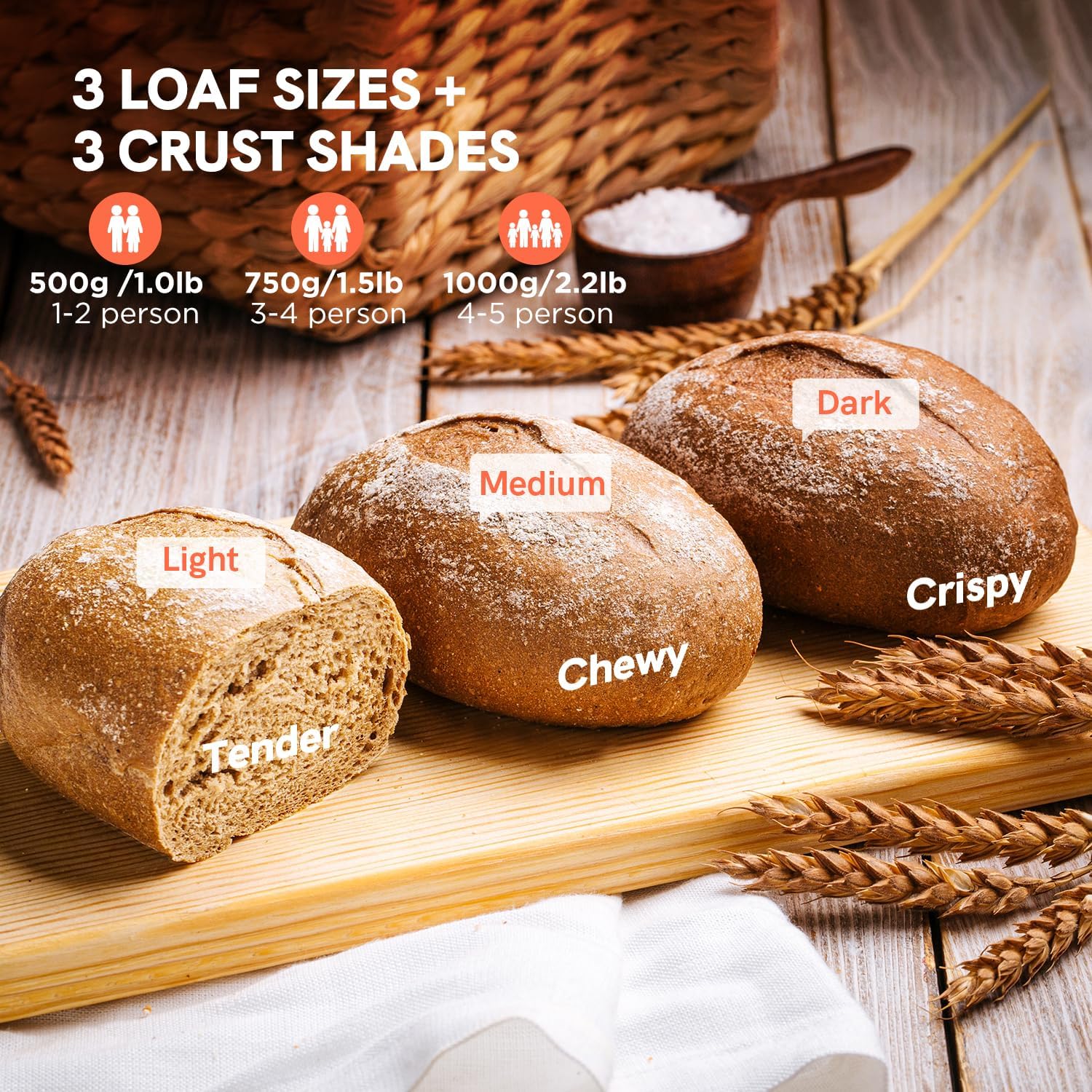
Image: Three different sized loaves of bread, demonstrating the 1 LB (Light/Tender), 1.5 LB (Medium/Chewy), and 2 LB (Dark/Crispy) options available for customization.
Delay Timer and Keep Warm Function
The 15-hour delay timer allows you to set the bread maker to start baking at a later time, ensuring fresh bread when you want it. The 1-hour automatic keep warm function maintains the bread's temperature after baking is complete.
- Delay Timer: Press the "DELAY" button to set the desired delay time. The total time displayed includes the baking cycle.
- Keep Warm: After the baking cycle finishes, the bread maker automatically enters a 60-minute keep warm phase.
- Power-off Recovery: The machine features a 10-minute power-off recovery, resuming the cycle if power is briefly interrupted.
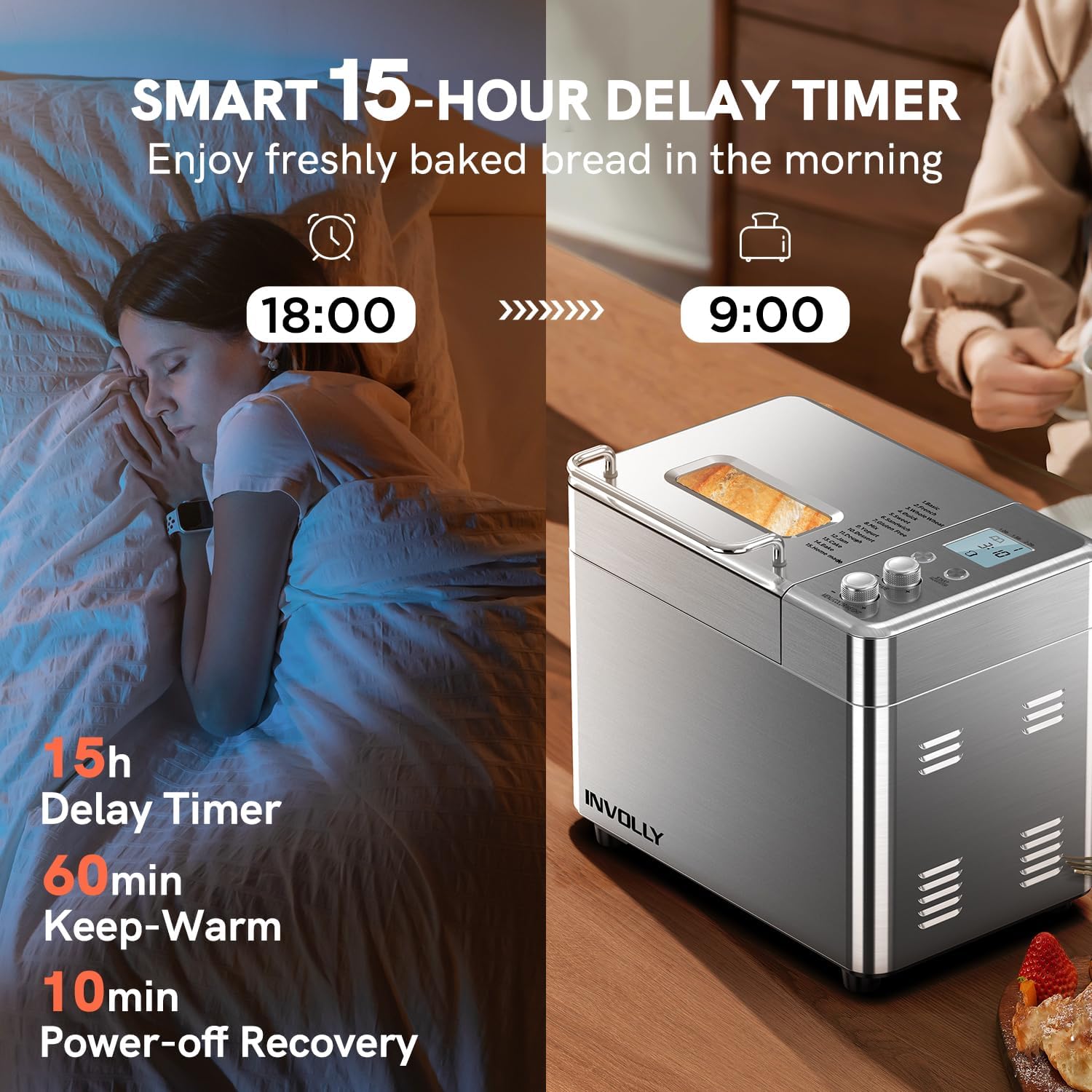
Image: Illustration of the smart 15-hour delay timer, allowing users to schedule baking for fresh bread in the morning.
Video: An official product video demonstrating the features and operation of the INVOLLY 15-in-1 Bread Maker, including the delay timer and automatic functions.
Automatic Fruit & Nut Dispenser
The detachable automatic fruit and nut dispenser ensures that additional ingredients like nuts, seeds, or dried fruits are released into the dough at the optimal time during the kneading cycle, preventing them from being crushed or over-mixed.
- Open the dispenser lid located on the top of the bread maker.
- Add your desired fruits, nuts, or other mix-ins into the dispenser. Do not overfill.
- Close the dispenser lid. The dispenser will automatically open and release the ingredients at the appropriate time during the selected program.
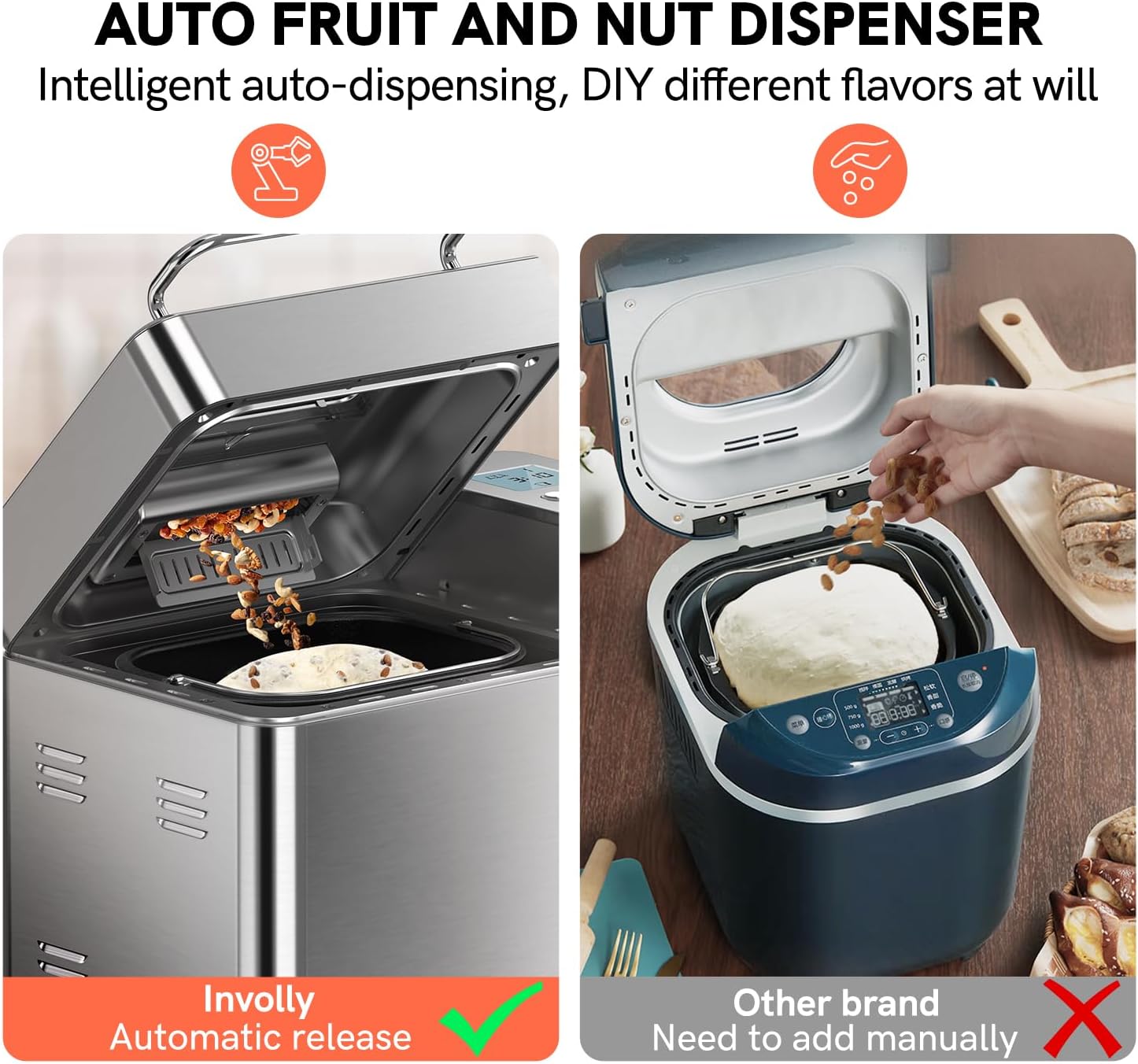
Image: A comparison highlighting the convenience of INVOLLY's intelligent auto-dispensing fruit and nut dispenser, contrasting it with manual addition methods.
Maintenance and Cleaning
Proper maintenance ensures the longevity and optimal performance of your bread maker.
- Before Cleaning: Always unplug the appliance and allow it to cool completely before cleaning.
- Bread Pan and Kneading Paddle: These parts have a non-stick coating and are dishwasher safe. For best results and to preserve the coating, hand washing with warm, soapy water is recommended. Do not use abrasive cleaners or metal utensils.
- Automatic Dispenser: The dispenser is detachable for easy cleaning. Wash with warm, soapy water and dry thoroughly.
- Exterior: Wipe the exterior of the bread maker with a soft, damp cloth. Do not immerse the main unit in water.
- Interior: Clean the interior of the baking chamber with a damp cloth. Remove any crumbs or residue.

Image: Illustration of the bread pan's non-stick coating and 360-degree even heating technology, emphasizing ease of cleaning and superior baking results.
Troubleshooting Guide
If you encounter any issues with your bread maker, please refer to the following common problems and solutions:
| Problem | Possible Cause | Solution |
|---|---|---|
| Bread does not rise | Expired yeast, incorrect water temperature, too much salt/sugar, wrong flour type. | Check yeast expiration, use lukewarm water (105-115°F), ensure correct ingredient measurements, use bread flour. |
| Bread collapses in the middle | Too much liquid, too much yeast, high humidity. | Reduce liquid slightly, reduce yeast, adjust recipe for humidity. |
| Crust is too thick/thin | Incorrect crust setting. | Adjust crust color setting (Light, Medium, Dark). |
| Machine not starting | Not plugged in, program not selected, Start/Stop button not pressed. | Ensure power connection, select a program, press Start/Stop button firmly. |
| Loud noise during kneading | Unstable surface, pan not properly seated. | Place on a stable, flat surface. Ensure bread pan is securely locked in place. |
If the problem persists after trying these solutions, please contact customer support.
Product Specifications
- Model Number: BM8216
- Brand: INVOLLY
- Power: 600 Watts
- Product Dimensions: 13.8"D x 8.9"W x 12.7"H
- Item Weight: 13 pounds
- Number of Programs: 15
- Loaf Sizes: 1 LB, 1.5 LB, 2 LB
- Crust Colors: Light, Medium, Dark
- Delay Timer: Up to 15 hours
- Keep Warm Function: 1 hour automatic
- Power-off Recovery: 10 minutes
- Material: Stainless Steel (exterior), Nonstick (bread pan)
Warranty and Support
For warranty information or technical support, please refer to the contact details provided in your product packaging or visit the official INVOLLY website. Please have your model number (BM8216) and purchase date ready when contacting support.
You can also refer to the official User Manual PDF for more detailed information: Download User Manual (PDF)
Related documentsBM8216


Ask a question about this manual
Ask about setup, troubleshooting, compatibility, parts, safety, or missing instructions. Manuals+ will review the question and use this page’s manual context to help answer it.