
Introduction
Thank you for choosing the RunSTAR Digital Smart Bathroom Scale. This advanced scale is designed to provide comprehensive body composition analysis, helping you monitor and track your health and fitness progress. Featuring a large LCD display and seamless app synchronization, it offers a user-friendly experience for the entire family.
Package Contents
- RunSTAR Digital Smart Bathroom Scale (Model: FG2210)
- User Manual
- 3 x AAA Batteries (pre-installed or included separately)

Image: The retail packaging of the RunSTAR Smart Body Fat Scale, showing the product name and key features.
Setup
1. Battery Installation
The scale requires 3 AAA batteries. If not pre-installed, open the battery compartment on the underside of the scale and insert the batteries, ensuring correct polarity (+/-). If pre-installed, remove the protective pull tab from the battery compartment to activate the scale.

Image: The RunSTAR Smart Scale, demonstrating its sleek design and connectivity with a smartphone and smartwatch displaying the companion app.
2. App Download and Registration
Download the "Starfit" app from the App Store (for iOS devices) or Google Play (for Android devices). Complete the registration process within the app to create your user profile.
You can scan the QR code on the product packaging or search for "Starfit" directly in your app store.
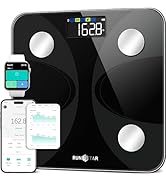
Image: A visual guide showing the four steps to set up the Starfit app: Register, Add Personal Data, Connect with Bluetooth, and Start to Use.
3. Connecting to the Starfit App
- Ensure Bluetooth is enabled on your smartphone.
- Open the Starfit app.
- Navigate to "Account" and then "My Devices".
- Tap the "+" icon in the upper right corner.
- Tap the "Bluetooth" logo to begin searching for smart devices.
- When "Runstar-RX" appears (the Bluetooth name of the scale), tap to complete the connection. A connected logo will appear on the scale's screen.
Operating Instructions
Taking a Measurement
Place the scale on a hard, flat surface. Step onto the scale barefoot and stand still. The large LCD screen will display 6 key measurements directly: weight, body fat rate, BMI, muscle mass, body water rate, and bone mass. For all 13 body composition data points, view them in the Starfit app.

Image: Close-up of the RunSTAR Smart Scale's large LCD display, highlighting its ability to show multiple body composition metrics simultaneously.
Understanding Body Composition Data
The RunSTAR scale utilizes advanced Bio-electrical Impedance Analysis (BIA) technology to calculate 13 essential body composition metrics, including:
- Weight
- Body Mass Index (BMI)
- Body Fat
- Fat-free Body Weight
- Subcutaneous Fat
- Visceral Fat
- Water
- Muscle Mass
- Bone Mass
- Protein
- Basal Metabolic Rate (BMR)
- Body Age

Image: A woman performing a stretch, with the RunSTAR scale in the foreground and icons illustrating the 13 body composition metrics measured by the device.
Starfit App Features
The Starfit app allows you to monitor and track your body data over time (weekly, monthly, or yearly trends). It supports offline measurement, meaning data is stored on the scale and automatically synced to the app when connected. The app also syncs with other popular fitness applications like Apple Health and Health Connect.

Image: A woman viewing her body data trends on the Starfit app on her smartphone, with logos indicating compatibility with Apple Health, Health Connect, and Fitbit.
Multiple User Profiles
The scale supports up to 24 user profiles, making it suitable for families and friends. It can instantly identify the user when they step on. A "Baby Mode" is also supported for tracking infant weight.

Image: A family scene with a smartphone displaying multiple user profiles within the Starfit app, emphasizing the scale's ability to manage data for up to 24 users.
Maintenance
- Clean the scale surface with a soft, damp cloth. Avoid abrasive cleaners or harsh chemicals.
- Do not immerse the scale in water.
- Store the scale in a dry place at room temperature.
- Replace batteries when the low battery indicator appears on the display.
Troubleshooting
| Problem | Solution |
|---|---|
| Scale does not turn on. | Check battery installation. Ensure the protective pull tab has been removed. Replace batteries if necessary. |
| Inaccurate readings. | Ensure the scale is on a hard, flat surface. Avoid carpets or uneven floors. Recalibrate by stepping on and off the scale quickly. Ensure feet are clean and dry. |
| Cannot connect to Starfit app. | Ensure Bluetooth is enabled on your device. Make sure the app is open and you are in the "My Devices" section. Restart the scale and your device. Try reconnecting through the app's pairing process. |
| "Lo" displayed. | Low battery. Replace the AAA batteries. |
| "Err" displayed. | Overload. The maximum weight capacity is 400lb/180kg. Step off the scale immediately. |
Specifications
- Model: FG2210
- Brand: RunSTAR
- Dimensions: 11.02 x 11.02 x 0.78 inches (280mm x 280mm x 20mm)
- Weight: 3.33 Pounds (1.51 kg)
- Weight Capacity: 400 lb / 180 kg
- Accuracy: 0.2 lb / 100 g
- Power Source: 3 x AAA Batteries (included)
- Display Type: Large LCD Screen
- Connectivity: Bluetooth
- Body Composition Metrics: 13 (Weight, BMI, Body Fat, Fat-free Body Weight, Subcutaneous Fat, Visceral Fat, Water, Muscle Mass, Bone Mass, Protein, BMR, Body Age)
- User Profiles: Up to 24
- Material: Tempered Glass (6mm)

Image: An X-ray view of the RunSTAR scale, illustrating the placement of its 4 high-precision G-shape sensors and electrodes for enhanced accuracy.
Warranty and Support
For warranty information and customer support, please refer to the contact details provided in your product packaging or visit the official RunSTAR website. You can also reach out to the seller through the platform where you purchased the product.
Manufacturer: runstar
Website: www.runstar.com
Email: service@runstar.com


