1. Product Overview
The ATN X-Sight 4K Pro is a smart day/night hunting scope designed for enhanced optical performance and advanced features. It integrates an Ultra HD 4K Sensor and Obsidian VI Dual Core processor for sharp, vivid imaging across all zoom levels. This package also includes the ATN Quick Detach Mount, providing a reliable and durable solution for mounting your scope.
Key Features:
- Ultra HD 4K Sensor with Obsidian VI Dual Core Processor for high resolution and vivid colors.
- Extended 18+ hours of continuous battery life.
- Built-in Ballistics Calculator for precise long-range shots, factoring in range, wind, angle, temperature, and humidity.
- Recoil-Activated Video Recording (RAV) to capture shots in full HD.
- Dual Stream Video capability.
- Smart Range Finder and E-Compass for enhanced situational awareness.
- One Shot Zero for quick and easy sighting in.
- Ultra Low Power Consumption.
- Profile Manager for saving multiple ballistic profiles.
- Quick Detach Mount for 30mm scope tubes, offering reliable fixation and zero retention when swapped between rifles.

Image: The ATN X-Sight 4K Pro Smart Day/Night Hunting Scope shown alongside the Quick Detach Mount.
2. Setup
2.1 Mounting the Scope
The ATN X-Sight 4K Pro is designed to be used with a 30mm scope tube mount. The included ATN Quick Detach Mount provides a secure and convenient mounting solution.
- Ensure your rifle is unloaded and pointed in a safe direction.
- Attach the Quick Detach Mount to your rifle's picatinny rail, ensuring it is securely fastened.
- Place the ATN X-Sight 4K Pro scope into the 30mm rings of the Quick Detach Mount.
- Adjust the scope for proper eye relief and reticle alignment.
- Tighten the scope rings evenly to secure the scope without overtightening.
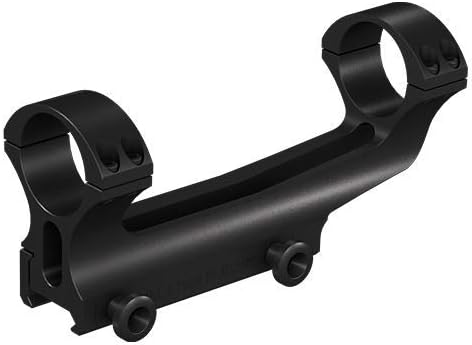
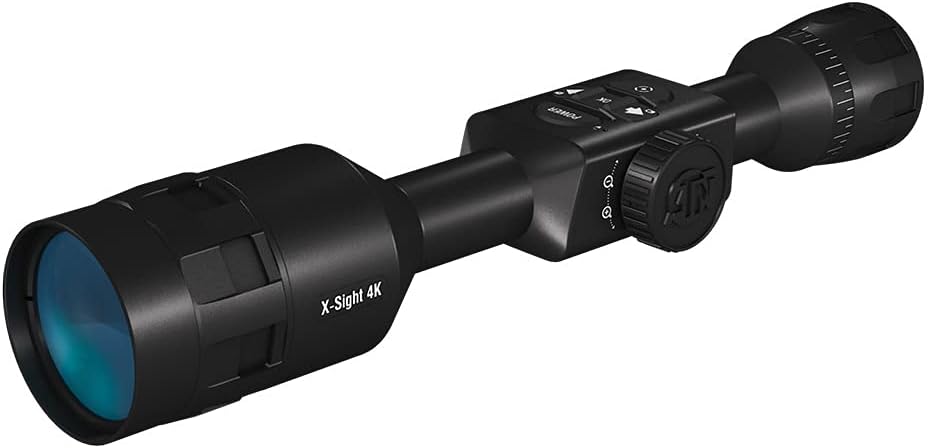
Image: The ATN Quick Detach Mount (left) and the ATN X-Sight 4K Pro Scope (right).
2.2 Powering On/Off and Initial Configuration
Locate the power button on the scope's control panel. Press and hold to power on or off. Follow the on-screen prompts for initial setup, including language, time, and date settings.

Image: Diagram highlighting key features and controls of the ATN X-Sight 4K Pro, including the power button and other smart technologies.
2.3 Firmware Updates
To ensure optimal performance and access to the latest features, it is recommended to regularly check for and install firmware updates. You will need an SD card and a computer for this process. Visit the official ATN website for detailed instructions and to download the latest firmware.
3. Operating the Scope
3.1 Core Functions
- Vivid Imaging: Experience clear and sharp images regardless of zoom level, thanks to the advanced optics and 4K sensor.
- Record HD Video: Capture your hunting moments in high definition. Videos are stored directly on a Micro SD Memory Card (not included).
- Ballistic Calculator: Utilize the integrated ballistic calculator to make precise shots. Input environmental factors like range, wind, angle to target, temperature, and humidity for accurate trajectory adjustments.
- Dual Stream Video: Stream video simultaneously to a connected device while recording.
- Recoil Activated Video (RAV): Automatically records video before and after your shot, ensuring you capture the critical moments without manual activation.
- Smart Range Finder: Quickly and accurately determine the distance to your target.
- E-Compass: An electronic compass provides directional information.
- One Shot Zero: Simplify the zeroing process. After your first shot, adjust the reticle to the point of impact, and the scope will automatically calculate the necessary adjustments.

Image: Diagram illustrating the "One Shot Zero" feature, showing how a single shot can be used to zero the scope.
3.2 Night Vision Mode
The X-Sight 4K Pro features an enhanced HD night vision mode, allowing for clear observation and targeting in low-light conditions or complete darkness. Refer to the on-screen menu for activating and adjusting night vision settings.
3.3 Profile Manager
The Profile Manager allows you to save multiple ballistic profiles for different rifles, ammunition types, or environmental conditions. This feature ensures quick and accurate adjustments when switching setups.
4. Maintenance
4.1 General Care and Cleaning
- Keep the scope and mount clean and free from dust and debris. Use a soft, lint-free cloth for cleaning external surfaces.
- For optical surfaces, use a lens brush or compressed air to remove loose particles, then gently wipe with a specialized lens cleaning cloth and solution.
- Avoid using abrasive materials or harsh chemicals that could damage the coatings or finish.
- Store the scope in a protective case when not in use to prevent scratches and impacts.
4.2 Battery Management
The ATN X-Sight 4K Pro offers over 18 hours of continuous battery life. To maximize battery longevity, ensure the device is fully charged before extended use and store it in a cool, dry place when not in use. If storing for long periods, it is advisable to periodically charge the battery to maintain its health.
5. Troubleshooting
Common Issues and Solutions:
| Issue | Possible Cause | Solution |
|---|---|---|
| Device does not power on. | Low or depleted battery. | Charge the device fully. |
| Poor image quality or freezing. | Outdated firmware; environmental factors. | Update firmware (see Section 2.3); ensure lenses are clean; adjust focus. |
| Mount does not hold zero. | Improper installation; loose screws. | Ensure mount is securely attached to the rail and scope rings are tightened evenly. |
| Video recording issues. | SD card error; full storage. | Check SD card for proper insertion and format; delete old files or use a new SD card. |
If issues persist, please refer to the official ATN support resources or contact customer service.
6. Specifications
| Specification | Value |
|---|---|
| Brand | ATN |
| Model Name | ATN X-Sight-4K, 3-14x Pro Edition |
| Color | Black |
| Style | 3-14x |
| Sport | Hunting |
| Material | Aluminum |
| Magnification Maximum | 14 x |
| Objective Lens Diameter | 30 Millimeters |
| Magnification Minimum | 3 x |
| Compatible Devices | Rifle |
| Mounting Type | Detach |
| Night vision | Yes |
7. Warranty and Support
For detailed warranty information, please refer to the official ATN website or the documentation included with your product. Warranty terms may vary based on region and retailer.
Official User Manual (PDF): Download PDF
ATN Brand Store: Visit Store
For technical support or further assistance, please contact ATN customer service directly through their official channels.


