1. Product Overview
The MINISFORUM GD70 Mini PC is a compact yet powerful computing solution designed for a wide range of applications, from light gaming and multimedia playback to demanding business tasks. Featuring an Intel Core i7-12650H processor, ample memory, and high-speed storage, it offers robust performance in a small form factor. Its versatile connectivity options, including triple display support and 2.5G Ethernet, make it an ideal choice for both home and office environments.
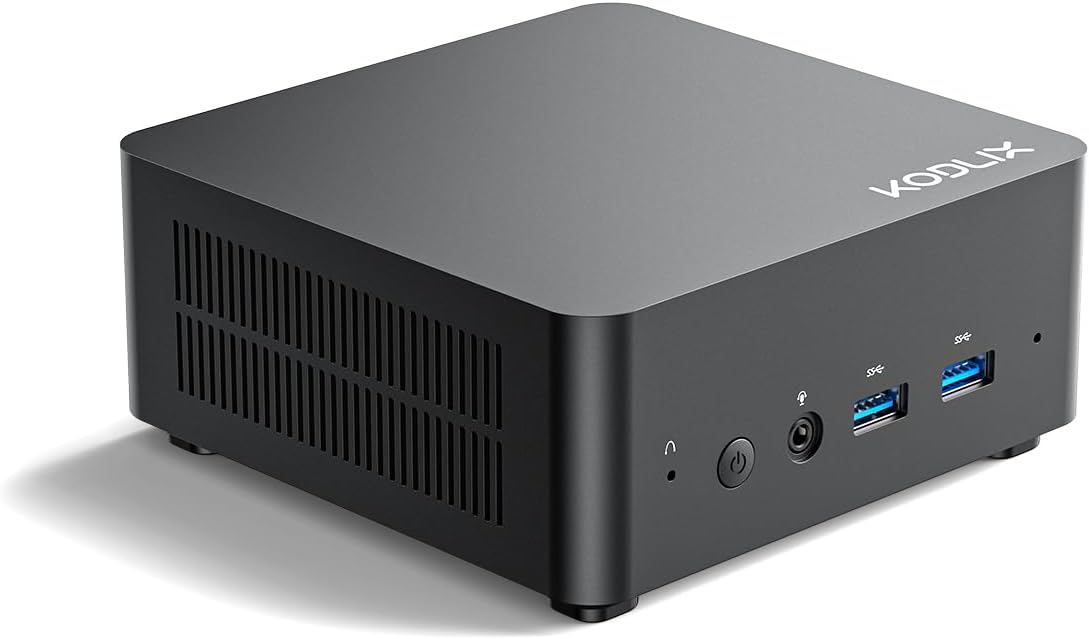
Figure 1.1: Front view of the MINISFORUM GD70 Mini PC, showcasing its compact design.
2. Package Contents and Initial Setup
Before beginning the setup process, please ensure all components are present in the package. The MINISFORUM GD70 Mini PC typically includes the main unit, a power adapter, an HDMI cable, a VESA mount with screws, and a SATA cable for additional storage.
Video 2.1: Unboxing and initial overview of the NAB6 Mini PC, demonstrating included accessories and basic setup steps.
2.1 Connecting Peripherals
To begin, connect the power adapter to the DC 19V port on the rear of the Mini PC and plug it into a power outlet. For initial setup, a wired keyboard and mouse are recommended. Connect them to the available USB ports. Connect your display(s) using the HDMI, DisplayPort, or USB-C (Alt DP) ports.

Figure 2.1: Detailed view of the front and rear ports of the Mini PC, including USB 3.2 Gen2 Type-A, USB 3.2 Gen2 Type-C (Alt DP and Data and PD), 3.5mm Audio Jack, Power Button, Clear CMOS, DMIC, DC 19V, HDMI 2.0, RJ45 2.5 Gigabit Ethernet Port, DisplayPort 1.4, and USB 2.0 ports.
Once powered on, the system will guide you through the Windows 11 Home Edition setup process. You will need your Wi-Fi password and a Microsoft account login. After initial setup, you can switch to wireless peripherals using the integrated Wi-Fi 6E and Bluetooth 5.2 connectivity.
3. Operating the Mini PC
The GD70 Mini PC is equipped with an Intel Core i7-12650H processor (10 Cores/16 Threads/24M Cache/up to 4.7GHz) and Intel UHD Graphics for 12th Gen Intel Processors, providing excellent performance for various tasks.
3.1 Display Configuration
The Mini PC supports triple screen output at 4K@60Hz via its HDMI 2.0, USB-C, and DisplayPort 1.4 interfaces. This allows for an expansive workspace, significantly boosting productivity for multitasking or immersive entertainment.

Figure 3.1: The Mini PC supporting a triple 4K display setup, ideal for multi-monitor workstations.
3.2 Network Connectivity
Equipped with 2.5G Ethernet ports, the GD70 offers data transmission rates 2.5 times faster than traditional Gigabit networks. This is beneficial for large data transfers, high-speed internet access, and seamless integration with NAS devices or high-end workstations.
3.3 Power Delivery (PD) Support
The USB-C port supports Power Delivery (PD), allowing for high-speed data transfer and convenient smart charging through a single cable, simplifying your desk setup.

Figure 3.2: The Mini PC utilizing its USB-C port for Power Delivery, enabling a single-cable solution for power and data.
4. Maintenance and Upgrades
The MINISFORUM GD70 is designed for flexible upgrades, allowing users to expand its capabilities as needed.
4.1 Memory (RAM) Upgrade
The Mini PC comes with 32GB DDR4 dual-channel memory, which is expandable up to 64GB (2x32GB). To upgrade, carefully open the chassis and replace the SODIMM modules in the designated slots.
4.2 Storage Upgrade
The system includes a 512GB PCIe4.0 SSD (M.2 2280), which can be upgraded to up to 2TB. Additionally, it supports a 2.5-inch SATA HDD (SATA 3.0 6.0Gb/s) for expanded storage. A SATA cable is included for this purpose.

Figure 4.1: Exploded view of the Mini PC's internal components, highlighting the M.2 SSD slots, DDR4 SODIMM slots, and the 2.5-inch SATA HDD bay.
5. Cooling System
The GD70 features an efficient cooling system with dual heat pipes and dual air vents, complemented by an active solid-state heat sink and side cooling openings. This design effectively dissipates heat, ensuring stable performance even under heavy loads.

Figure 5.1: Diagram illustrating the "COLD WAVE 1.5" cooling system with its heat pipe and air vents.
6. Troubleshooting
While the GD70 is designed for robust performance, certain scenarios, especially under demanding applications like intensive gaming, can lead to increased temperatures and fan activity.
- High Temperatures/Fan Noise: Under heavy CPU/GPU load (e.g., playing graphically intensive games), the internal components may heat up, causing the cooling fans to increase speed. This is normal behavior to prevent overheating. Ensure the Mini PC has adequate airflow around its vents and is not placed in an enclosed space.
- Performance Throttling: In extreme cases of high temperature, the CPU may slightly reduce its performance (thermal throttling) to protect itself. This is a built-in safety mechanism. Allow the device to cool down, or ensure better ventilation.
- Slow Boot Time: An unexpected reboot, BIOS reset, RAM replacement, or SSD replacement may cause a slow boot time. In general, the boot time will resume after one normal reboot.
If you experience persistent issues not covered here, please refer to the manufacturer's website for updated troubleshooting guides or contact customer support.
7. Specifications
| Feature | Detail |
|---|---|
| Brand | MINISFORUM |
| Model | GD70 (DeskMini) |
| Processor | Intel Core i7-12650H (10 Cores/16 Threads, up to 4.7GHz) |
| Graphics | Intel UHD Graphics |
| RAM | 32GB DDR4 (Expandable to 64GB) |
| Storage | 512GB PCIe4.0 SSD (M.2 2280, up to 2TB), supports 2.5-inch SATA HDD |
| Display Output | 1x HDMI 2.0, 1x USB-C (Alt DP), 1x DisplayPort 1.4 (Triple 4K@60Hz) |
| Ethernet | 2.5G LAN Port |
| Wireless Connectivity | WiFi 6E, Bluetooth 5.2 |
| USB Ports | 2x USB 3.2 Gen2 Type-A (front), 1x USB 3.2 Gen2 Type-C (front), 2x USB 2.0 (rear) |
| Audio | 3.5mm Headphone Jack |
| Operating System | Windows 11 Home Edition (pre-installed) |
| Dimensions | Approx. 5.10 x 5.03 x 2.14 inches (129.5 x 127.8 x 54.4 mm) |
| Weight | Approx. 1.1 lbs (547g) |

Figure 7.1: Physical dimensions of the MINISFORUM GD70 Mini PC.
8. Warranty and Support
For detailed warranty information, technical support, and service inquiries, please refer to the official MINISFORUM website or the documentation included with your product. Keep your purchase receipt for warranty claims.


