
1. Product Overview
The Wolf Guard JD-W03 Wireless Strobe Siren is an outdoor-rated security device designed to integrate with Wolf Guard alarm systems. It provides both visual (strobe light) and audible (110 dB siren) alerts during an alarm event, effectively deterring intruders. Its waterproof design ensures reliable operation in various outdoor conditions.
Important Compatibility Note: Wolf Guard sirens are exclusively compatible with Wolf Guard alarm systems. Please verify your alarm system's brand before purchase.

Image 1: Front view of the Wolf Guard JD-W03 Wireless Strobe Siren, showcasing its compact and modern design.
2. Safety Information
- Read all instructions carefully before installation and use.
- Ensure the power adapter is connected to a suitable power source as specified.
- Do not expose the device to extreme temperatures or direct sunlight for prolonged periods.
- Keep the device away from water or excessive moisture, despite its waterproof design, to prevent damage.
- Only use the provided power adapter. Using unauthorized adapters may damage the device and void the warranty.
- Do not attempt to open or repair the device yourself. Refer all servicing to qualified personnel.
- Keep out of reach of children.
3. Package Contents
Please check the package for the following items:
- 1 x JD-W03 Flash Siren
- 1 x Power Adapter
- 1 x User Manual
4. Product Features
- Durable and Waterproof Design: Constructed from flame-retardant ABS plastic, ensuring robustness and weather resistance. Features a modern, waterproof design.
- Powerful Strobe Light and Siren: Integrates a high-brightness flash light and a high-decibel sound. Upon alarm activation, a bright light and loud siren (110 dB) effectively deter potential threats.
- Wireless Connectivity: Supports connection with up to 100 wireless detectors.
- Customizable Operation Modes: Built-in jumper allows customization of flash and sound settings (ON/OFF options).
- Integrated Backup Battery: Equipped with a rechargeable backup battery to maintain operation during external power outages.
- Anti-Tamper Alarm: Features a built-in tamper switch that triggers an alarm if the device is manipulated.
- Wired Alarm Terminal: Includes an integrated cable terminal for wired alarm connections, useful in environments with magnetic interference.

Image 2: The JD-W03 siren is suitable for both indoor and outdoor use, featuring a 110dB sound volume and a backup battery for continuous operation.
5. Setup and Installation
- Unpack the Device: Carefully remove all components from the packaging.
- Power Connection: Connect the provided power adapter to the siren's power input and plug it into a wall outlet. The siren has a built-in rechargeable backup battery that will charge automatically.
- Mounting Location: Choose a suitable outdoor location for installation. Consider areas where the siren's sound and strobe light will be most effective, such as near entry points or in a visible area. Ensure the location allows for optimal wireless signal reception (up to 80m unobstructed).
- Physical Installation: Use the provided screws to securely mount the siren to a wall or other stable surface. Refer to the diagram below for physical dimensions and mounting points.

Image 3: Front and back views of the JD-W03 siren, illustrating its dimensions (195mm height, 110mm width) and key connection points including the power input and reset/code jumper.
- Pairing with Wolf Guard Alarm System:
- Put your Wolf Guard alarm control panel into pairing mode (refer to your alarm system's manual for specific instructions).
- Activate a sensor connected to your alarm system (e.g., open a door with a contact sensor, trigger a motion detector).
- The siren should emit a beep, indicating successful pairing. The siren can connect with up to 100 wireless detectors.
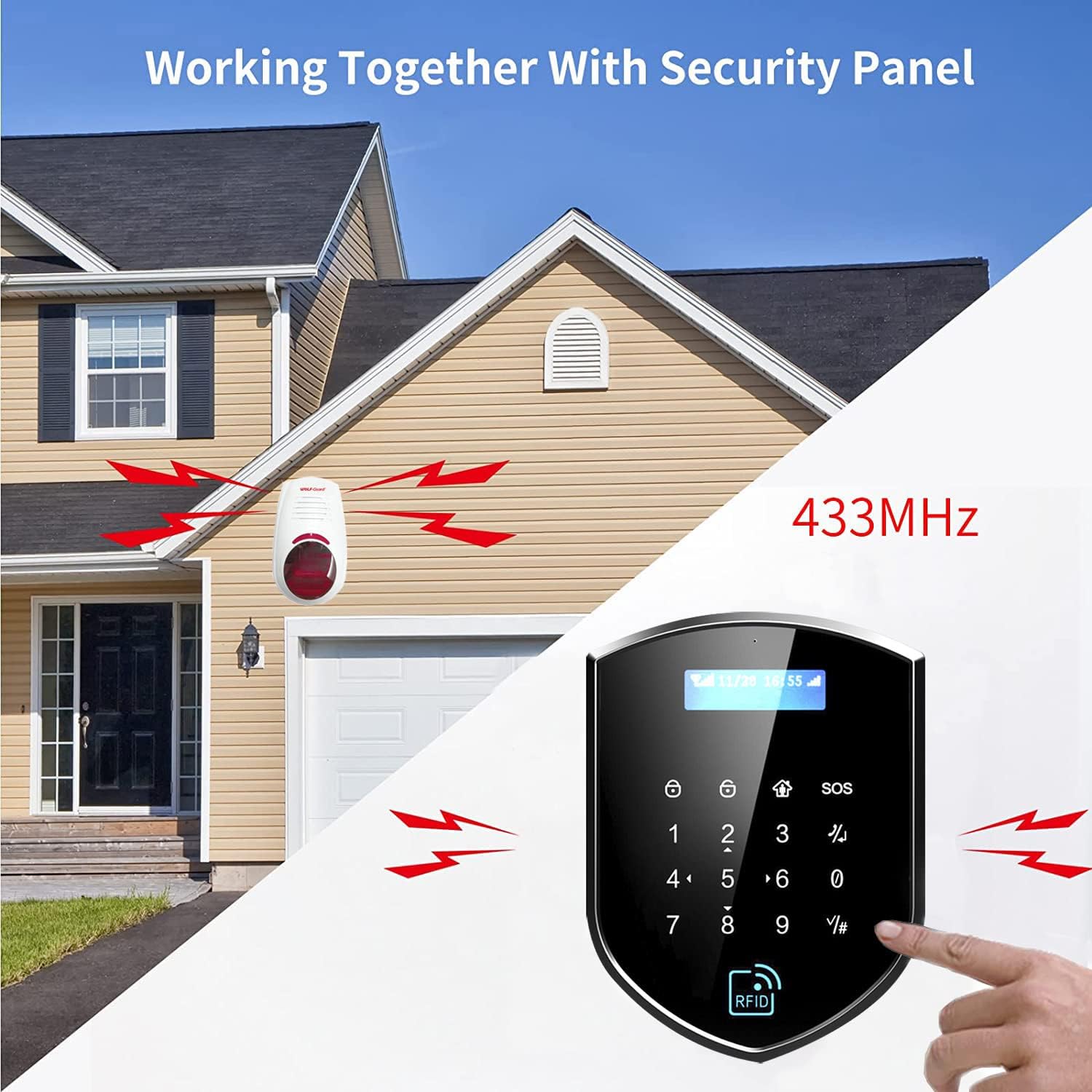
Image 4: The JD-W03 siren seamlessly integrates and works with a Wolf Guard security control panel, communicating wirelessly at 433MHz.
- Jumper Settings (Optional): The siren features an integrated jumper for customizing operation modes (flash and sound ON/OFF). Consult the device's internal markings or a detailed diagram (if available) for specific jumper configurations.
- Wired Alarm Connection (Optional): If experiencing magnetic interference or requiring a wired connection, use the integrated cable terminal for a wired alarm setup.
6. Operating Instructions
- Once paired with your Wolf Guard alarm system, the JD-W03 siren will activate automatically upon receiving an alarm signal from the control panel.
- When an alarm is triggered, the siren will emit a loud 110 dB sound and a bright strobe light simultaneously.
- The integrated backup battery ensures the siren continues to function even if external power is interrupted.
- The anti-tamper switch will trigger an alarm if the siren unit is forcibly removed or manipulated.
7. Maintenance
- Cleaning: Periodically wipe the siren's exterior with a soft, damp cloth to remove dust and debris. Do not use abrasive cleaners or solvents.
- Battery Check: The built-in rechargeable battery is designed for long-term use. If you notice a significant decrease in performance during power outages, contact support for potential battery replacement options.
- Environmental Considerations: While waterproof, avoid directing high-pressure water jets directly at the siren. Ensure drainage around the unit is not obstructed.
8. Troubleshooting
- Siren not pairing or behaving inconsistently:
- Ensure the siren is within the wireless reception range (80m unobstructed) of your Wolf Guard alarm system.
- Verify your alarm system is in pairing mode when attempting to connect the siren.
- Ensure the siren has stable power.
- Confirm compatibility: This siren is only compatible with Wolf Guard alarm systems.
- Try resetting the siren (if a reset button/procedure is available, implied by 'RESET/CODE' on the back image). After resetting, re-attempt the pairing process.
- Difficulty connecting to control unit (especially via WiFi):
- This siren primarily uses 433MHz wireless frequency for communication with the alarm panel, not WiFi directly. Ensure you are following the correct pairing procedure for 433MHz devices with your Wolf Guard control panel.
- If your control panel uses WiFi for other functions, ensure the panel itself is properly configured.
- Alarm volume concerns (not as loud as expected):
- The siren is rated at 110 dB. Ensure there are no obstructions directly in front of the siren's speaker grille.
- Consider the installation location; sound can be absorbed or muffled by surrounding structures.
- Power cable length is short:
- Plan your installation location to be near a power outlet or use an appropriate outdoor-rated extension cord if necessary. Ensure any extension cords are suitable for outdoor use and meet local electrical codes.
- Cannot set entry delay:
- Entry and exit delays are typically configured on the main Wolf Guard alarm control panel, not directly on the siren. Refer to your alarm system's user manual for instructions on setting delays.
9. Technical Specifications
| Parameter | Value |
|---|---|
| Voltage | 12 V DC 500 mA |
| Operating Current | 280 mA |
| Static Current | 14 mA |
| Reception Frequency | 433 MHz ± 0.5 MHz |
| Wireless Reception Sensitivity | 5 mV/m |
| Reception Distance | 80 m (unobstructed) |
| Anti-interference | 1 V/m (range: 20 MHz ~ 1 GHz) |
| Max Wireless Sensors | ≤ 100 pieces |
| Volume | 110 dB ± 3 dB |
| Operating Temperature | 0 to 40 °C |
| Relative Humidity | ≤ 90% (non-condensing) |
| Dimensions (L x W x H) | 19.5 x 11 x 6 cm |
| Weight | 440 grams |
| Battery | 1 Lithium metal (included) |
| Power Source | Battery powered |
| Installation Method | Wireless |
| Control Method | Remote control |
| Compatible Devices | Home security system |
10. Warranty and Support
For warranty information and technical support, please refer to the documentation provided with your original purchase or contact Wolf Guard customer service directly. Keep your purchase receipt as proof of purchase.