
1. Introduction
This manual provides detailed instructions for the XMSJSIY USB Type C PD Pigtail Cable. This product is a 1.2-meter, 18 AWG cable featuring a USB Type C male connector on one end and a 6-pin bare wire on the other. It is designed for DIY power supply and data transmission applications for 5V/5A USB equipment, supporting fast charging and data transfer for various compatible devices such as computers, mobile phones, and cameras. The cable is constructed with durable PVC material, ensuring flexibility and longevity.
2. Safety Information
- Ensure proper insulation for bare wires to prevent short circuits.
- Verify voltage and current compatibility of connected devices to avoid damage. This cable supports up to 5V/5A.
- Do not expose the cable to extreme temperatures or moisture.
- Keep out of reach of children.
- Handle with care; avoid excessive bending or pulling that could damage internal wires.
3. Product Features
- Type C PD Pigtail Cable: Includes a Type C male plug and a 6-pin bare wire end for versatile DIY applications.
- Fast Charging & Data Transfer: Supports Power Delivery (PD) charging and USB 2.0 data transfer with a large current capacity of 5A.
- Durable Construction: Made with high-quality PVC material, making it flexible and resistant to deformation.
- Easy Installation: The bare wire ends are pre-stripped for convenient soldering and connection.
- Color-Coded Wires: Wires are color-coded for easy identification of functions (Red for positive, Black for ground, Green for D+, White for D-, Yellow for CC1, Blue for CC2).
4. Package Contents
- 2 x XMSJSIY USB Type C PD Pigtail Cables (1.2m)
5. Setup and Installation
This cable is designed for DIY projects requiring a USB Type C connection with bare wire access. Follow these steps for proper setup:
- Identify Wire Functions: Refer to the wire color code to correctly identify each function.
- Red Wire: Positive (5V)
- Black Wire: Ground (GND)
- Green Wire: Data Positive (D+)
- White Wire: Data Negative (D-)
- Yellow Wire: Configuration Channel 1 (CC1)
- Blue Wire: Configuration Channel 2 (CC2)
- Prepare for Connection: The bare wire ends are pre-stripped for ease of soldering or connecting to terminal blocks. Ensure the stripped ends are clean and free from fraying.
- Connect Wires: Carefully connect each colored wire to its corresponding terminal or component in your DIY project. Double-check all connections for polarity and correct data lines.
- Secure Connections: After making connections, ensure they are secure and properly insulated to prevent accidental short circuits or disconnections. Use heat shrink tubing or electrical tape as needed.
- Test Functionality: Before full deployment, test the connection with a low-power device to confirm correct functionality and power delivery.

Figure 1: Wire Color Coding for USB Type C Pigtail Cable. Red is 5V, Black is GND, Green is D+, White is D-, Yellow is CC1, and Blue is CC2.
6. Operating Instructions
Once the cable is correctly installed and connected to your device or project, operation is straightforward:
- Power Supply: Connect the USB Type C end to a compatible power source (e.g., a USB-C charger, power bank, or computer port) to provide 5V/5A power to your connected DIY equipment.
- Data Transfer: If your project involves data communication, ensure the D+ and D- wires are correctly connected to the data lines of your device. The cable supports USB 2.0 data speeds.
- Fast Charging: For devices supporting USB Power Delivery (PD), this cable facilitates fast charging up to 5A, provided the power source and the receiving device are also PD compatible.

Figure 2: Examples of devices compatible with the USB Type C Pigtail Cable, including power banks, smartphones, and tablets.
7. Maintenance
To ensure the longevity and optimal performance of your XMSJSIY USB Type C PD Pigtail Cable, follow these maintenance guidelines:
- Cleaning: Keep the cable and connectors clean and free from dust and debris. Use a dry, soft cloth for cleaning.
- Storage: Store the cable in a cool, dry place away from direct sunlight and extreme temperatures. Avoid tightly coiling the cable to prevent internal wire damage.
- Inspection: Periodically inspect the cable for any signs of wear, cuts, or damage to the PVC insulation or connectors. If damage is observed, discontinue use and replace the cable.
- Connection Integrity: Ensure that any soldered or connected bare wire ends remain secure and properly insulated. Re-insulate if necessary.
8. Troubleshooting
If you encounter issues with your USB Type C PD Pigtail Cable, consider the following troubleshooting steps:
| Problem | Possible Cause | Solution |
|---|---|---|
| No power delivery | Incorrect wiring; loose connection; incompatible power source; faulty device. | Verify wire connections (polarity); ensure all bare wire connections are secure; check if the power source is functional and compatible (5V/5A); test with another device. |
| No data transfer | Incorrect D+/D- wiring; loose data line connection; device not configured for data transfer. | Confirm D+ and D- wires are correctly connected; ensure data line connections are secure; check device settings for data transfer mode. |
| Slow charging | Power source not PD compatible; device not PD compatible; cable damage. | Ensure both power source and device support USB Power Delivery (PD); inspect cable for damage; replace if necessary. |
| Cable appears damaged | Physical stress; improper handling. | Discontinue use immediately. Replace the cable to prevent electrical hazards or damage to connected devices. |
9. Specifications
| Feature | Detail |
|---|---|
| Brand | XMSJSIY |
| Model Number | ddcee02c-92ea-4560-a161-067e340044a1 |
| Cable Type | USB Type C PD Pigtail Cable |
| Connector Type | USB Type C (Male) to 6-pin Bare Wire |
| Cable Length | 1.2 meters (120 Centimeters) |
| Wire Gauge | 18 AWG |
| Max Current | 5 Amperes (A) |
| Max Voltage | 5 Volts (V) |
| Special Feature | Fast Charging (PD compatible) |
| Data Transfer | USB 2.0 support |
| Outer Material | Polyvinyl Chloride (PVC) |
| Compatible Devices | Power banks, Laptops, Smartphones, Cameras, Personal Computers (for DIY applications) |
| Product Dimensions | 6 x 4 x 1 cm; 70 grams (for the package of 2 cables) |

Figure 3: Cable dimensions including overall length, connector size, and bare wire length.
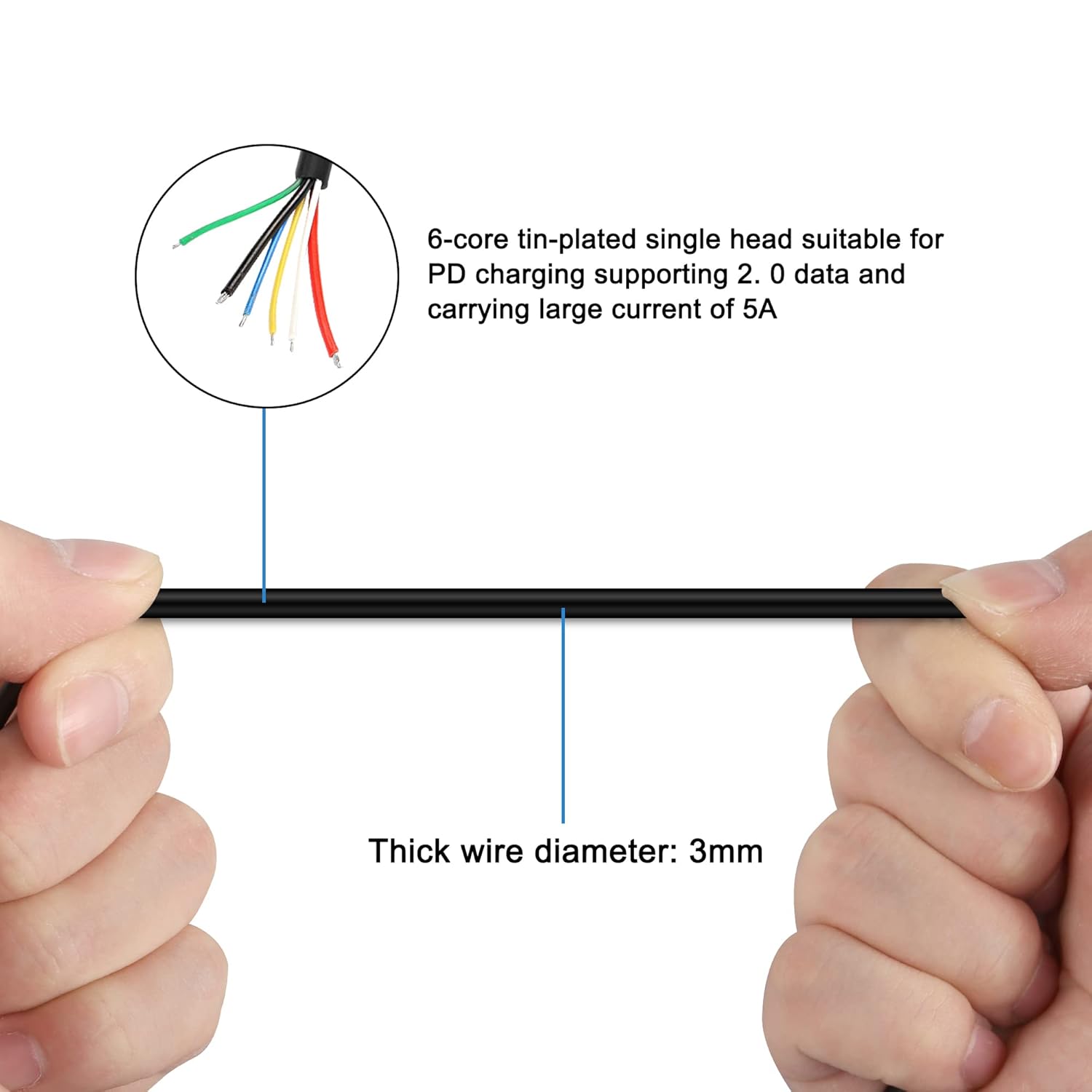
Figure 4: Cable construction details, showing 3mm outer diameter and 6-core tin-plated wires.

Figure 5: USB Type C connector details, highlighting PVC material and nickel-plated plug.

Figure 6: Product details, including the nickel-plated plug, flexible cable, and six internal cores.
10. Warranty and Support
Information regarding specific warranty terms for this product is not provided in the product details. For any support inquiries, technical assistance, or warranty claims, please contact the seller directly through the platform where the purchase was made. Ensure you have your purchase details and model number (ddcee02c-92ea-4560-a161-067e340044a1) available when contacting support.
The seller is "ShenZhen YingTuYou Jia Ju Shi Pin Com LTD".