
1. Product Overview
The Agrieyes Z-W09 Mini Strobe Light Bar is a versatile, rechargeable, and magnetic LED beacon light designed for emergency and warning applications on various vehicles. It features both APP and remote control options for ease of use and offers multiple lighting modes and colors.
2. Package Contents
Upon opening the package, ensure all the following items are present:
- Agrieyes Z-W09 Mini Strobe Light Bar
- Infrared Remote Control
- 5V 2A Wall Charger
- 12V Cigarette Lighter Plug Charger

3. Setup and Installation
The Agrieyes Z-W09 is designed for quick and secure installation on metal surfaces.
- Magnetic Mounting: The light bar is equipped with 2 x 6 N38 magnets, providing a strong pull force of 60 pounds. Simply place the light bar on a clean, flat metal surface of your vehicle's roof.
- Power Connection: For continuous power or charging while in use, plug the provided 12V cigarette lighter adapter into your vehicle's 12-24V power outlet.
- Removal: When not in use, the light can be easily removed by hand without the need for tools.


4. Operating Instructions
The Agrieyes Z-W09 offers multiple control methods and various lighting modes.
4.1 Control Methods
You can control the light bar using the integrated buttons, the infrared remote control, or the dedicated smartphone application.

4.1.1 Integrated Buttons
The light bar features buttons on its top surface for basic control:
- ON/OFF Switch: Powers the unit on or off.
- Mode Switch: Cycles through available flashing patterns.
- High/Low Brightness: Adjusts the light intensity.
- Battery Display: Indicates the current battery level.

4.1.2 Infrared Remote Control
The included remote control provides convenient wireless operation.
- Power ON/OFF: Turns the light bar on or off.
- Mode Switch: Cycles through the various flashing patterns.
- Brightness Control: Adjusts between low and high brightness modes.
Note: Ensure the remote control has a clear line of sight to the light bar for optimal performance.
4.1.3 Smartphone Application (JW-TECH)
Download the 'JW-TECH' app to control the light bar via Bluetooth. The app allows you to:
- Directly control modes and colors.
- Access 4 different colors and 10 modes, including a special SOS mode.
4.2 Lighting Modes and Brightness
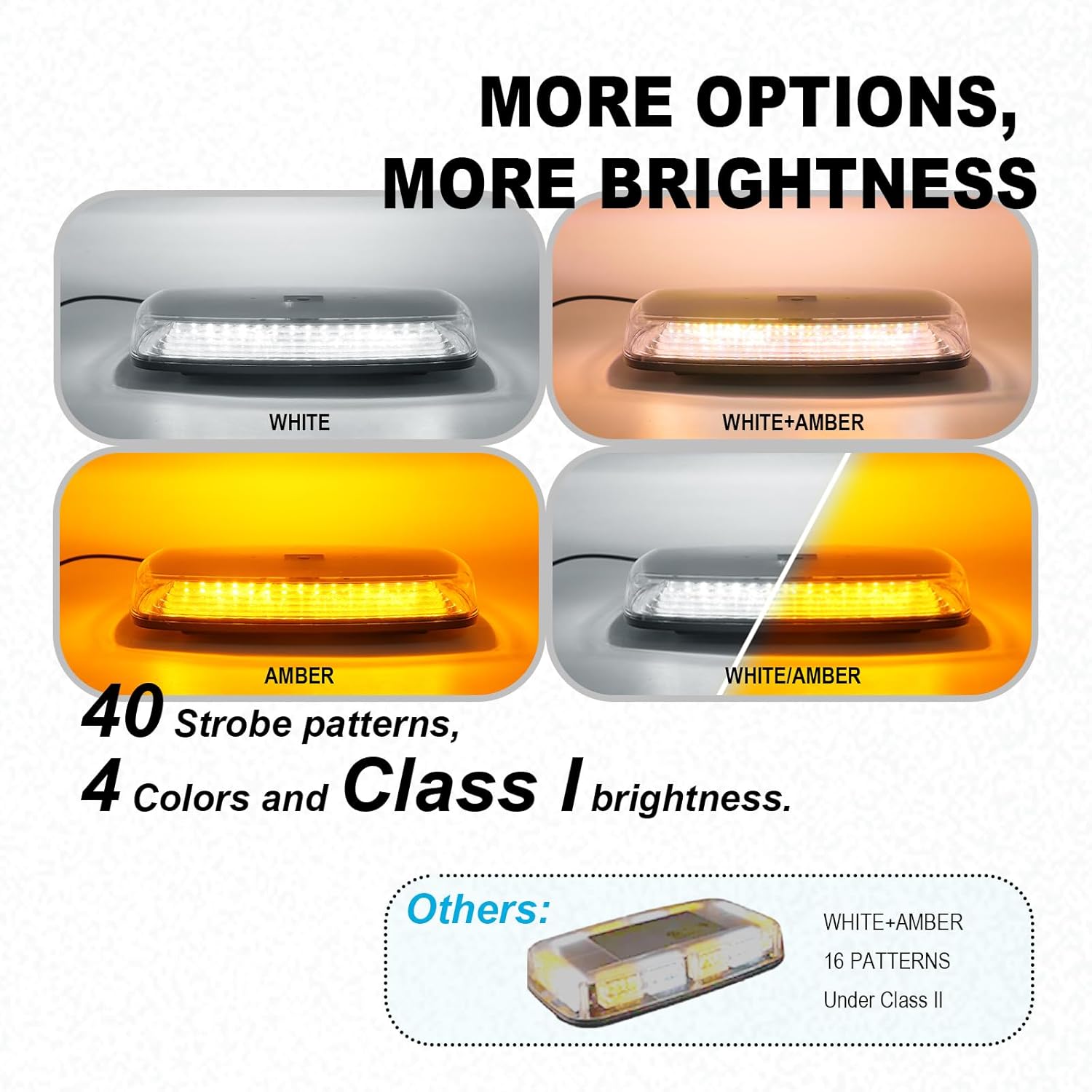
The Agrieyes Z-W09 features 84 high-brightness LED chips, offering Class I brightness and various patterns.
- Colors: Amber and White.
- Modes: Multiple flashing patterns are available, including a dedicated SOS mode via the app.
- Brightness: Adjustable between high and low settings to suit different visibility requirements.
4.3 Video Demonstrations
Video: Demonstrates the Agrieyes APP Control Mini Strobe Light Bar's features, including app and remote control.
Video: Remote control instructions for the Agrieyes AG-W16R Mini LED Beacon, applicable to similar Agrieyes models.
Video: General demonstration of the wireless rechargeable strobe light in action.
5. Charging
The Agrieyes Z-W09 is rechargeable and includes overcharge, overdischarge, and overtemperature protection.
- Charging Time: Approximately 4 hours for a full charge.
- Operating Time: Lasts for approximately 6.5 hours on a full charge.
- Charging Options: Use the provided 5V 2A wall charger or the 12V cigarette lighter plug charger.

6. Durability and Maintenance
The light bar is built for durability and performance in various conditions.
- Construction: Features a robust ABS housing that resists scratches.
- Waterproof Rating: IP67 waterproof rating ensures protection against dust and water immersion.
- Service Life: Designed for over 5000 hours of service life.
- Cleaning: Wipe the light bar with a soft, damp cloth. Avoid abrasive cleaners or solvents.
7. Specifications
| Feature | Detail |
|---|---|
| Model Number | Z-W09 |
| Brand | Agrieyes |
| Dimensions | 30.48 x 15.75 x 5.89 cm |
| Weight | 453.59 g |
| Light Source Type | LED (84 high-brightness chips) |
| Colors | Amber, White |
| Voltage | 12-24 Volts |
| Wattage | 38 watts |
| Waterproof Rating | IP67 |
| Mounting Type | Magnetic (2 x 6 N38 magnets) |
| Battery Type | 2 Lithium Ion batteries (included) |
| Charging Time | Approx. 4 hours |
| Operating Time | Approx. 6.5 hours |
8. Troubleshooting
- Light not turning on: Ensure the battery is charged. Check the power connection if using the cigarette lighter plug.
- Remote control not working: Verify the remote's battery. Ensure there is no obstruction between the remote and the light bar.
- App connectivity issues: Ensure Bluetooth is enabled on your smartphone and the light bar is within range. Restart the app and the light bar if connection problems persist.
- Short battery life: Ensure the unit is fully charged before use. Battery performance can vary with usage patterns and environmental conditions.
9. Warranty and Support
For warranty information or technical support, please refer to the product packaging or contact Agrieyes customer service directly. Keep your purchase receipt for warranty claims.