1. Introduction
The NANKADF TPS series laboratory power supply is a mini-type switching power supply designed for precision and reliability. It features an intuitive encoder knob for precise voltage and current adjustment, a high-definition 4-digit LED display, and integrated USB-A/Type-C fast charging ports. This power supply is suitable for continuous operation at full load and is widely used in electronic product repair, laboratory research and development, teaching, and production line aging tests.

Figure 1.1: NANKADF 30V 10A DC Power Supply
This image shows the front view of the NANKADF 30V 10A DC Power Supply, highlighting its compact design, large LED display, and control knobs. The display shows voltage, current, and power readings.
2. Safety Precautions
- Always connect the power supply to a grounded outlet.
- Do not operate the device in wet or damp conditions.
- Ensure proper ventilation; do not block air vents.
- Do not open the casing; there are no user-serviceable parts inside. Refer all servicing to qualified personnel.
- Verify the input voltage selector (115V/230V) is set correctly for your region before connecting to power.
- Avoid short-circuiting the output terminals for extended periods, even with protection features enabled.
3. Package Contents
Please check the package contents upon receipt to ensure all items are present and undamaged:
- 1 x NANKADF DC Power Supply (30V 10A)
- 1 x Power Cord (UK plug, ensure compatibility or use an adapter)
- 1 x Output Test Lead Set (Red and Black)
- 1 x User Manual (English)

Figure 3.1: Included Accessories
This image displays the NANKADF DC Power Supply along with its standard accessories: the power cord, output test leads, and the user manual.
4. Product Overview
Familiarize yourself with the various components and controls of your NANKADF DC Power Supply.

Figure 4.1: Front and Rear Panel Layout
This detailed diagram illustrates the front and rear panels of the power supply, labeling all indicators, controls, and connection ports for easy identification.
Front Panel Controls and Indicators:
- LED Display: Shows Voltage Output (V), Current Output (A), and Output Power (W). Includes indicators for Constant Voltage (C.V), Constant Current (C.C), and Overcurrent Protection (OCP).
- Encoder Setting Knob: Used to precisely adjust voltage and current values. Press to switch adjustment position (digit), rotate to change value.
- V/A (Voltage/Current Switching Key): Toggles between voltage and current adjustment modes.
- OUT (Output Button): Toggles the power output ON/OFF.
- OCP (Overcurrent Protection Switch): Activates or deactivates the Overcurrent Protection function.
- Power Switch: Turns the unit ON/OFF.
- USB-A Port: Fast charging output (up to 18W).
- Type-C Port: Fast charging output (up to 18W).
- Output Terminals: Red (+) for positive, Black (-) for negative, Green (GND) for ground.
Rear Panel Components:
- Power Input Interface: For connecting the AC power cord.
- Fuse Box: Contains the main fuse for protection.
- Voltage Selector Switch (230V/115V): Selects the appropriate input voltage for your region.
- Cooling Fan: Provides active cooling for internal components.
5. Setup
- Unpack and Inspect: Carefully remove the power supply and all accessories from the packaging. Inspect for any signs of physical damage.
- Set Input Voltage: Locate the voltage selector switch on the rear panel. Ensure it is set to the correct voltage (115V or 230V) for your local power grid. Incorrect setting can damage the unit.
- Connect Power Cord: Plug the provided power cord into the power input interface on the rear panel of the power supply, then plug the other end into a grounded AC outlet.
- Connect Output Leads: Connect the red test lead to the red (+) terminal and the black test lead to the black (-) terminal. The green terminal is for ground connection if required by your application.
6. Operation
6.1 Powering On/Off
Press the Power Switch button on the front panel to turn the unit ON or OFF. The LED display will illuminate upon power-on.
6.2 Adjusting Voltage and Current
The NANKADF power supply uses an encoder knob for precise adjustments.
- Select Adjustment Mode: Press the V/A button to switch between Voltage (V) and Current (A) adjustment modes. The active mode will be indicated on the display.
- Select Digit: Press the Encoder Setting Knob to move the cursor to the desired digit you wish to adjust.
- Adjust Value: Rotate the Encoder Setting Knob clockwise to increase the value or counter-clockwise to decrease it.

Figure 6.1: Encoder Knob Adjustment
This image demonstrates the two-step process for adjusting values using the encoder knob: pressing to select the digit and rotating to change the numerical value.
6.3 Output Control
After setting the desired voltage and current, use the OUT button to enable or disable the power output.
- Press OUT once to turn the output ON. The 'OUT' indicator on the display will light up.
- Press OUT again to turn the output OFF. The 'OUT' indicator will turn off.
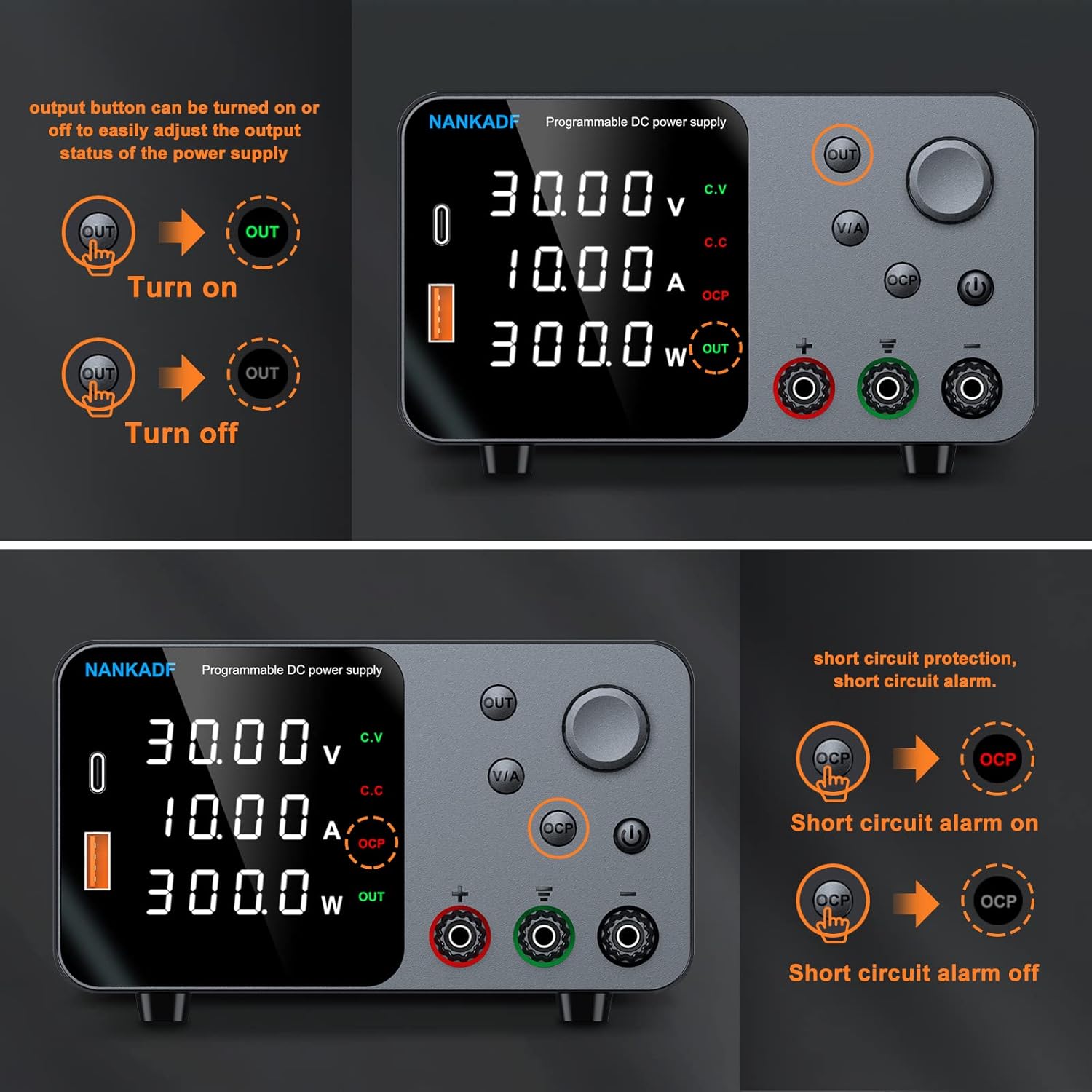
Figure 6.2: Output and OCP Button Functions
This image illustrates how to turn the output on and off using the OUT button, and how to activate/deactivate the OCP (Overcurrent Protection) feature.
6.4 Overcurrent Protection (OCP)
The OCP function provides additional protection against overcurrent conditions or short circuits.
- Press the OCP button to activate the Overcurrent Protection. The 'OCP' indicator on the display will light up.
- If the output current exceeds the set limit or a short circuit occurs while OCP is active, the power supply will automatically stop output and emit an alarm.
- Press OCP again to deactivate the protection.
6.5 Using USB Charging Ports
The power supply is equipped with USB-A and Type-C fast charging ports (up to 18W) for convenience.
- Simply connect your compatible electronic devices to the USB-A or Type-C port for fast charging.
- These ports can be used simultaneously with the main DC output.
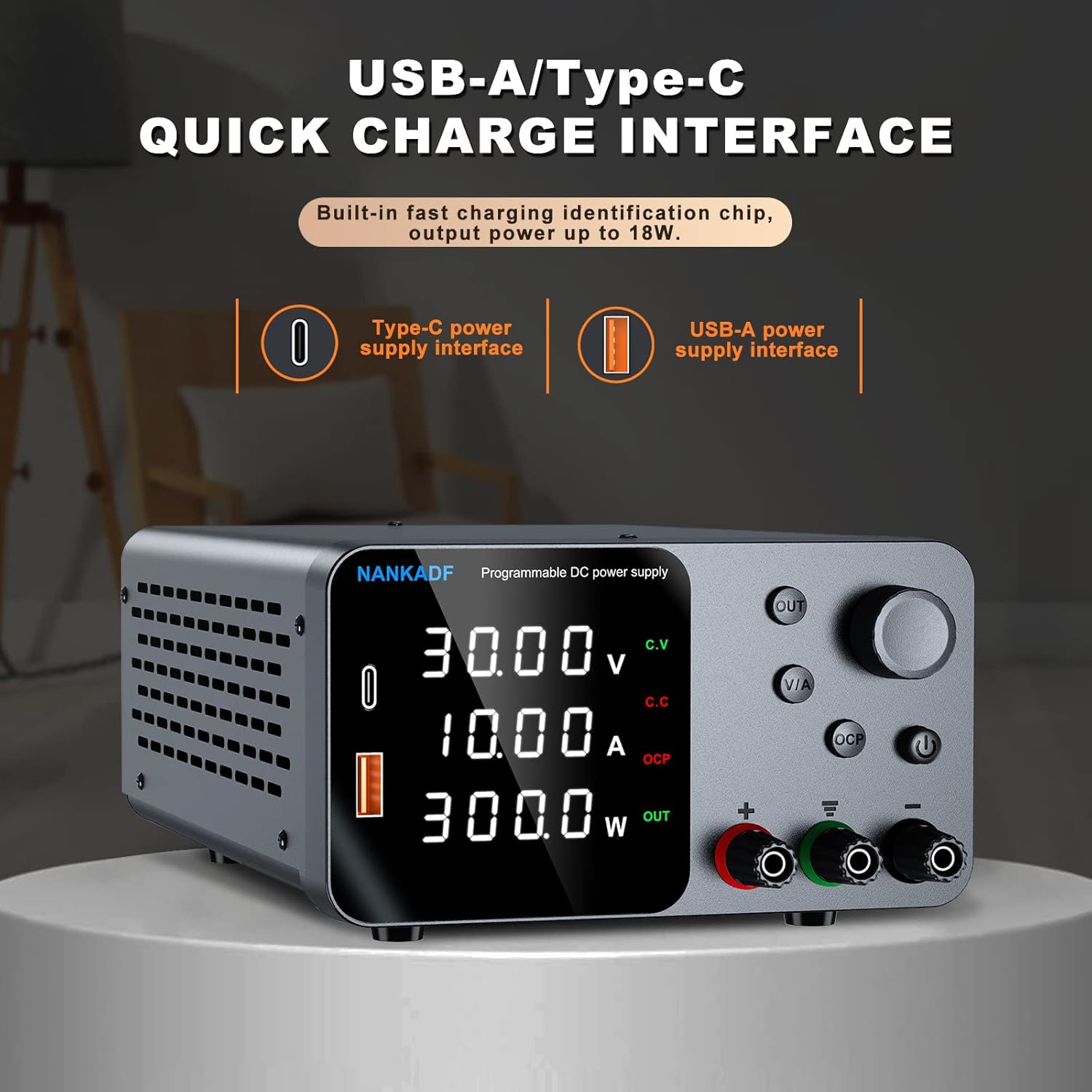
Figure 6.3: USB Charging Ports
This image highlights the integrated USB-A and Type-C fast charging interfaces on the front panel, capable of delivering up to 18W of power.
6.6 Mute Function
To silence the button press beeps:
- Long press the OUT button for a few seconds. The unit will switch to mute mode, and button press sounds will be disabled.
- Long press OUT again to re-enable the beeps.

Figure 6.4: Mute Function Activation
This image illustrates how to activate the mute function by long-pressing the OUT button, which disables the audible beeps for button presses.
7. Maintenance
- Cleaning: Use a soft, dry cloth to clean the exterior of the unit. Do not use abrasive cleaners or solvents.
- Ventilation: Ensure the cooling fan and vents on the side and rear panels are free from dust and obstructions to maintain proper airflow.
- Storage: When not in use for extended periods, store the power supply in a cool, dry place away from direct sunlight and excessive humidity.
8. Troubleshooting
| Problem | Possible Cause | Solution |
|---|---|---|
| No power/Display off | Power cord not connected; Power switch off; Incorrect input voltage selection; Blown fuse. | Check power cord connection; Turn on power switch; Verify 115V/230V selector setting; Check and replace fuse if necessary (refer to qualified personnel). |
| No output voltage/current | Output is OFF; OCP activated; Short circuit in load. | Press the OUT button to turn output ON; Check if OCP indicator is lit, resolve load issue, then reset OCP; Disconnect load and check for short circuit. |
| OCP alarm sounds | Output current exceeded set limit; Short circuit detected. | Reduce load current or increase current limit setting; Check for and remove any short circuits in the connected load. |
| Display readings inaccurate | Loose connections; External interference. | Ensure all connections are secure; Operate away from strong electromagnetic fields. |
9. Specifications
Technical specifications for the NANKADF 30V 10A DC Power Supply:
| Feature | Specification |
|---|---|
| Brand | NANKADF |
| Model Number | 30V 10A |
| Input Voltage | 230V AC / 115V AC (Switchable) |
| Output Voltage | 0-30V DC |
| Output Current | 0-10A DC |
| Max Power Output | 300W |
| Voltage Display Accuracy | 0.01V |
| Current Display Accuracy | 0.001A |
| Display Type | 4-digit LED |
| USB Output | USB-A, Type-C (up to 18W fast charging) |
| Protection Features | Short-circuit protection, Over-temperature protection, Over-voltage protection, Over-current protection (OCP) |
| Dimensions (L x W x H) | Approx. 21 x 14 x 8 cm (8.27 x 5.7 x 3.15 inches) |
| Weight | Approx. 1.45 kg (2.53 lbs) |

Figure 9.1: Product Dimensions and Weight
This image provides a visual representation of the compact dimensions and weight of the NANKADF DC Power Supply, highlighting its portability.

Figure 9.2: Internal Protection Features
This image illustrates the internal components and various protection features such as Overvoltage Protection (OVP), Overcurrent Protection (OCP), Over Temperature Protection, Short Circuit Alert, Low Ripple, and High Precision.
10. Warranty and Support
Every NANKADF product undergoes rigorous testing and aging processes to ensure quality and reliability. We are committed to enhancing user experience and service.
NANKADF provides after-sales services and technical consulting for this product. For any questions, technical assistance, or warranty claims, please contact NANKADF customer support through your purchase platform or the official NANKADF website. Please have your model number and purchase date ready when contacting support.


