
Introduction
This manual provides comprehensive instructions for the safe operation, setup, and maintenance of your X-IMVNLEI19 Foldable FPV Drone. Please read this manual thoroughly before operating the drone to ensure proper function and to prevent damage or injury.
Product Overview
The X-IMVNLEI19 is a compact, foldable drone designed for both beginners and experienced users. It features a 720P HD adjustable camera for aerial photography and video recording, optical flow positioning for stable flight, and various intelligent flight modes.

The X-IMVNLEI19 drone, its remote controller, a smartphone displaying the FPV view, two modular batteries, and spare propellers. The drone is shown in its unfolded state, ready for flight.
What's in the Box
Verify that all components are present upon unboxing:
- X-IMVNLEI19 Drone (x1)
- Remote Control (x1)
- Lithium Ion Batteries (x2)
- USB Charging Cable (x1)
- Spare Propellers (x4)
- Screwdriver (x1)
- Instruction Manual (x1)
- Propeller Guards (x4)
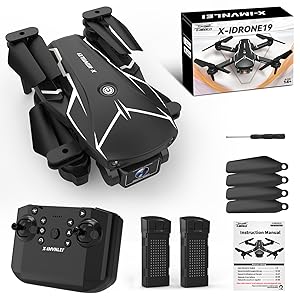
A visual representation of the X-IMVNLEI19 drone package contents, including the folded drone, remote controller, two batteries, a screwdriver, propeller guards, and the instruction manual.
Setup
- Charge Batteries: Connect the provided USB charging cable to the drone batteries and a compatible USB power source. The indicator light will show charging status and turn off when fully charged.
- Install Batteries: Insert the charged batteries into the designated compartment on the drone. Ensure they are securely latched.
- Unfold Drone Arms: Gently unfold the drone's four arms until they click into place.
- Install Propeller Guards (Optional): For added protection, attach the propeller guards to each motor arm.
- Install Remote Control Batteries: Insert 3x AAA batteries (not included) into the remote control.

The top image illustrates the compact, folded size of the X-IMVNLEI19 drone, fitting easily in the palm of a hand. The bottom image demonstrates its portability, showing the folded drone being stored in a small bag.
Operating Instructions
Pairing the Drone and Remote Control
- Place the drone on a flat, level surface.
- Turn on the drone's power switch. The indicator lights will flash.
- Turn on the remote control.
- Push the left joystick up then down. The drone lights will stop flashing, indicating successful pairing.
Basic Flight Controls
Familiarize yourself with the remote control layout and basic maneuvers:
- One Key Start/Landing: Press the one-key take-off/landing button to automatically launch or land the drone.
- Altitude Hold: The optical flow positioning system allows the drone to maintain a stable altitude automatically.
- Directional Control: Use the right joystick to control forward, backward, left, and right movement.
- Rotation: Use the left joystick to control ascent, descent, and rotation (yaw).
- Speed Adjustment: The drone offers 3 high-speed flight modes. Use the speed button on the remote to cycle through them.
- Headless Mode: Activate Headless Mode for simplified control, where the drone's orientation is relative to the pilot, regardless of its front direction.

A child operating the drone remote control, with illustrations of Headless Mode, One Key Start/Landing, and Altitude Hold features. This image highlights the ease of control for the X-IMVNLEI19 drone, showing a child using the remote. It also visually explains key features: Headless Mode (simplified orientation), One Key Start/Landing (automated take-off/landing), and Altitude Hold (stable hovering).
Advanced Features
- 3D Flips: Press the 3D flip button and move the right joystick in the desired direction to perform aerial stunts.
- Custom Path Flight: Utilize the mobile app to draw a desired flight path on your screen, and the drone will automatically follow it.
- Gesture Control: Certain hand gestures can be used to trigger photo or video recording when using the mobile app.

The top image demonstrates the drone's 360-degree flip capability, adding an exciting element to flight. The bottom image showcases its agility and suitability for indoor use, depicting it as a 'small space traveler' navigating around a table.

This image illustrates the Custom Path Flight feature, where users can draw a flight route on their smartphone app, and the drone will autonomously follow the specified trajectory over a mountainous landscape.
Camera Operation & App Connectivity
The X-IMVNLEI19 drone is equipped with a 720P HD FPV camera, adjustable by 90 degrees, allowing for diverse aerial perspectives. Video output resolution is 1920x1080 pixels.
- Download the App: Scan the QR code in the instruction manual or search for "KY UFO" in your device's app store (App Store for iOS, Google Play for Android).
- Connect to Wi-Fi: On your smartphone, go to Wi-Fi settings and connect to the drone's Wi-Fi network (usually named "Drone_XXXX").
- Launch App: Open the "KY UFO" app. You should see the live FPV feed from the drone's camera.
- Record Photos/Videos: Use the dedicated buttons within the app interface to capture photos or start/stop video recording. Files will be saved directly to your phone.

A detailed view of the drone's 720P HD camera, highlighting its 90-degree adjustable angle. An inset image compares the clarity of the drone's camera output to a less clear 'Other' camera, emphasizing its superior image quality.

This image demonstrates the HD FPV (First Person View) capability, showing a smartphone mounted on the remote control. The phone screen displays a real-time live video feed from the drone's camera, offering an immersive aerial perspective of a boat on the water.
Maintenance
- Propeller Inspection: Regularly check propellers for damage (cracks, bends). Replace any damaged propellers immediately using the provided spares and screwdriver.
- Motor Care: Keep motors free from dust and debris. Avoid operating in sandy or dusty environments.
- Battery Care: Store batteries in a cool, dry place. Do not overcharge or over-discharge. If not used for extended periods, charge them every 3 months to maintain battery health.
- Cleaning: Use a soft, dry cloth to clean the drone body and camera lens. Avoid using harsh chemicals.
Troubleshooting
| Problem | Possible Cause | Solution |
|---|---|---|
| Drone does not respond to remote. | Not paired or low battery. | Re-pair the drone and remote. Ensure batteries are charged. |
| Drone drifts during flight. | Not calibrated or strong wind interference. | Perform gyroscope calibration (refer to app instructions). Avoid flying in windy conditions. |
| FPV feed is choppy or disconnected. | Weak Wi-Fi signal or interference. | Ensure drone and phone are close. Avoid areas with strong Wi-Fi interference. Reconnect Wi-Fi. |
| Drone does not take off. | Low battery or propellers not installed correctly. | Charge batteries. Check propeller installation and ensure they spin freely. |
Specifications
- Model Name: X-IMVNLEI19
- Brand: X-IMVNLEI
- Dimensions (Folded): Approx. 5.5"L x 3.9"W x 1.38"H
- Weight: Approx. 68 Grams (2.4 ounces)
- Camera: 720P HD FPV (90° adjustable)
- Video Output Resolution: 1920x1080 Pixels
- Connectivity: Wi-Fi
- Flight Time: Up to 20 minutes per battery (with 2 batteries included)
- Battery Type: Lithium Ion
- Skill Level: Beginner
- Special Features: Optical Flow Positioning, 3D Flips, Headless Mode, One Key Start/Landing, Custom Path Flight, Gesture Control, 3 Speed Modes.
Warranty and Support
For warranty information and customer support, please refer to the contact details provided on the product packaging or visit the official X-IMVNLEI website. Keep your purchase receipt as proof of purchase for warranty claims.
For further assistance, you may also contact the seller directly through the platform where the product was purchased.
