
1. Introduction
Thank you for choosing the Bestier 63-inch TV Stand. This manual provides detailed instructions for assembly, operation, maintenance, and troubleshooting to ensure safe and optimal use of your new entertainment center. Please read all instructions carefully before beginning assembly and retain this manual for future reference.
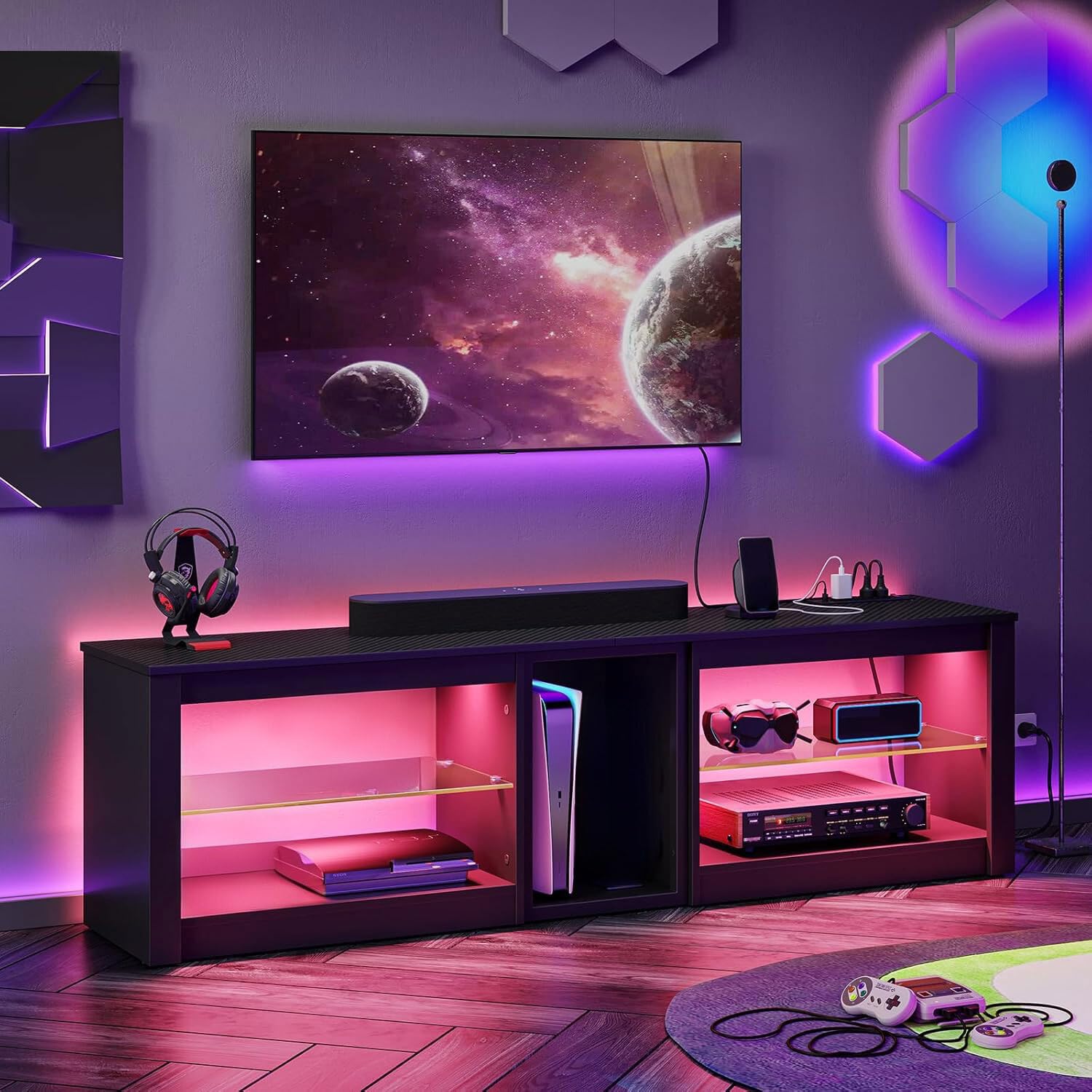
Image 1.1: The Bestier 63-inch TV Stand featuring integrated LED lighting and ample storage for gaming consoles and media devices.
2. Safety Information
Important Safety Instructions:
- Always follow assembly instructions carefully. Incorrect assembly can lead to instability and injury.
- Do not exceed the maximum weight capacity for the top surface (132 lbs / 60 kg) and glass shelves (33 lbs / 15 kg).
- Place the TV stand on a level, stable surface to prevent tipping.
- Use the included anti-tip hardware to secure the TV stand to a wall, especially if children or pets are present.
- Keep small parts and packaging materials away from children.
- Ensure all electrical connections for the power outlets and LED lights are properly secured and meet local electrical codes.
- Do not overload the power outlets. The rated power is 1500W.

Image 2.1: The TV stand is constructed from P2 Particle Board, a material designed for durability and safety.
3. Package Contents
Before assembly, verify that all parts and hardware are present. Refer to the included parts list in your physical package for specific component identification. If any parts are missing or damaged, please contact Bestier customer service.
4. Assembly Instructions
Assembly typically requires two adults and a screwdriver. Follow the step-by-step diagrams and instructions provided in your physical assembly guide. An assembly video is also available for visual guidance.
4.1 Assembly Video Guide
Video 4.1: A step-by-step visual guide demonstrating the assembly process for the Bestier TV Stand. This video covers attaching panels, installing hardware, and placing glass shelves.
4.2 Key Assembly Steps
- Step 1: Attach the side panels to the base using the provided screws and cam locks.
- Step 2: Secure the middle support panels.
- Step 3: Install the back panels, ensuring proper alignment for cable management.
- Step 4: Insert the adjustable glass shelves into the desired height positions.
- Step 5: Mount the LED light strips according to the instructions.
- Step 6: Install the power outlet unit into the designated slot on the top surface.
5. Operating Instructions
5.1 Power Outlets
The TV stand includes a built-in power strip with 4 AC outlets (120V/12A) and 2 USB ports (5V/2.2A). This unit provides surge protection for connected devices.
- Plug the TV stand's main power cord into a wall outlet.
- Connect your TV, gaming consoles, and other devices to the AC outlets.
- Use the USB ports to charge compatible devices.
- Ensure the power switch on the outlet unit is in the 'ON' position for power delivery.

Image 5.1: Integrated power outlets and USB ports for convenient device charging and power supply.
5.2 LED Lighting System
The integrated LED lights offer 7 main colors and 20 dynamic modes, controlled by the included remote.
- Point the remote control towards the LED receiver on the TV stand.
- Press the 'ON' button to activate the lights.
- Use the color buttons to select a static color.
- Use the 'MODE' button to cycle through dynamic lighting effects.
- Adjust brightness and speed using the dedicated buttons.

Image 5.2: The remote control allows for easy customization of the LED lighting, offering a range of colors and dynamic modes.
6. Features and Storage
This TV stand is designed for functionality and aesthetics, providing ample storage and convenient features.
- Spacious Top Surface: Accommodates TVs up to 70 inches.
- Dedicated PS5 Storage: A central compartment is specifically sized for a PlayStation 5 console, ensuring proper ventilation and easy access.
- Adjustable Glass Shelves: Two tempered glass shelves on either side can be adjusted to three different height options to fit various media devices, gaming accessories, or decorative items.
- Cable Management: Rear cutouts facilitate organized cable routing, keeping wires tidy and out of sight.

Image 6.1: The central compartment is designed to perfectly fit a PS5 console, with dimensions of 12.6 inches wide and 18.7 inches high.

Image 6.2: The glass shelves can be adjusted to three different heights to accommodate various items.
6.1 Product Feature Video
Video 6.3: A video showcasing the key features of the Bestier TV Stand, including LED lighting, power outlets, and storage capabilities.
7. Maintenance and Care
To maintain the appearance and longevity of your TV stand:
- Wipe surfaces with a damp cloth, then dry immediately with a clean, soft cloth.
- Avoid using harsh chemicals or abrasive cleaners, as these can damage the finish.
- Periodically check all screws and connections to ensure they remain tight.
- Keep the TV stand away from direct sunlight and excessive moisture.
- Clean glass shelves with a glass cleaner and a soft cloth.
8. Troubleshooting
If you encounter any issues with your Bestier TV Stand, refer to the following common problems and solutions:
| Problem | Possible Cause | Solution |
|---|---|---|
| LED lights not working | Loose connection, remote battery dead, power switch off | Check all LED strip connections. Replace remote battery. Ensure power switch is ON. |
| Power outlets not providing power | Main power cord unplugged, power strip switch off, circuit breaker tripped | Ensure main power cord is securely plugged in. Turn power strip switch ON. Check household circuit breaker. |
| Stand feels wobbly | Loose screws, uneven floor, anti-tip kit not installed | Tighten all assembly screws. Move to a level surface or use shims. Install anti-tip hardware to a wall stud. |
If the problem persists, please contact Bestier customer service for further assistance.
9. Specifications
- Brand: Bestier
- Model: TV Stand
- Material: P2 Particle Board, Tempered Glass
- Color: Black Carbon Fiber
- Product Dimensions: 62.99" L x 13.78" W x 20.51" H
- Item Weight: 49.2 pounds
- Max TV Size: Up to 70 inches
- Weight Capacity (Top): 132 lbs (60 kg)
- Weight Capacity (Glass Shelves): 33 lbs (15 kg) per shelf
- Power Outlets: 4 AC Outlets (120V/12A), 2 USB Ports (5V/2.2A)
- Rated Power: 1500W
- LED Lights: 7 Main Colors, 20 Dynamic Modes
- Care Instructions: Wipe with Damp/Dry Cloth

Image 9.1: Detailed product dimensions and weight capacities for the Bestier TV Stand.
10. Warranty and Support
Bestier offers customer support for any quality issues. Please refer to your purchase documentation for specific warranty details. For assistance with assembly, missing parts, or product issues, please contact Bestier customer service directly. Contact information can typically be found on the Bestier website or your product packaging.
Customer Service:
- Email: [Refer to product packaging or Bestier website]
- Phone: [Refer to product packaging or Bestier website]
- Website: Bestier Official Store


