
MESTEK WM710-G
MESTEK WM710 Pinless Wood Moisture Meter User Manual
Model: WM710-G | Brand: MESTEK
Introduction
The MESTEK WM710 Pinless Wood Moisture Meter is a non-destructive induction hygrometer designed for accurately measuring the moisture content of various materials such as wood, drywall, masonry, and concrete. Utilizing high-frequency electromagnetic wave signals, it provides precise readings without causing damage to the surface. This manual provides detailed instructions for the proper use, maintenance, and troubleshooting of your device to ensure optimal performance and longevity.

Image: The MESTEK WM710 Pinless Wood Moisture Meter, shown with its carrying case and included AAA batteries.
Safety Information
Please read all safety warnings and instructions carefully before using the device. Failure to follow these instructions may result in electric shock, fire, or serious injury.
- Keep the device away from water and high humidity environments.
- Do not attempt to disassemble or modify the meter. Repairs should only be performed by qualified personnel.
- Ensure batteries are inserted with correct polarity. Remove batteries if the device will not be used for an extended period.
- Avoid dropping the device or subjecting it to strong impacts.
- Use the device only for its intended purpose as a moisture meter.
Package Contents
Verify that all items are present in the package:
- 1 x MESTEK WM710 Pinless Wood Moisture Meter
- 3 x 1.5V AAA Batteries
- 1 x Screwdriver (for battery compartment)
- 1 x Carrying Cloth Bag
- 1 x User Manual (this document)

Image: Contents of the MESTEK WM710 package, including the meter, batteries, screwdriver, and user manual.
Product Overview
Familiarize yourself with the components and controls of your MESTEK WM710 moisture meter.
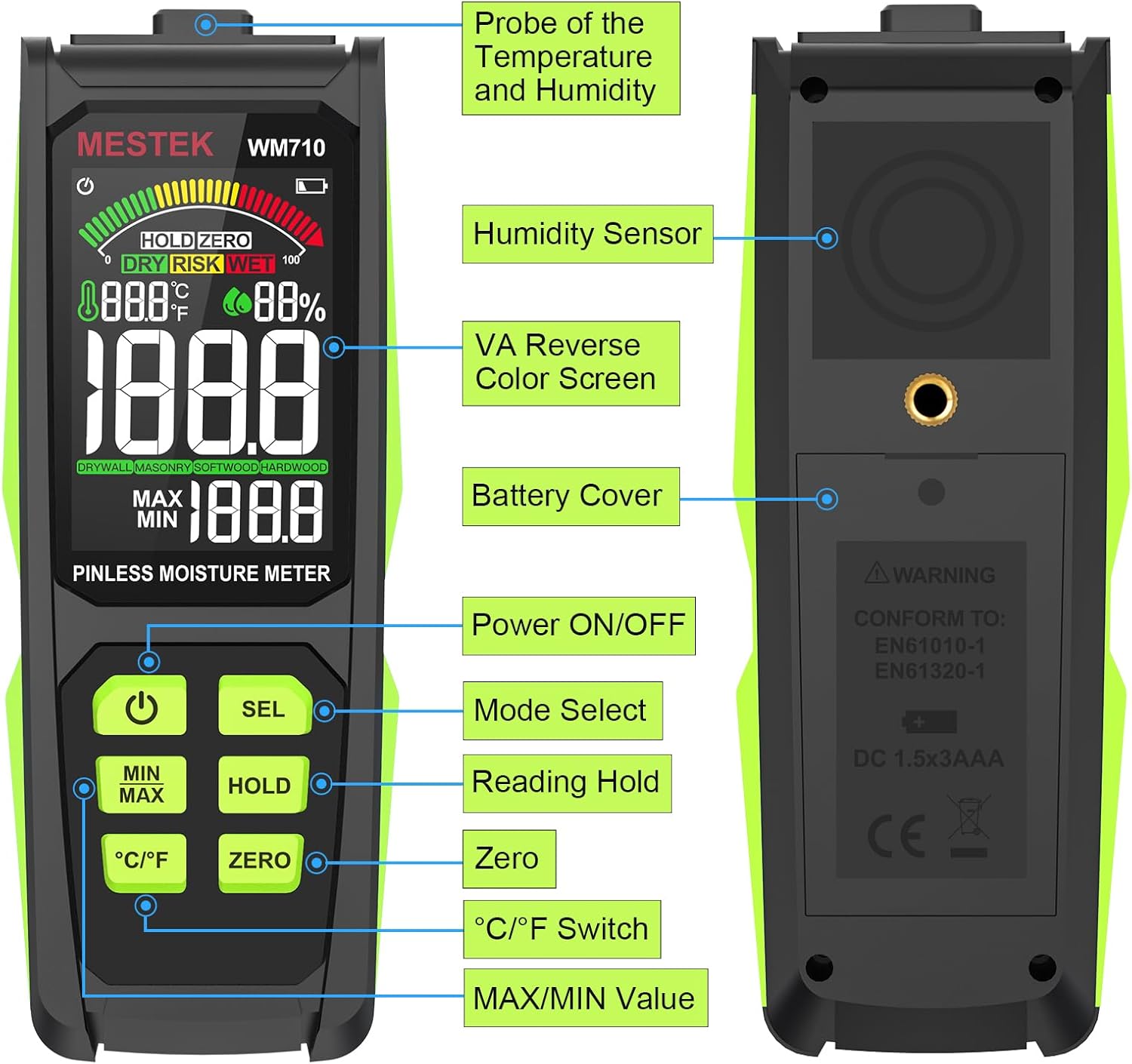
Image: Front and back view of the MESTEK WM710, highlighting key components such as the VA Reverse Color Screen, Humidity Sensor, Battery Cover, Power ON/OFF button, Mode Select (SEL), Reading Hold (HOLD), Zero, °C/°F Switch, and MAX/MIN Value buttons.
Key Components:
- VA Reverse Color Screen: 3-inch HD color display showing measurements, temperature, humidity, and status indicators.
- Humidity Sensor: Located on the back for ambient humidity readings.
- Probe of the Temperature and Humidity: Top-mounted sensor for ambient temperature and humidity.
- Battery Cover: Located on the back, secured with a screw.
- Power ON/OFF Button: Turns the device on or off.
- SEL Button (Mode Select): Short press to switch between Drywall, Masonry, Softwood, and Hardwood modes.
- HOLD Button (Reading Hold): Freezes the current measurement on the display.
- ZERO Button: Used for zero clearing before measurement.
- °C/°F Switch Button: Toggles between Celsius and Fahrenheit for temperature display.
- MIN/MAX Button: Displays the minimum and maximum recorded moisture values.
Setup
1. Battery Installation
- Locate the battery cover on the back of the device.
- Use the included screwdriver to loosen the screw on the battery cover.
- Remove the battery cover.
- Insert the 3 x 1.5V AAA batteries, ensuring correct polarity (+/-).
- Replace the battery cover and tighten the screw.
2. Initial Power On
Press the Power ON/OFF button to turn on the device. The LCD screen will illuminate and display initial readings.
Operating Instructions
1. Power On/Off
- To turn on: Press the Power ON/OFF button.
- To turn off: Press and hold the Power ON/OFF button for approximately 2 seconds. The device also features an auto power-off function to conserve battery life if inactive for a period.
2. Mode Selection
The WM710 supports four measurement modes for different materials:
- DRYWALL
- MASONRY
- SOFTWOOD
- HARDWOOD
To select a mode, short press the SEL button. The selected mode will be indicated on the LCD screen.

Image: The meter's display showing the selection of different material modes: Drywall, Masonry, Softwood, and Hardwood.
3. Performing a Measurement
- Turn on the meter and select the appropriate material mode using the SEL button.
- Press the ZERO button to clear any previous readings and calibrate the sensor.
- Place the back of the meter (where the induction sensor is located) flat against the surface of the material you wish to measure. Ensure the entire sensor area is in contact with the material.
- Wait for approximately 3 seconds for the reading to stabilize. The moisture content will be displayed on the screen.
- The maximum measuring depth is 0.78 inches (20 mm). Ensure the object area is greater than 40x40mm for accurate readings.

Image: Illustration of the MESTEK WM710's non-destructive measurement principle, showing the induction sensor on the back of the device.
4. Interpreting Readings (Humidity Alarm)
The 3-inch HD color screen features a three-color analog bar display and indicates moisture status as "DRY", "RISK", or "WET" using green, yellow, and red colors, respectively.
| Measurement Mode | Green / DRY | Yellow / RISK | Red / WET |
|---|---|---|---|
| DRYWALL | 0.0~17.9 | 18.0~35.9 | 36.0~54.0 |
| MASONRY | 0.0~11.9 | 12.0~23.9 | 24.0~36.0 |
| SOFTWOOD | 0.0~31.9 | 32.0~63.9 | 64.0~100 |
| HARDWOOD | 0.0~31.9 | 32.0~63.9 | 64.0~100 |

Image: Examples of the MESTEK WM710 display indicating DRY (green), RISK (yellow), and WET (red) moisture levels, along with the corresponding numerical ranges for different materials.
5. HOLD Function
Press the HOLD button to freeze the current measurement on the display. Press it again to release and resume live readings.
6. Temperature and Humidity Display
The meter also displays ambient temperature and humidity. Use the °C/°F button to switch between Celsius and Fahrenheit temperature units.
7. MAX/MIN Record
Press the MIN/MAX button to view the maximum and minimum moisture readings recorded during a measurement session. Press again to cycle through MAX, MIN, and current readings.
Applications and Usage
The MESTEK WM710 is versatile and suitable for a wide range of applications:
- Testing moisture content in lumber and various wood types (softwood, hardwood).
- Checking moisture in building materials such as drywall, plaster, concrete, and masonry.
- Identifying potential water leaks in walls, floors, and ceilings.
- Assessing the dryness of firewood for efficient burning.
- Inspecting moisture levels in caravans or other recreational vehicles.
- General woodworking and construction projects to ensure material readiness.

Image: The MESTEK WM710 being used to measure moisture in different materials, including drywall, masonry, softwood, and hardwood.
Maintenance
- Cleaning: Wipe the device with a soft, dry cloth. Do not use abrasive cleaners or solvents.
- Storage: Store the meter in its carrying cloth bag in a cool, dry place, away from direct sunlight and extreme temperatures.
- Battery Replacement: Replace batteries when the low battery indicator appears on the screen to ensure accurate readings.
- Sensor Care: Keep the induction sensor on the back of the device clean and free from debris to maintain measurement accuracy.
Troubleshooting
| Problem | Possible Cause | Solution |
|---|---|---|
| Device does not turn on. | Low or dead batteries; incorrect battery installation. | Replace batteries with new ones; ensure correct polarity. |
| Inaccurate readings. | Sensor not fully in contact; incorrect mode selected; sensor dirty. | Ensure full contact with surface; select correct material mode; clean sensor area. |
| Display is dim or flickering. | Low battery power. | Replace batteries. |
| "Out of Range" alarm. | Moisture content is outside the measurable range for the selected mode. | This indicates very high or very low moisture. Verify the material and mode. |
Specifications

Image: The MESTEK WM710 meter with its dimensions indicated, showing a length of 6.49 inches and a display width of 2.7 inches.
| Feature | Detail |
|---|---|
| Model | WM710-G |
| Measurement Principle | Non-destructive Induction |
| Maximum Measuring Depth | 0.78 inches (20 mm) |
| Measurement Range | 0.0 - 100.0 (relative value) |
| Measurement Accuracy | ±4% |
| Temperature Accuracy | ±2.0°C / ±3°F |
| Humidity Accuracy | ±5.0%RH |
| Display | 3-inch HD Color LCD with 3-color analog bar |
| Power Source | 3 x 1.5V AAA Batteries (Alkaline) |
| Auto Power-Off | Yes |
| Dimensions | 6.5 x 2.48 x 1.26 inches (approx.) |
| Item Weight | 6.4 ounces |
Warranty and Support
Warranty Information
The MESTEK WM710 Pinless Wood Moisture Meter comes with a 3-year replacement warranty. If the product fails due to manufacturing defects or normal use within this period, MESTEK will replace it without questions asked.
Customer Support
For any questions, technical assistance, or warranty claims, please contact MESTEK customer support. Refer to the contact information provided on the product packaging or the official MESTEK website for the most up-to-date support channels.
We are committed to providing customers with products of better quality, more stable performance, more functions, and simpler operation.
Ask a question about this manual
Ask about setup, troubleshooting, compatibility, parts, safety, or missing instructions. Manuals+ will review the question and use this page’s manual context to help answer it.