
Introduction
This manual provides instructions for the Generic replacement remote control designed for various Venturer portable mobile DVD player models. This remote is intended to function as a substitute for your original remote. Please note that some advanced or specific functions of your original device may not be fully supported by this replacement remote.
Compatible Models: PVS19261, PVS1262, PVS1233, PVS6281, PVS19388IR, PVS6081G, PVS7980, PVS7287, PVS6100W, PVS1102DIVX.
If your specific Venturer model is not listed, this remote may not be compatible. Please verify compatibility before use.
Package Contents
- 1 x Generic Replacement Remote Control
- Note: Batteries are not included and must be purchased separately.
Setup
Installing Batteries
- Locate the battery compartment on the back of the remote control.
- Slide open the battery compartment cover.
- Insert 1 CR2 battery, ensuring the positive (+) and negative (-) terminals align correctly with the markings inside the compartment.
- Close the battery compartment cover securely.
The remote control is ready for use immediately after battery installation. No programming is required.
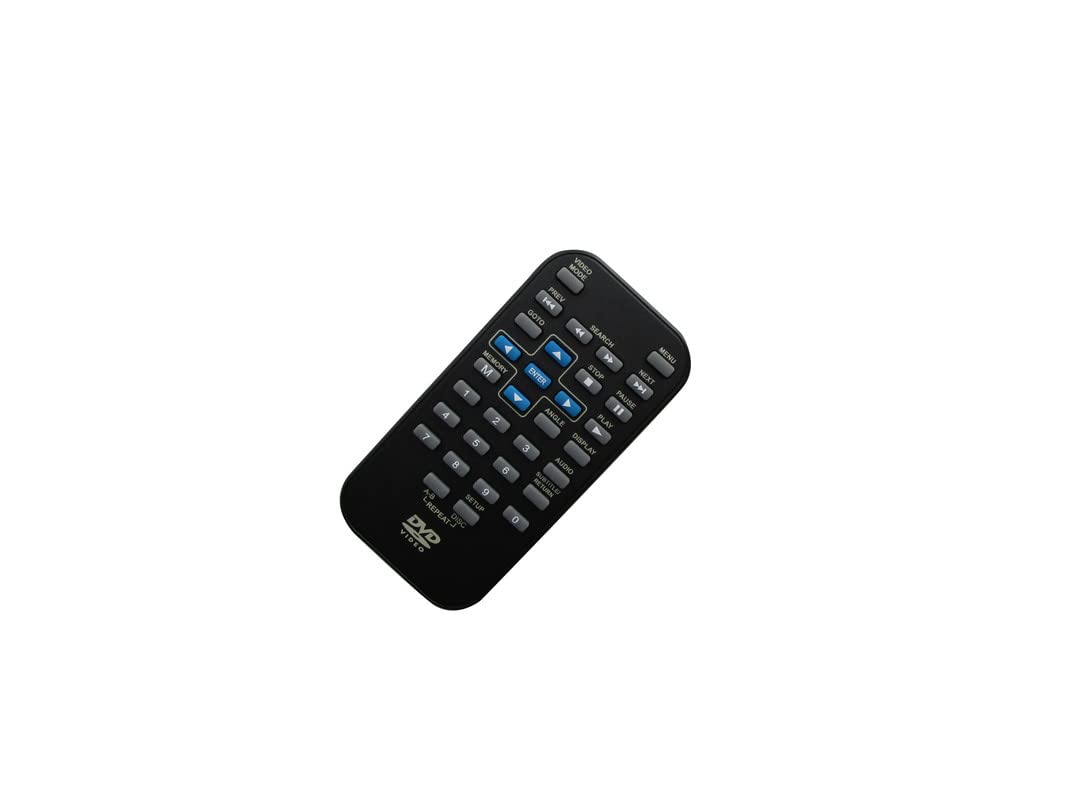
Image: Back view of the remote control, highlighting the battery compartment. The remote is black and rectangular with rounded edges.
Operating Instructions
This replacement remote control operates via infrared (IR) technology. Ensure a clear line of sight between the remote and the IR receiver on your Venturer portable DVD player for optimal performance.
Basic Functions
- Power: Turns the DVD player on or off.
- Play/Pause: Starts or pauses disc playback.
- Stop: Stops disc playback.
- Fast Forward/Rewind: Skips forward or backward through content.
- Next/Previous: Skips to the next or previous track/chapter.
- Volume Up/Down: Adjusts the audio volume.
- Menu: Accesses the DVD menu.
- Directional Buttons (Up, Down, Left, Right) & Enter: Navigates menus and confirms selections.
Refer to your Venturer DVD player's original manual for specific functions and their corresponding buttons, as this replacement remote aims to replicate the most common controls.

Image: Front view of the remote control, displaying its array of buttons for various functions. The remote is black and has a standard layout.
Maintenance
Battery Replacement
When the remote control's range decreases or it becomes unresponsive, it is likely time to replace the battery. Follow the battery installation steps outlined in the "Setup" section.
- Always use a fresh CR2 battery.
- Do not mix old and new batteries.
- Remove batteries if the remote will not be used for an extended period to prevent leakage.
- Dispose of used batteries responsibly according to local regulations.
Cleaning
To clean the remote control, gently wipe its surface with a soft, dry cloth. For stubborn dirt, slightly dampen the cloth with water. Avoid using harsh chemicals, abrasive cleaners, or excessive moisture, as these can damage the remote.
Troubleshooting
- Remote not responding:
- Ensure there is a fresh CR2 battery installed correctly.
- Check for any obstructions between the remote and the DVD player's IR receiver.
- Confirm you are within the effective operating range (typically 15-20 feet).
- Certain functions do not work:
- This is a replacement remote. It may not support all functions of your original Venturer remote. Only basic and common functions are guaranteed.
- Verify that your Venturer DVD player model is listed as compatible in the "Introduction" section.
- Remote feels sluggish or has reduced range:
- Replace the battery with a new one.
If issues persist after following these steps, and your model is confirmed compatible, consider contacting the seller for further assistance.
Specifications
| Feature | Description |
|---|---|
| Brand | Generic |
| Model Number | Easytry17899 |
| Connectivity Technology | Infrared (IR) |
| Compatible Devices | Venturer Portable DVD/Blu-ray Players (Specific models listed in Introduction) |
| Number of Batteries Required | 1 CR2 battery |
| Button Quantity | 20 |
| Color | Random (typically black) |
Warranty
This product typically comes with a 90-day warranty from the date of purchase. Please retain your proof of purchase for any warranty claims. The warranty covers manufacturing defects but does not cover damage caused by misuse, accidents, or unauthorized modifications.
For specific warranty details and claims, please refer to the seller's policy or contact them directly.
Support
For further assistance or inquiries regarding this replacement remote control, please contact the seller through the platform where the purchase was made. Provide your order number and a detailed description of the issue to facilitate a quicker resolution.
Manufacturer: SZHKHXD