
Roinvou (00-03) 2+64G
Roinvou Android 13 Car Stereo User Manual
Model: (00-03) 2+64G | Brand: Roinvou
1. Introduction
This manual provides detailed instructions for the installation, operation, and maintenance of your Roinvou Android 13 Car Stereo. Designed specifically for Toyota RAV4 models from 2000 to 2003, this unit enhances your driving experience with advanced features like Wireless CarPlay, Android Auto, GPS navigation, Bluetooth connectivity, and a high-definition touch screen.
2. Safety Information
Always prioritize safety during installation and operation. Improper installation can lead to vehicle damage or personal injury. If unsure, seek professional assistance.
- Disconnect the vehicle's battery before beginning installation to prevent electrical shorts.
- Ensure all wiring connections are secure and properly insulated.
- Do not operate the device in a manner that distracts you from driving.
- Avoid exposing the unit to extreme temperatures or moisture.
3. Package Contents
Verify that all items are present in your package:
- Roinvou Car Stereo for Toyota RAV4
- Power Cable
- RCA Harness
- GPS Antenna
- AHD Backup Camera
- External Microphone
- Rear Camera Input Cable
- Dual USB Cable
- Installation Tool & Accessories
4. Setup and Installation
4.1 Removing the Old Radio
To begin, you will need an H5 Allen head driver to remove the four screws securing the beauty ring around your existing radio. Once these screws are out, gently pull the cover to remove it. Next, use a 10mm socket to remove the four bolts holding the old radio in place (two on each side). Before fully removing the radio, disconnect all cable plugs, including the main power, speaker wires, and radio antenna. A useful tip is to stuff a piece of paper into the bolt holes to prevent bolts from falling into the dashboard cavity.
Video: A7369 Center Console Disassembly Wiring Method. This video demonstrates the process of removing the old car stereo from a Toyota RAV4, including screw removal and cable disconnection.
4.2 Installing the New Stereo
Transfer the mounting brackets from your old radio to the new Roinvou unit. These brackets typically align with existing holes on the new radio. Secure them with the provided screws. The new cable harness is designed for plug-and-play installation with your vehicle's existing wiring. Connect the main power and speaker wires.
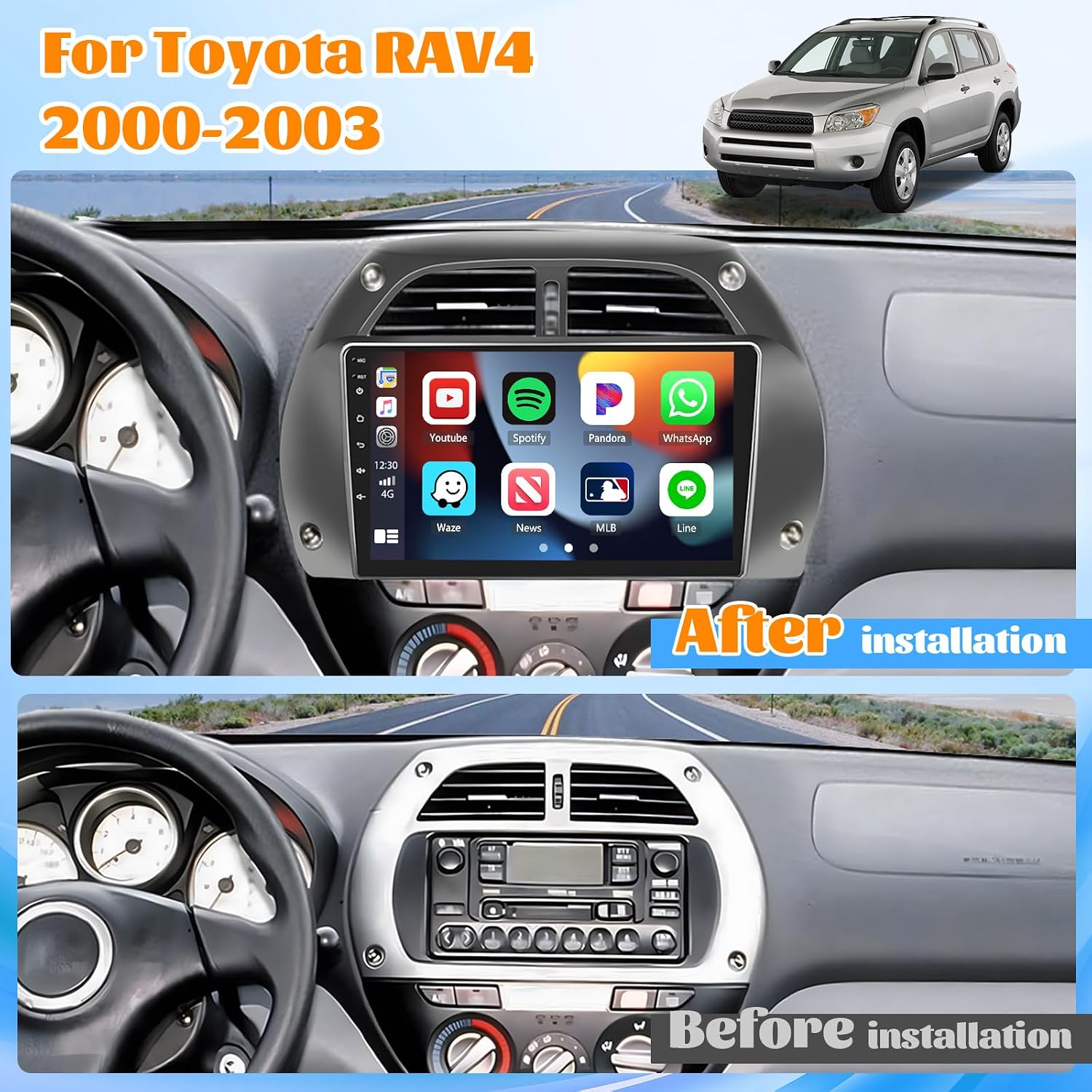
Image: Before and After Installation. This image illustrates the visual transformation of the dashboard after installing the Roinvou car stereo, showing the integrated 9-inch touch screen.
4.3 Connecting Peripherals
- GPS and WiFi Antennas: For optimal signal reception, place the GPS and WiFi antennas (modules) above the glove box area. Ensure they are not obstructed by metal components.
- USB Cables: Connect the dual USB cables to the designated ports on the stereo. One cable is typically for quick charging, and the other for 'Easy Connect' features like screen mirroring.
- Backup Camera: Connect the included AHD backup camera to the rear camera input cable. Ensure the reverse input cable is plugged in, even if the camera is not immediately used, as it can affect Bluetooth and WiFi signal reception.
- Steering Wheel Control (SWC): The unit supports original steering wheel control buttons. If your vehicle does not have a CANBUS decoder, connect the Key1/Key2 wires from the power cable to the corresponding port of your original car and use the 'SteeringWheelKey' manual function to activate button functions. If your vehicle has a CANBUS decoder, connect it before powering on the machine, then navigate to Apps > Settings > Factory Settings (1234) > CAN Settings to configure SWC.
5. Operating Instructions
5.1 Wireless CarPlay & Android Auto
The Roinvou stereo is compatible with both wired and wireless Apple CarPlay and Android Auto. This allows for seamless integration of your smartphone, providing access to navigation, calls, messages, music, and voice assistants directly from the car's touch screen.
Video: UI Function & Carplay and Android Auto Connection. This video demonstrates the user interface functions and the connection process for both Apple CarPlay and Android Auto.
5.2 Mirror Link
Utilize the Mirror Link feature for Android and iOS smartphones to synchronize your phone screen with the car stereo's display. This allows you to enjoy videos and other content on the larger 9-inch screen.

Image: Mirror Link for Android/iOS. This image shows the Mirror Link functionality, allowing smartphone content to be displayed on the car stereo screen.
5.3 EQ/FM/RDS Radio
The built-in EQ allows for frequency division adjustment, providing a panoramic sound experience. The FM/RDS radio features 18 preset stations, enabling you to save and quickly access your favorite news, music, and programs with Hi-fi high-fidelity sound.
5.4 GPS Navigation and WiFi Connectivity
The unit comes pre-equipped with North American maps for offline navigation. For real-time traffic updates and online navigation, you can download apps from the Play Store. The stereo supports WiFi hotspot connectivity, allowing you to access and download various online applications like Instagram, Facebook, and TikTok.

Image: GPS Navigation and WiFi Connection. This image highlights the built-in GPS navigation capabilities and the stereo's ability to connect to WiFi for online features and app downloads.
5.5 Bluetooth Call/Music
Connect your smartphone via Bluetooth for hands-free calling and audio streaming. The system allows you to make and receive calls directly from the stereo interface and play music wirelessly.
5.6 Voice Assistant
Utilize voice commands (Siri/Google Assistant) for various functions, making your driving experience safer and more convenient.
5.7 Desktop Themes
The Roinvou stereo offers 28 different UI themes, allowing for personalization of the interface to suit your preferences.

Image: 28 Desktop Themes. This image displays a selection of the 28 available user interface themes, offering diverse customization options for the stereo's appearance.
6. Maintenance
To ensure the longevity and optimal performance of your Roinvou car stereo, follow these general maintenance guidelines:
- Regularly clean the touch screen with a soft, lint-free cloth. Avoid abrasive cleaners.
- Keep the unit free from dust and debris.
- Check for and install any available software updates to ensure the best performance and access to new features.
- Avoid exposing the unit to direct sunlight for extended periods, especially in hot climates.
7. Troubleshooting
If you encounter issues with your Roinvou car stereo, refer to the following common solutions:
- No Power/Unit Not Turning On: Check all power connections and ensure the vehicle's battery is properly connected. Verify fuses.
- Backup Camera Not Working: Ensure the brown reversing wire is correctly connected to the reversing input. Check that the camera is set to NTSC in the unit's settings.
- Touch Screen Unresponsive/Malfunctioning: Disconnect and reconnect the unit's power. If the issue persists, a factory reset may be necessary (refer to settings menu).
- Bluetooth/CarPlay/Android Auto Connection Issues: Ensure Bluetooth is enabled on both the stereo and your phone. Delete previous pairings and re-pair. Check for any pending permissions on your phone. Verify that the reverse input cable is plugged in, as it can affect signal reception.
- System Shuts Off with Headlights: Check the wiring, specifically the green wire, as this has been a known solution for some users.
- No GPS Signal: Ensure the GPS antenna is placed in an unobstructed location, ideally above the glove box.
For persistent issues or advanced troubleshooting, please contact Roinvou customer support via Amazon chat.
8. Specifications
| Feature | Detail |
|---|---|
| Product Dimensions | 12.2 x 3.35 x 7.99 inches |
| Item Weight | 3.39 pounds |
| Screen Size | 9 Inches |
| Resolution | 1024 x 600 |
| Connectivity Technology | Bluetooth, Wi-Fi, USB |
| Audio Output Mode | Stereo |
| Vehicle Service Type | Car |
| Manufacturer | Roinvou |
| Country of Origin | China |
9. Warranty and Support
Roinvou offers a 30-day refund/replacement policy and a one-year warranty for this product. For any questions, technical assistance, or warranty claims, please contact Roinvou customer service directly through Amazon chat. They aim to provide answers within 24 hours.
Related documents(00-03) 2+64G


Ask a question about this manual
Ask about setup, troubleshooting, compatibility, parts, safety, or missing instructions. Manuals+ will review the question and use this page’s manual context to help answer it.