
1. Introduction
Thank you for choosing the DICKIE TOYS Parkin G Garage. This instruction manual provides essential information for the safe assembly, operation, and maintenance of your new toy. Please read this manual thoroughly before use and retain it for future reference.

Image 1.1: The DICKIE TOYS Parkin G Garage, showcasing its multi-level structure, ramps, and included vehicles.
2. Safety Information
WARNING: CHOKING HAZARD - Small parts. Not for children under 3 years.
- Adult supervision is recommended during assembly and play.
- Keep packaging materials away from children to prevent suffocation.
- Do not modify the product. Use only original parts and accessories.
- Ensure all parts are securely connected before play to prevent detachment.
- Batteries should be inserted with the correct polarity. Do not mix old and new batteries, or different types of batteries. Remove exhausted batteries promptly.
3. Package Contents
Please check the package to ensure all components are present before beginning assembly. If any parts are missing or damaged, please contact customer support.

Image 3.1: Product packaging illustrating the main components and features.
The package typically includes:
- Multi-level garage structure components (pillars, parking decks)
- Connecting ramps and tracks
- Base playmat
- Manual lift mechanism
- Light and sound module
- Assorted toy vehicles (e.g., cars, helicopter)
- Small accessories (e.g., flags, signs)
- Instruction Manual (this document)
4. Assembly and Setup
Assembly should be performed by an adult. Follow these steps carefully:
- Prepare the Base: Unfold the base playmat on a flat, stable surface.
- Assemble the Main Tower: Connect the vertical pillars and parking deck sections according to the numbered slots. Ensure each piece clicks securely into place.
- Attach Ramps: Connect the various ramps and tracks to their designated levels and the main tower. Pay attention to the direction of the ramps for smooth vehicle movement.
- Install Light and Sound Module: Locate the light and sound module. Open the battery compartment using a small screwdriver (not included). Insert 2 AAA batteries, ensuring correct polarity (+/-). Close the compartment. Attach the module to the top of the main tower.
- Attach Manual Lift: Secure the manual lift mechanism to its designated position on the garage structure.
- Add Accessories: Place flags, signs, and other small accessories into their respective slots on the garage and playmat.
- Final Check: Verify that all connections are firm and stable before allowing children to play.
5. Operating Instructions
The Parkin G Garage offers various interactive features for engaging play:
- Using the Manual Lift: Place a toy car onto the lift platform. Rotate the knob or crank (if applicable) to raise or lower the car between parking levels.
- Light and Sound Features: Press the button on the light and sound module (located at the top of the main tower) to activate realistic garage sounds and flashing lights.
- Ramp Play: Place toy cars at the top of the ramps and release them to watch them descend through the garage levels. The garage features ramps that allow cars to change directions.
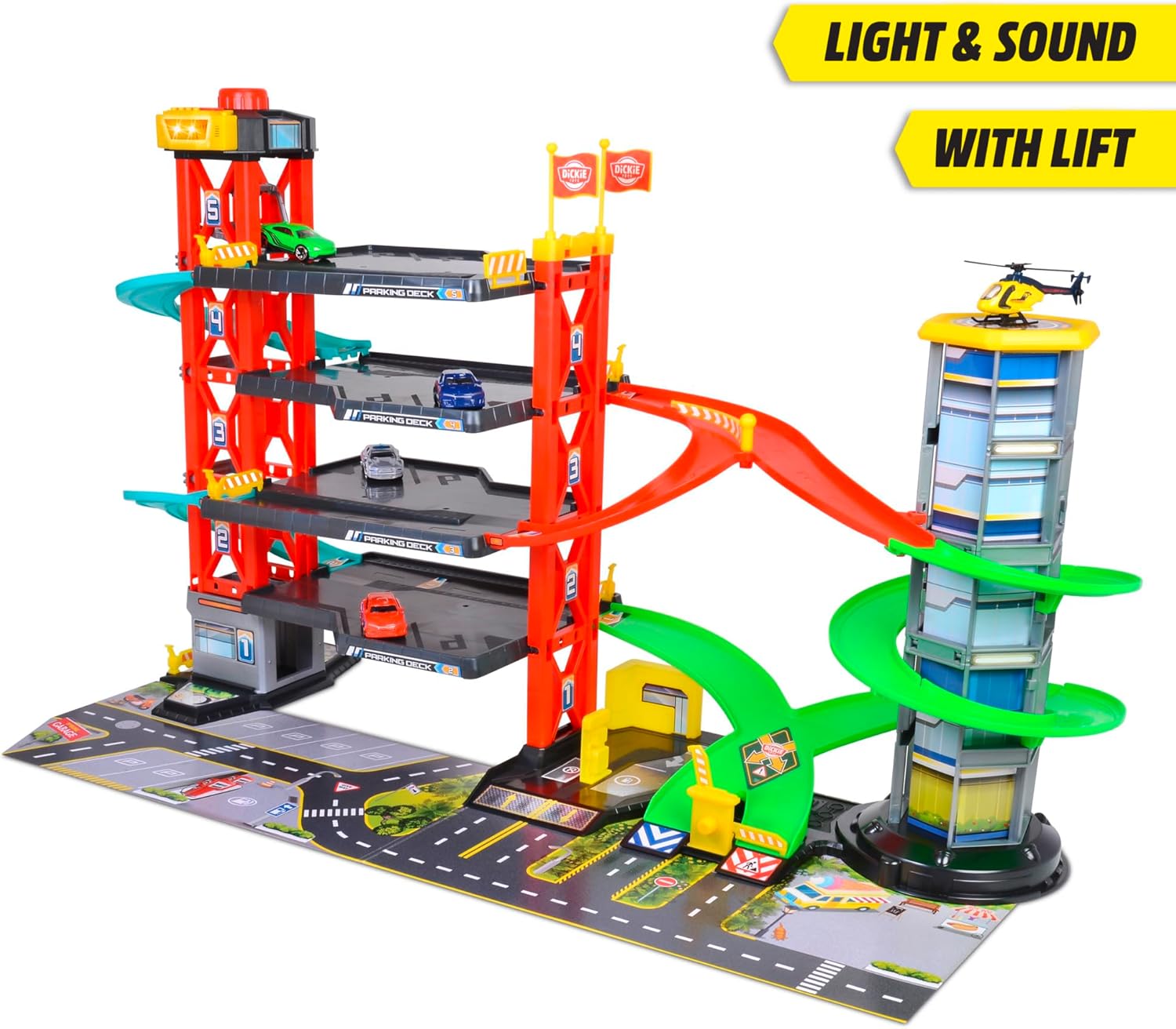
Image 5.1: Close-up view highlighting the light and sound module and the manual lift mechanism.

Image 5.2: Illustrates the multi-directional ramps for dynamic vehicle movement.
6. Maintenance and Care
- Cleaning: Wipe the garage and accessories with a soft, damp cloth. Do not immerse electronic components (light and sound module) in water. Avoid harsh chemicals or abrasive cleaners.
- Storage: Store the toy in a clean, dry place away from direct sunlight and extreme temperatures when not in use.
- Battery Replacement: Replace batteries when lights dim or sounds become faint. Always use new, identical batteries.
7. Troubleshooting
| Problem | Possible Cause | Solution |
|---|---|---|
| Lights/Sounds not working |
|
|
| Parts do not connect securely |
|
|
| Cars get stuck on ramps |
|
|
8. Specifications
- Model Number: 203339000
- Brand: DICKIE TOYS
- Product Dimensions (Assembled): Approximately 3.74 x 29.92 x 16.34 inches (9.5 x 76 x 41.5 cm)
- Item Weight: Approximately 5.5 pounds (2.5 kg)
- Recommended Age: 3+ years (Note: Always supervise younger children due to small parts.)
- Batteries Required: 2 x AAA (not included)
9. Warranty and Support
DICKIE TOYS products are manufactured to high-quality standards. For warranty information, product support, or to inquire about replacement parts, please contact your local DICKIE TOYS distributor or visit the official DICKIE TOYS website.
Contact Information:
- Website: www.dickietoys.de/en/ (or relevant regional website)
- Refer to product packaging for specific regional contact details.