
1. Introduction and Overview
The Mackie DLZ Creator is an advanced content creation studio designed to simplify audio production for podcasters, streamers, and content creators. It integrates a 12-channel digital mixer with intuitive controls, powerful processing, and flexible connectivity options to help you achieve professional-quality audio.
Key Features:
- 12-channel Digital Mixer: Comprehensive control over multiple audio sources.
- 4 Onyx80 Mic Preamps: High-quality preamps for pristine audio capture.
- Mix Agent™ Technology: Virtual audio assistant for guided setup and level setting.
- AutoMix: Automatically manages levels for up to 4 microphones.
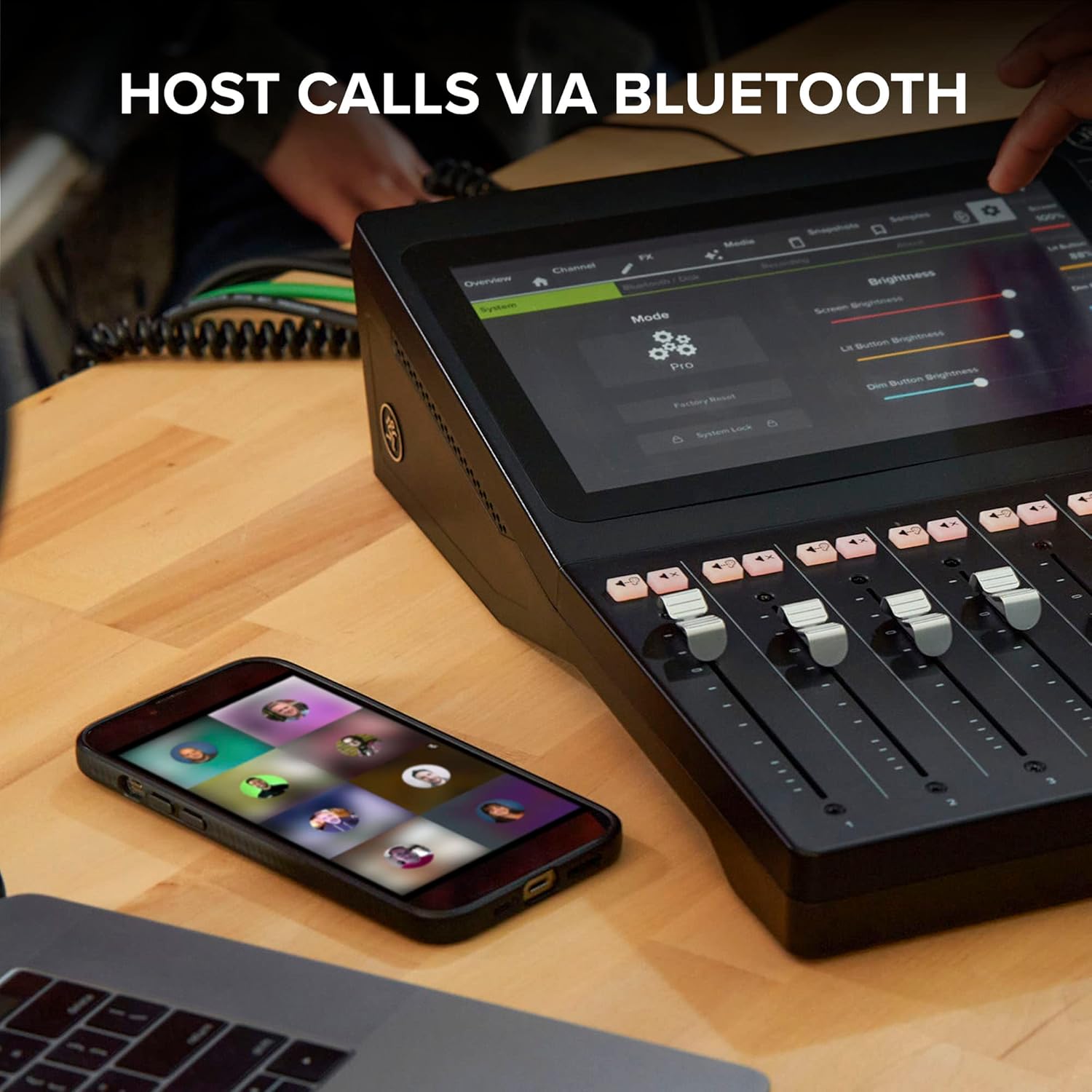
- Mix Minus: Seamlessly integrate call-in guests via Bluetooth® without echo.
- 10.1" Touchscreen: Large, full-color display for intuitive control and visual feedback.
- Flexible Recording & Streaming: Record directly to SD card or USB flash drive, or stream to computer via USB.
- Multiple Control Modes: Easy, Enhanced, and Pro modes adapt to your experience level.

The DLZ Creator is designed to make you a better content producer by providing powerful tools in an accessible interface. Its adaptive control modes ensure that whether you are a beginner or a seasoned professional, you can achieve optimal results.
2. Setup
Setting up your DLZ Creator is streamlined with the integrated Mix Agent™ technology, guiding you through essential configurations.
2.1 Initial Connection
Before powering on, ensure all necessary microphones, headphones, and other devices are connected to the appropriate inputs and outputs on the rear panel of the DLZ Creator.

2.2 Mix Agent™ Guided Setup
The Mix Agent™ is your virtual audio assistant. It guides you through critical setup steps, including setting gain levels for your microphones. Follow the on-screen prompts to optimize your audio input.

2.3 Headphone Mixes
The DLZ Creator allows for custom headphone mixes, ensuring each participant hears exactly what they need. This is crucial for monitoring and collaboration.
3. Operating Modes
The DLZ Creator offers three distinct control modes to match your expertise and workflow preferences: Easy, Enhanced, and Pro.

3.1 Easy Mode
Designed for beginners, Easy mode provides basic controls with automated features for quick and effortless setup. Most settings are handled automatically, allowing you to focus on your content.
3.2 Enhanced Mode
Enhanced mode offers simplified controls optimized for simplicity without sacrificing tone. It provides more control than Easy mode, ideal for users with some audio experience who want more customization without being overwhelmed.
3.3 Pro Mode
Pro mode provides full-featured controls with extended parameters for precision processing. This mode is for professional audio engineers and users who demand the most granular control over their sound.
4. Connectivity and Recording
The DLZ Creator offers diverse connectivity options for recording and streaming your content.
4.1 Recording to SD Card or USB Drive
Record your audio directly to an SD card or USB flash drive. The mixer supports both stereo and multi-track recording, providing flexibility for post-production.

4.2 Multi-Device Recording
The DLZ Creator can record up to 4 microphones and integrate audio from 3 additional devices, allowing for complex multi-source productions.
4.3 Bluetooth® Connectivity & Mix Minus
Connect your smartphone via Bluetooth® to bring call-in guests into your mix. The Mix Minus feature ensures your guests hear the full mix without an audible echo of their own voice, providing a professional and seamless conversation.

4.4 Menu Navigation
The 10.1" touchscreen provides comprehensive menu navigation, allowing you to access all settings and features at a glance. Familiarize yourself with the interface for efficient operation.
5. Hardware Overview
The DLZ Creator is built with robust hardware components designed for durability and performance.
5.1 Front Panel Features
- 10.1" Touchscreen: Central display for all controls and visual feedback.
- Premium Faders: Tactile faders for precise level adjustments.
- Sample Triggers: Dedicated pads for triggering custom samples and sound effects.
- Mute/Solo Buttons: Quick control over individual channel audio.
- Multi-Function Encoders: Rotary knobs for parameter adjustments.
- Record to SD Card Button: One-touch recording initiation.
- AutoMix Level Management: Button to activate automatic microphone level adjustment.

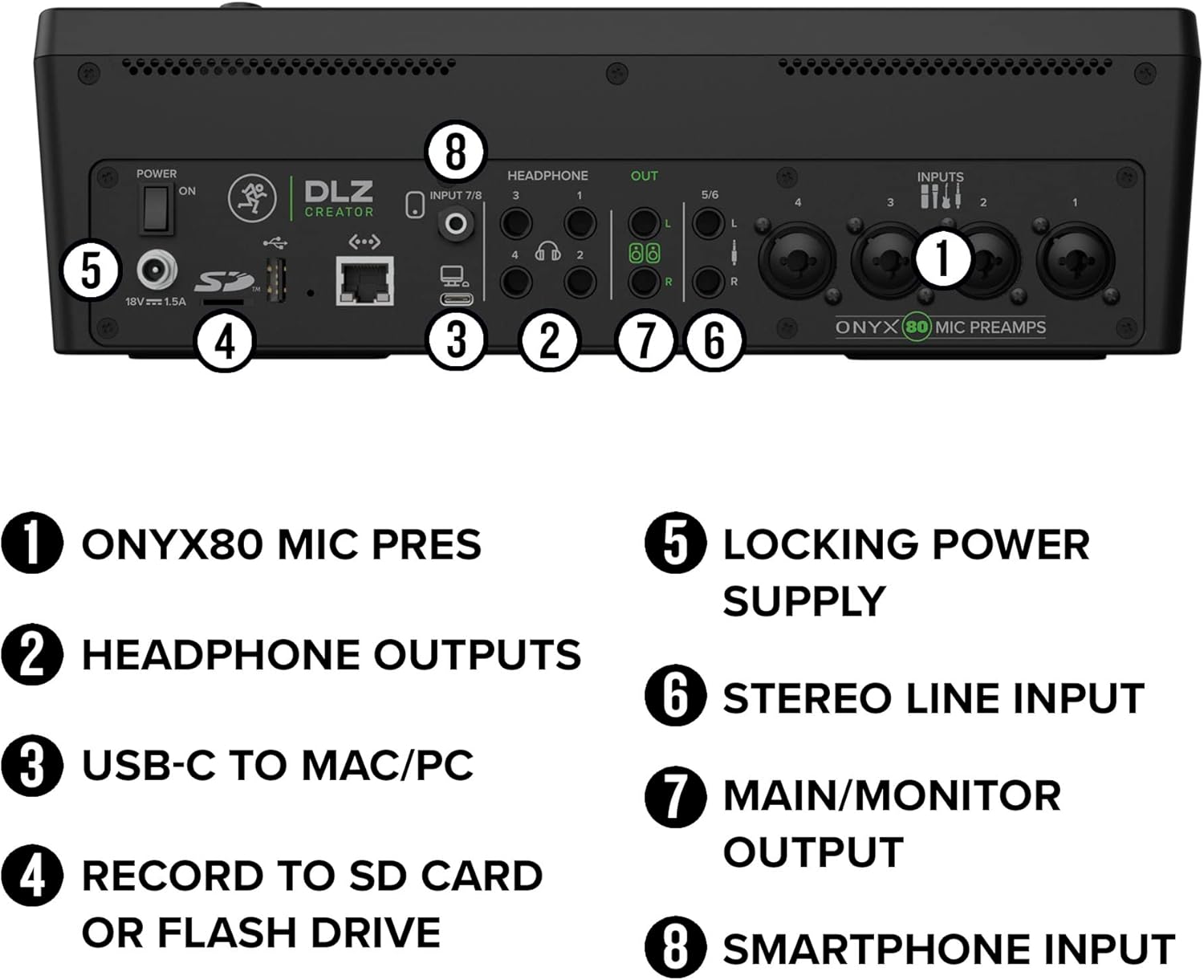
5.2 Rear Panel Connections
- Onyx80 Mic Pres: XLR/TRS combo inputs for microphones.
- Headphone Outputs: Four independent headphone jacks for monitoring.
- USB-C to Mac/PC: Connects to your computer for streaming and multi-track recording.
- Record to SD Card or Flash Drive: Slot for direct recording media.
- Locking Power Supply: Secure power connection.
- Stereo Line Input: TRS inputs for external line-level devices.
- Main/Monitor Output: TRS outputs for connecting to speakers or other audio systems.
- Smartphone Input: Dedicated input for connecting mobile devices.

6. Troubleshooting
If you encounter any issues with your Mackie DLZ Creator, consider the following common troubleshooting steps:
- No Power: Ensure the power adapter is securely connected to both the mixer and a working power outlet. Check the power switch on the rear panel.
- No Audio Input: Verify that microphones and other input devices are correctly connected to the appropriate channels. Check gain levels using Mix Agent™ or manual adjustments. Ensure phantom power is enabled for condenser microphones.
- No Audio Output: Confirm that main outputs are connected to speakers or headphones. Check output levels and ensure channels are not muted or soloed incorrectly.
- Software/Firmware Issues: If the touchscreen is unresponsive or features are not working as expected, try restarting the unit. Check the Mackie website for the latest firmware updates and installation instructions.
- Recording Problems: Ensure the SD card or USB drive is properly inserted and formatted. Check available storage space.
For detailed troubleshooting guides and solutions, please refer to the complete User Manual PDF available on the Mackie support website.
7. Specifications
| Feature | Specification |
|---|---|
| Item Weight | 9.12 pounds |
| Product Dimensions | 15 x 13 x 4.1 inches |
| Number of Channels | 12 |
| Microphone Preamps | 4 Onyx80 |
| Touchscreen Size | 10.1 inches |
| Connectivity Technology | USB, Bluetooth, Ethernet (NDI) |
| Power Source | Corded Electric |
| Model Number | DLZ Creator |
8. Warranty and Support
Mackie products are built for reliability and performance. The DLZ Creator comes with a limited warranty covering defects in materials and workmanship under normal use. For specific warranty terms, conditions, and registration, please refer to the warranty card included with your product or visit the official Mackie website.
Customer Support:
For technical assistance, product registration, or to download the full user manual PDF, please visit the Mackie support website:
You can also find FAQs, software downloads, and contact information for customer service on their website.