
WLTOYS 284010
WLTOYS 284010 1:28 Electric 4WD RC Car Instruction Manual
Model: 284010
Introduction
This manual provides essential information for the safe and efficient operation, maintenance, and troubleshooting of your WLTOYS 284010 1:28 Electric 4WD RC Car. Please read this manual thoroughly before using the product to ensure proper function and longevity.
Setup
Package Contents
Before starting, ensure all components are present:
- WLTOYS 284010 RC Car
- 2.4G Remote Control
- 7.4V 400mAh Li-ion Battery
- 7.4V 2000mA USB Charging Cable

Image: WLTOYS 284010 RC Car, remote control, battery, and charging cable included in the package.
Battery Charging
The included 7.4V 400mAh Li-ion battery must be charged before first use. Follow these steps:
- Disconnect the battery from the RC car.
- Connect the battery to the 7.4V 2000mA USB charging cable.
- Plug the USB charging cable into a compatible USB power source.
- Charge the battery for approximately 0.5 hours (30 minutes).
- Once charging is complete, disconnect the battery from the charger.
Important Battery Notes:
- Always charge the battery separately from the car.
- If the battery is completely depleted, it may not charge. Try to charge it when some power remains.
- When not using the RC car, disconnect the battery from the car's wiring to prevent damage. Ensure the battery is fully charged before storing.
Remote Control Battery Installation
The 2.4G remote control requires 4x 1.5V AA batteries (not included). Open the battery compartment on the back of the remote control and insert the batteries, observing correct polarity. Close the compartment securely.
Operating Instructions
Powering On and Pairing
- Connect the fully charged battery to the RC car.
- Turn on the RC car's power switch.
- Turn on the remote control. The remote and car should automatically pair. If not, refer to the troubleshooting section.
Basic Controls
- Throttle Trigger: Pull to accelerate forward, push to brake/reverse.
- Steering Wheel: Turn left or right to steer the car.

Image: The chassis of the WLTOYS 284010, highlighting the 5-line 3-gram digital steering gear for flexible and smooth control.
LED Lights
The WLTOYS 284010 is equipped with LED headlights and roof lights for enhanced visibility and an engaging driving experience, especially in low-light conditions.

Image: The WLTOYS 284010 RC Car showcasing its bright LED headlights and roof lights, designed for improved visibility during night driving.
Driving Tips
- The car features a 130 brushed motor, allowing speeds up to 30km/h.
- The metal chassis provides durability and stability.
- All-terrain rubber tires offer strong ground adhesion and friction resistance for various surfaces.
- Independent suspension on front and rear wheels ensures smooth cornering and stable body posture, adapting to different terrains.

Image: A detailed view of the WLTOYS 284010's high-performance natural rubber tires, designed for superior grip on various surfaces.
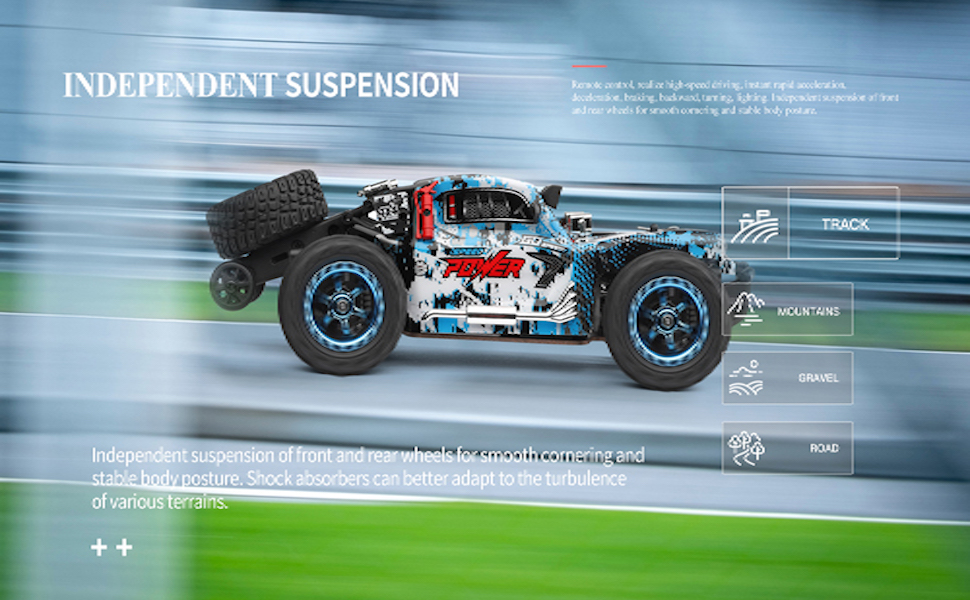
Image: The WLTOYS 284010 RC Car navigating a track, illustrating the effectiveness of its independent suspension system for stability and smooth handling.
Integrated Mobile Phone Holder
The remote control features an integrated mobile phone holder. This allows for attaching a smartphone to the remote for potential real-time control vision or recording, though the car itself does not include a camera.

Image: The remote control for the WLTOYS 284010, featuring a built-in mobile phone bracket, alongside a view of the car's durable metal chassis.
Maintenance
Cleaning
After each use, especially in dusty or dirty environments, gently clean the car to remove debris. Use a soft brush or cloth. Avoid using water directly on electronic components.
Battery Care and Storage
- Always disconnect the battery from the car when not in use.
- Store the battery in a cool, dry place, away from direct sunlight and extreme temperatures.
- For long-term storage, ensure the battery is partially charged (around 50-60%) to maintain its health. Do not store a fully depleted or fully charged battery for extended periods.
General Storage
Store the RC car and remote control in a dry, safe place when not in use. Protect them from impacts and extreme temperatures.
Troubleshooting
| Problem | Possible Cause | Solution |
|---|---|---|
| Car does not respond to remote control | Low battery in car or remote; Not paired; Interference | Charge car battery; Replace remote batteries; Re-pair car and remote; Move to an area with less interference. |
| Battery not charging | Battery completely depleted; Faulty charger/cable; Loose connection | Ensure battery has some residual charge before attempting to charge; Check all connections; Try a different USB power source or charging cable if available. |
| Reduced performance/speed | Low battery; Obstruction in moving parts; Damaged motor/components | Charge battery fully; Check for debris in wheels/gears; Contact support if components appear damaged. |
| Steering issues | Steering trim incorrect; Damaged steering servo; Obstruction | Adjust steering trim on remote; Check for debris around steering mechanism; Contact support if servo is damaged. |
Specifications
| Feature | Detail |
|---|---|
| Model | WLTOYS 284010 |
| Scale | 1:28 |
| Top Speed | 30 km/h |
| Motor | 130 Brushed Motor |
| Drive System | 4WD (Four-Wheel Drive) |
| Remote Control Mode | 2.4G Radio Control |
| Remote Control Distance | Greater than 100 meters |
| Car Battery | 7.4V 400mAh Li-ion Battery |
| Charging Equipment | 7.4V 2000mA USB Charging Cable |
| Charging Time | Approximately 0.5 hours (30 minutes) |
| Use Time | Approximately 20 minutes |
| Product Size (L x W x H) | 16.5 x 8.0 x 6.0 cm (6.5 x 3.1 x 2.4 inches) |
| Material | PA + Alloy + Electronic Parts |
| Color | Blue |
| Special Features | LED Lights, Independent Suspension, Metal Chassis |
Warranty Information
This product comes with a manufacturer's warranty of 30 days from the date of purchase. Please retain your proof of purchase for any warranty claims. The warranty covers manufacturing defects but typically excludes damage caused by misuse, accidents, or unauthorized modifications.
Customer Support
For further assistance, technical support, or inquiries regarding spare parts, please contact the seller or manufacturer directly. Refer to your purchase documentation for specific contact details.
You can also visit the official WLTOYS store on Amazon for more information and product updates: WLTOYS Store
Related documents284010


Ask a question about this manual
Ask about setup, troubleshooting, compatibility, parts, safety, or missing instructions. Manuals+ will review the question and use this page’s manual context to help answer it.