
1. Introduction
This manual provides essential information for the safe and efficient operation, installation, and maintenance of your Kratos 69K-917 Full Dice Modular Ice Machine. Please read these instructions thoroughly before installation and use to ensure optimal performance and longevity of the unit. This commercial ice machine is designed for high-volume ice production in foodservice environments.

Image 1: Kratos 69K-917 Full Dice Modular Ice Machine. Unit shown with an optional ice storage bin, which is sold separately.
2. Safety Information
Always adhere to the following safety guidelines to prevent injury and damage to the equipment:
- Electrical Safety: Ensure the unit is connected to a properly grounded 115 Volt electrical outlet. Do not use extension cords. Disconnect power before any service or cleaning.
- Water Supply: Connect the unit to a potable water supply with appropriate pressure and filtration. Ensure all water connections are secure to prevent leaks.
- Ventilation: Maintain adequate clearance around the unit for proper airflow to the air-cooled compressor. Blocked vents can lead to overheating and reduced efficiency.
- Installation: Installation should be performed by qualified personnel in accordance with all local and national codes.
- Cleaning: Use only recommended cleaning agents and follow the cleaning procedures outlined in this manual.
- Moving the Unit: Use caution when moving the unit. It is heavy and may require multiple people or lifting equipment.
3. Setup and Installation
Proper installation is crucial for the performance and longevity of your ice machine.
3.1 Unpacking
Carefully remove the unit from its packaging. Inspect for any shipping damage. Report any damage to the carrier immediately.
3.2 Placement
- Place the ice machine on a strong, level surface capable of supporting its weight when full of ice.
- Ensure adequate ventilation. Do not block the air intake or exhaust vents. Maintain at least 6 inches of clearance on all sides and the top.
- Avoid direct sunlight or proximity to heat-generating equipment.
3.3 Electrical Connection
Connect the unit to a dedicated 115 Volt, 60 Hz, single-phase electrical supply with proper grounding. Refer to the unit's data plate for specific amperage requirements.
3.4 Water Supply and Drainage
- Connect the ice machine to a cold, potable water supply using a dedicated shut-off valve and a water filter (recommended).
- Ensure proper drainage for wastewater. The drain line must have a continuous downward slope and be connected to an open drain.
4. Operating Instructions
The Kratos 69K-917 features user-friendly digital controls for efficient ice production.
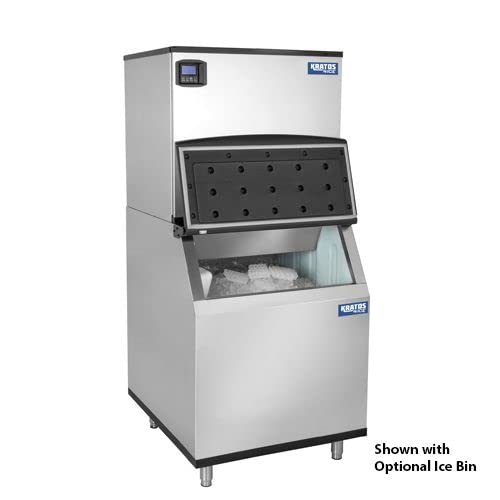
Image 2: Key features of the Kratos ice machine, including programmable digital controls and an automatic cleaning cycle.
4.1 Initial Startup
- After all connections are secure, open the water supply valve.
- Plug in the unit or turn on the dedicated circuit breaker.
- The digital screen will illuminate, displaying the ice machine's status.
- Follow the on-screen prompts or refer to the control panel guide for initial settings.
4.2 Digital Controls
The programmable digital controls allow you to adjust settings such as ice production cycles and cleaning schedules. The digital screen provides real-time information on the unit's operational status, including any alerts or error codes.
4.3 Ice Production
Once powered on and configured, the machine will begin its ice-making cycle. The unit is designed for full dice ice production. The automatic bin overflow prevention feature will pause ice production when the connected ice bin (sold separately) is full.
5. Maintenance
Regular maintenance ensures efficient operation and extends the life of your ice machine.
5.1 Automatic Cleaning Cycle
The unit features an automatic cleaning cycle. It is recommended to run this cycle regularly as per the manufacturer's guidelines or as indicated by the digital display. Refer to the control panel instructions for initiating and managing the cleaning cycle.
5.2 General Cleaning
- Exterior: Clean the stainless steel body with a soft cloth and mild detergent. Avoid abrasive cleaners.
- Interior: Periodically clean the ice-making components and the ice storage bin (if applicable) with a food-safe sanitizer.
- Air Filter: The air-cooled compressor requires a clean air filter. Check and clean the air filter regularly (monthly or more frequently in dusty environments) to ensure proper airflow and prevent compressor strain.
5.3 Access for Service
The hinged front panel provides easy access for cleaning and service of internal components. Always disconnect power before opening the panel for maintenance.
6. Troubleshooting
This section addresses common issues you might encounter. For problems not listed here, contact qualified service personnel.
| Problem | Possible Cause | Solution |
|---|---|---|
| No ice production | No power, water supply off, clogged filter, high ambient temperature, bin full sensor activated. | Check power connection and circuit breaker. Ensure water supply is open. Clean or replace water filter. Empty ice bin. Relocate unit if ambient temperature is too high. |
| Poor ice quality (soft, cloudy) | Poor water quality, dirty evaporator, low water pressure. | Install or replace water filter. Run cleaning cycle. Check water supply pressure. |
| Unit making unusual noise | Loose components, fan obstruction, compressor issue. | Inspect for loose parts. Clear any obstructions from fan. Contact service technician if compressor noise persists. |
| Water leak | Loose water connections, clogged drain line. | Check and tighten all water supply and drain connections. Clear any blockages in the drain line. |
7. Specifications
| Brand | Kratos |
| Model Name | 69K-917 |
| Daily Production | 521 lb. (Full Dice) |
| Voltage | 115 Volts |
| Refrigerant | R134a |
| Material Type | Stainless Steel |
| Dimensions (W x D x H) | 30" x 24-3/5" x 21" |
| Certifications | UL and NSF certified |
8. Warranty and Support
8.1 Warranty Information
This Kratos ice machine comes with a one-year limited warranty. Please note that the warranty is void if the unit is used in a residential setting. For food trucks or mobile applications, a 90-day limited warranty applies. Retain your proof of purchase for warranty claims.
8.2 Customer Support
For technical assistance, parts, or warranty inquiries, please contact Kratos customer support. Refer to your purchase documentation for specific contact details or visit the official Kratos website.