
CLY FLB030
CLY Security Light User Manual
Brand: CLY | Model: FLB030
1. Introduction
Thank you for choosing the CLY 30W Motion Sensor Outdoor Security Light. This floodlight is designed to provide reliable and energy-efficient illumination for your outdoor spaces, such as gardens, garages, doorways, and yards. Featuring a sensitive PIR motion sensor and a durable, waterproof design, it enhances security and convenience around your property. This manual provides essential information for safe installation, operation, and maintenance of your new security light.
2. Important Safety Information
Please read all instructions carefully before installation and use. Retain this manual for future reference.
- Electrical Safety: This product features a unique plastic-coated aluminum shell design, providing double-layer safety protection and eliminating the need for an earth wire. Despite this, all electrical work should be performed by a qualified electrician or in accordance with local electrical codes. Ensure power is disconnected at the main circuit breaker before installation or maintenance.
- Installation Location: Install the light in a location where it is protected from direct impact and excessive vibration. Ensure the mounting surface is stable and can support the weight of the fixture.
- Waterproof Rating: The light fixture is IP66 rated, and the sensor head is IP65 rated, ensuring protection against dust and powerful water jets. It is suitable for outdoor use in various weather conditions, including rain and snow.
- Heat: The light fixture will generate heat during operation. Do not touch the light surface when it is on or immediately after it has been turned off. Ensure adequate ventilation around the fixture.
- Light Source: Do not stare directly into the LED light source when it is illuminated, as this may cause eye strain or damage.
3. Package Contents
Verify that all components are present and undamaged upon opening the package:
- CLY 30W Motion Sensor Security Light (1 unit)
- Mounting Bracket (pre-attached)
- Screws and Wall Plugs (for installation)
- User Manual (this document)

Image 3.1: Contents of the CLY Security Light package, including the light unit, pre-attached bracket, and mounting hardware.
4. Product Overview
The CLY 30W Motion Sensor Security Light integrates a powerful LED floodlight with an infrared PIR motion sensor. Its design focuses on simplicity and effectiveness for outdoor security lighting.
- LED Floodlight: Provides 2820 lumens of 6500K cold white light, offering bright and wide illumination.
- PIR Motion Sensor: Detects movement within a 0-12 meter range and a 120°-180° detection angle, activating the light automatically. The sensor head can rotate 180° vertically and horizontally for optimal positioning.
- Fixed Operation: This security light is designed to operate only at night and has a fixed lighting duration of 30 seconds per activation. There are no adjustable buttons for time or day/night settings.
- Adjustable Bracket: The robust mounting bracket allows for 180° adjustment, enabling flexible installation on walls, ceilings, or ground.
- Durable Construction: Made from plastic-coated aluminum, ensuring good heat dissipation, corrosion resistance, and enhanced insulation for safety.

Image 4.1: Illustration of the fixed 30-second lighting time and night-only operation of the security light.
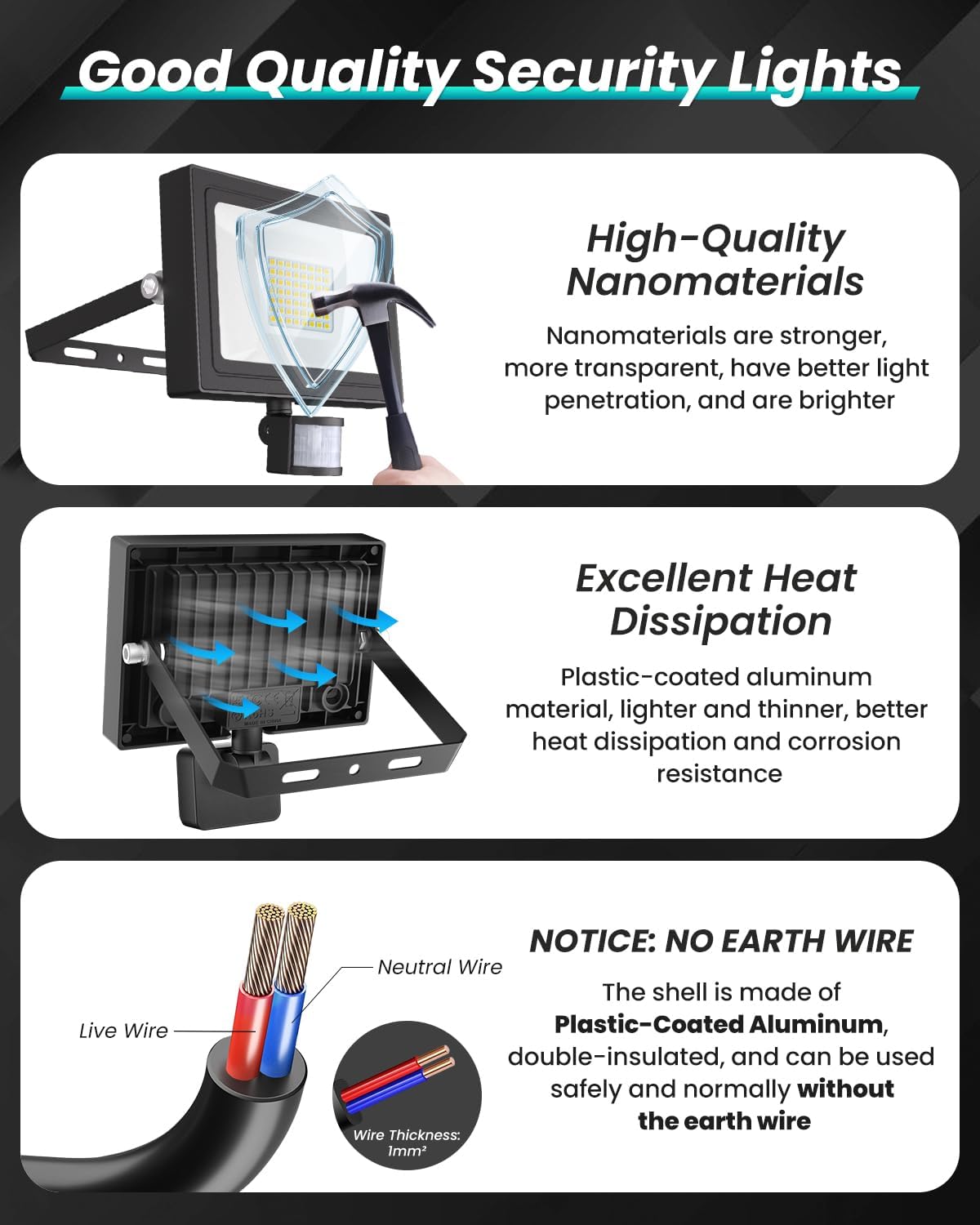
Image 4.2: Features of the security light including durable materials, efficient heat dissipation, and the unique no-earth-wire design.
5. Specifications
| Feature | Detail |
|---|---|
| Model Number | FLB030 |
| Wattage | 30W |
| Lumen Output | 2820 LM |
| Color Temperature | 6500K Cold White |
| Waterproof Rating | IP66 (Light Fixture), IP65 (Sensor Head) |
| Motion Sensing Distance | 0-12 meters |
| Motion Sensing Angle | 120°-180° |
| Lighting Time | 30 seconds (Fixed) |
| Operation Mode | Night Only (Fixed) |
| Product Dimensions | 14.5 x 5.8 x 17 cm |
| Item Weight | 0.46 Kilograms |
| Material | Plastic-coated Aluminum |
| Wire Length | 1 meter (approx. 3.28 ft) |
| Wire Thickness | 1mm² |

Image 5.1: Visual representation of the light's detection and lighting ranges, along with recommended installation height.
6. Setup and Installation
Follow these steps for safe and proper installation of your CLY Security Light.
6.1 Before Installation
- Disconnect Power: Always turn off the power supply at the main circuit breaker before beginning any electrical work.
- Choose Location: Select an outdoor location that provides the desired lighting coverage and motion detection. The recommended installation height is 3-5 meters (approx. 9.8-16.4 feet) for optimal performance.
- Mounting Surface: Ensure the mounting surface is sturdy enough to support the light fixture and is free from obstructions.
6.2 Wiring Instructions (NO EARTH WIRE Design)
This security light is designed with a plastic-coated aluminum housing that provides double insulation, eliminating the need for an earth wire. This enhances safety and simplifies installation.
- Identify the Live (brown) and Neutral (blue) wires from your mains power supply.
- Connect the brown wire from the light fixture to the Live wire of your mains supply.
- Connect the blue wire from the light fixture to the Neutral wire of your mains supply.
- Secure all connections with appropriate electrical connectors (not supplied). Ensure no bare wires are exposed.

Image 6.1: Illustration of the two-wire connection (Live and Neutral) and the insulated housing that negates the need for an earth wire.
6.3 Mounting the Light
The adjustable bracket allows for various installation methods:
- Mark the drilling points on your chosen surface using the mounting bracket as a template.
- Drill holes at the marked points. Insert the provided wall plugs if installing on masonry or concrete.
- Secure the mounting bracket to the surface using the provided screws.
- Adjust the angle of the light fixture and the motion sensor head to achieve the desired coverage and detection area. The bracket can be adjusted 180°, and the sensor head can rotate 180° up and down.
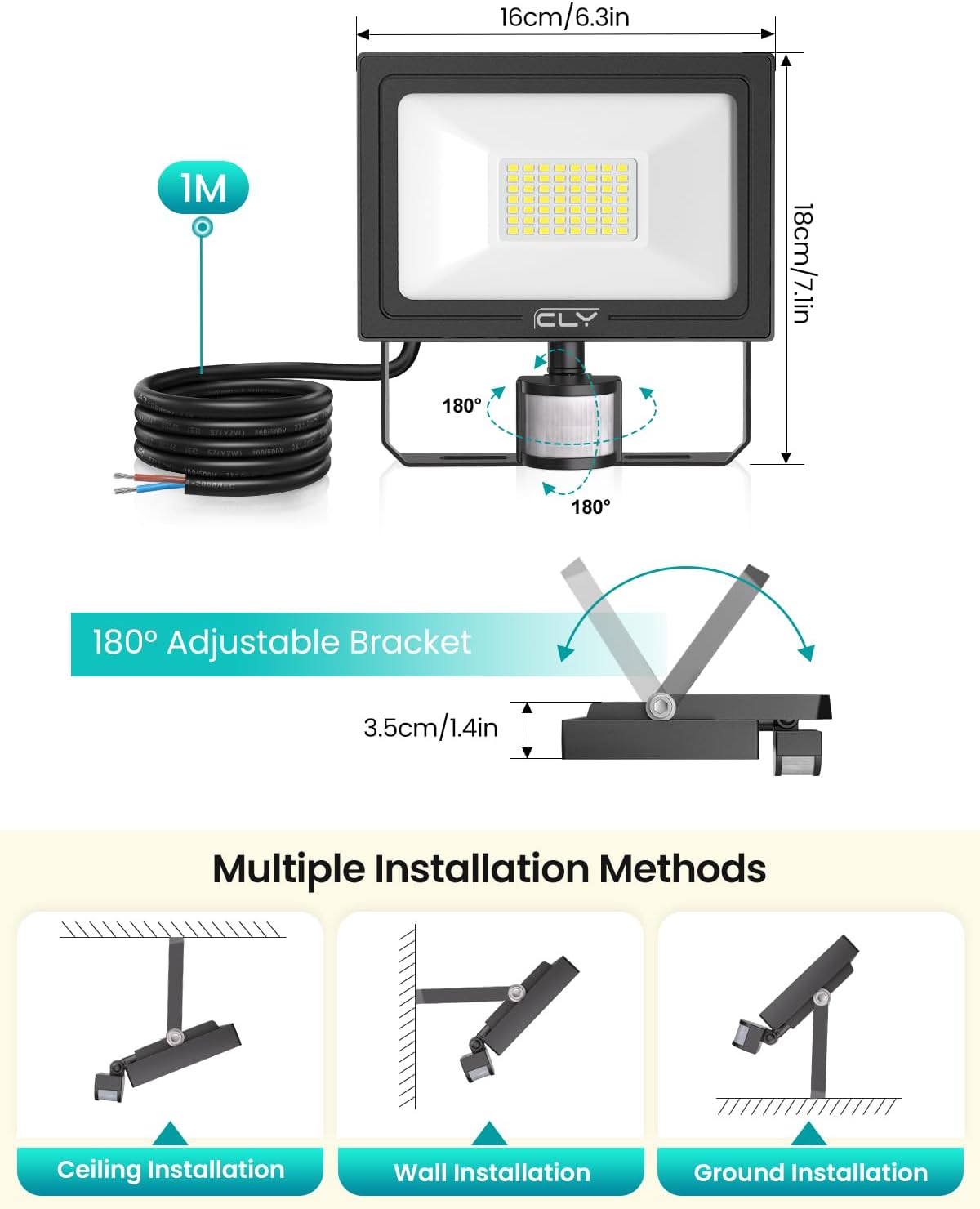
Image 6.2: Demonstrates the 180° adjustable bracket and various installation options including ceiling, wall, and ground mounting.
6.4 Final Steps
- Once installation is complete and all connections are secure, restore power at the main circuit breaker.
- Test the light by walking into the detection area after dark. The light should illuminate for 30 seconds.
7. Operating Instructions
The CLY Security Light is designed for simple, automatic operation.
- Automatic Activation: The integrated PIR motion sensor will automatically detect movement within its range (0-12 meters) when it is dark.
- Night-Only Operation: The light is designed to function exclusively at night. It will not activate during daylight hours, conserving energy.
- Fixed Lighting Duration: Once activated by motion, the light will remain on for a fixed duration of 30 seconds. If motion is continuously detected within this period, the light will remain on until motion ceases, then turn off after 30 seconds.
- No Adjustments: Please note that there are no buttons or dials to adjust the lighting time or the day/night sensitivity. These settings are fixed for optimal security and energy efficiency.

Image 7.1: Illustrates the motion sensor's detection capabilities and the fixed 30-second lighting duration, operating only at night.

Image 7.2: Example of the security light providing illumination for a driveway at night, demonstrating its energy-saving fixed operation.
8. Maintenance
Regular maintenance ensures optimal performance and longevity of your security light.
- Cleaning: Periodically clean the light fixture and sensor lens with a soft, damp cloth. Do not use abrasive cleaners or solvents, as these can damage the finish or sensor. Ensure the power is off before cleaning.
- Inspection: Regularly inspect the wiring and mounting for any signs of wear, damage, or loosening. Address any issues promptly.
- Weather Resistance: The IP66 rating ensures the light is highly resistant to outdoor elements. However, extreme weather conditions may still require occasional checks.

Image 8.1: Demonstrates the light's robust weather resistance, including protection against rain, heat, and frost.
9. Troubleshooting
If you encounter issues with your CLY Security Light, refer to the following common problems and solutions:
| Problem | Possible Cause & Solution |
|---|---|
| Light does not turn on at night. |
|
| Light stays on continuously or turns on randomly. |
|
| Light is not bright enough. |
|
| Motion detection range is too short/long. |
|
If you are unable to resolve the issue using the above steps, please contact CLY customer support for further assistance.
10. Warranty and Support
CLY is committed to providing high-quality products and excellent customer service.
- Warranty: We provide a 2-year replacement service for our products. This warranty covers defects in materials and workmanship under normal use.
- Customer Support: For any questions, technical assistance, or warranty claims, please refer to the Service Email Address provided on the product packaging or contact us through Amazon. We aim to reply within 24 hours.
Your satisfaction is our priority. Please do not hesitate to reach out if you experience any issues with your CLY Security Light.
Related documentsFLB030


Ask a question about this manual
Ask about setup, troubleshooting, compatibility, parts, safety, or missing instructions. Manuals+ will review the question and use this page’s manual context to help answer it.