
1. Introduction
The AOPUTTRIVER AP-189B is a professional digital manometer designed for precise measurement of differential pressure. This versatile instrument is equipped with dual ports and offers 11 selectable pressure units, making it suitable for a wide range of applications including HVAC systems, air quality monitoring, flow measurement, and gas thermometry.
Its high accuracy, data recording capabilities, and user-friendly interface ensure reliable performance for both professional and DIY tasks.

Figure 1: AP-189B Digital Manometer and Accessories
This image displays the AP-189B Digital Manometer along with its essential accessories, including the protective carrying case, connection hoses, and an adapter, highlighting the complete kit provided for immediate use.
2. Package Contents
Please check the package carefully upon receipt to ensure all items are present and undamaged:
- 1 x AP-189B Digital Manometer
- 1 x Protective Carrying Case
- 1 x Small Screwdriver
- 2 x 1.5V AAA Batteries
- 1 x User Manual (in 6 languages)

Figure 2: Package Contents
This image clearly displays all components included in the AP-189B product package, ensuring users can verify they have received everything necessary for operation.
3. Product Overview and Key Features
The AP-189B manometer is designed for ease of use and high performance. Familiarize yourself with its components and functions:
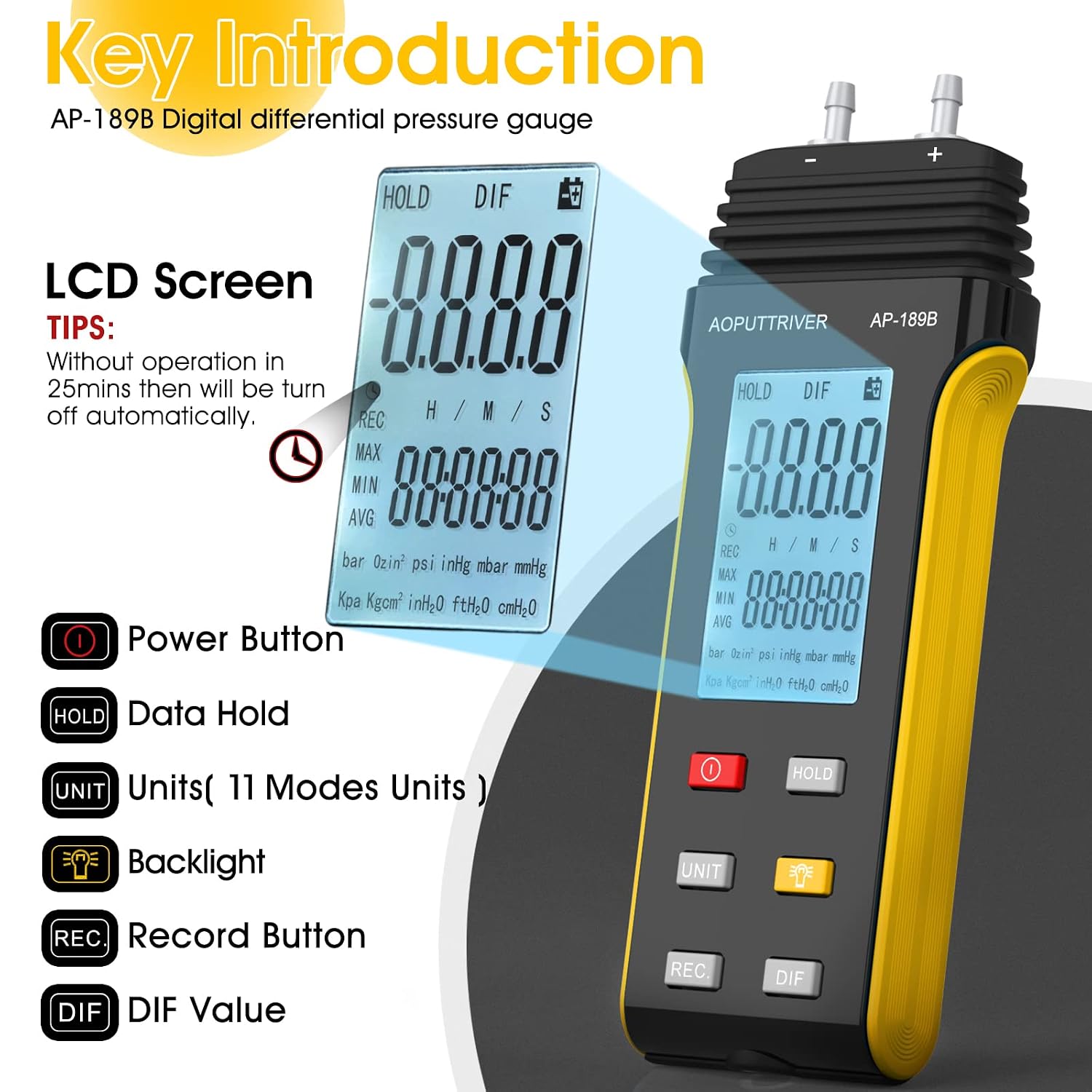
Figure 3: Key Components and Buttons
This diagram highlights the main parts of the AP-189B manometer, including the LCD screen for readings and various control buttons such as Power, HOLD, UNIT, Backlight, REC (Record), and DIF (Differential).
Key Features:
- High Precision: Accurate measurements with a range of ±2.000 psi and ±0.3% FSO accuracy.
- 11 Selectable Units: Easily switch between Psi, kPa, Kgfcm², ozin², bar, mbar, inHg, mmHg, inH²O, ftH²O, and cmH²O.
- Data Record & Zero Setting: Record MAX/MIN/AVG values and perform zero calibration for accurate readings.
- Multifunctional: Includes differential pressure measurement, data hold, MAX/MIN/AVG/DIF modes, and a large LCD with backlight.
- Automatic Shutdown: Conserves battery life by automatically turning off after 25 minutes of inactivity.
- Low Battery Indicator: Alerts when batteries need replacement.

Figure 4: Professional Features Summary
This infographic provides a quick overview of the AP-189B's professional capabilities, such as its high accuracy, multiple measurement units, data recording, and ergonomic design.
4. Specifications
Detailed technical specifications for the AP-189B Digital Manometer:
| Parameter | Value |
|---|---|
| Measurement Range | ±2.000 psi |
| Accuracy | ±0.3% FSO (at 25 °C) |
| Repeatability | ±0.25% |
| Linearity/Hysteresis | ±0.1% FSO |
| Maximum Pressure Limit | 30 psi |
| Selectable Units | Psi, kPa, Kgfcm², ozin², bar, mbar, inHg, mmHg, inH²O, ftH²O, cmH²O |
| Display | Large LCD with Backlight |
| Power Supply | 2 x 1.5V AAA Batteries |
| Automatic Shutdown | After 25 minutes of no operation |
| Dimensions (L x W x H) | 160mm x 62mm x 31mm (6.29in x 2.44in x 1.22in) |
| Weight | Approx. 230 grams |

Figure 5: Product Dimensions
This image provides a detailed view of the AP-189B manometer's physical dimensions, including its height, width, depth, and the diameter of its dual pressure ports, essential for understanding its form factor and compatibility.
5. Setup
5.1 Battery Installation
- Locate the battery compartment on the back of the device.
- Use the provided small screwdriver to open the battery compartment cover.
- Insert two 1.5V AAA batteries, ensuring correct polarity (+/-).
- Replace the battery compartment cover and secure it with the screw.
5.2 Connecting Hoses
The AP-189B features dual ports for differential pressure measurement. Connect the pressure hoses to the (+) and (-) ports as required for your application. Ensure connections are secure to prevent leaks and ensure accurate readings.
6. Operating Instructions
6.1 Power On/Off
- To power on the device, press the Power button ().
- To power off, press and hold the Power button until the display turns off.
6.2 Unit Selection
Press the UNIT button () to cycle through the 11 available pressure units: Psi, kPa, Kgfcm², ozin², bar, mbar, inHg, mmHg, inH²O, ftH²O, and cmH²O.
6.3 Zero Setting
Before taking a measurement, especially for differential pressure, it is recommended to perform a zero setting to ensure accuracy. Ensure both ports are open to atmospheric pressure or connected to the same pressure source before performing this step.
- Short press the HOLD button.
- Then, press and hold the HOLD button for more than 5 seconds. The display will show a "---" symbol, indicating successful zero calibration.

Figure 6: Zero Setting Procedure
This image illustrates the process of performing a zero setting on the AP-189B manometer, showing the user pressing and holding the 'HOLD' button to calibrate the device for accurate measurements.
6.4 Data Hold
Press the HOLD button to freeze the current reading on the display. Press it again to release the hold and resume live readings.
6.5 MAX/MIN/AVG/DIF Functions
The device can record and display maximum, minimum, average, and differential pressure values:
- Press the REC button () to start recording. The "REC" icon will appear on the display.
- While recording, press REC repeatedly to cycle through MAX, MIN, and AVG values.
- Press the DIF button () to display the differential pressure between the two ports.
- To stop recording, press and hold the REC button.
6.6 Backlight
Press the Backlight button () to turn the LCD backlight on or off, improving visibility in low-light conditions.

Figure 7: Backlight and Auto-Shutdown
This image demonstrates the AP-189B's clear display with its bright backlight, making readings visible in various lighting conditions. It also highlights the automatic shutdown feature, which activates after 25 minutes of inactivity to conserve battery life.
6.7 Automatic Shutdown
The AP-189B is designed to automatically power off after approximately 25 minutes of no operation to save battery life. This feature can be reset or disabled according to the full user manual if continuous operation is required.
7. Applications
The AOPUTTRIVER AP-189B Digital Manometer is widely used in various fields due to its precision and versatility:
- HVAC Systems: For testing and balancing heating, ventilation, and air conditioning systems.
- Air Conditioning & Ventilation Systems: Measuring pressure differences in ducts and filters.
- Flow Measurement: Used with Pitot tubes to measure air velocity and flow rates.
- Air Quality Monitoring: Assessing pressure in clean rooms and controlled environments.
- Gas System Calibration: Troubleshooting and calibrating gas pressure systems.
- Laboratory Testing: For various pressure-related experiments and measurements.

Figure 8: Common Applications
This visual collage demonstrates the diverse environments and tasks where the AP-189B differential pressure gauge can be effectively utilized, from industrial HVAC systems to laboratory settings and outdoor equipment maintenance.
8. Maintenance
8.1 Cleaning
Wipe the device with a soft, dry cloth. Do not use abrasive cleaners or solvents. Keep the pressure ports free from dust and debris.
8.2 Storage
When not in use for extended periods, remove the batteries to prevent leakage. Store the manometer in its protective case in a cool, dry place, away from direct sunlight and extreme temperatures.
8.3 Battery Replacement
Replace batteries when the low battery indicator appears on the display to ensure accurate readings and proper operation.
9. Troubleshooting
Common Issues and Solutions:
- Device does not power on: Check battery installation and ensure batteries are not depleted. Replace if necessary.
- Inaccurate readings: Perform a zero setting. Ensure hoses are properly connected and free from kinks or blockages. Verify the correct unit is selected.
- Display is dim or flickering: Replace batteries.
- Device shuts off unexpectedly: The automatic shutdown feature may be active. Ensure continuous operation if needed (refer to full manual for disabling this feature if applicable).
For further troubleshooting or issues not listed here, please refer to the comprehensive user manual or contact customer support.
10. Warranty and Support
The AOPUTTRIVER AP-189B Digital Manometer comes with a 365-day warranty and lifetime technical support.
If you encounter any product quality issues or require assistance, please do not hesitate to contact AOPUTTRIVER customer service. We are committed to resolving any problems as quickly as possible to ensure your satisfaction.
For support, please refer to the contact information provided in your product packaging or visit the official AOPUTTRIVER website.