
Yvvpiupu LSPA6
Yvvpiupu Wi-Fi Smart Plug User Manual
Model: LSPA6
Brand: Yvvpiupu
Introduction
The Yvvpiupu Wi-Fi Smart Plug is a modern home appliance designed to provide remote control, smart timing, and voice control capabilities for your electronic devices. By pairing with a smartphone and a dedicated application, it allows you to manage your home appliances conveniently from anywhere, enhancing your quality of life and promoting energy efficiency.

The Yvvpiupu Smart Plug offers convenient remote control and smart features for your home.
Setup Guide
1. Unboxing and Initial Inspection
Upon opening the package, ensure all components are present: the smart plug unit and the user manual.

Verify all items are included in the package.
2. App Installation
Download the Smart Life APP by scanning the QR codes provided on the product packaging or by searching for 'Smart Life' in your device's app store. The app is compatible with both Android and iOS operating systems.
3. Connecting the Smart Plug
Plug the smart plug into a standard wall outlet. The indicator light on the plug will begin to flash, indicating it is in pairing mode and ready for connection.

Insert the smart plug into a wall outlet.
Open the Smart Life APP on your smartphone. The app should automatically detect the new device. If not, manually add the device by navigating to 'Add Device' and selecting 'Electrical' > 'Plug (Wi-Fi)' or 'Socket (Wi-Fi)'. Follow the on-screen instructions to connect the smart plug to your 2.4GHz Wi-Fi network. It is crucial to connect to a 2.4GHz network, as 5GHz networks are not supported for initial setup.
This video demonstrates the process of connecting the smart plug to the Smart Life app.
Once successfully connected, the indicator light on the smart plug will become solid, and the device will appear in your Smart Life app's device list.

The smart plug is ready for use once connected to the app.
Operating Instructions
1. Remote Control
With the Smart Life APP, you can easily control your home appliances from anywhere with an internet connection. Simply open the app, select your smart plug, and toggle the power button to turn the connected device on or off. This eliminates worries about forgetting to turn off appliances when you're away.

Control your appliances remotely using the Smart Life app.
2. Voice Control
The smart plug is compatible with popular voice assistants such as Amazon Alexa, Google Assistant, SmartThings, and DuSmart. After linking your Smart Life account with your preferred voice assistant, you can control connected appliances using simple voice commands. For example, you can say, "Alexa, turn on the lamp."

Control your smart plug with voice commands through compatible smart assistants.
This short video demonstrates the smart plug's voice control functionality.
3. Timer and Schedule Functions
Utilize the timer function within the Smart Life APP to set specific times for your appliances to automatically turn on or off. This feature allows you to create custom schedules, such as daily routines, weekly programs, or countdown timers, saving time and energy.
4. Manual Control
For immediate control, the smart plug is equipped with a physical power button on its side. You can press this button to manually toggle the power of the connected appliance without needing to use the app.
Key Features
- Comprehensive Control: Offers remote control, smart timing/delay/countdown, status feedback, power-off memory, voice control, sharing function, and smart scene control.
- Voice Assistant Compatibility: Seamlessly integrates with Amazon Alexa, Google Assistant, SmartThings, and DuSmart for convenient voice commands.
- Enhanced Safety: Designed to prevent electric arcs during plugging and unplugging. Features built-in lightning protection, anti-voltage, anti-short circuit, and anti-overload functions.
- Energy Saving: Automatically detects electrical current changes to manage power, eliminating standby energy consumption for a greener environment.
- Dual Connectivity (2023 Model): Supports both Bluetooth and Wi-Fi connections for more stable and faster pairing compared to Wi-Fi-only plugs.
- Smart Monitoring (Select Models): May include built-in sensors to monitor environmental data such as light, temperature, humidity, and household electricity consumption. (Note: Feature availability may vary by specific model variant.)
- No Hub Required: Operates directly with your existing Wi-Fi network, eliminating the need for an additional smart home hub or router.
- Versatile Application: Suitable for a wide range of household appliances, from air conditioners and water heaters to lamps and small kitchen devices.

The smart plug can control a variety of home appliances.
Maintenance
To ensure optimal performance and longevity of your Yvvpiupu Wi-Fi Smart Plug, follow these simple maintenance guidelines:
- Cleaning: Wipe the exterior of the smart plug with a soft, dry cloth. Do not use liquid cleaners or abrasive materials, as they may damage the device.
- Environment: Keep the smart plug in a dry environment, away from excessive moisture, heat, or direct sunlight.
- Handling: Avoid dropping the device or subjecting it to strong impacts.
- Firmware Updates: Regularly check the Smart Life APP for any available firmware updates for your smart plug to ensure it has the latest features and security enhancements.
Troubleshooting
If you encounter issues with your smart plug, please refer to the following common troubleshooting steps:
- Cannot Connect to Wi-Fi:
- Ensure your Wi-Fi router is broadcasting a 2.4GHz network. The smart plug does not support 5GHz networks for initial setup.
- Verify the smart plug's indicator light is flashing, indicating it is in pairing mode. If not, long-press the power button on the plug to initiate pairing mode.
- Check your Wi-Fi password for accuracy.
- Move the smart plug closer to your Wi-Fi router to improve signal strength during setup.
- App Issues / Timer Not Working:
- Close and restart the Smart Life APP.
- Ensure your smartphone has a stable internet connection.
- Check for any available updates for the Smart Life APP in your device's app store.
- If the issue persists, try removing the device from the app and re-pairing it.
- Device Unresponsive:
- Check if the smart plug is securely plugged into the wall outlet and receiving power.
- Verify your home Wi-Fi network is active and stable.
- Try unplugging the smart plug from the wall outlet for 10 seconds, then plug it back in to reboot it.
Product Specifications
| Attribute | Detail |
|---|---|
| Product Dimensions | 2.12 x 1.97 x 1.13 inches; 2.4 ounces |
| Item Model Number | LSPA6 |
| Manufacturer | Yvvpiupu |
| Country of Origin | China |
| Color | White |
| Voltage | 120 Volts |
| Material | Iron |
| Connector Type | US Type B Plug |
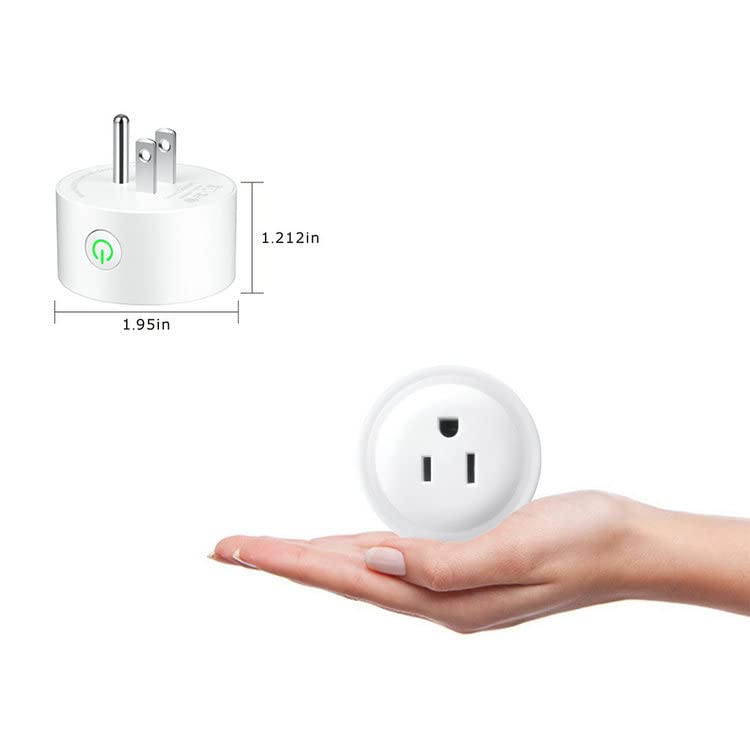
Dimensions of the Yvvpiupu Smart Plug.

Rear view of the smart plug with technical specifications.
Warranty and Support
For warranty information, technical support, or any inquiries regarding your Yvvpiupu Wi-Fi Smart Plug, please refer to the contact details provided on the product packaging or visit the official Yvvpiupu website. Keep your purchase receipt as proof of purchase for warranty claims.
Ask a question about this manual
Ask about setup, troubleshooting, compatibility, parts, safety, or missing instructions. Manuals+ will review the question and use this page’s manual context to help answer it.