
iHandy CRC1001
iHandy CRC1001 Universal TV Remote Control User Manual
Model: CRC1001
Introduction
This manual provides comprehensive instructions for the iHandy CRC1001 Universal TV Remote Control. This remote is designed as a direct replacement for various Samsung TV remote models, offering broad compatibility with both new and older Samsung televisions. It operates without the need for complex programming or pairing, ensuring a straightforward user experience.
Safety Information
- Do not expose the remote control to direct sunlight, high temperatures, or high humidity.
- Avoid dropping or subjecting the remote control to strong impacts.
- Do not attempt to disassemble or modify the remote control. This will void the warranty.
- Keep batteries out of reach of children. If swallowed, seek immediate medical attention.
- Dispose of used batteries according to local regulations. Do not dispose of batteries in fire.
Package Contents
Please check the package contents to ensure all items are present:
- 1 x iHandy CRC1001 Universal TV Remote Control
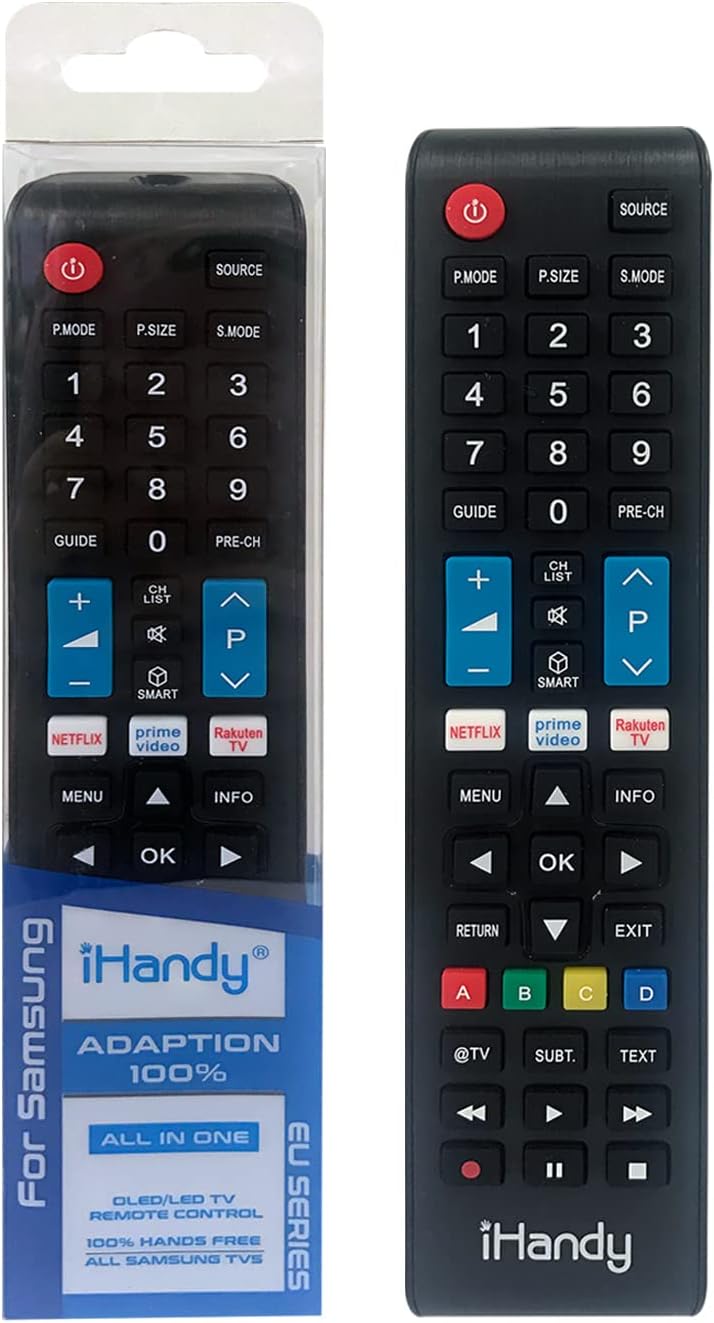
Image: The iHandy CRC1001 remote control shown alongside its transparent retail packaging.
Note: Two AAA batteries are required for operation and are not included in the package.
Setup
Battery Installation
The iHandy CRC1001 remote control requires two AAA batteries (not included) for operation. Follow these steps to install the batteries:
- Locate the battery compartment cover on the back of the remote control.
- Slide the battery compartment cover downwards or press the latch (if present) and lift to open.
- Insert two AAA batteries, ensuring the positive (+) and negative (-) terminals align correctly with the markings inside the compartment.
- Replace the battery compartment cover by sliding it back into place until it clicks securely.

Image: Front and back view of the iHandy CRC1001 remote control, highlighting the battery compartment on the rear.
Once batteries are installed, the remote control is ready for use. No programming or pairing is required.
Operating Instructions
The iHandy CRC1001 remote control is designed for intuitive use with Samsung TVs. Simply point the remote at your television and press the desired button. The remote offers responsive keys and precise control up to 12 meters (40 feet).

Image: Front view of the iHandy CRC1001 remote control, displaying all buttons and their labels.
Key Functions
| Button | Function |
|---|---|
| Power (⑂) | Turns the TV On or Off. |
| SOURCE | Selects the input source (HDMI, AV, etc.). |
| P.MODE / P.SIZE / S.MODE | Picture Mode, Picture Size, and Sound Mode adjustments. |
| Number Buttons (0-9) | Direct channel selection. |
| GUIDE | Displays the electronic program guide. |
| PRE-CH | Switches to the previously viewed channel. |
| Volume (+/-) | Adjusts the volume level. |
| Mute (🔇) | Mutes or unmutes the TV sound. |
| Channel (CH LIST / ▲ / ▼) | Changes channels up or down, or displays the channel list. |
| SMART | Accesses the Smart Hub or smart features of the TV. |
| NETFLIX / Prime Video / Rakuten TV | Direct access buttons for streaming services. |
| MENU / INFO / OK | Accesses TV menu, displays information, confirms selections. |
| Navigation Arrows (◀ ▶ ▲ ▼) | Navigates through menus and options. |
| RETURN / EXIT | Goes back to the previous screen or exits the current menu. |
| Color Buttons (A, B, C, D) | Context-sensitive functions, often used in Smart TV apps or teletext. |
| @TV / SUBT. / TEXT | Accesses TV mode, subtitles, or teletext. |
| Media Control Buttons (◀◀ / ▶▶ / ▶ / ⏸ / ■) | Rewind, Fast Forward, Play, Pause, Stop for media playback. |
Maintenance
- Clean the remote control with a soft, dry cloth. Do not use liquid cleaners or abrasive materials.
- If the remote control will not be used for an extended period, remove the batteries to prevent leakage.
- Store the remote control in a cool, dry place away from direct sunlight.
Troubleshooting
| Problem | Possible Solution |
|---|---|
| Remote control is not working. |
|
| Some buttons are not responding. |
|
| Remote control range is reduced. |
|
Specifications
- Model: CRC1001
- Brand: iHandy
- Compatible Devices: Samsung Televisions
- Connectivity Technology: Infrared (IR)
- Power Source: 2 x AAA Batteries (not included)
- Dimensions: 8.07 x 1.97 x 0.98 inches (approx. 20.5 x 5.0 x 2.5 cm)
- Weight: 3.17 ounces (approx. 90 grams)
- Operating Range: Up to 12 meters (40 feet)
- Material: New ABS material
Warranty and Support
This iHandy product is designed for reliability and performance. For any questions or issues regarding your remote control, please contact the seller directly through your order details on the platform where you purchased the product.
Your satisfaction is our priority. We are committed to resolving any concerns you may have.
For further assistance, please refer to the contact information provided by your retailer or the iHandy official website (if available).
Ask a question about this manual
Ask about setup, troubleshooting, compatibility, parts, safety, or missing instructions. Manuals+ will review the question and use this page’s manual context to help answer it.