
Hisense 65E6KT
Hisense 65E6KT 4K UHD Smart TV User Manual
Model: 65E6KT | Brand: Hisense
1. Introduction
Thank you for choosing the Hisense 65E6KT 4K UHD Smart TV. This television is designed to provide an immersive viewing experience with stunning picture quality and smart features. This manual will guide you through the setup, operation, and maintenance of your new TV, ensuring you get the most out of its capabilities.
Key features include:
- 4K UHD Resolution: Delivers four times the resolution of Full HD TVs for incredible detail and clarity.
- Dolby Vision HDR: Provides amazing brightness, contrast, and color depth, inspired by cinema technology.
- DTS Virtual X: Offers an immersive audio experience without the need for additional speakers.
- VIDAA U6 Smart TV: An intuitive operating system with access to popular streaming apps like YouTube, Netflix, Prime Video, and Disney+.
- Alexa Built-in: Control your TV and smart home devices using voice commands.
- Game Mode Plus: Reduces input lag for a smoother gaming experience.
- Smooth Motion with MEMC: Ensures fluid and clear motion, especially in fast-paced scenes.
2. What's in the Box
Please check the contents of your package. If any items are missing or damaged, contact your retailer.
- 1x Hisense 65E6KT TV
- 1x Remote Control
- 2x AAA Batteries (for remote control)
- 1x User Manual (this document)
- 1x Quick Start Guide

Image: Overview of the Hisense 65E6KT TV, showing its dimensions and the typical contents included in the packaging, such as the remote control and user manual.
3. Setup Guide
3.1 Unpacking and Placement
Carefully remove the TV from its packaging. It is recommended to have two people for this process due to the size and weight of the television. Place the TV on a stable, flat surface or mount it on a wall using a compatible VESA mount (sold separately).
3.2 Stand Installation
If you are not wall-mounting, attach the included stands to the bottom of the TV. Ensure the stands are securely fastened with the provided screws. Refer to the quick start guide for detailed diagrams.

Image: An angled view of the Hisense 65E6KT TV, showcasing its slim design and the attached stand, ready for placement on a TV unit.
3.3 Connecting Devices
Connect your external devices such as cable boxes, gaming consoles, or Blu-ray players to the appropriate ports on the back of the TV.
- HDMI: For high-definition video and audio. The Hisense 65E6KT features multiple HDMI ports.
- USB: For connecting USB storage devices to play media.
- Ethernet (LAN): For a wired internet connection.
- Antenna/Cable In: For connecting an antenna or cable TV signal.
- Digital Audio Out (Optical): For connecting to a soundbar or audio receiver.

Image: A detailed close-up of the rear panel of the Hisense 65E6KT TV, highlighting the various input and output ports available for connecting external devices.
3.4 Power On
Once all connections are made, plug the power cord into the TV and then into a wall outlet. Press the power button on the remote control or on the TV itself to turn it on. Follow the on-screen instructions for initial setup, including language selection, network connection, and channel scanning.
4. Operating Instructions
4.1 Remote Control
The included remote control allows you to navigate the TV's menus, adjust volume, change channels, and access smart features. Insert the two AAA batteries into the remote control, ensuring correct polarity.
4.2 Smart TV (VIDAA U6)
The Hisense 65E6KT runs on the VIDAA U6 operating system, providing a user-friendly interface for accessing a wide range of content and applications. Connect your TV to the internet via Wi-Fi or Ethernet to enjoy streaming services like Netflix, YouTube, Prime Video, and Disney+.
4.3 Picture Quality Features
Experience stunning visuals with the TV's advanced picture technologies:
- 4K UHD: Enjoy incredibly sharp and detailed images.
- Dolby Vision HDR: Enhances brightness, contrast, and color for a more lifelike picture.
- Pixel Tuning: Fine-tunes each pixel for optimal image quality.
- Direct Full Array: Provides precise control over brightness and contrast, leading to deeper blacks and vibrant colors.

Image: A graphic illustrating the concept of 4K UHD resolution, emphasizing its high detail and vibrant color capabilities.

Image: A visual representation of Dolby Vision HDR technology, showing how it enhances detail and color in content compared to standard display.
4.4 Audio Features
The Hisense 65E6KT offers enhanced audio with:
- DTS Virtual X: Provides an immersive, multi-dimensional audio experience, making you feel like you're in the center of the action.

Image: A graphic illustrating the immersive sound field created by DTS:X audio technology, showing sound waves emanating from the TV.
4.5 Gaming Features
- Game Mode Plus: Significantly reduces input lag, providing a more responsive and competitive gaming experience.

Image: A graphic depicting a car racing game, illustrating how Game Mode Plus ensures ultra-smooth gaming and incredible reaction times by reducing latency.
4.6 Voice Control (Alexa Built-in)
With Alexa Built-in, you can control your TV using just your voice. Press the microphone button on your remote and speak commands to change channels, adjust volume, search for content, or control compatible smart home devices.
4.7 Smooth Motion with MEMC
MEMC (Motion Estimation, Motion Compensation) technology ensures that even the most dynamic objects appear fluid and crystal clear, providing a seamless viewing experience without motion blur.

Image: A graphic showing a car in motion, illustrating the Smooth Motion MEMC technology that ensures clear and fluid movement on screen.
4.8 Official Product Video
Video: An official product video showcasing the key features and visual capabilities of the Hisense E6 series television, including its design, picture quality, and smart functions.
5. Maintenance
5.1 Cleaning the Screen
Gently wipe the screen with a soft, lint-free cloth. For stubborn marks, lightly dampen the cloth with water or a specialized screen cleaner. Avoid using harsh chemicals or abrasive materials.
5.2 Cleaning the Cabinet
Wipe the TV cabinet with a soft, dry cloth. Do not use any liquid cleaners directly on the cabinet.
5.3 Power Cord Care
Always handle the power cord by the plug. Do not pull on the cord itself. Ensure the cord is not pinched or walked on.
6. Troubleshooting
If you encounter any issues with your TV, please refer to the following common solutions before contacting customer support.
| Problem | Possible Solution |
|---|---|
| No Power | Check if the power cord is securely plugged into the TV and the wall outlet. Try a different outlet. |
| No Picture, but Sound is Present | Ensure the correct input source is selected. Check cable connections to external devices. |
| No Sound, but Picture is Present | Check volume level and mute status. Verify audio cable connections. If using external audio, ensure TV speakers are not disabled. |
| Remote Control Not Working | Replace batteries. Ensure there are no obstructions between the remote and the TV's IR sensor. |
| Cannot Connect to Wi-Fi | Check your router and modem. Re-enter Wi-Fi password. Try restarting the TV and router. |
7. Specifications
Below are the technical specifications for the Hisense 65E6KT TV:
- Model Number: 65E6KT
- Screen Size: 164 cm (65 inches)
- Display Technology: LED
- Resolution: 4K UHD (3840 x 2160)
- Refresh Rate: 60 Hz
- Dimensions (with stand): 145.2 x 30 x 89.6 cm (W x D x H)
- Weight: 24.5 Kilograms
- Connectivity: Bluetooth, USB, Ethernet, HDMI, WLAN
- Supported Internet Services: YouTube, Amazon Instant Video, Netflix
- Energy Efficiency Class: F (SDR), G (HDR)

Image: The official product data sheet for the Hisense 65E6KT, detailing technical specifications and energy efficiency information. For more details, visit the EPREL database.
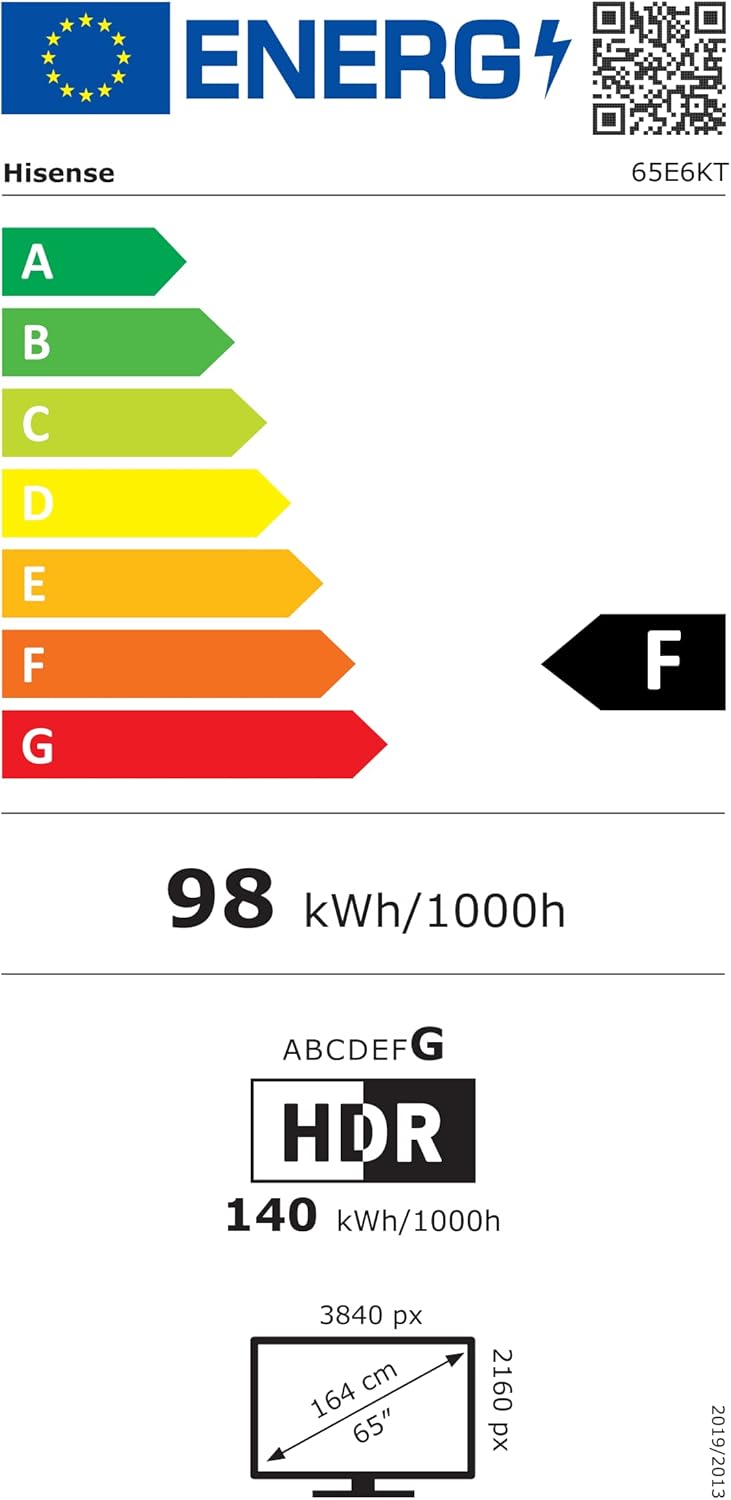
Image: The energy efficiency label for the Hisense 65E6KT, indicating its energy consumption and class ratings for both SDR and HDR content.
8. Warranty and Support
Your Hisense 65E6KT TV comes with a standard manufacturer's warranty. Please refer to the warranty card included in your package for specific terms and conditions. For technical support, service, or further inquiries, please visit the official Hisense support website or contact their customer service hotline.
For additional information and resources, you can visit the Hisense Brand Store on Amazon.
Related Documents - 65E6KT
 |
Hisense M2 Pro Laser Mini Projector: 4K UHD, 1300 Lumens, and Advanced Features Explore the Hisense M2 Pro, a 4K UHD laser mini projector offering 1300 lumens, 25,000 hours of entertainment, Dolby Vision, HDR10+, and HLG support. Features Trichroma technology, DTS Virtual:X, and Auto-Magic 2.0 for automatic screen adjustment. |
 |
Hisense A6G Series 43-inch 4K UHD Android TV User Guide Detailed user guide for the Hisense A6G Series 43-inch 4K UHD Android TV, covering features like Dolby Vision HDR, Google Assistant, Chromecast Built-in, and technical specifications. |
 |
Hisense 43-inch A6G Series LED 4K UHD Smart Android TV (43A6G) - Specifications and Features Detailed overview and technical specifications for the Hisense 43-inch A6G Series LED 4K UHD Smart Android TV (Model 43A6G), featuring Android TV, Google Assistant, Dolby Vision, and HDR10. |
 |
Hisense 50A6Q 4K UHD Smart TV - Specifications and Features Comprehensive technical specifications, features, and connectivity details for the Hisense 50A6Q 4K UHD Smart TV, including display technology, audio capabilities, smart features, and dimensions. |
 |
Hisense 50-inch A6G Series 4K UHD Smart Android TV (50A6G) - Features and Specifications Explore the Hisense 50-inch A6G Series 4K UHD Smart Android TV (Model 50A6G). Discover features like 4K Ultra HD, Dolby Vision HDR, Google Assistant, Chromecast built-in, and Auto Low Latency Game Mode. View detailed technical specifications, dimensions, and connectivity options. |
 |
Hisense AX5140Q Quick Start Manual - Setup and Connections Concise guide to setting up your Hisense AX5140Q soundbar, covering connections via HDMI ARC/eARC, Optical, AUX, and Bluetooth pairing. Includes setup diagrams and important trademark information. |
Ask a question about this manual
Ask about setup, troubleshooting, compatibility, parts, safety, or missing instructions. Manuals+ will review the question and use this page’s manual context to help answer it.