
GATEXPERT GT2200-GREY
GATEXPERT GT2200-GREY Sliding Automatic Gate Operator Kit
User Instruction Manual
1. Product Overview
The GATEXPERT GT2200-GREY is a robust sliding gate operator kit designed for automatic gate control. It is suitable for sliding gates weighing up to 3300 pounds and up to 40 feet in length. The system utilizes a chain-driven mechanism for reliable operation and is powered by 110-120V/60Hz with a 550W motor.
This operator enhances convenience and security for various applications, including residential properties, courtyards, pastures, farms, and ranches.
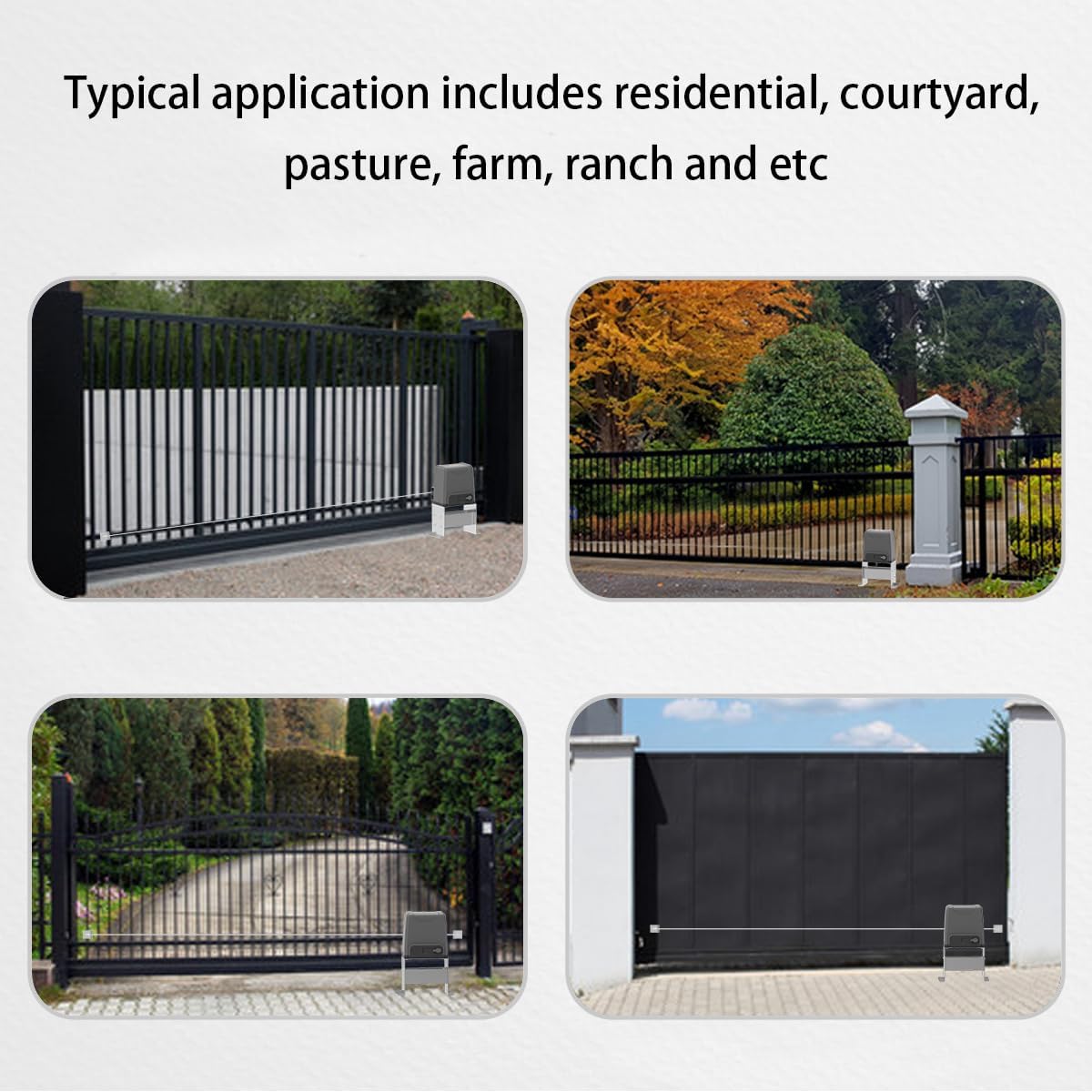
Figure 1: Typical applications for the GATEXPERT GT2200-GREY gate operator.
2. Safety Information
Important Safety Instructions: Read and follow all instructions carefully before installation and operation to prevent injury or damage.
- Ensure all electrical connections are made by a qualified professional and comply with local electrical codes.
- Keep hands and feet clear of the gate and moving parts during operation.
- Do not allow children to play with or operate the gate opener or its remote controls.
- In case of power failure or remote control loss, use the provided manual release keys to operate the gate manually.
- Regularly inspect the gate and operator for any signs of wear, damage, or misalignment.
- Do not attempt to repair the unit yourself. Contact qualified service personnel.
3. Package Contents
Verify that all components listed below are included in your package:
- 1 x Motor Unit
- 1 x Accessories Box
- 1 x Set of Infrared Sensors
- 2 x Remote Controls
- 2 x Manual Release Keys
- 2 x Chains (10ft/pc)
- 1 x User Manual (this document)

Figure 2: GATEXPERT GT2200-GREY Kit Contents.
4. Setup and Installation
The GATEXPERT GT2200-GREY gate operator is designed for easy DIY installation using commonly available tools. No welding or high-voltage electrical connections are required. The entire installation process typically takes only a few hours.
4.1 Physical Installation
Mount the motor unit securely on a stable surface next to your sliding gate. Ensure proper alignment with the gate's chain. Refer to the detailed diagrams in the included physical user manual for precise measurements and mounting procedures.
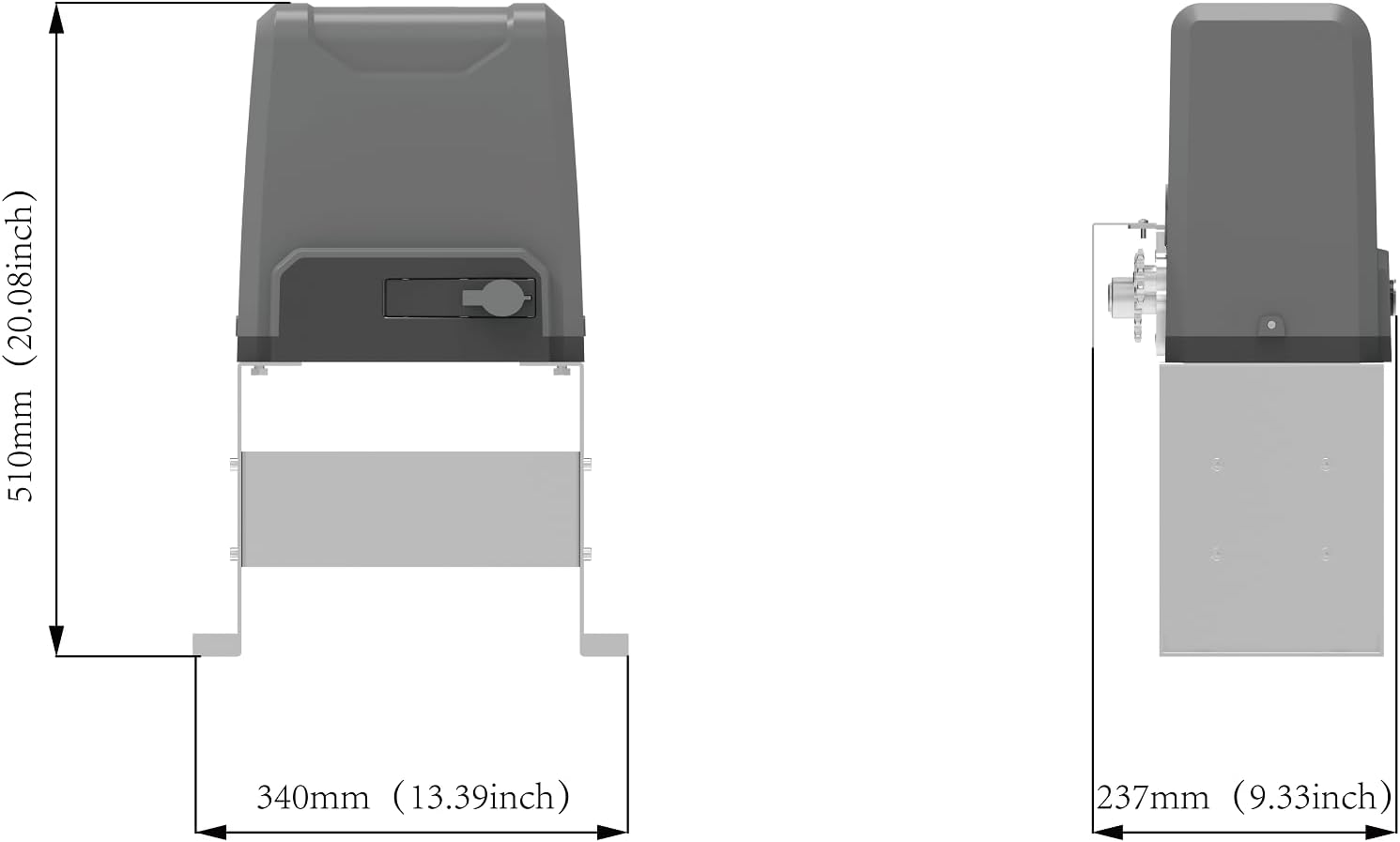
Figure 3: Motor Unit Dimensions (510mm / 20.08in height, 340mm / 13.39in width, 237mm / 9.33in depth).
4.2 Electrical Connections
Connect the motor unit to a 110-120V/60Hz power supply. Ensure all wiring is secure and insulated. The internal control board, shown in Figure 4, houses the necessary connections for power, motor, and accessories like infrared sensors.

Figure 4: Internal Control Board.
5. Operating Instructions
This section details how to operate your GATEXPERT GT2200-GREY gate operator, including remote control programming and automatic closing settings.
5.1 Remote Control Management
The gate operator comes with two remote controls. You can learn new remotes or delete existing ones from the system's memory.
Video 1: Instructions on how to delete and learn remote controls, and set the automatic door closing time.
5.1.1 Deleting Remote Controls
- Press and hold the learning button AN1 on the control board. The indicator light LED2 will turn on.
- Continue holding the button until LED2 turns off. This action will delete all previously matched remote controls from the system.
5.1.2 Learning Remote Controls
- Press the learning button AN1 on the control board once. The indicator light LED2 will flash.
- While LED2 is flashing, press the desired button on the remote control that you wish to program. LED2 will turn off.
- Immediately press the same button on the remote control a second time. LED2 will flash several times and then turn off, indicating successful learning.
5.2 Automatic Closing Time Setting
The automatic closing time can be adjusted using the DIP switches on the control board. Refer to the video for a visual guide.
| DIP Switch 2 | DIP Switch 3 | Automatic Close Time |
|---|---|---|
| ON | OFF | 15 seconds |
| OFF | ON | 30 seconds |
| OFF | OFF | 45 seconds |
| ON | ON | No automatic close function |
The system also supports connection of various accessories such as external buttons, wireless keypads, and alarm lamps for enhanced functionality.


Figure 5: Various views of the GT2200-GREY motor unit.
6. Maintenance
Regular maintenance ensures the longevity and optimal performance of your gate operator. Perform the following checks periodically:
- Cleanliness: Keep the motor unit and chain free from dirt, debris, and obstructions.
- Lubrication: Periodically lubricate the gate chain and any moving parts as recommended in the full product manual.
- Sensor Check: Ensure infrared sensors are clean and properly aligned for obstacle detection.
- Fasteners: Check all mounting bolts and fasteners for tightness.
- Manual Operation: Test the manual release mechanism to ensure it functions correctly.
7. Troubleshooting
If you encounter issues with your GATEXPERT GT2200-GREY gate operator, consider the following common troubleshooting steps:
- Gate Not Moving:
- Check power supply and connections.
- Ensure manual release is fully engaged/disengaged.
- Verify remote control battery and programming (refer to Section 5.1).
- Gate Stops Mid-Operation:
- Check for obstructions in the gate's path.
- Inspect infrared sensors for blockage or misalignment.
- Remote Control Not Working:
- Replace remote control batteries.
- Re-program the remote control (refer to Section 5.1.2).
- Unusual Noises:
- Inspect the chain and gears for wear or foreign objects.
- Ensure proper lubrication.
For more complex issues or if troubleshooting steps do not resolve the problem, please contact customer support.
8. Specifications
| Feature | Detail |
|---|---|
| Model | GT2200-GREY |
| Max Gate Weight | Up to 3300 lbs |
| Max Gate Length | Up to 40 ft |
| Drive Mode | Sprocket and Chain Transmission |
| Power Supply | 110-120V/60Hz |
| Motor Power | 550W |
| Item Weight | 47.6 pounds |
| Product Dimensions | 13.4 x 9.33 x 20.1 inches |
| Batteries (for remotes) | 2 Lithium Metal batteries (included) |
9. Warranty and Support
For any questions regarding installation, operation, or general inquiries, please contact GATEXPERT customer service. Our team is available to assist you.
Contact Information: Refer to the contact details provided on the product packaging or the official GATEXPERT website for service email and other support channels.
Ask a question about this manual
Ask about setup, troubleshooting, compatibility, parts, safety, or missing instructions. Manuals+ will review the question and use this page’s manual context to help answer it.