
1. Introduction
Thank you for choosing the HerQs Pin Pro Wireless BBQ Thermometer. This device is designed to provide precise and reliable temperature measurements for various cooking methods, ensuring perfectly cooked food every time. With its dual probes and intuitive app, monitoring your cooking has never been easier.
2. Safety Information
- Always handle probes with care. The probe tips are sharp.
- Do not expose the main unit to direct flame or extreme heat. The probes are designed for high temperatures, but the main unit is not.
- Keep the device and probes out of reach of children.
- Ensure probes are fully inserted into the thickest part of the meat, avoiding bone.
- Clean probes thoroughly after each use to prevent bacterial contamination.
- Do not immerse the main unit in water. It is not waterproof.
3. Package Contents
Please verify that all items are present in your package:
- HerQs Pin Pro Main Unit
- 2 x Wireless Temperature Probes
- USB-C Charging Cable
- User Manual (this document)
4. Product Overview
Familiarize yourself with the components of your HerQs Pin Pro thermometer.

Figure 4.1: HerQs Pin Pro Main Unit Front Display. Shows current temperature, target temperature, probe number, and doneness level.

Figure 4.2: Two HerQs Pin Pro Wireless Probes. These probes are inserted into food for temperature measurement.

Figure 4.3: Back of HerQs Pin Pro Main Unit. Features charging docks for probes, a QR code for app activation, and a magnetic back for convenient placement.
Main Unit Features:
- Large Display: Shows current temperature, target temperature, probe status, and doneness.
- Probe Docks: Integrated charging and storage for two wireless probes.
- Magnetic Back: Allows attachment to metal surfaces like grills or refrigerators.
- Kickstand: For tabletop placement.
- USB-C Port: For charging the main unit.
Probe Features:
- Wireless Design: No cables to manage during cooking.
- High-Temperature Resistance: Probes can withstand heat up to 500°C (932°F).
- Precise Sensors: For accurate and reliable temperature readings.
5. Setup
5.1 Initial Charging
- Connect the HerQs Pin Pro main unit to a power source using the provided USB-C cable.
- Ensure both wireless probes are securely placed in their respective charging docks on the back of the main unit.
- Allow the device and probes to fully charge before first use. Charging status indicators will be visible on the main unit.
5.2 App Installation and Pairing
- Download the 'ToGrill' app from your smartphone's app store (available for iOS and Android). You can scan the QR code on the back of the main unit for direct access.
- Open the 'ToGrill' app and follow the on-screen instructions to create an account or log in.
- Ensure Bluetooth is enabled on your smartphone.
- Turn on the HerQs Pin Pro main unit. The app should automatically detect the device. If not, manually search for and connect to the 'HerQs Pin Pro' within the app's device settings.
- Once paired, the app will display real-time temperature data from the probes.
6. Operating Instructions
6.1 Using the Probes
- Remove the desired probe(s) from the main unit's charging dock.
- Insert the probe tip into the thickest part of the food, ensuring it does not touch any bone. For poultry, insert into the thickest part of the thigh or breast.
- The main unit display will show the current temperature for the inserted probe(s).
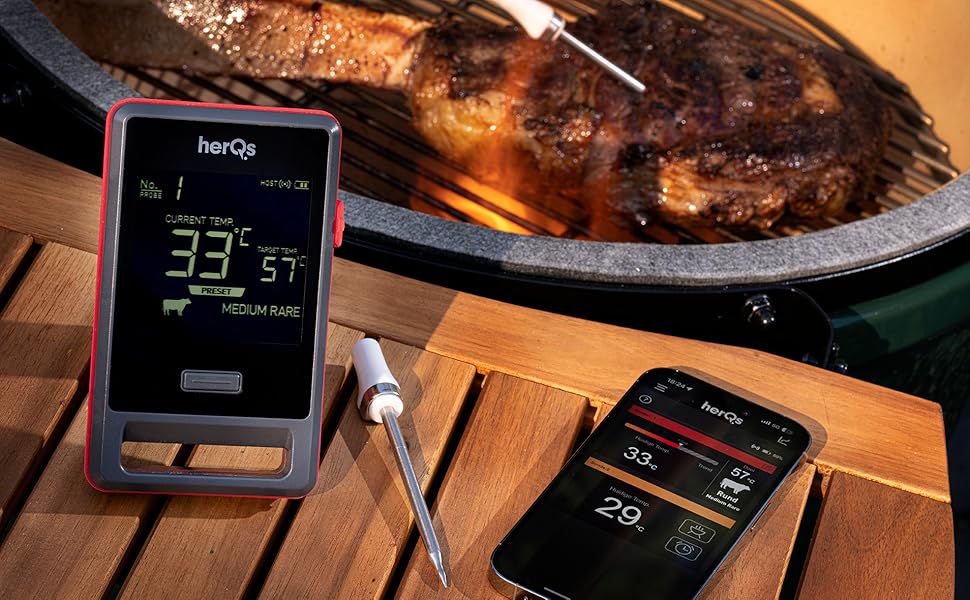
Figure 6.1: HerQs Pin Pro Thermometer monitoring meat temperature on a grill.
6.2 Using the 'ToGrill' App
The 'ToGrill' app provides enhanced control and monitoring capabilities:
- Real-time Monitoring: View current temperatures for both probes directly on your smartphone.
- Preset Temperatures: Select from a variety of preset temperatures for different types of meat and desired doneness levels.
- Custom Alarms: Set personalized target temperatures and receive notifications when your food reaches the desired doneness.
- Cooking Recommendations: Access guidance for optimal cooking temperatures and times.
- Temperature History: Track the temperature progression of your cook.

Figure 6.2: The HerQs Pin Pro main unit and the 'ToGrill' app working together to monitor cooking temperatures.

Figure 6.3: Example screenshot of the 'ToGrill' app interface.
6.3 Versatile Use
The HerQs Pin Pro is suitable for a wide range of cooking applications:
- Grilling (BBQ)
- Oven Roasting/Baking
- Pan Frying
- Air Frying
7. Maintenance
7.1 Cleaning the Probes
- Allow probes to cool completely after use.
- Wash the metal part of the probes with warm, soapy water.
- Wipe the ceramic handle with a damp cloth. Do not immerse the entire probe in water.
- Dry thoroughly before storing.
7.2 Cleaning the Main Unit
- Wipe the main unit with a soft, damp cloth.
- Do not use abrasive cleaners or immerse the unit in water.
7.3 Storage
Store the HerQs Pin Pro main unit with probes securely in their docks in a cool, dry place when not in use.
8. Troubleshooting
If you encounter issues with your HerQs Pin Pro, please refer to the following common problems and solutions:
| Problem | Possible Cause | Solution |
|---|---|---|
| Device not turning on | Low battery | Charge the main unit and probes using the USB-C cable. |
| Probes not reading temperature | Probe not fully inserted; Probe damaged; Not properly seated in dock for connection. | Ensure probe is fully inserted into food. Check for visible damage. Re-seat probe in main unit dock. |
| App not connecting to device | Bluetooth off; Device out of range; App not updated. | Ensure Bluetooth is enabled on your phone. Move closer to the main unit. Update the 'ToGrill' app to the latest version. Restart both the app and the device. |
| Inaccurate temperature readings | Probe not inserted correctly; Sensor dirty; Probe damaged. | Re-insert probe into the thickest part of the food, avoiding bone. Clean the probe sensor. If issues persist, the probe may be damaged. |
For further assistance, please refer to the 'ToGrill' app's help section or visit the HerQs official website.
9. Specifications
- Model Number: 1232717
- Brand: HerQs
- Item Weight: 280 grams
- Package Dimensions: 17.6 x 11.8 x 3.8 cm
- Battery: 1 Lithium-polymer (included)
- Probe Heat Resistance: Up to 500°C (932°F)
- Connectivity: Bluetooth (via 'ToGrill' app)
- Country of Origin: China
10. Warranty and Support
For information regarding warranty coverage and customer support, please visit the official HerQs website or contact their customer service directly. Details may also be available within the 'ToGrill' mobile application.