
HerQs 1232720
Contents
HerQs Pin Probe Wireless Meat Thermometer User Manual
Model: 1232720
Brand: HerQs
1. Introduction
The HerQs Pin Probe is a 100% wireless meat thermometer designed to provide precise temperature measurements for various cooking methods. It connects via Bluetooth to the HerQs app on your smartphone, allowing you to monitor cooking progress, set desired doneness levels, and receive alerts, ensuring perfectly cooked meat every time.

Image: The HerQs Pin Probe, its charging case, and a smartphone displaying the HerQs app interface with temperature readings.
2. Package Contents
Your HerQs Pin Probe package includes the following items:
- 1 x HerQs Pin Probe
- 1 x Charging Case
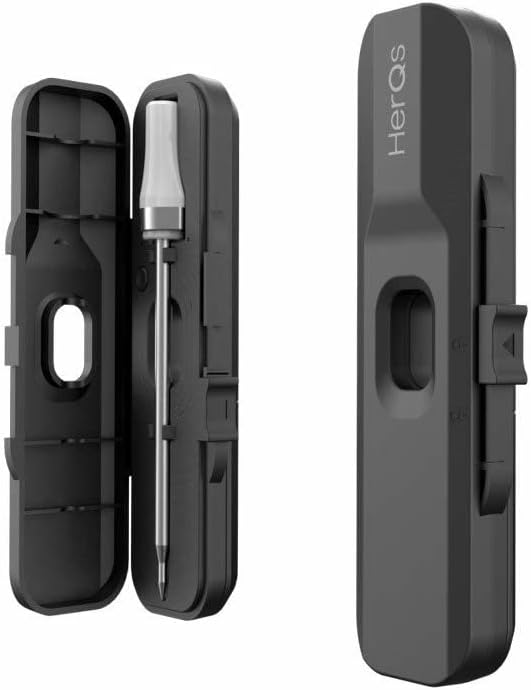
Image: The HerQs Pin Probe securely placed inside its open charging case.
3. Setup
3.1 Initial Charging
Before first use, ensure the HerQs Pin Probe is fully charged. Place the probe into its charging case. The case will charge the probe. A full charge ensures optimal performance and battery life.
3.2 App Download and Installation
The HerQs Pin Probe requires the HerQs mobile application for operation. Download the app from your device's app store:
- For iOS devices: Requires iOS 11.0 or later.
- For Android devices: Requires Android 5.0 or later.
Search for "HerQs" in the App Store (iOS) or Google Play Store (Android) and install the application.
3.3 Pairing the Probe with the App
- Ensure Bluetooth is enabled on your smartphone.
- Open the HerQs application.
- Follow the on-screen prompts within the app to connect to your HerQs Pin Probe. The app will guide you through the pairing process.
4. Operating Instructions
4.1 Inserting the Probe
Carefully insert the pointed end of the HerQs Pin Probe into the thickest part of the meat, avoiding bones. Ensure the probe is inserted deep enough so that the temperature sensor (located near the tip) is fully within the meat.
4.2 Using the HerQs App
The HerQs app provides an intuitive interface for monitoring your cooking. Once connected:
- Select Meat Type: Choose the type of meat you are cooking from the app's predefined options.
- Set Desired Doneness: Select your preferred doneness level (e.g., rare, medium, well-done). The app will automatically set the target temperature.
- Custom Temperature: Optionally, you can manually set a specific target temperature if you prefer.
- Real-time Monitoring: The app displays the current internal temperature of your food in real-time.
- Alerts: The app will notify you when your food reaches the target temperature.

Image: The HerQs Pin Probe accurately measuring the temperature of meat on a grill, with the companion app showing the progress.
4.3 Versatile Use
The HerQs Pin Probe is suitable for a variety of cooking environments:
- Barbecues
- Ovens
- Pans
- Air Fryers
5. Maintenance and Care
To ensure the longevity and accuracy of your HerQs Pin Probe, follow these care instructions:
- Cleaning: After each use, clean the probe thoroughly with a damp cloth. Do not submerge the entire probe or the charging case in water.
- Storage: Always store the probe in its charging case when not in use. This protects the probe and keeps it ready for the next use.
- Temperature Exposure: While the probe is designed for high temperatures, avoid exposing the charging case or the probe's non-metal parts to direct flame or extreme heat.

Image: Cooked meat on a cutting board, with the HerQs Pin Probe and its charging case ready for cleaning and storage.
6. Troubleshooting
If you encounter issues with your HerQs Pin Probe, consider the following:
6.1 Connectivity Issues
- Ensure Bluetooth is active on your smartphone.
- Make sure the probe is charged.
- Restart the HerQs app and try reconnecting.
- Ensure your smartphone is within the Bluetooth range of the probe.
6.2 Inaccurate Readings
- Verify the probe is inserted correctly into the thickest part of the meat, away from bones.
- Ensure the probe is clean and free of debris.
- Check the app for any available updates.
For further assistance, please refer to the HerQs website or contact customer support.
7. Specifications
| Feature | Specification |
|---|---|
| Model | 1232720 |
| Dimensions | 19.89 x 3.2 x 8.31 cm |
| Weight | 130 grams |
| Connectivity Technology | Bluetooth |
| Peak Temperature Range | 1-350 °C (33-572 °F) |
| Continuous Temperature Range | 1-250 °C (33-482 °F) |
| Measurement Deviation | Max 1% |
| Compatible OS | iOS 11.0+, Android 5.0+ |
| External Material | Plastic |
| Components Included | 1 Probe |
8. Warranty and Support
For information regarding the product warranty, returns, or technical support, please visit the official HerQs website or contact their customer service department. Keep your proof of purchase for warranty claims.
Ask a question about this manual
Ask about setup, troubleshooting, compatibility, parts, safety, or missing instructions. Manuals+ will review the question and use this page’s manual context to help answer it.