
1. Product Overview
The FEELWORLD F5 Pro V4+ is a compact and versatile 6-inch touchscreen camera field monitor designed to enhance your video production workflow. It features a native 1920x1080 high-resolution display with REC-709 color calibration for sharp and rich image quality. Its innovative design includes a Sony F970 external install and power kit, allowing for easy integration and powering of external equipment like LED lights or wireless transmitters, thereby reducing overall photography equipment weight and space.
The monitor supports 4K HDMI input and loop-out, enabling simultaneous display and output of live signals. It offers flexible power options including Type-C input, F970 battery plate, and 8.4V DC output. Essential monitoring tools such as histogram, false color, focus assist, embedded audio, pixel to pixel, frame guides, and nine grid are included to aid in accurate exposure and focus.
2. What's in the Box
- F5 Pro V4 Monitor
- Semi-rigid carry case
- Various cables (e.g., HDMI, Type-C)
- Extra battery (AndyCine branded)
- L-bracket for mounting
- Sunshield

Image: The FEELWORLD F5 Pro V4+ monitor displayed with its full set of included accessories, including cables, battery, mounting bracket, and sunshield.
3. Setup
3.1 Powering the Monitor
The F5 Pro V4+ offers multiple power options:
- Battery: Insert a compatible Sony F970 series battery into the battery plate on the back of the monitor. Ensure the battery is fully charged for optimal performance.
- Type-C Input: Connect a 5V Type-C power source to the monitor's Type-C port. This can also be used for charging compatible batteries.
- DC Input: Use the provided 12V 1.5A power adapter to connect the monitor to a wall outlet via the DC IN port.

Image: Close-up view of the monitor's side, highlighting the HDMI In/Out, DC In/Out, 5V Type-C Power Supply, and 3.5mm Ear Phone Slot. The F970 battery plate is also visible.
3.2 Mounting the Monitor
The monitor can be mounted using the included L-bracket or other compatible mounting solutions. It features 1/4-20 screw mounts on the top, bottom, and right sides for versatile rigging. The integrated F970 external install and power kit on the back allows for direct mounting and powering of additional accessories like wireless transmitters or LED lights, simplifying your setup.
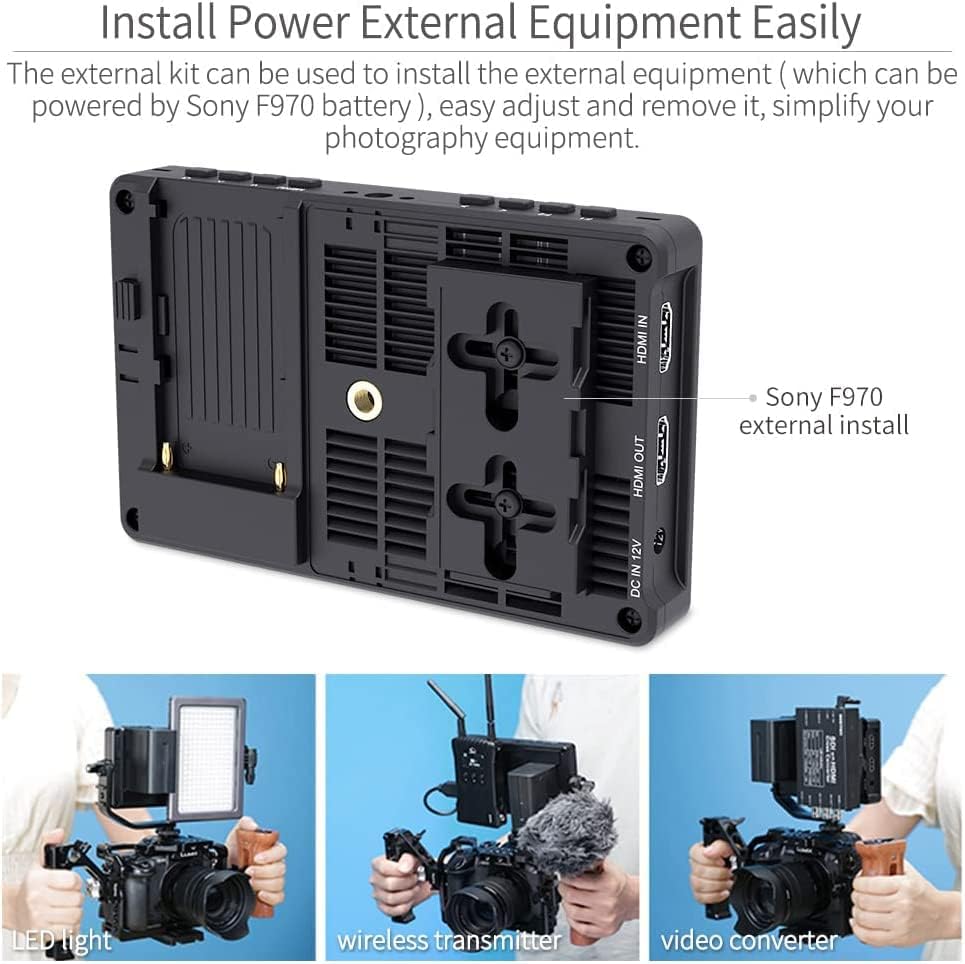
Image: The back of the monitor showing the Sony F970 external install kit, with examples of the monitor mounted on cameras with an LED light, wireless transmitter, and video converter.
3.3 Connecting to Camera
Connect your camera's HDMI output to the monitor's HDMI In port using an HDMI cable. If you need to loop the signal to another monitor, use the HDMI Out port. The monitor supports 4K HDMI input and output (4096x2160p 24Hz / 3840x2160p 30/29.97/25/24/23.98Hz).
4. Operating the Monitor
4.1 Touchscreen Controls
The F5 Pro V4+ features an intuitive touchscreen interface. You can easily zoom in and out of your shot using a pinch-to-zoom gesture. Double-tap the screen to access the shortcut menu, allowing quick adjustments to various functions. Swipe up or down from the bottom of the screen to increase or decrease brightness and volume.
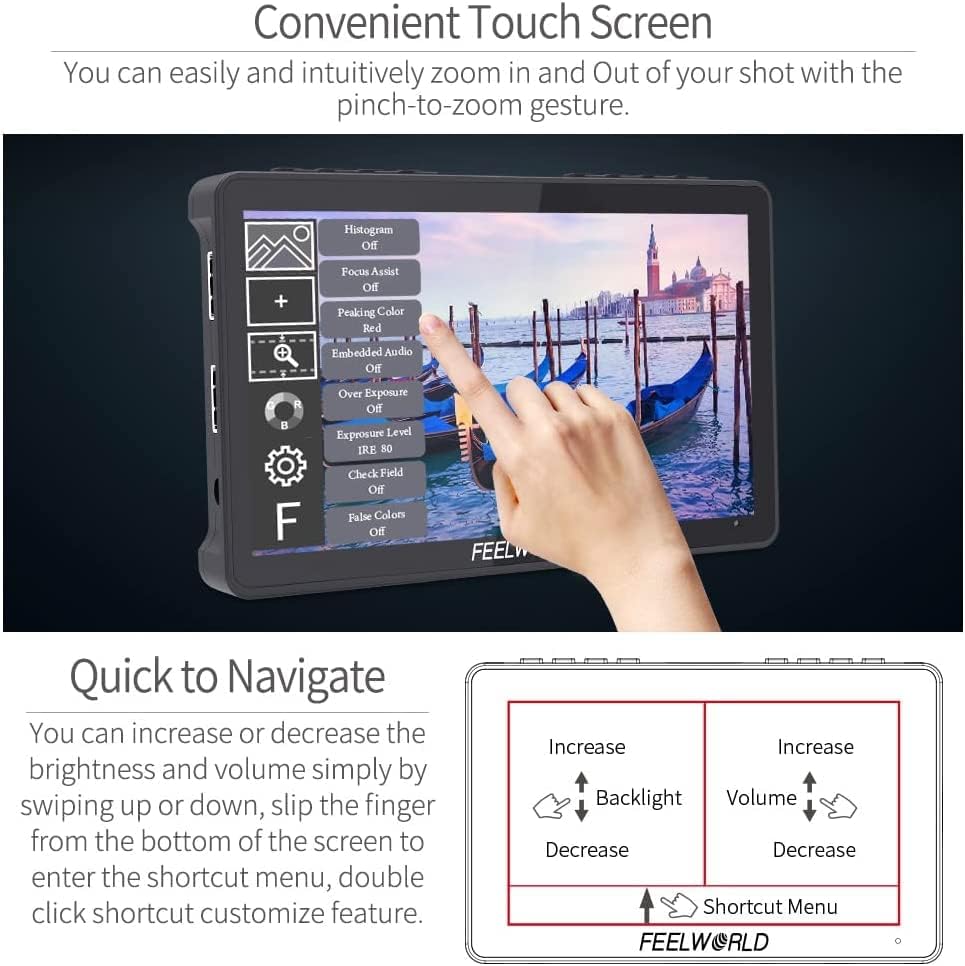
Image: The monitor displaying its touchscreen menu, with a hand interacting to select options like Histogram, Focus Assist, and Peaking Color. Below, diagrams illustrate swipe gestures for brightness and volume control.
4.2 Button Controls and Menu Navigation
In addition to touchscreen controls, the monitor has physical buttons on the top for menu navigation and function shortcuts. While the touchscreen is generally more responsive, these buttons provide an alternative method for control. Press the 'MENU' button to enter the main menu system, and use the directional buttons to navigate through options.
4.3 Loading Custom 3D LUTs
The monitor supports loading up to 32 custom 3D LUTs via the Type-C interface to a USB drive. This feature is crucial for applying specific looks to your footage in real-time, ensuring accurate color representation and creative control during shooting.
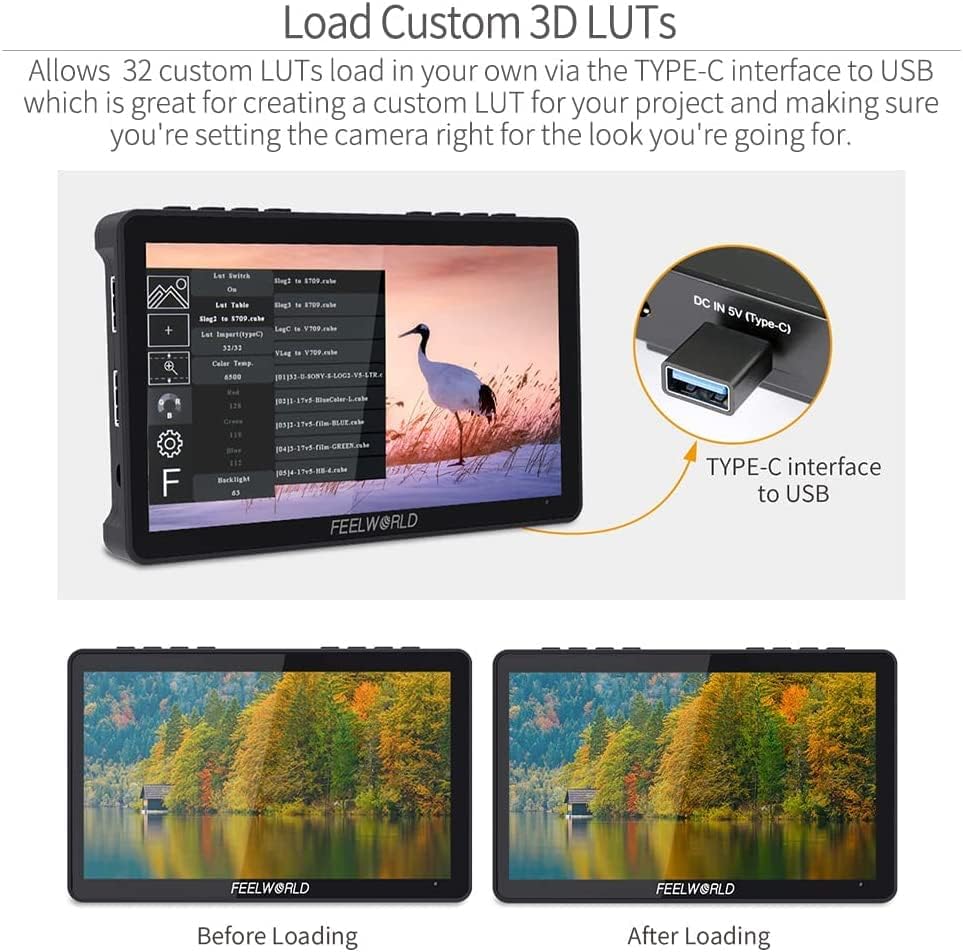
Image: The monitor displaying the 3D LUT loading interface, with a USB drive connected via the Type-C port. Below, two images show the visual difference before and after applying a 3D LUT.
4.4 Outdoor Use and Sunshield
The F5 Pro V4+ has a brightness of 500 nits. For outdoor shooting in bright sunlight, it is recommended to attach the included sunshield to improve visibility and reduce glare. The sunshield easily snaps onto the monitor's frame.
5. Advanced Monitoring Features
The monitor includes a comprehensive suite of professional monitoring tools to assist with accurate exposure and focus:
- Histogram: Displays the tonal distribution of your image.
- False Color: Helps in setting correct exposure by displaying different exposure levels as color overlays.
- Focus Assist (Peaking Filter): Highlights in-focus areas with a colored outline (e.g., red, green, blue). Note: The sensitivity of focus assist is fixed.
- Embedded Audio: Visual representation of audio levels.
- Pixel to Pixel: Allows for a 1:1 pixel mapping of the input signal to the display.
- Frame Guides: Displays various aspect ratio guides for framing your shots.
- Nine Grid: A compositional aid that divides the screen into nine equal sections.
- Exposure (Zebras): Indicates overexposed areas.
- Image Flip: Flips the image horizontally or vertically.
- Anamorphic Mode: De-squeezes anamorphic footage.
- Zoom-in: Magnifies a portion of the image for critical focus.
- Image Freeze: Freezes the current frame on the display.
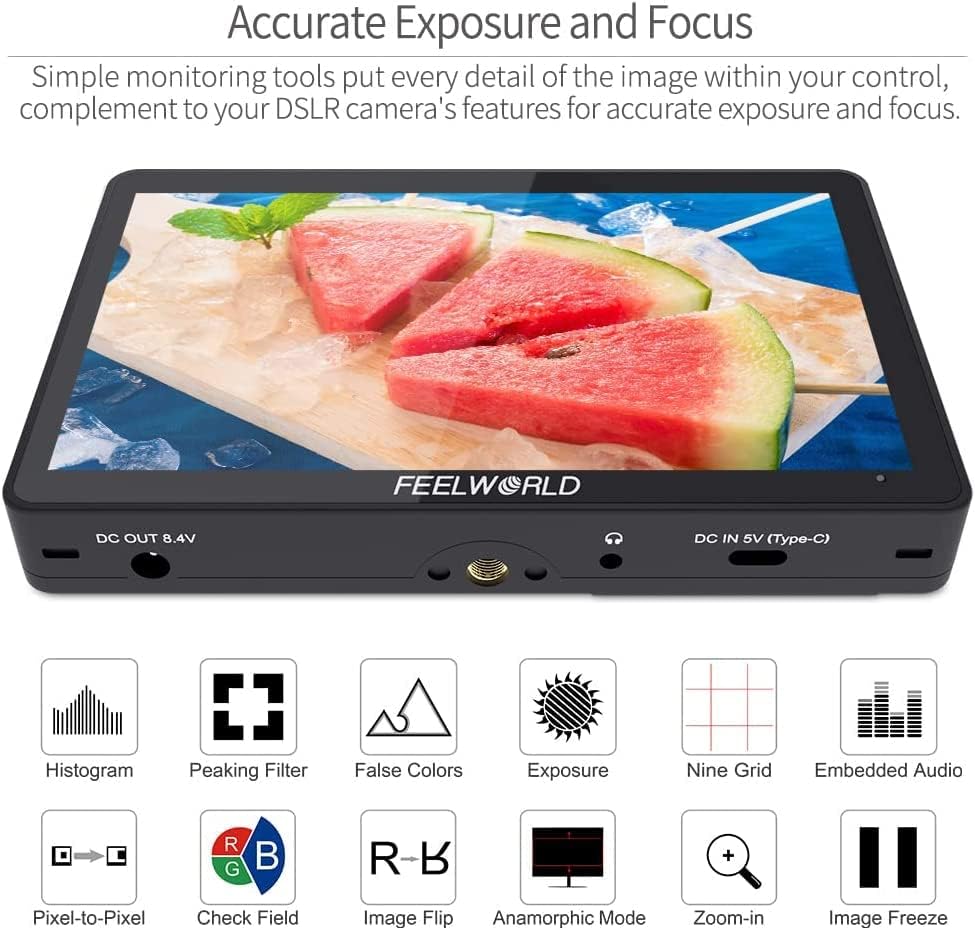
Image: The monitor screen showing an example of monitoring tools activated, including histogram, peaking filter, false colors, and embedded audio levels.
6. Compatibility
The F5 Pro V4+ is widely compatible with various cameras and accessories:
- HDMI: Connects to any camera with 4K HDMI output.
- Battery: Compatible with Sony F970, F960, F950, F930, F770, F750, F730, F570, F550, F530, QM91D, QM91, QM90D, QM90, QM71D, QM71, QM70D, QM70, QM51D, QM51, FM71, FM70 series batteries.
- External Equipment: The F970 external install and power kit allows for mounting and powering of various external devices, such as LED lights, video converters, and wireless transmission systems.
7. Maintenance
To ensure the longevity and optimal performance of your FEELWORLD F5 Pro V4+ monitor, follow these maintenance guidelines:
- Cleaning: Use a soft, dry cloth to clean the monitor's exterior. For the screen, use a microfiber cloth specifically designed for electronics. Avoid harsh chemicals or abrasive materials.
- Storage: When not in use, store the monitor in its provided semi-rigid carry case to protect it from dust, scratches, and impacts.
- Temperature: Avoid exposing the monitor to extreme temperatures or high humidity.
- Handling: Handle the monitor with care to prevent drops or physical damage.
8. Troubleshooting
If you encounter issues with your FEELWORLD F5 Pro V4+ monitor, refer to the following common troubleshooting steps:
- Cannot turn on the monitor:
- Ensure you are using the standard 12V 1.5A power adapter to connect the monitor.
- If power is supplied by battery, check if the battery is fully charged.
- Have noise during recording:
- Long press the “<” button and turn down the volume to near zero to avoid noise during recording. Long press “>” to increase the volume.
- The monitor displays "no signal":
- Try another HDMI cable.
- Connect the monitor's HDMI to your computer to check if the monitor receives a signal.
- Change the camera's output signal and confirm if the monitor's input signal supports the camera's output signal.
- When focus peak is turned on, other information on the monitor is also displayed:
- Try to turn off "HDMI Information Display" under the "HDMI Settings" tab in the menu system. This should prevent similar situations when focus peaking is active.
9. Specifications
| Feature | Value |
|---|---|
| Model Number | f5 prov4-6 |
| Screen Diagonal | 6 inches |
| Resolution | 1920x1080 |
| Brightness | 500 nit |
| Contrast Ratio | 1000:1 |
| Viewing Angle | 160° |
| Item Weight | 1.14 pounds (approx. 517g) |
| Package Dimensions | 7.48 x 5 x 4.25 inches |
| Manufacturer | FEELWORLD |
10. Warranty and Support
For warranty information and customer support, please refer to the documentation included with your product or visit the official FEELWORLD website. Keep your proof of purchase for any warranty claims.