1. Introduction
Welcome to the user manual for your Qubo Neonw 2.4-inch Mobile Device. This guide provides essential information on how to set up, operate, maintain, and troubleshoot your device. Please read this manual thoroughly before using your device to ensure safe and optimal performance.
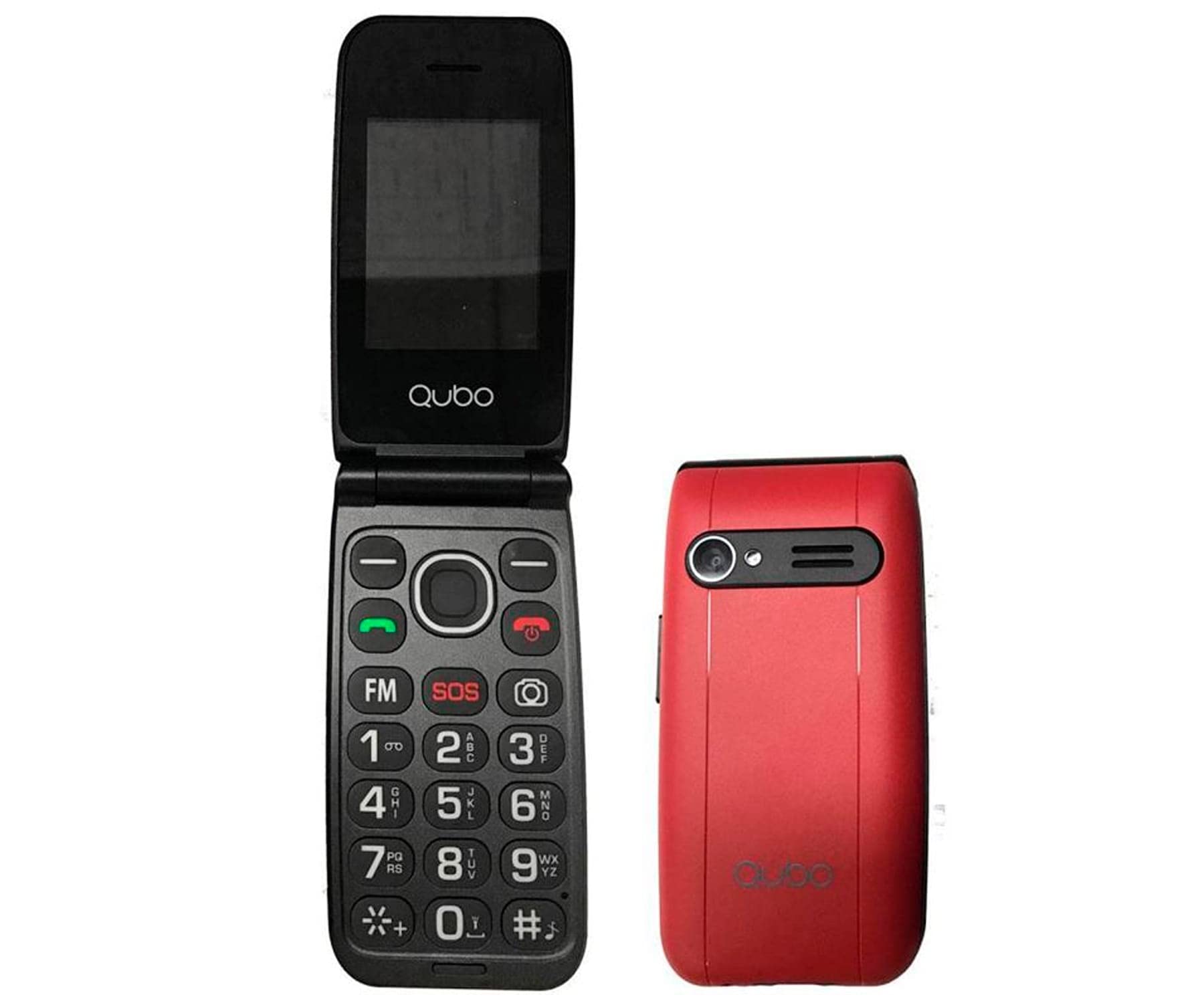
Front view of the Qubo Neonw 2.4-inch mobile device, showcasing its display and keypad.
2. Safety Information
To prevent injury or damage to your device, please observe the following safety precautions:
- Read all instructions carefully before use.
- Keep the device away from water and other liquids.
- Do not expose the device to extreme temperatures or direct sunlight.
- Avoid dropping or subjecting the device to severe impact.
- Use only manufacturer-approved accessories.
- Do not attempt to disassemble or repair the device yourself. Refer all servicing to qualified personnel.
- Dispose of the device and its battery responsibly according to local regulations.
3. Package Contents
Please check the package for the following items:
- Qubo Neonw 2.4-inch Mobile Device
- Charging Cable
- Power Adapter
- User Manual (this document)
- Other standard accessories (may vary by region)
If any items are missing or damaged, please contact your retailer or Qubo customer support.
4. Product Overview
The Qubo Neonw is a compact 2.4-inch mobile device designed for network and mobile connectivity. It features a durable plastic and metal construction, and includes special features such as Internet access, Radio, USB connectivity, a camera, and a jack connector for audio.
Key physical features include:
- 2.4-inch Display: For clear viewing of menus and content.
- Keypad: For navigation and input.
- Camera: For capturing photos.
- USB Port: For charging and data transfer.
- Audio Jack: For connecting headphones.
5. Setup
Follow these steps to set up your Qubo Neonw device:
- Charge the Battery: Connect the charging cable to the device and the power adapter, then plug the adapter into a wall outlet. Allow the device to charge fully before first use.
- Insert SIM Card (if applicable): If your device requires a SIM card for mobile network access, carefully open the SIM card slot (refer to the device diagram if available) and insert your SIM card as directed.
- Power On: Press and hold the Power button until the screen lights up.
- Initial Configuration: Follow the on-screen prompts to select your language, set the date and time, and configure any other initial settings.
6. Operating the Device
This section covers basic operations of your Qubo Neonw device:
- Navigation: Use the directional keys and central selection button to navigate through menus and select options.
- Making Calls: Enter the phone number using the keypad and press the Call button.
- Internet Access: Access the internet browser from the main menu. Ensure your device has an active data connection or is connected to Wi-Fi (if supported).
- Radio: Select the Radio application from the menu. You may need to connect headphones to act as an antenna.
- Camera: Open the Camera application to take photos.
- USB Connectivity: Connect the device to a computer using a USB cable for data transfer or to use it as a mass storage device.
7. Maintenance
Proper maintenance ensures the longevity of your device:
- Cleaning: Use a soft, dry, lint-free cloth to clean the device. Do not use harsh chemicals or abrasive materials.
- Battery Care: Avoid fully discharging the battery frequently. Charge the device regularly. Do not expose the battery to high temperatures.
- Storage: When not in use for extended periods, store the device in a cool, dry place, away from direct sunlight.
8. Troubleshooting
If you encounter issues with your device, try the following solutions:
| Problem | Possible Solution |
|---|---|
| Device does not power on | Ensure the battery is charged. Connect the charger and wait a few minutes before attempting to power on again. |
| Cannot connect to network | Check if the SIM card is properly inserted. Verify that you have network coverage in your area. Restart the device. |
| Charging issues | Ensure the charging cable and adapter are securely connected and undamaged. Try a different power outlet or charger. |
| Device is unresponsive | Perform a soft reset by removing and reinserting the battery (if removable), or by pressing and holding the Power button for an extended period (e.g., 10-15 seconds). |
If the problem persists, contact Qubo customer support for further assistance.
9. Specifications
| Feature | Detail |
|---|---|
| Model Number | NEONW_RD_SOS |
| Product Dimensions (L x W x H) | 50 x 50 x 28 cm |
| Item Weight | 190 grams |
| Material Type | Plastic, Metal |
| Number of Units per Item | 1 |
| Manufacturer | Qubo |
| Country of Origin | United States of America |
| Brand | Qubo |
| Mounting Type | Cradle Mount |
| Color | Red |
| Special Features | Internet, Radio, USB, Camera, Jack Connector |
| Date First Available | May 3, 2023 |
10. Warranty and Support
For warranty information, please refer to the warranty card included with your product or visit the official Qubo website. Qubo provides customer support for any questions or issues you may have regarding your Neonw mobile device.
Manufacturer: Qubo
Please retain your proof of purchase for warranty claims.


