
1. Introduction
This manual provides essential instructions for the safe and effective replacement of carbon brushes in compatible Bosch rotary hammer drills. Please read this manual thoroughly before attempting any installation or maintenance procedures. Proper installation ensures optimal tool performance and longevity of the carbon brushes.
2. Safety Information
WARNING: Always disconnect the power tool from the power source before performing any adjustments, changing accessories, or storing the tool. Failure to do so can result in serious personal injury.
- Wear appropriate personal protective equipment (PPE), such as safety glasses and gloves.
- Ensure the work area is clean, well-lit, and free from obstructions.
- If you are unsure about any step, consult a qualified technician.
- Keep children and bystanders away while performing maintenance.
3. Product Overview
The Jyving carbon brushes are designed as direct replacement parts for specific Bosch rotary hammer models. Carbon brushes are critical components in electric motors, responsible for conducting current between the stationary and rotating parts of the motor. Worn carbon brushes can lead to reduced power, intermittent operation, or complete motor failure.

Figure 1: A pair of Jyving carbon brushes, showing the carbon block, copper wire, and terminal connector.
4. Compatibility
These carbon brushes are compatible with the following Bosch rotary hammer models:
- Bosch GBH2-22
- Bosch GBH 2-22
- Bosch GBH2-23
- Bosch GBH 2-23
- Bosch GBH 2-26
- Bosch GBH2-26
- Bosch GBH2-28
- Bosch GBH 2-28
- Bosch GBH 3-28DRE
- Bosch GBH3-28DRE
Always verify your tool's model number before purchasing and installing replacement parts.
5. Specifications
| Attribute | Value |
|---|---|
| Material | Carbon, Metal |
| Dimensions (Approx.) | 18mm x 8mm x 5mm |
| Quantity | 1 Pair (2 pieces) |
6. Installation Instructions
Follow these steps carefully to replace the carbon brushes in your Bosch rotary hammer:
- Disconnect Power: Ensure the rotary hammer is unplugged from the power outlet.
- Locate Brush Caps: Identify the carbon brush caps on the motor housing. These are typically small, slotted or Phillips head caps on the sides of the tool.
- Remove Old Brushes:
- Using a screwdriver, carefully unscrew the brush caps.
- Gently pull out the old carbon brushes and their springs. Note their orientation.
- Inspect the commutator for any damage or excessive wear.

Figure 2: A single carbon brush, ready for installation or removal.
- Install New Brushes:
- Insert the new Jyving carbon brushes into the brush holders, ensuring the copper wire and terminal are correctly positioned. The carbon block should slide smoothly into the holder.
- Ensure the spring is properly seated behind the carbon brush, applying gentle pressure.
- Carefully screw the brush caps back into place. Do not overtighten.
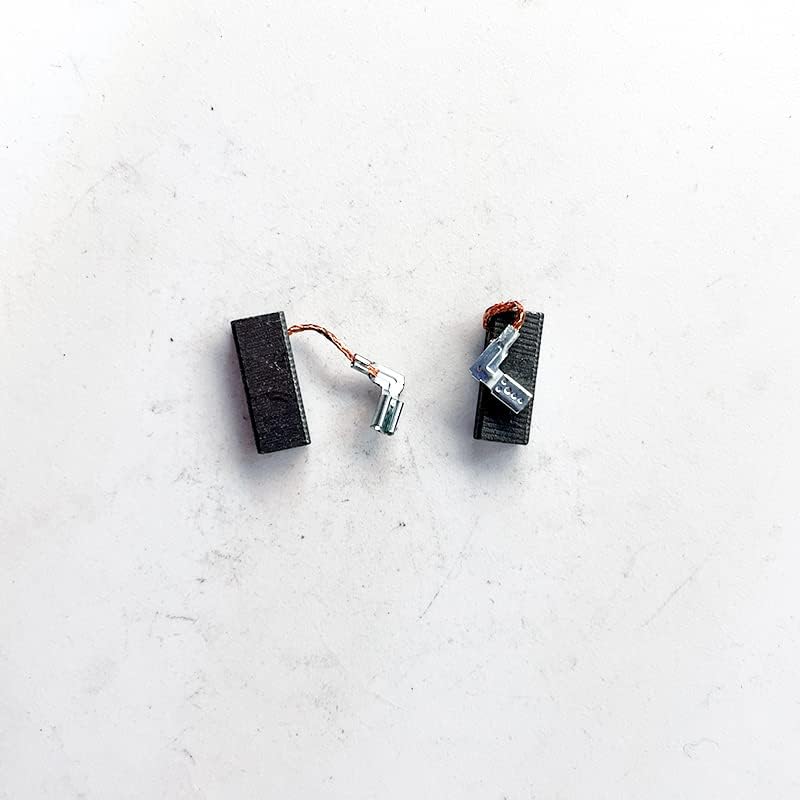
Figure 3: New carbon brushes prepared for insertion into the tool.
- Test Operation:
- Plug the rotary hammer back into the power source.
- Briefly run the tool at a low speed to allow the new brushes to seat properly. You may observe some minor sparking initially, which should reduce quickly.
- If the tool operates smoothly, the installation is complete.
7. Maintenance
Carbon brushes are wear-and-tear components and require periodic inspection and replacement. The lifespan of carbon brushes depends on the tool's usage intensity and operating conditions.
- Regular Inspection: If your tool shows signs of reduced power, excessive sparking, or intermittent operation, inspect the carbon brushes.
- Replacement: Replace carbon brushes when they are worn down to approximately one-quarter of their original length or if they appear chipped or damaged. Always replace both brushes at the same time to ensure balanced motor operation.
- Commutator Cleaning: While replacing brushes, it is good practice to gently clean the commutator with a soft, lint-free cloth to remove any carbon dust buildup.
8. Troubleshooting
If your tool does not operate correctly after replacing the carbon brushes, consider the following:
- No Power:
- Ensure the tool is securely plugged into a working power outlet.
- Verify that the carbon brushes are fully seated and the brush caps are tightened.
- Check for any loose wire connections.
- Excessive Sparking:
- A small amount of sparking is normal with new brushes as they seat. If sparking is excessive or persists, ensure the brushes are correctly installed and the commutator is clean.
- Excessive sparking can also indicate a worn or damaged commutator, which may require professional service.
- Reduced Performance:
- Confirm that the correct carbon brushes were installed for your specific tool model.
- Ensure no other internal components are damaged.
If issues persist, it is recommended to seek assistance from a qualified power tool repair technician.
9. Disposal
Please dispose of worn-out carbon brushes and other tool components responsibly according to local environmental regulations. Do not dispose of electrical components with general household waste.
10. Warranty and Support
For information regarding warranty coverage or technical support for your Jyving carbon brushes, please refer to the seller's information or contact the manufacturer directly. Keep your purchase receipt as proof of purchase.