
bonkyo F998
BONKYO F998 Audio Interface Sound Card User Manual
Model: F998
1. Product Overview
The BONKYO F998 Audio Interface Sound Card is a professional-grade live sound card designed for various audio applications, including live streaming, karaoke, and recording. It offers advanced features such as multi-device compatibility, a wide array of sound effects, and voice modulation capabilities to enhance your audio experience.

Figure 1: Front view of the BONKYO F998 Audio Interface Sound Card.
2. Package Contents
Please verify that all items listed below are included in your package:
- F998 Sound Card Unit x 1
- Audio Cable x 2
- USB Charging Cable x 1
- User Manual (Japanese) x 1

Figure 2: All components included in the F998 Sound Card package.
3. Setup Guide
3.1 Connecting to Devices
The F998 sound card offers wide compatibility with various devices, including smartphones, computers, and tablets. It supports simultaneous live broadcasting from up to three mobile phones.
- Smartphones/Tablets: Connect your smartphone or tablet to the sound card using the provided audio cables. The F998 supports up to three mobile phones for simultaneous live streaming.
- PC/Laptop: Connect the sound card to your computer via the USB cable for recording or live streaming.
- Microphone: Plug your condenser microphone into the designated microphone input port.
- Headphones/Earphones: Connect your headphones or earphones to the headset or earphone output jacks for monitoring audio.

Figure 3: Connection diagram for the F998 Sound Card with various devices.
3.2 Bluetooth Connection
To connect via Bluetooth, press the 'BT' button on the sound card. The Bluetooth function will activate, allowing for easy transfer of accompaniment music from your mobile device.

Figure 4: Bluetooth connectivity feature of the F998 Sound Card.
4. Operating Instructions
The F998 sound card features intuitive controls for adjusting audio and applying various effects.
4.1 Control Knobs
- TREBLE+, MID+, BASS+: Adjust the high, mid, and low frequencies of your audio output.
- RECORD+: Controls the recording volume.
- MIC+: Adjusts the microphone input volume.
- ECHO+: Controls the echo effect level.
4.2 Function Buttons
The sound card includes various buttons for special effects and sound modes:
- Voice Changer: Includes 'Male Voice', 'Female Voice', 'Child Voice', and 'Monster Voice' effects.
- Special Effects:
- MUTE: Mutes all audio output.
- Voice Over: Reduces background music volume when speaking.
- Denoiser: Reduces ambient noise for clearer audio.
- Karaoke: Optimizes settings for karaoke performances.
- Sound Effects: A variety of interesting sound effects such as 'Cheer', 'Din', 'Kiss', 'Gunshot', 'Yell', 'Laughter', 'PUBG', 'Dindin', 'Awesome', 'Giggle', 'Applause', 'Slash', 'Mary', 'Awkward', and 'Guys'.
- Modes: Select from 6 different modes (e.g., PRO, POP, MC) to suit your audio needs.
- Electronic Effects: Choose from 12 electronic effect options.
5. Maintenance
Proper maintenance ensures the longevity and optimal performance of your F998 Sound Card.
- Cleaning: Use a soft, dry cloth to wipe the surface of the device. Avoid using liquid cleaners or abrasive materials.
- Battery Care: The vocal card can be charged in 1-2 hours and provides 8-10 hours of continuous use. To prevent battery damage, avoid charging the sound card with a smartphone fast charger. Use the provided USB charging cable with a standard 5V/1A power source.
- Storage: Store the device in a cool, dry place away from direct sunlight and extreme temperatures.
6. Troubleshooting
If you encounter any issues with your F998 Sound Card, please refer to the following common problems and solutions:
| Problem | Possible Cause | Solution |
|---|---|---|
| No sound output | Incorrect cable connection, low volume settings, muted output. | Check all cable connections, ensure volume knobs are turned up, and verify the MUTE button is not active. |
| Distorted or unclear sound | Input overload, incorrect gain settings, faulty cable. | Adjust input levels, check microphone gain, try a different audio cable. |
| Bluetooth connection issues | Device not in pairing mode, interference, distance. | Ensure 'BT' button is pressed, keep devices within range, restart both devices. |
| Battery not charging | Faulty USB cable, incompatible charger, damaged charging port. | Use the provided USB cable, avoid fast chargers, try a different USB port or power adapter. |
| Noise during charging | Interference from charger or power source. | Avoid using smartphone fast chargers. Use a standard 5V/1A charger. |
7. Specifications
Detailed technical specifications for the BONKYO F998 Audio Interface Sound Card:
- Model Number: F998
- Brand: BONKYO
- Connectivity Technology: USB
- Channels: 2
- Power Source: Battery Powered
- Battery Type: 1 Lithium Ion Battery
- Voltage: 5 Volts
- Item Weight: 10 Grams
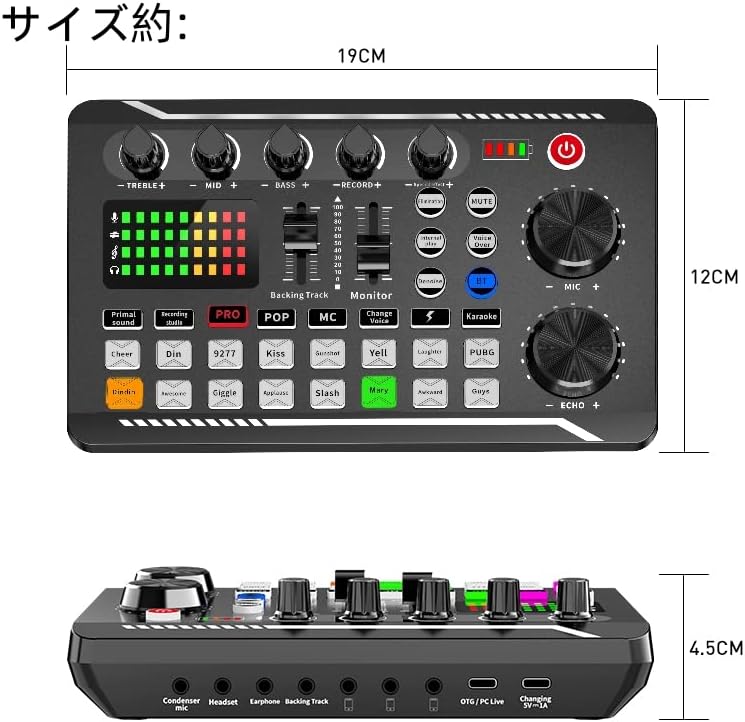
Figure 5: Approximate dimensions of the F998 Sound Card.
8. Warranty and Support
Your BONKYO F998 Sound Card comes with a 1-year warranty from the date of purchase.
As the original manufacturer, BONKYO is committed to providing excellent customer service. If you have any questions, concerns, or require technical assistance, please do not hesitate to contact us via email. Our support team will be happy to assist you.
For warranty claims or support inquiries, please refer to the contact information provided on the product packaging or the official BONKYO website.
Ask a question about this manual
Ask about setup, troubleshooting, compatibility, parts, safety, or missing instructions. Manuals+ will review the question and use this page’s manual context to help answer it.