
TESSAN TS-161-IN-C
Contents
TESSAN US to India Type D Plug Adapter Instruction Manual
Model: TS-161-IN-C
Introduction
Thank you for choosing the TESSAN US to India Type D Plug Adapter. This adapter is designed to provide convenient power access for your electronic devices when traveling to countries that use Type D outlets. It features multiple AC outlets and USB charging ports to accommodate various devices simultaneously.

Figure 1: Countries compatible with the Type D power adapter, including India, Nepal, Sri Lanka, and Sudan.
The TESSAN Type D adapter is compatible in overseas countries such as Bangladesh, India, Kuwait, Maldives, Namibia, Nepal, Pakistan, Qatar, Sri Lanka, and Yemen. Please read this manual thoroughly before use to ensure safe and optimal performance of your adapter.
Important Safety Information
- Not a Voltage Converter: This adapter is a plug adapter only. It does not convert voltage. Ensure your electronic devices (e.g., hair dryers, straighteners, curling irons) are dual voltage (100V-250V) before plugging them in. Using non-dual voltage devices with this adapter in a country with a different voltage can damage your device and pose a safety risk.
- For devices that are not dual voltage, a separate voltage converter is required.
- Do not exceed the maximum load rating of the adapter.
- Keep out of reach of children.
- Do not use in wet environments.
- Do not disassemble or modify the adapter.
- Insert the adapter fully into the wall socket.

Figure 2: Important notice regarding voltage conversion. This adapter is not a voltage converter.
Product Overview
The TESSAN Type D Travel Adapter (Model TS-161-IN-C) is a compact and versatile charging solution. It features:
- 1 Type B American AC Outlet: For standard 3-prong US plugs.
- 3 Type A American AC Outlets: For standard 2-prong US plugs.
- 2 USB-A Ports: Output up to 2.4A for charging smartphones, tablets, and other USB-powered devices.
- 1 USB-C Port: Output up to 3A for faster charging of compatible USB-C devices.
- Type D Plug: Compatible with outlets in India, Bangladesh, Kuwait, Maldives, Namibia, Nepal, Pakistan, Qatar, Sri Lanka, and Yemen.
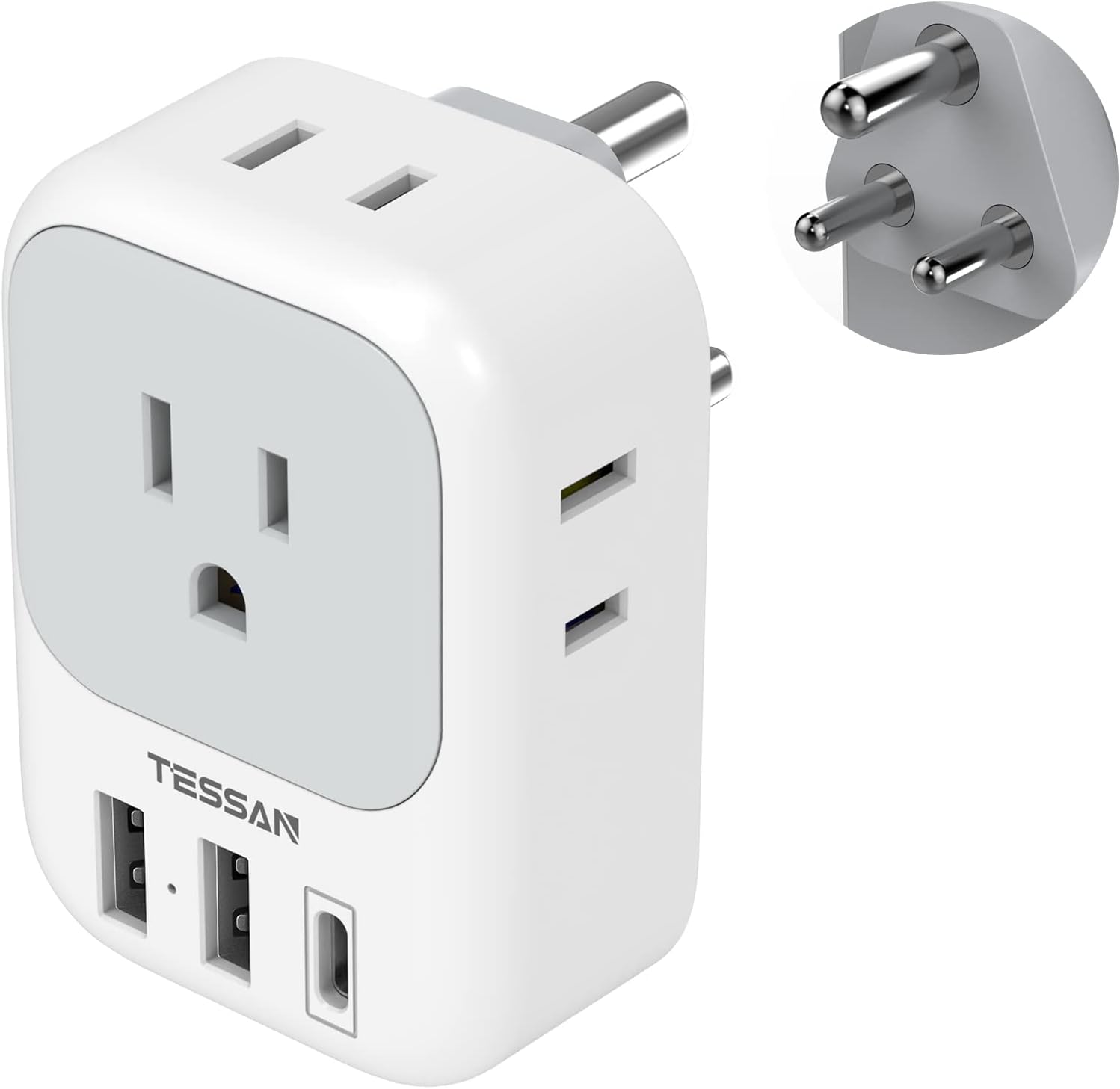
Figure 3: Front view of the TESSAN Type D Plug Adapter with its various ports.

Figure 4: Detailed view of the USB-A and USB-C charging ports and their applications.
Setup Instructions
- Verify Compatibility: Before plugging in, confirm that the destination country uses Type D outlets and that your devices are compatible with the local voltage (100V-250V).
- Insert Adapter: Plug the TESSAN Type D adapter firmly into a Type D wall socket. Ensure it is securely seated.
- Connect Devices:
- For AC-powered devices, insert their plugs into the American AC outlets on the adapter.
- For USB-powered devices, connect their charging cables to the USB-A or USB-C ports.

Figure 5: The adapter in use, demonstrating simultaneous charging of multiple devices.
Operating Instructions
Once the adapter is plugged into a Type D wall socket and your devices are connected, power will be supplied to them. The adapter is designed for simultaneous charging of up to 7 devices (4 AC outlets, 3 USB ports).
- The USB-A ports provide up to 2.4A, suitable for most standard USB devices.
- The USB-C port provides up to 3A, offering faster charging for compatible devices.
- The adapter automatically detects connected devices to optimize charging speed.
Care and Maintenance
- Keep the adapter clean and dry. Wipe with a soft, dry cloth if necessary.
- Avoid dropping the adapter or subjecting it to strong impacts.
- Store in a cool, dry place when not in use.
- Do not expose to extreme temperatures or direct sunlight.
Troubleshooting
- Device not charging:
- Ensure the adapter is fully inserted into the wall socket.
- Verify that the wall socket is active.
- Check if your device's charging cable is properly connected to the adapter and the device.
- Confirm your device is dual voltage (100V-250V) if using in a country with a different voltage than your device's origin.
- Test with another device or cable to rule out a faulty device or cable.
- Adapter feels warm:
It is normal for the adapter to feel slightly warm during operation, especially when charging multiple devices. If it becomes excessively hot or emits smoke/odor, immediately unplug it and discontinue use.
Specifications
| Model Number | TS-161-IN-C |
| Product Dimensions | 2.7 x 2.7 x 3 inches |
| Item Weight | 3.87 ounces |
| Input Voltage | 100V-250V AC, 50/60Hz (Not a voltage converter) |
| AC Outlets | 4 US Standard (1x 3-prong, 3x 2-prong) |
| USB-A Output | 5V/2.4A (each port) |
| USB-C Output | 5V/3A |
| Total USB Output | 5V/3.4A Max |
| Plug Type | Type D (India, Bangladesh, etc.) |
| Manufacturer | TESSAN |

Figure 6: Dimensions and weight of the TESSAN Type D adapter.
Warranty and Support
TESSAN products come with a standard manufacturer's warranty. For specific warranty details, product support, or technical assistance, please refer to the official TESSAN website or contact their customer service directly.
You can visit the TESSAN Store on Amazon for more information and contact options.
Documents and downloads
Ask a question about this manual
Ask about setup, troubleshooting, compatibility, parts, safety, or missing instructions. Manuals+ will review the question and use this page’s manual context to help answer it.