Introduction
The Canon EOS 1300D DSLR Camera, complemented by the EF-S18-55 DC III F3.5-5.6 lens, offers an excellent entry point for photographers seeking to elevate their skills. With its 18-megapixel APS-C sensor, DIGIC 4+ processor for reduced noise, versatile lens range, Full HD video capabilities, 9-point autofocus system, Wi-Fi/NFC connectivity, and creative filters, this camera is a user-friendly, all-in-one solution that empowers users to capture high-quality photos and videos, making it an ideal choice for photography enthusiasts at any level.
What's in the Box
- Canon EOS 1300D Camera Body
- EF-S 18-55mm DC III F3.5-5.6 Lens
- Camera Strap
- Lens Cap
- Body Cap
Setup
1. Attaching the Lens
Align the red dot on the lens with the red dot on the camera body. Turn the lens clockwise until it clicks into place. To remove, press the lens release button and turn the lens counter-clockwise.
2. Inserting the Battery and Memory Card
Open the battery compartment cover on the bottom of the camera. Insert the battery with the correct orientation. Close the cover. Open the memory card slot cover on the side of the camera. Insert an SD card until it clicks. Close the cover.
3. Initial Power On
Turn the power switch to 'ON'. The camera will prompt you to set the date, time, and time zone. Follow the on-screen instructions.

Figure 1: Front view of the Canon EOS 1300D camera with the EF-S 18-55mm lens.
Operating
1. Mode Dial
The mode dial on the top of the camera allows you to select various shooting modes:
- Basic Zone Modes: Fully automatic modes for simple point-and-shoot operation (e.g., Scene Intelligent Auto, Flash Off, Creative Auto, Portrait, Landscape, Close-up, Sports).
- Creative Zone Modes: Provide more control over camera settings (e.g., Program AE (P), Shutter-priority AE (Tv), Aperture-priority AE (Av), Manual Exposure (M)).
- Movie Shooting Mode: For recording Full HD videos.

Figure 2: Top view highlighting the mode dial for selecting shooting options.
2. Basic Controls and LCD Screen
The rear of the camera features a 3.0-inch LCD monitor and various control buttons for navigation and setting adjustments. Use the directional buttons and 'SET' button to navigate menus and confirm selections. The 'DISP' button cycles through display options on the LCD. The 'ISO' button allows quick adjustment of light sensitivity.
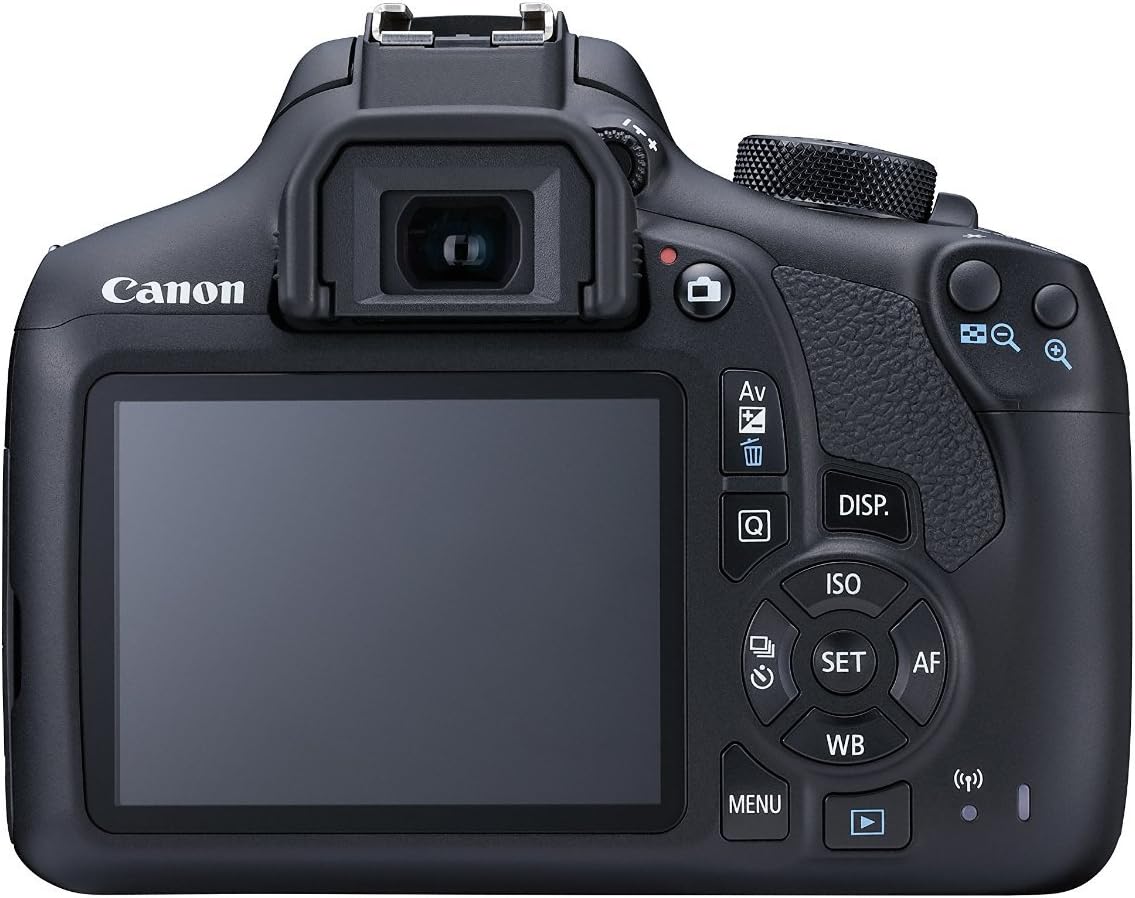
Figure 3: Rear view of the camera with the LCD screen and control layout.
3. Autofocus System
The camera features a 9-point autofocus system. In most shooting modes, the camera will automatically select the appropriate AF points. You can also manually select AF points in Creative Zone modes using the AF point selection button.
4. Wi-Fi and NFC Connectivity
The EOS 1300D is equipped with built-in Wi-Fi and NFC for easy wireless sharing of photos and videos between compatible devices. Refer to the camera's on-screen menu for detailed instructions on connecting to smartphones, tablets, or other Wi-Fi enabled devices.

Figure 4: Left side view of the camera, showing connectivity ports.

Figure 5: Right side view of the camera, highlighting the memory card slot and NFC logo.
Maintenance
1. Cleaning the Camera
Use a soft, lint-free cloth to clean the camera body. For the lens, use a lens brush to remove dust, then a lens cleaning cloth with a specialized lens cleaning solution if necessary. Avoid touching the lens surface directly with your fingers.
2. Battery Care
Always use genuine Canon batteries. Store batteries in a cool, dry place. If the camera will not be used for an extended period, remove the battery.
3. Storage
Store the camera in a dry, well-ventilated area, away from direct sunlight and extreme temperatures. Use a camera bag for protection during transport.
Troubleshooting
Common Issues and Solutions:
- Camera not powering on: Check if the battery is charged and correctly inserted.
- Images are blurry: Ensure the lens is clean, the autofocus is engaged, and the shutter speed is appropriate for the lighting conditions.
- Memory card error: Reinsert the memory card. If the issue persists, try formatting the card (this will erase all data) or use a different card.
- Wi-Fi/NFC connection issues: Ensure both devices have Wi-Fi/NFC enabled and are within range. Refer to the camera's connectivity settings.
Specifications
| Feature | Detail |
|---|---|
| Model Name | EOS 1300D |
| Photo Sensor Resolution | 18 MP |
| Photo Sensor Technology | CMOS |
| Image Stabilization | Optical |
| Optical Zoom | 3 x |
| Minimum Focal Length | 18 Millimeters |
| Maximum Focal Length | 88 Millimeters |
| ISO Range | 100-6400 (expandable to H: 12800) |
| Video Resolution | 1080p (Full HD) |
| Screen Size | 3 Inches |
| Connectivity Technology | Wi-Fi, NFC |
| Autofocus Points | 9 |
| Supported File Format | RAW, MP4 |
Warranty and Support
This renewed product comes with a 90-day limited warranty. For technical support or service inquiries, please refer to the official Canon support website or contact their customer service directly. Keep your purchase receipt as proof of purchase for warranty claims.


