
1. Introduction
Thank you for choosing the Devoko Electric Height Adjustable Desk. This manual provides comprehensive instructions for the assembly, operation, and maintenance of your new desk. Designed for a healthier work-life balance, this desk allows you to seamlessly switch between sitting and standing positions, promoting better posture and productivity.
Key features include a robust steel frame, a spacious 120x80cm desktop, integrated USB-A and USB-C charging ports, and a smart control panel with memory presets and anti-collision functionality.

The Devoko Electric Height Adjustable Desk, showcasing its clean design and ample workspace.
2. Safety Information
- Read all instructions carefully before assembly and use.
- Keep children and pets away from the desk during operation.
- Ensure all cables are properly routed and secured to prevent tripping hazards or damage.
- Do not overload the desk beyond its maximum weight capacity (70 kg dynamic, 80 kg static).
- Avoid placing liquids directly on the control panel or near electrical components.
- In case of malfunction, unplug the desk immediately and contact customer support.
- The desk is equipped with an anti-collision system. Do not obstruct its movement.
3. Package Contents
Please check that all components are present before beginning assembly:
- Desktop Panels (4 sections)
- Desk Legs (2)
- Crossbar/Frame Components
- Control Box
- Control Panel with USB Ports
- Power Adapter and Cable
- Cable Management Tray
- Assembly Hardware (screws, bolts, etc.)
- Assembly Tools (Allen wrench, screwdriver)
- User Manual
4. Assembly Instructions
Assembly is designed to be straightforward, typically taking around 30 minutes. All necessary tools are included.
Step-by-Step Guide:
- Unpack and Organize: Carefully unpack all components and lay them out on a clean, soft surface to prevent scratches. Identify each part using the provided diagram.
- Assemble the Frame: Attach the crossbar components to the desk legs using the provided hardware. Ensure all connections are secure.
- Attach Desktop Panels: Secure the four desktop panels to the assembled frame. The pre-drilled holes will guide you.
- Install Control Box and Panel: Mount the control box and the control panel to the underside of the desktop as indicated in the instructions.
- Connect Cables: Connect the motor cables from the legs to the control box, and then connect the control panel cable to the control box. Finally, connect the power adapter to the control box.
- Install Cable Management Tray: Attach the cable management tray to the underside of the desk to organize your power strips and cables.
- Final Checks: Double-check all screws and connections to ensure they are tight and secure.

The desk is designed for very easy installation, with assembly tools included.

The included cable management tray helps keep your workspace tidy.
5. Operation Guide
Your Devoko desk features an intelligent control panel for effortless height adjustment and convenient charging.
Control Panel Functions:
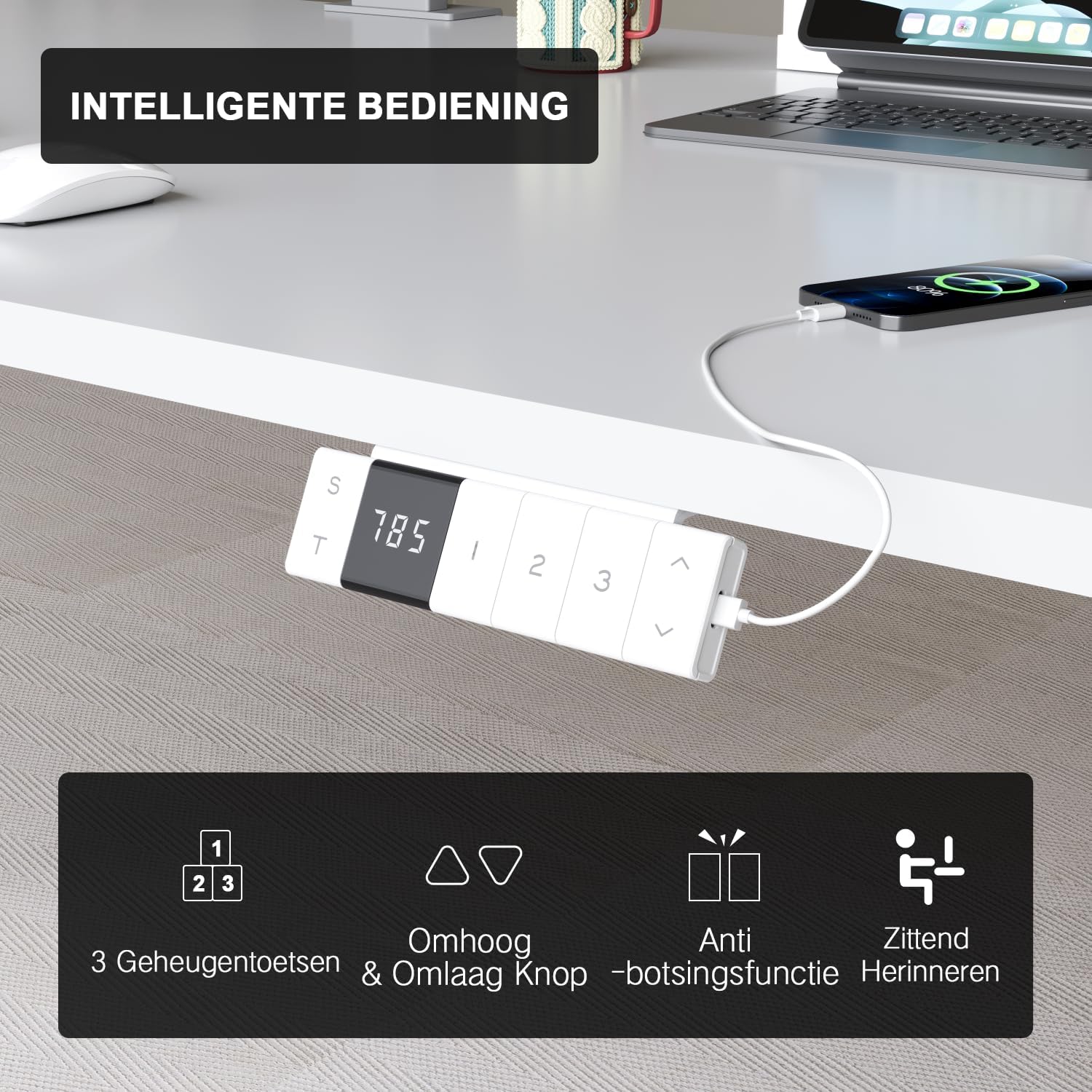
The intelligent control panel features a digital display, height adjustment buttons, memory presets, and USB charging ports.
- Up/Down Buttons (▲ / ▼): Press and hold to smoothly adjust the desk height. The desk moves at a speed of 20mm/s with operating noise less than 45dB.
- Memory Presets (1, 2, 3): Save your preferred sitting and standing heights. To set a preset: adjust the desk to the desired height, then press the 'S' button followed by the desired number (1, 2, or 3). The desk will automatically move to this height with a single press.
- USB-A & USB-C Charging Ports: Conveniently located on the control panel, these ports allow you to charge your devices directly from the desk, eliminating the need for extra wall adapters.
- Anti-Collision Function: The desk is equipped with a sensitive anti-collision system that detects obstacles during movement and automatically stops to prevent damage or injury.
- Sitting Reminder (T): The control panel may feature a timer function (indicated by 'T') to remind you to switch between sitting and standing positions for healthier work habits.

Easily switch between sitting mode (72 cm) and standing mode (118 cm) to optimize your comfort and health.
6. Maintenance
- Cleaning: Use a soft, damp cloth to wipe down the desktop and frame. Avoid abrasive cleaners or harsh chemicals that could damage the finish.
- Cable Management: Periodically check and reorganize cables to prevent tangles and ensure smooth operation.
- Fasteners: Occasionally check all screws and bolts to ensure they remain tight. Retighten if necessary.
- Motor Care: The motor is designed for durability and has been tested over 10,000 cycles. No special maintenance is required for the motor itself.
7. Troubleshooting
If you encounter any issues with your Devoko desk, please refer to the following common problems and solutions:
| Problem | Possible Cause | Solution |
|---|---|---|
| Desk does not move. | Power cable disconnected; Control box error. | Check power connection. Unplug and replug the desk for 10 seconds to reset the control box. |
| Desk moves unevenly or makes unusual noise. | Loose connections; Obstruction. | Check all assembly connections. Ensure no objects are obstructing the legs' movement. |
| Anti-collision system triggers too often. | Sensitivity setting; Obstruction. | Ensure no objects are near the desk's path. Refer to the full manual for anti-collision sensitivity adjustment if available. |
| USB ports not charging. | Desk not powered; Device compatibility. | Ensure the desk is plugged in and powered on. Check if the device requires specific charging protocols. |
If the problem persists after trying these solutions, please contact Devoko customer support for further assistance.
8. Specifications
| Feature | Detail |
|---|---|
| Brand | Devoko |
| Model Number | 0077B-1222 |
| Color | White |
| Desktop Dimensions (L x W) | 120 cm x 80 cm (47.2 x 31.5 inches) |
| Height Range | 72 cm to 118 cm (28.3 to 46.5 inches) |
| Material | FSC-certified particle board (desktop), Industrial-grade steel (frame) |
| Dynamic Load Capacity | 70 kg (154 lbs) |
| Static Load Capacity | 80 kg (176 lbs) |
| Lifting Speed | 20 mm/s |
| Noise Level | < 45 dB |
| Special Features | Electric height adjustment, Ergonomic design, Integrated USB-A & USB-C charging, 3-Function Memory, Anti-collision system, Mobile with wheels |
| Certifications | TÜV, CE |
| Product Weight | 24.5 kg (54 lbs) |

Desktop dimensions: 120cm x 80cm.

Key performance metrics: 70kg load capacity, 20mm/s speed, quiet operation, and anti-collision safety.
9. Warranty and Support
The Devoko Electric Height Adjustable Desk comes with a 5-year warranty, ensuring peace of mind regarding its durability and performance. This warranty covers manufacturing defects and motor malfunctions under normal use.
For technical support, warranty claims, or any questions not covered in this manual, please contact Devoko customer service through the retailer's platform or the official Devoko website. Please have your model number (0077B-1222) and purchase date ready when contacting support.


