
VILTROX JYC-03342
VILTROX AF 75mm f/1.2 XF Fuji X-Mount Lens Instruction Manual
Model: JYC-03342
Introduction
Thank you for purchasing the VILTROX AF 75mm f/1.2 XF lens. This high-performance APS-C prime lens is designed for Fujifilm X-Mount cameras, offering an ultra-large f/1.2 aperture for exceptional low-light performance and beautiful background blur. This manual provides detailed instructions for its proper use, setup, and maintenance to ensure optimal performance and longevity.
What's in the Box

This image displays all items included in the product packaging, ensuring you have received all necessary components.
- VILTROX AF 75mm f/1.2 XF Mount Lens
- Lotus-shaped Lens Hood
- Front Lens Cap
- Rear Lens Cap
- Carrying Bag
- User Manual
Product Features
- F1.2 Ultra-Large Aperture: The first VILTROX lens with an F1.2 ultra-large aperture, featuring 11 ultra-round aperture blades for natural and smooth bokeh, creating a shallow depth of field.
- Medium Telephoto Prime Lens: A 75mm focal length (equivalent to approximately 115mm on APS-C) suitable for various scenes including portraits, landscapes, and event photography.
- Excellent Autofocus Performance: Utilizes an STM + lead screw motor for accurate and responsive autofocus, supporting eye-control and animal focus.
- AF/MF Focus Switch: A dedicated switch on the lens body allows for convenient toggling between autofocus and manual focus modes.
- Automatic/Manual Aperture Adjustment: Offers flexibility with an aperture knob for automatic adjustment (A mode) and a manual aperture ring for precise control.
- Advanced Optical Design: Composed of 16 elements in 11 groups, including 3 ED (Extra-low Dispersion) glass elements and 4 high refractive index glass elements to correct dispersion and reduce aberrations.
- Nano-Coating Technology: Reduces flare and ghosting, ensuring sharp images even in backlit conditions.
Setup
Attaching the Lens

This image highlights the lens mount and the AF/MF switch, crucial for attaching the lens and selecting focus mode.
Align the red dot on the lens barrel with the corresponding mark on your Fujifilm X-Mount camera body. Rotate the lens clockwise until it clicks into place. Ensure the lens is securely mounted before use.
Attaching the Lens Hood
Align the lens hood with the front of the lens, matching the alignment marks. Rotate the hood clockwise until it locks securely. The lotus-shaped hood helps to prevent stray light from entering the lens and causing flare.
Removing Lens Caps
Remove the front and rear lens caps before attaching the lens to the camera or beginning photography. Always replace them when the lens is not in use to protect the optical elements.
Operating the Lens
Focus Mode Selection (AF/MF)
This image clearly shows the AF/MF switch located on the side of the lens barrel, allowing users to easily toggle between autofocus and manual focus.
Locate the AF/MF switch on the side of the lens barrel. Slide the switch to 'AF' for autofocus or 'MF' for manual focus. In AF mode, the lens will automatically focus when the camera's shutter button is half-pressed. In MF mode, rotate the focus ring on the lens to adjust focus manually.
Aperture Adjustment

This image provides a detailed view of the aperture ring and its f-stop markings, from f/1.2 to f/16, along with the 'A' setting for automatic aperture control.
The lens features an aperture ring with markings from F1.2 to F16, and an 'A' setting.
- Automatic Aperture: Turn the aperture ring to the 'A' position. The camera will then control the aperture automatically or allow you to set it via the camera's controls.
- Manual Aperture: Rotate the aperture ring to your desired F-stop (e.g., F1.2, F2.8, F8). This allows for direct, tactile control over depth of field and exposure.
Firmware Updates
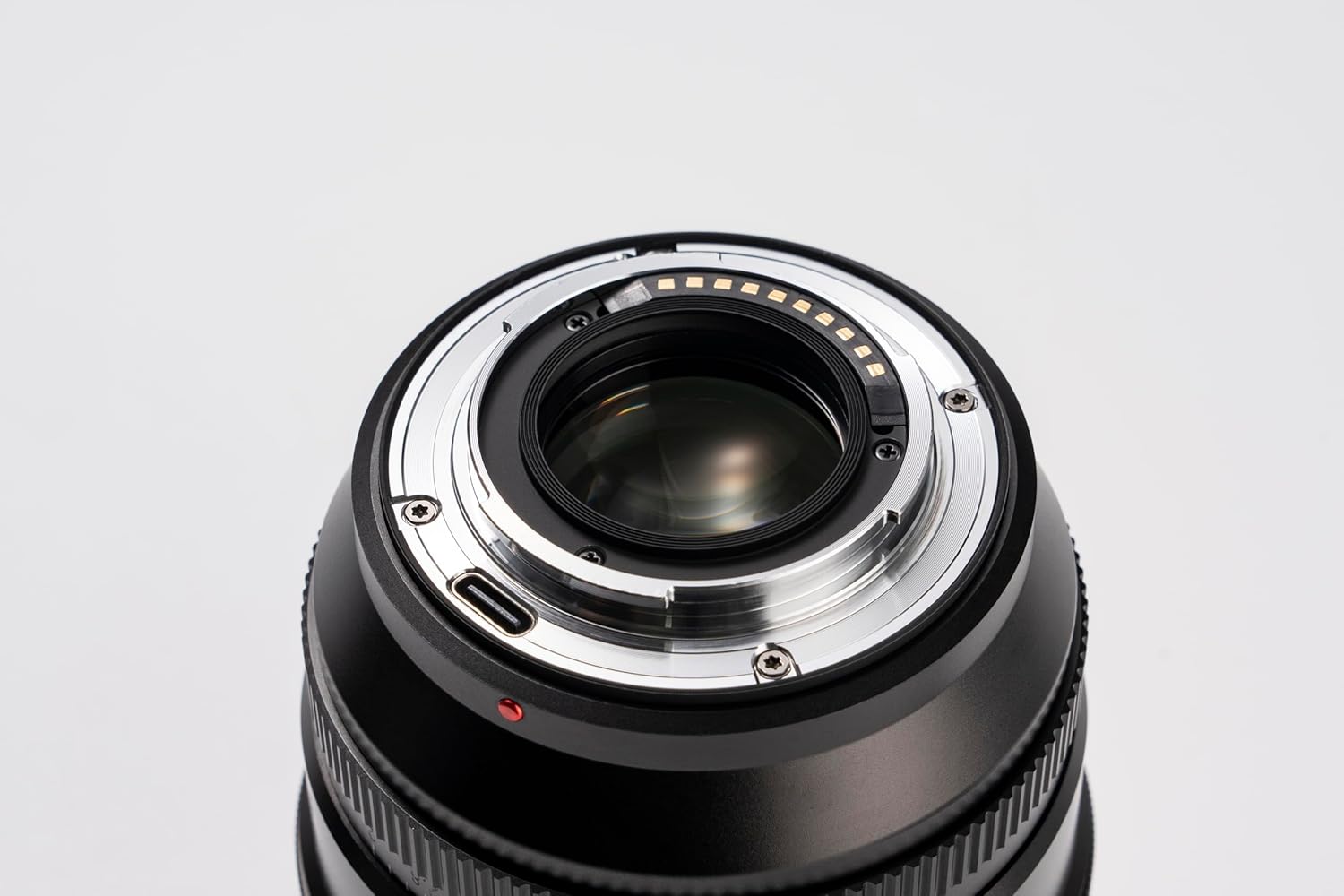
This image shows the rear of the lens, including the electronic contacts for communication with the camera and the USB-C port for firmware updates.
The lens is equipped with a USB-C port for firmware updates. Visit the official VILTROX website for the latest firmware and instructions on how to update your lens to ensure optimal performance and compatibility with new camera models.
Maintenance
- Cleaning the Lens: Use a soft, lint-free microfiber cloth specifically designed for optics to clean the lens elements. For stubborn smudges, use a small amount of lens cleaning solution applied to the cloth, not directly to the lens. Avoid touching the glass surfaces with your fingers.
- Cleaning the Lens Body: Wipe the lens body with a dry, soft cloth. Do not use organic solvents such as paint thinner or benzene.
- Storage: When not in use, store the lens with both front and rear caps attached in a cool, dry place, away from direct sunlight and high humidity. Consider using a desiccant to prevent mold growth, especially in humid environments.
- Avoid Impact: Protect the lens from drops and impacts, which can damage the optical elements or internal mechanisms.
- Temperature Extremes: Avoid exposing the lens to extreme temperatures, both hot and cold, for prolonged periods.
Troubleshooting
| Problem | Possible Cause | Solution |
|---|---|---|
| Lens not recognized by camera | Improperly mounted lens; dirty contacts; outdated firmware. | Ensure lens is securely mounted. Clean lens and camera contacts with a clean, dry cloth. Check VILTROX website for firmware updates. |
| Autofocus is slow or inaccurate | Low light conditions; subject too close/far; dirty contacts; outdated firmware. | Ensure adequate lighting. Check focus range (0.88m to ∞). Clean contacts. Update firmware. Try manual focus if AF struggles. |
| Images are blurry or soft | Incorrect focus; camera shake; dirty lens elements. | Verify focus. Use a faster shutter speed or tripod. Clean lens elements. |
| Aperture ring not responding | Ring set to 'A' mode; mechanical issue. | Ensure aperture ring is set to a specific F-stop if manual control is desired. If issue persists, contact support. |
Specifications
| Feature | Detail |
|---|---|
| Model | AF 75mm F1.2 XF |
| Lens Mount | Fujifilm X-Mount |
| Sensor Format | APS-C |
| Focal Length | 75mm (equivalent to approx. 115mm on APS-C) |
| Aperture Range | F1.2 - F16 |
| Number of Aperture Blades | 11 (ultra-round) |
| Optical Structure | 16 elements in 11 groups (including 3 ED, 4 high refractive index) |
| Focus Mode | AF (inner AF) / MF |
| Drive System | STM + lead screw motor |
| Viewing Angle | 21.35° |
| Filter Diameter | φ77mm |
| Focus Range | 0.88m to ∞ |
| Maximum Magnification | 0.1X |
| Product Dimensions | φ87 x 101 mm (approx. 3.42 x 3.97 inches) |
| Product Weight | Approx. 670g (1.48 lbs) |
Warranty and Support
VILTROX provides a limited warranty for this product. Please refer to the warranty card included in your product packaging for specific terms and conditions. For technical support, firmware updates, or service inquiries, please visit the official VILTROX website or contact their customer service department. Keep your purchase receipt as proof of purchase for warranty claims.
Official VILTROX Store: VILTROX Official Store on Amazon
Related documentsJYC-03342


Ask a question about this manual
Ask about setup, troubleshooting, compatibility, parts, safety, or missing instructions. Manuals+ will review the question and use this page’s manual context to help answer it.