
1. Introduction and Overview
The KKnoon ATU-10-0A is a compact and efficient shortwave automatic antenna tuner designed for amateur radio enthusiasts. This device functions as both a shortwave power meter and a standing wave meter, providing essential information for optimizing antenna performance. It operates across a wide frequency band from 1.8 MHz to 30 MHz, making it suitable for various shortwave applications.
The tuner features a robust aluminum alloy housing, ensuring durability and stable performance. With a minimum starting tuning power of 0.2W and a maximum measurable power of 20W, it is particularly well-suited for QRP (low power) operations. The built-in 1200mAh lithium battery offers portability and convenience, rechargeable via a standard Type-C cable.

Image 1.1: Front view of the KKnoon ATU-10-0A Shortwave Automatic Antenna Tuner, showcasing its compact design and display.
2. Safety Information
- Do not exceed the maximum input power of 20W. Exceeding this limit can damage the device.
- Ensure proper antenna and transceiver connections before powering on the device. Incorrect connections may lead to equipment damage or poor performance.
- Keep the device away from water, moisture, and extreme temperatures.
- Do not attempt to open or modify the device. Refer all servicing to qualified personnel.
- Use only the specified Type-C cable for charging the internal battery.
3. Package Contents
Verify that all items are present in the package:
- 1 x KKnoon ATU-10-0A Automatic Antenna Tuner
- 1 x USB Type-C Charging Cable
4. Product Features
- Dual Functionality: Operates as both a shortwave power meter and a standing wave meter.
- Wide Frequency Range: Effective tuning from 1.8 MHz to 30 MHz.
- Low Power Activation: Minimum starting tuning power of 0.2W, ideal for QRP transceivers.
- High Power Handling: Maximum measurable power of 20W.
- Durable Construction: Housing made of wear-resistant aluminum alloy for stable and reliable performance.
- Built-in Battery: Integrated 3.7V, 1200mAh lithium battery for portable use.
- USB Type-C Charging: Convenient recharging via a Type-C cable.
- LC Combination Reaction: Utilizes a 7-group LC combination for efficient tuning.

Image 4.1: Key features of the ATU-10-0A, including its built-in battery, digital display, and robust construction.
5. Setup
5.1 Initial Charging
Before first use, fully charge the internal 1200mAh lithium battery. Connect the provided USB Type-C cable to the 5V@1A TypeC port on the front panel of the tuner and to a suitable USB power source (e.g., computer USB port, wall adapter). The Charge indicator LED will illuminate during charging and typically change color or turn off when fully charged.
5.2 Connecting to Transceiver and Antenna
Refer to Image 5.1 for connection points.
- Connect your shortwave transceiver's antenna output to the TRX port on the rear panel of the ATU-10-0A using a suitable coaxial cable.
- Connect your antenna to the ANT port on the rear panel of the ATU-10-0A using a suitable coaxial cable.
- Ensure all connections are secure to prevent signal loss or damage.

Image 5.1: Front and rear panel layout, illustrating the ANT, TRX, TUNE button, Charge indicator, and Type-C port.
6. Operating Instructions
6.1 Powering On/Off
Locate the red toggle switch on the front panel. Flip the switch to the 'ON' position to power on the tuner. The display will illuminate. Flip the switch to the 'OFF' position to power off the tuner.
6.2 Automatic Tuning
The ATU-10-0A is designed for automatic tuning. When powered on and connected, it will automatically attempt to tune the antenna for the lowest SWR (Standing Wave Ratio) when RF power is applied from the transceiver. The minimum power required to initiate tuning is 0.2W.
6.3 Manual Tuning / Reset
- To initiate a manual tuning cycle, long-press the blue 'TUNE' button on the front panel. The display will show "TUNE" or similar indication as it performs a tuning sweep.
- To reset the tuner to its baseline settings, short-press the blue 'TUNE' button. This can be useful if you change bands or antennas and want to clear previous tuning parameters.
6.4 Display Readings
The integrated display provides real-time information:
- PWR: Indicates the current power output in Watts.
- L: Inductance value in microhenries (uH).
- SWR: Standing Wave Ratio, a measure of antenna match. Aim for values close to 1.0.
- C: Capacitance value in picofarads (pF).

Image 6.1: Close-up of the tuner's display, showing power, inductance, SWR, and capacitance readings.
7. Maintenance
7.1 Cleaning
Wipe the exterior of the device with a soft, dry cloth. Do not use liquid cleaners or solvents, as they may damage the finish or internal components.
7.2 Battery Care
To prolong battery life, avoid fully discharging the battery frequently. Recharge the device regularly, especially if it will be stored for an extended period. Store the device in a cool, dry place.
7.3 Storage
When not in use, store the ATU-10-0A in a clean, dry environment, away from direct sunlight and extreme temperatures.
8. Troubleshooting
- Device does not power on: Ensure the battery is charged. Connect the Type-C cable and attempt to power on while charging. Verify the power switch is in the 'ON' position.
- Unable to tune / High SWR: Check all coaxial cable connections between the transceiver, tuner, and antenna. Ensure the antenna is suitable for the operating frequency. Try a manual tuning cycle by long-pressing the 'TUNE' button. Ensure your transceiver is outputting at least 0.2W for automatic tuning to initiate.
- Inconsistent readings: Verify that all connections are secure and free from corrosion. Ensure no external interference is affecting the device.
- LED stays on/blinks after power off: This behavior has been observed by some users. If the device functions normally otherwise, it may not indicate a fault. If it affects operation or battery life, contact customer support.
9. Specifications
| Feature | Specification |
|---|---|
| Model | ATU-10-0A |
| Material | Aluminum Alloy + Printed Circuit Board |
| Working Frequency | 1.8 - 30 MHz |
| Minimum Tuning Power (T-PER) | 0.2W |
| Maximum Measurable Power | 20W |
| Battery | 1 x 3.7V, 1200mAh Lithium Battery (included) |
| Charging Port | USB Type-C (5V@1A) |
| Item Dimensions (L x W x H) | 167 x 90 x 38 mm (6.57 x 3.54 x 1.50 inches) |
| Item Weight | 371g (13.09 ounces) |
| Package Dimensions (L x W x H) | 182 x 120 x 62 mm (7.17 x 4.72 x 2.44 inches) |
| Package Weight | 437g (15.41 ounces) |
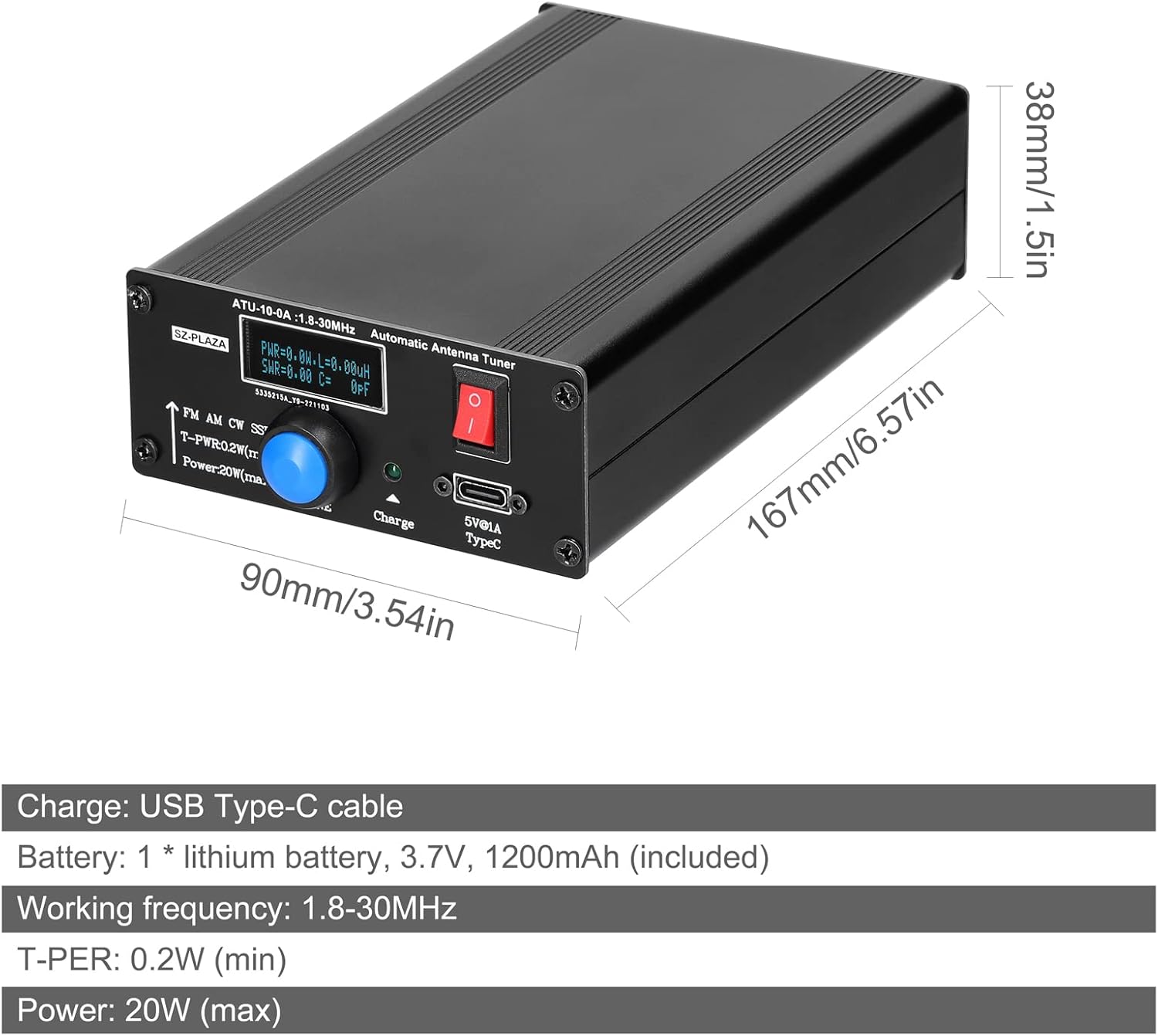
Image 9.1: Physical dimensions of the ATU-10-0A tuner.
10. Warranty and Support
10.1 Warranty Information
Specific warranty details for the KKnoon ATU-10-0A are not provided in this manual. Please refer to the product packaging, your purchase receipt, or contact the seller/manufacturer directly for information regarding warranty coverage and terms.
10.2 Customer Support
For technical assistance, troubleshooting not covered in this manual, or warranty inquiries, please contact KKnoon customer support through their official website or the retailer from whom the product was purchased. Keep your purchase details readily available when contacting support.