
Tribesigns HOGA-U0002
Tribesigns Writing Computer Desk Instruction Manual
Model: HOGA-U0002
1. Introduction
Thank you for choosing the Tribesigns Writing Computer Desk. This manual provides detailed instructions for the assembly, operation, and maintenance of your new desk. Designed for both functionality and aesthetic appeal, this 55-inch heavy-duty study desk features a modern design with Z-shaped metal legs and a spacious desktop, ideal for home offices, studies, or bedrooms. Please read this manual thoroughly before beginning assembly or use to ensure safe and proper setup.

Image: The Tribesigns Writing Computer Desk, showcasing its grey desktop and white Z-shaped metal legs, set up in a modern home office environment with a laptop and office chair.
2. Safety Information
- Always assemble the desk on a soft, clean surface (e.g., a rug or blanket) to prevent scratches or damage to the desktop and flooring.
- Ensure all bolts and fasteners are securely tightened before using the desk. Periodically check and re-tighten as necessary.
- Do not overload the desk. The maximum weight recommendation is 149 kilograms (approximately 330 lbs).
- Keep small parts and packaging materials away from children and pets to prevent choking hazards.
- Avoid placing hot items directly on the desktop. Use coasters or protective pads.
- Do not stand or sit on the desk.
3. Package Contents
Before beginning assembly, verify that all components listed below are present and undamaged. If any parts are missing or damaged, please contact customer support.
- Desktop Panel (Engineered Wood)
- Z-Shaped Metal Legs (2 pieces)
- Frame Bar (1 piece)
- Hardware Pack (bolts, adjustable foot-pads, Allen key)
- Assembly Instructions Manual
4. Setup and Assembly
Assembly of the Tribesigns Writing Computer Desk is designed to be straightforward and can typically be completed in under 15 minutes. It is recommended that two people assemble the desk for ease and safety.
- Prepare the Workspace: Clear an open area and lay down a soft surface, such as a rug or blanket, to protect the desktop and your floor during assembly.
- Position the Desktop: Place the desktop panel upside down on the prepared soft surface.
- Attach the Legs: Align the two Z-shaped metal legs with the pre-drilled holes on the underside of the desktop. Ensure the legs are oriented correctly as shown in the diagram below.
- Secure the Frame Bar: Attach the frame bar between the two legs, connecting them securely.
- Insert and Tighten Bolts: Use the provided bolts and Allen key to secure the legs and frame bar to the desktop. All bolts are the same size, simplifying the process. Tighten all bolts firmly, but do not overtighten. Note: Some screw holes may have paint, requiring a little extra effort to insert the screws initially.
- Install Adjustable Foot Pads: Screw the adjustable foot pads into the bottom of each metal leg. These pads help maintain stability on uneven floors and prevent scratching.
- Flip the Desk: With assistance, carefully flip the assembled desk upright and place it in its desired location.
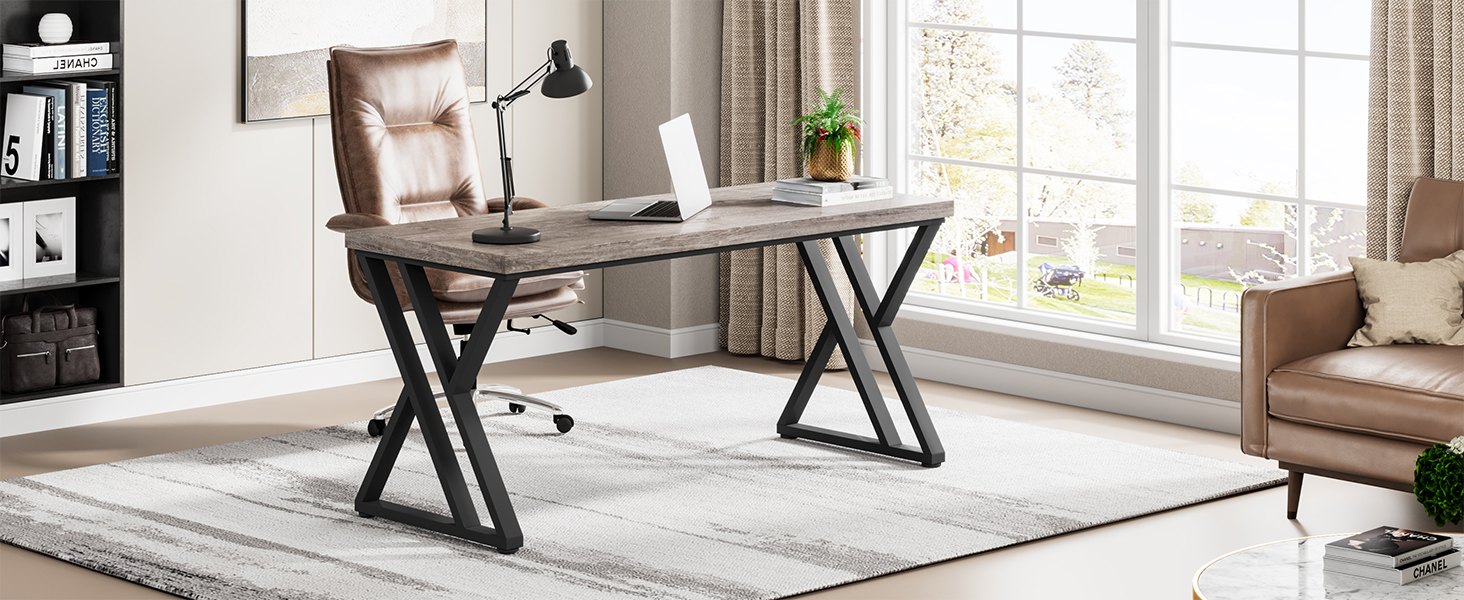
Image: An exploded view diagram illustrating the simple assembly process of the Tribesigns desk, showing the desktop, two Z-shaped legs, and the connecting frame bar.

Image: A detailed view of the adjustable foot pads on the Z-shaped metal leg, designed to protect floors and ensure stability.
5. Operating Instructions
The Tribesigns Writing Computer Desk is designed for versatile use in various settings. Its spacious desktop provides ample room for a laptop, monitor, books, office supplies, and paperwork.
- Placement: Position the desk in a stable, level area. Avoid placing it in direct sunlight or near heat sources to prevent material degradation.
- Load Distribution: Distribute weight evenly across the desktop to maintain stability and prevent stress on any single point.
- Leg Room: The design ensures ample space underneath for various office chairs, allowing for comfortable seating and leg movement.

Image: The Tribesigns desk in use, featuring a computer monitor, keyboard, and other office accessories, highlighting its functional workspace.
6. Maintenance
To ensure the longevity and appearance of your Tribesigns desk, follow these simple maintenance guidelines:
- Cleaning: Wipe the desktop and metal frame with a dry, soft cloth. For stubborn marks, a slightly damp cloth can be used, followed immediately by a dry cloth. Avoid harsh chemicals or abrasive cleaners.
- Spills: The desktop is designed to be water-resistant. In case of spills, wipe them immediately to prevent moisture absorption.
- Scratch Resistance: While the desk is scratch-resistant, avoid dragging sharp or heavy objects across the surface to maintain its finish.
- Fastener Check: Periodically check all bolts and connections to ensure they remain tight. Re-tighten if any looseness is detected.

Image: A close-up of the desk surface demonstrating its water-resistant and easy-to-clean properties, with water droplets visible on the grey wood finish.
7. Troubleshooting
If you encounter any issues with your desk, please refer to the following common troubleshooting tips:
| Problem | Possible Cause | Solution |
|---|---|---|
| Desk wobbles or is unstable. | Uneven floor or loose fasteners. | Adjust the foot pads on the bottom of the legs until the desk is level. Check and tighten all assembly bolts. |
| Scratches on the desktop. | Sharp objects or abrasive cleaning. | While the surface is scratch-resistant, avoid dragging items. Use protective mats for heavy or sharp objects. |
| Difficulty during assembly. | Paint in screw holes or incorrect alignment. | Apply slight pressure when inserting screws into painted holes. Ensure components are correctly aligned before tightening. Refer to the assembly diagram. |
8. Specifications
| Feature | Detail |
|---|---|
| Brand | Tribesigns |
| Model Number | HOGA-U0002 |
| Product Dimensions (D x W x H) | 23.6"D x 55.12"W x 29.53"H |
| Color | Grey |
| Style | Country Rustic |
| Base Material | Metal |
| Top Material Type | Engineered Wood (E1 High Density Board) |
| Finish Type | Grey Wood |
| Special Feature | Scratch Resistant, Adjustable Leg Pads |
| Maximum Weight Recommendation | 149 Kilograms (330 lbs) |
| Recommended Number of People for Assembly | 2 |
| Product Care Instructions | Wipe with Dry Cloth |

Image: A diagram illustrating the key dimensions of the Tribesigns Writing Computer Desk, including height, width, and depth.

Image: A visual comparison highlighting the superior quality of E1 High Density Board used in the desk's construction versus ordinary particle board.
9. Warranty and Support
The Tribesigns Writing Computer Desk comes with a Limited Warranty. For specific details regarding warranty coverage, please refer to the warranty information provided with your purchase or contact Tribesigns customer support directly.
If you have any questions, require assistance with assembly, or need to report missing/damaged parts, please contact Tribesigns customer service. Contact information can typically be found on the product packaging or on the official Tribesigns website.
Manufacturer: Tribesigns
Related documentsHOGA-U0002


Ask a question about this manual
Ask about setup, troubleshooting, compatibility, parts, safety, or missing instructions. Manuals+ will review the question and use this page’s manual context to help answer it.