
Product Overview
This manual provides detailed instructions for the assembly, operation, and maintenance of your ONKRON Motorized TV Stand, model TS1991E. This electric TV stand is designed to support 50-100 inch displays weighing up to 265 lbs, featuring VESA patterns from 200x200 to 1000x600 mm. It offers smooth motorized height adjustment, a 5-degree tilt option, and mobile functionality with lockable wheels, making it suitable for various environments including business, education, events, and home use.
The stand includes a height-adjustable storage shelf and an additional webcam shelf, enhancing its utility. Its robust construction ensures stability and durability.
Important Safety Information
- Weight Capacity: Do not exceed the maximum load capacity of 265 lbs for TVs or 176.3 lbs for interactive panels. Overloading can cause instability and damage.
- Screen Size: Ensure your display is within the recommended 50-100 inch size range.
- VESA Compatibility: Verify your TV's VESA mounting pattern is compatible (200x200 to 1000x600 mm).
- Assembly: Follow all assembly instructions carefully. Improper assembly can lead to product failure or injury.
- Electrical Safety: Ensure the power cord is not pinched or damaged. Do not operate the stand with a damaged cord or plug. Keep liquids away from electrical components.
- Movement: When moving the stand, ensure the TV is securely mounted and the path is clear. Lock the wheels once the stand is in its desired position.
- Children and Pets: Keep children and pets away from the stand during operation to prevent accidents.
- Maintenance: Regularly inspect the stand for loose parts or damage. Do not attempt to repair electrical components yourself.
Package Contents
Before beginning assembly, please verify that all components listed below are present and undamaged. If any parts are missing or damaged, contact ONKRON customer support.

Image: All components and hardware for the ONKRON TS1991E Motorized TV Stand laid out for inspection.
- Base components
- Vertical columns with integrated motors
- TV mounting bracket and arms
- Adjustable AV shelf
- Webcam shelf
- Remote control
- Control panel
- Caster wheels (with locking mechanism)
- Power strip holder
- All necessary fasteners and tools for assembly
Assembly Instructions
Follow these steps carefully to assemble your ONKRON Motorized TV Stand. It is recommended to have two people for assembly due to the size and weight of some components.
- Unpack and Organize: Carefully remove all components from the packaging. Lay them out on a clean, flat surface and compare them with the 'Package Contents' section to ensure all parts are present.
- Assemble the Base: Attach the support legs to the central base frame using the provided bolts and tools. Ensure all connections are secure.
- Install Caster Wheels: Securely attach the caster wheels to the bottom of the base legs. Ensure the locking mechanisms are functional.
- Attach Vertical Columns: Mount the two vertical columns, which house the motorized lift mechanism, to the assembled base. Connect any internal wiring as instructed in the detailed diagram (refer to the included paper manual for specific wiring steps).
- Install TV Mounting Bracket: Secure the TV mounting bracket to the top of the vertical columns. This bracket will hold your television.
- Mount TV Arms to Television: Attach the TV mounting arms to the back of your television using the appropriate VESA screws. Ensure the arms are centered and securely fastened.
- Hang Television: Carefully lift your television and hook the TV mounting arms onto the bracket installed on the stand. Secure the TV in place with the safety screws or clips provided.
- Install Shelves: Attach the adjustable AV shelf and the webcam shelf to the desired heights on the vertical columns.
- Connect Power: Plug the stand's power cord into a grounded electrical outlet.

Image: Rear view of the assembled ONKRON Motorized TV Stand, showing the mounting bracket and column structure.
Operating Instructions
Height Adjustment
The ONKRON TS1991E features a motorized lift system for effortless height adjustment. You can control the height using the included remote control or the integrated control panel on the stand.
- Remote Control: Use the 'Up' and 'Down' arrows on the remote to raise or lower the TV. The stand offers a height adjustment range from 44.5 inches to 63 inches.
- Memory Presets: The control panel allows you to save up to 4 preferred height settings. To save a height, adjust the stand to the desired position, then press and hold one of the numbered preset buttons (1, 2, 3, or 4) until you hear a beep or see a confirmation on the display. To recall a saved height, simply press the corresponding numbered button.
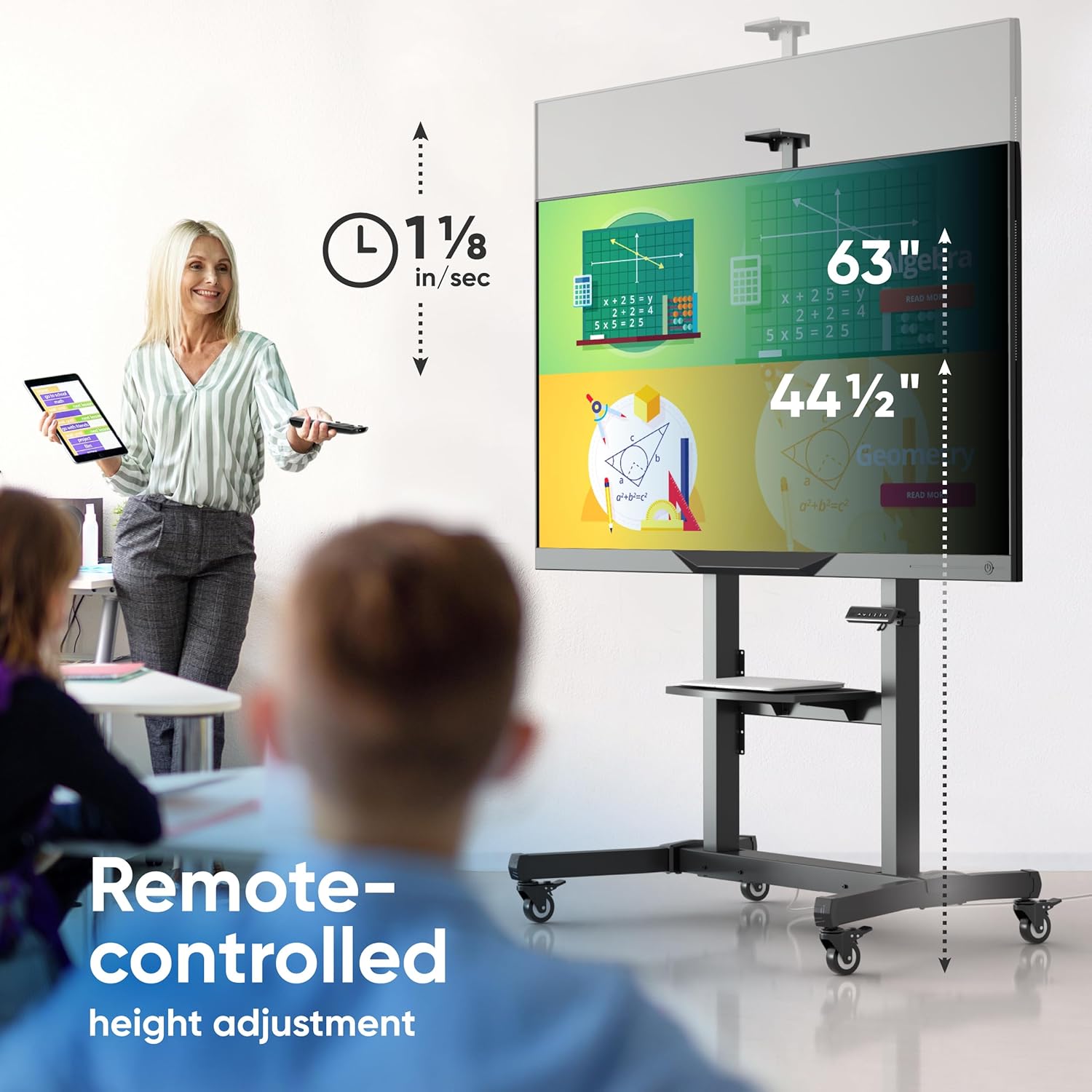
Image: Remote control being used to adjust the height of the TV stand, illustrating the adjustable height range.

Image: Close-up of the integrated control panel with height adjustment buttons and memory presets.
Tilt Adjustment
The TV mounting bracket allows for a manual tilt adjustment of +/- 5 degrees. This feature helps optimize viewing angles and reduce glare.
- To adjust the tilt, loosen the tilt locking knobs on the sides of the TV mounting arms.
- Carefully tilt the TV to the desired angle (up to 5 degrees up or down).
- Tighten the tilt locking knobs to secure the TV in position.

Image: A person demonstrating the manual tilt adjustment of the TV screen on the stand.
Mobility and Stability
The stand is equipped with smooth-running caster wheels for easy relocation. Each wheel includes a locking mechanism to ensure stability when the stand is stationary.
- To move the stand, unlock all caster wheels.
- Carefully push the stand to its new location.
- Once in position, engage the locking mechanism on all wheels to prevent unintended movement.
Image: Close-up view of the maneuverable wheels with locking system on the TV stand.
Accessory Shelves
The stand includes an adjustable AV tray and a webcam shelf for additional equipment.
- AV Tray: The main shelf can be adjusted to various heights along the vertical columns to accommodate laptops, media players, or other accessories. It supports up to 11 lbs.
- Webcam Shelf: A dedicated shelf is provided at the top for mounting a webcam, ideal for video conferencing.

Image: The adjustable AV shelf and webcam shelf providing additional storage space for accessories.
Product Video
Video: An official ONKRON promotional video demonstrating the features and operation of the TS1991E Motorized TV Stand, including height adjustment and mobility.
Maintenance
- Cleaning: Wipe the stand with a soft, dry cloth. For stubborn marks, a slightly damp cloth can be used, followed by immediate drying. Avoid abrasive cleaners or solvents.
- Inspection: Periodically check all bolts and fasteners to ensure they are tight. Re-tighten if necessary.
- Cable Management: Ensure all cables are neatly routed and not pinched by moving parts.
- Motor Care: The motorized components are designed for long-term use and generally require no special maintenance. Avoid obstructing the lift mechanism during operation.
Troubleshooting
- Stand Not Moving:
- Check if the power cord is securely plugged into both the stand and the wall outlet.
- Ensure the power outlet is functional.
- Verify that the remote control batteries are not depleted.
- If the stand has an overload protection feature, it might have been triggered. Unplug the stand for 10 minutes, then plug it back in.
- Remote Control Not Responding:
- Replace the remote control batteries.
- Ensure there are no obstructions between the remote and the stand's receiver.
- TV Appears Unstable:
- Ensure all mounting bolts for the TV and the stand's structure are securely tightened.
- Verify that the TV's weight and VESA pattern are within the stand's specifications.
- Make sure the caster wheels are locked when the stand is stationary.
- Unusual Noises During Operation:
- Slight motor noise is normal. If the noise is loud or grinding, discontinue use and contact customer support.
- Check for any obstructions in the lift mechanism.
If you encounter issues not covered here, please contact ONKRON customer support for assistance.
Specifications
- Model: TS1991E
- Screen Size Compatibility: 50 - 100 inches
- Maximum Load Capacity: 265 lbs (for TVs), 176.3 lbs (for interactive panels)
- VESA Compatibility: 200x200 mm to 1000x600 mm
- Height Adjustment Range: 44.5 inches to 63 inches
- Tilt Angle: +/- 5 degrees
- Material: Alloy Steel
- Item Weight: 77 lbs
- Adjustable AV Shelf Load: Up to 11 lbs
- Color: Black

Image: Visual representation of VESA compatibility, screen size range, and weight limits.

Image: Detailed dimensions of the ONKRON Motorized TV Stand.
Warranty and Support
ONKRON motorized TV stands undergo multi-stage quality control for long-term reliability. For any questions regarding your ONKRON TS1991E Motorized TV Stand, including assembly, operation, or troubleshooting, please contact ONKRON customer support. Our team is ready to assist you.
For more information and support, please visit the official ONKRON website or refer to the contact details provided with your product packaging.