
Ctronics 710-3MPB
Ctronics 2K 3MP WiFi Indoor PTZ Security Camera (Model 710-3MPB)
Instruction Manual
Introduction
This manual provides essential information for the safe and effective use of your Ctronics 2K 3MP WiFi Indoor PTZ Security Camera, Model 710-3MPB. Please read these instructions carefully before installation and operation. Keep this manual for future reference.
Product Overview
The Ctronics 2K 3MP WiFi Indoor PTZ Security Camera offers advanced surveillance features for your home or office. It provides high-resolution video, comprehensive coverage, intelligent detection, and two-way communication.

Figure 1: Ctronics 2K 3MP WiFi Indoor PTZ Security Camera (Model 710-3MPB)
Key Features
- 2K 3MP Resolution with 360° Coverage: Captures clear video with 2K resolution. Features 355° horizontal and 120° vertical rotation for complete area coverage without blind spots.
- Human/Motion Detection, Auto Tracking, and Built-in Alarm: Detects human shapes and general motion. Automatically tracks detected subjects with 4X digital zoom. Activates an alarm based on detection settings.
- Infrared Night Vision and Two-Way Audio: Provides clear night vision up to 20 meters using 8 infrared LEDs. Integrated microphone and speaker allow for real-time two-way communication.
- Superior 2.4 GHz Wi-Fi Connection and Custom Presets: Operates on 2.4 GHz Wi-Fi with a 5 DB antenna for stable connectivity. Supports up to 8 preset points for quick monitoring of frequent areas.
- Optional Cloud Storage and 24/7 Local Storage: Supports local storage via a MicroSD card (up to 128GB) for continuous 24/7 recording. Cloud storage options are also available for alarm video uploads.
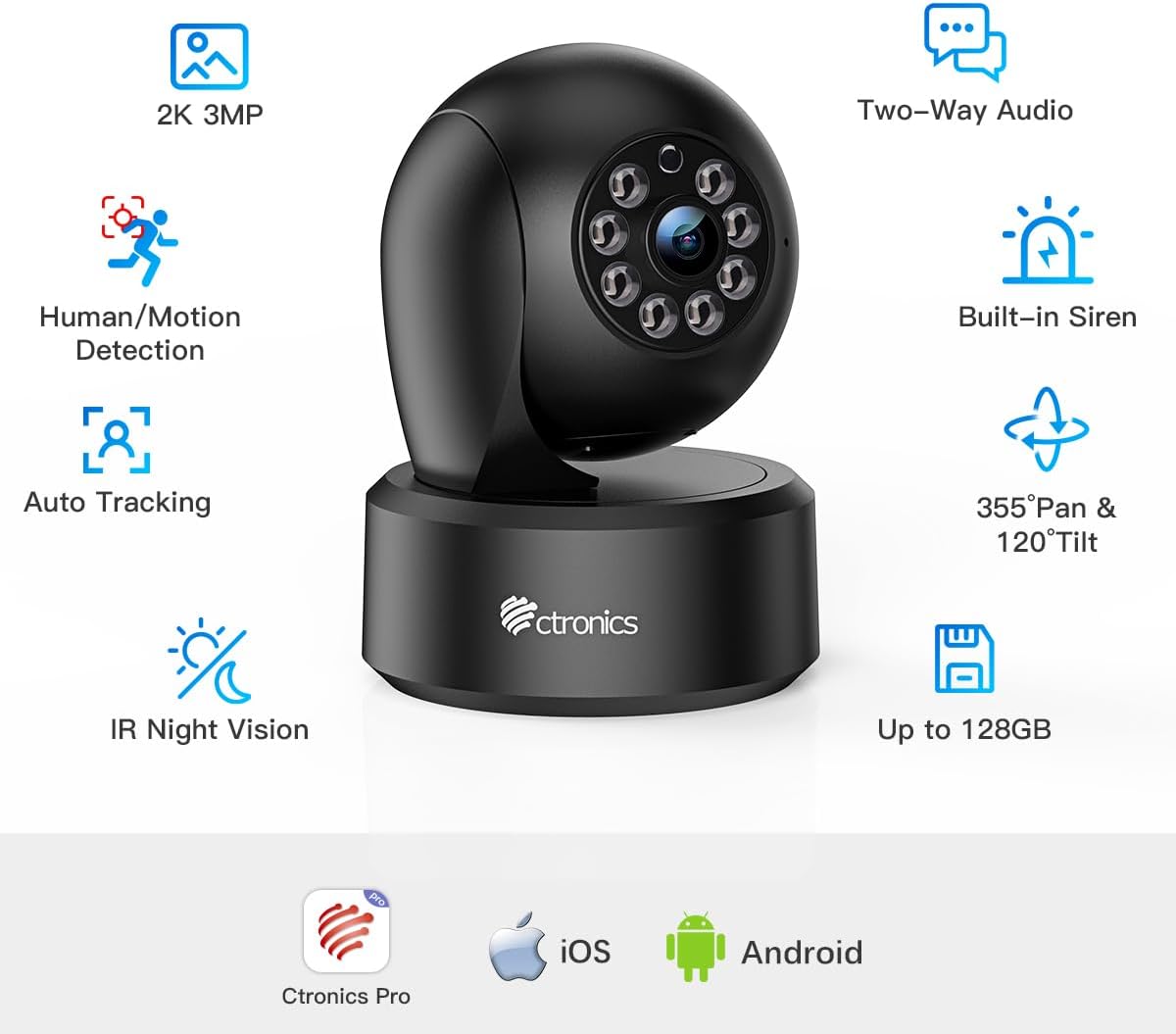
Figure 2: Overview of Ctronics Camera Features
Setup Guide
Follow these steps to set up your Ctronics security camera:
1. Insert MicroSD Card (Optional)
If you plan to use local storage, insert a MicroSD card (up to 128GB, not included) into the camera's designated slot. Gently push the card until it clicks into place.

Figure 3: MicroSD Card Insertion
2. Power On the Camera
Connect the camera to a power source using the provided power adapter. The camera will initiate its startup sequence, which may include a self-test rotation. Wait for the camera to complete its initialization.
3. Download and Install the Ctronics Pro App
Download the "Ctronics Pro" app from your smartphone's app store (iOS or Android). Install the app and create an account if you don't already have one.

Figure 4: Ctronics Pro App Icon
4. Connect to Wi-Fi and Add Device
Open the Ctronics Pro app. Follow the in-app instructions to add your new camera. This typically involves selecting "Add Device," confirming the camera is powered on, and then scanning the QR code located on the camera's body. Ensure your smartphone is connected to a 2.4 GHz Wi-Fi network, as the camera only supports this frequency. Enter your Wi-Fi password when prompted to connect the camera to your network.

Figure 5: App-based Setup Process
After successful connection, you will be prompted to set a new password for the camera for security purposes. It is recommended to use a strong password with a combination of uppercase and lowercase letters, numbers, and symbols.
Operating Your Camera
Pan/Tilt Control and Presets
Use the directional controls within the Ctronics Pro app to remotely adjust the camera's viewing angle (355° horizontal, 120° vertical). You can also set and recall up to 8 preset viewing positions for quick navigation to important areas.

Figure 6: Pan/Tilt Functionality and Preset Points
Human/Motion Detection and Auto Tracking
Configure detection settings in the app to receive alerts for human presence or general motion. Enable auto-tracking to have the camera follow detected subjects. An integrated siren can be activated upon detection to deter intruders.

Figure 7: Human/Motion Detection and Auto Tracking
Infrared Night Vision
The camera automatically switches to infrared night vision in low-light conditions, providing clear black and white video up to 20 meters. This ensures continuous monitoring even in complete darkness.

Figure 8: Infrared Night Vision Capability
Two-Way Audio
Utilize the two-way audio feature to listen in on your environment or speak through the camera's speaker. This is ideal for communicating with family members, pets, or deterring unwanted visitors.

Figure 9: Two-Way Audio Functionality
Multi-Platform Access and Sharing
Access your camera feed from various devices including smartphones, tablets, and computers (iOS/Android/Windows/Mac OS). You can also securely share camera access with family and friends through the Ctronics Pro app.

Figure 10: Multi-Platform and Multi-User Access
Maintenance
- Cleaning: Gently wipe the camera lens and body with a soft, dry cloth. Avoid using harsh chemicals or abrasive cleaners.
- Firmware Updates: Regularly check the Ctronics Pro app for available firmware updates. Keeping your camera's firmware up-to-date ensures optimal performance and security.
- Password Security: Always use a strong, unique password for your camera and change it periodically to prevent unauthorized access.
- Placement: Ensure the camera is placed in a stable location, away from direct sunlight, heat sources, and areas with high humidity.
Troubleshooting
| Issue | Possible Cause | Solution |
|---|---|---|
| Camera cannot connect to Wi-Fi. | Incorrect Wi-Fi password; camera is too far from router; router is 5GHz only. | Verify Wi-Fi password. Move camera closer to router. Ensure your router supports 2.4 GHz Wi-Fi. |
| No recording to MicroSD card. | SD card not inserted correctly; card is full; card is not formatted; card is faulty. | Reinsert SD card. Format the SD card via the app. Replace with a new card if necessary. |
| Motion detection alerts are too frequent or not triggering. | Sensitivity settings are too high/low; detection zone not configured correctly. | Adjust motion detection sensitivity in the app. Define specific detection zones to minimize false alarms. |
| Poor video quality. | Weak Wi-Fi signal; dirty lens. | Ensure strong Wi-Fi signal. Clean the camera lens. |
Technical Specifications
| Feature | Specification |
|---|---|
| Video Recording Resolution | 3 MP (2K) |
| Color | Black |
| Number of Channels | 2 |
| Wireless Communication Technology | Wi-Fi |
| Form Factor | Dome |
| Effective Video Resolution | 3 MP |
| Viewing Angle | 360 Degrees |
| Night Vision Range | 20 Meters |
| Frame Rate | 1-15fps |
| Material | Plastic |
| Voltage | 5 Volts |
| Power | 24 Watts |
| Dimensions (L x W x H) | 8.5 x 13 x 8.5 cm |
| Special Features | Two-way audio, Human/Motion Detection, Auto Tracking |
| Model Number | 710-3MPB |
| Zoom Type | Digital Zoom |
| Focus Type | Auto Focus |
| Recommended Uses | Indoor Security |
| Compatible Devices | Smartphone/Tablet/Desktop/Laptop |
| Power Source | Electric Cable |
| Mounting Type | Ceiling/Surface Mount |
Warranty and Support
For warranty information, technical support, or any inquiries regarding your Ctronics product, please refer to the official Ctronics website or contact their customer service directly. Contact details can typically be found on the product packaging or the Ctronics official website.
Related documents710-3MPB


Ask a question about this manual
Ask about setup, troubleshooting, compatibility, parts, safety, or missing instructions. Manuals+ will review the question and use this page’s manual context to help answer it.