
Simsen CT15
Contents
Simsen 95oz Dehumidifier User Manual
Model: CT15
1. Introduction
Thank you for choosing the Simsen 95oz Dehumidifier. This compact and powerful dehumidifier is designed to effectively remove excess moisture from your indoor environment, creating a more comfortable and healthier living space. With its advanced semiconductor technology, large water tank capacity, and user-friendly features, it is ideal for various spaces such as bedrooms, bathrooms, basements, closets, and RVs.

Figure 1.1: The Simsen 95oz Dehumidifier in Space Grey, showcasing its sleek design and water tank.
Key Features:
- Powerful Dehumidification: Removes up to 34oz of moisture per day in optimal conditions (86°F, 80% RH), covering areas up to 800 sq ft.
- Large Capacity Water Tank: Equipped with a 95oz (2.8L) water tank, reducing the frequency of emptying.
- Quiet Operation: Features a 35dB quiet sleep mode for undisturbed rest or study.
- Colorful Atmosphere Lights: Integrated LED lights to create a pleasant ambiance, with an option to turn them off.
- Detachable Filter: An upgraded filter helps remove small particles from the air, ensuring fresher air and efficient operation.
- Auto Shut-off: Automatically turns off when the water tank is full, preventing leaks and overflows, with a red indicator light and beep alert.
- Continuous Drain Option: Includes a drain hose for continuous water drainage, eliminating the need for manual emptying.
- Portable & Compact Design: Ergonomic recessed handles make it easy to move and place in various locations.
2. Setup Guide
Follow these steps to set up your Simsen Dehumidifier for optimal performance.
2.1 Unpacking
- Carefully remove the dehumidifier and all accessories from the packaging.
- Verify that all components are present: Dehumidifier unit, Water Tank, Drain Hose, and User Manual.
- Remove any protective film or packaging materials from the unit.
2.2 Placement
Choose a suitable location for your dehumidifier to maximize its efficiency.
- Place the unit on a flat, stable surface.
- Ensure there is at least 8 inches (20 cm) of space around the air inlet and outlet for proper airflow.
- Avoid placing the unit near heat sources, direct sunlight, or in areas with excessive dust.
- The dehumidifier is suitable for spaces between 30-720 sq ft. For best results, place it in the center of the room or area you wish to dehumidify.

Figure 2.1: Recommended placement of the dehumidifier for optimal coverage in various spaces.
2.3 Power Connection
Connect the power cord to a suitable electrical outlet. Ensure the voltage matches the specifications of the unit.
2.4 Drain Hose Installation (Optional)
For continuous drainage, you can attach the included drain hose.
- Remove the water tank from the unit.
- Locate the drainage hole at the bottom of the water tank and remove the plug.
- Insert one end of the drain hose firmly into the drainage hole.
- Direct the other end of the hose to a suitable drain, such as a sink or floor drain, ensuring the hose is not kinked or elevated above the unit.
- Replace the water tank into the unit.
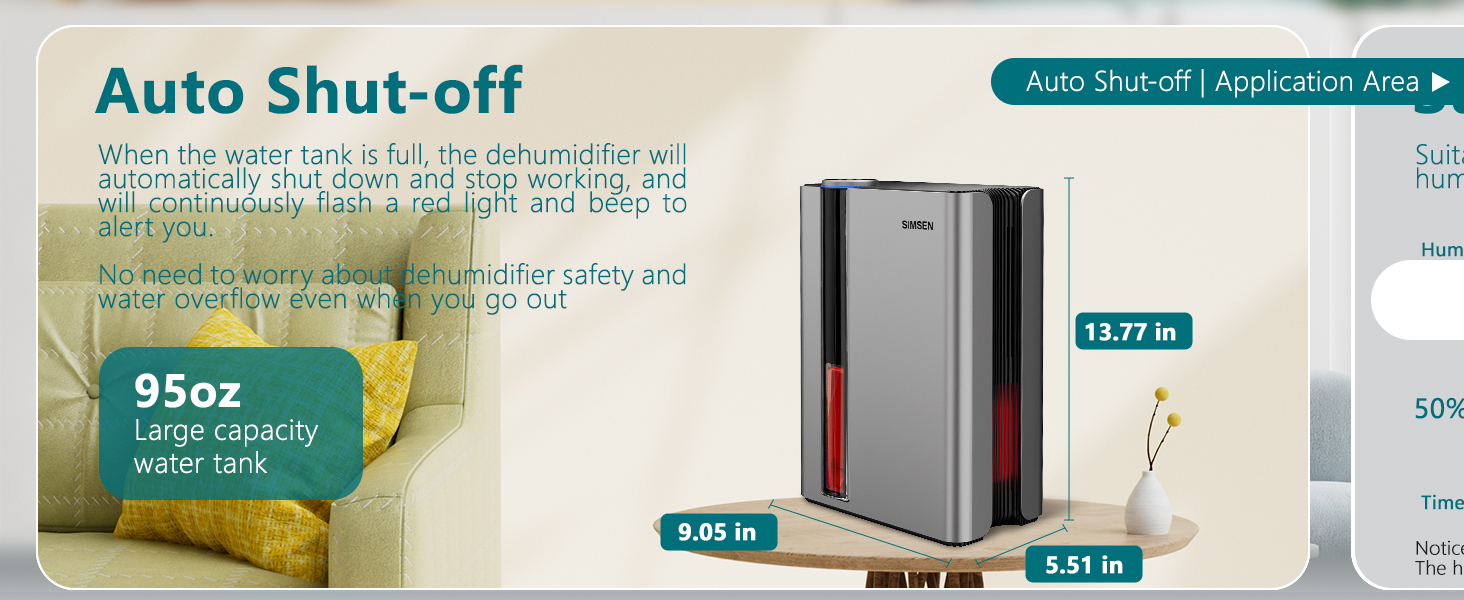
Figure 2.2: Steps for installing the continuous drain hose.
3. Operating Instructions
Learn how to use your Simsen Dehumidifier's various functions.

Figure 3.1: Overview of the control panel buttons.
3.1 Power On/Off
- Press the ON/OFF Button (
 ) to turn the dehumidifier on or off.
3.2 Operating Modes
The dehumidifier offers two main operating modes:
- High Power Mode: The default mode for maximum dehumidification.
- Quiet Sleep Mode: Press the Sleep Mode Button () to activate. In this mode, the fan speed is reduced, and all lights are turned off for a quieter operation (approx. 35dB), ideal for bedrooms or quiet environments.
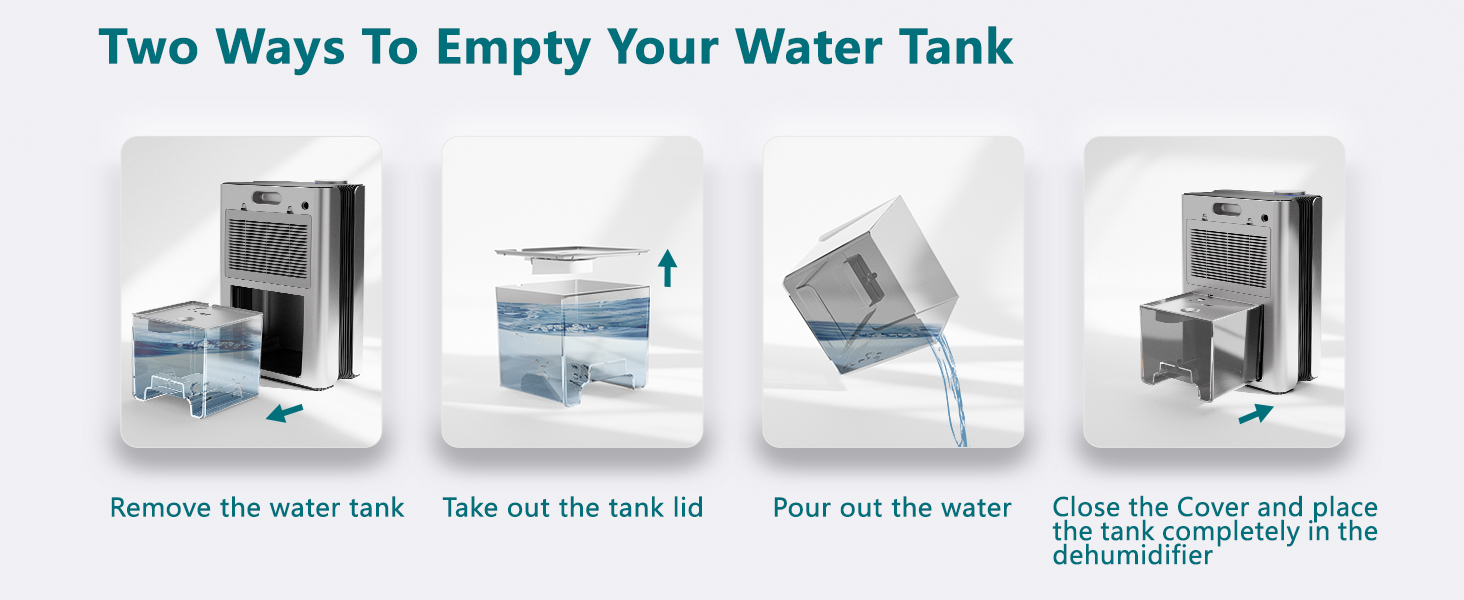
Figure 3.2: The dehumidifier operating in quiet sleep mode.
3.3 Colorful Atmosphere Lights
The unit features integrated LED lights to enhance the ambiance.
- Press the Night Lights Button () to cycle through different colors or turn the lights off.
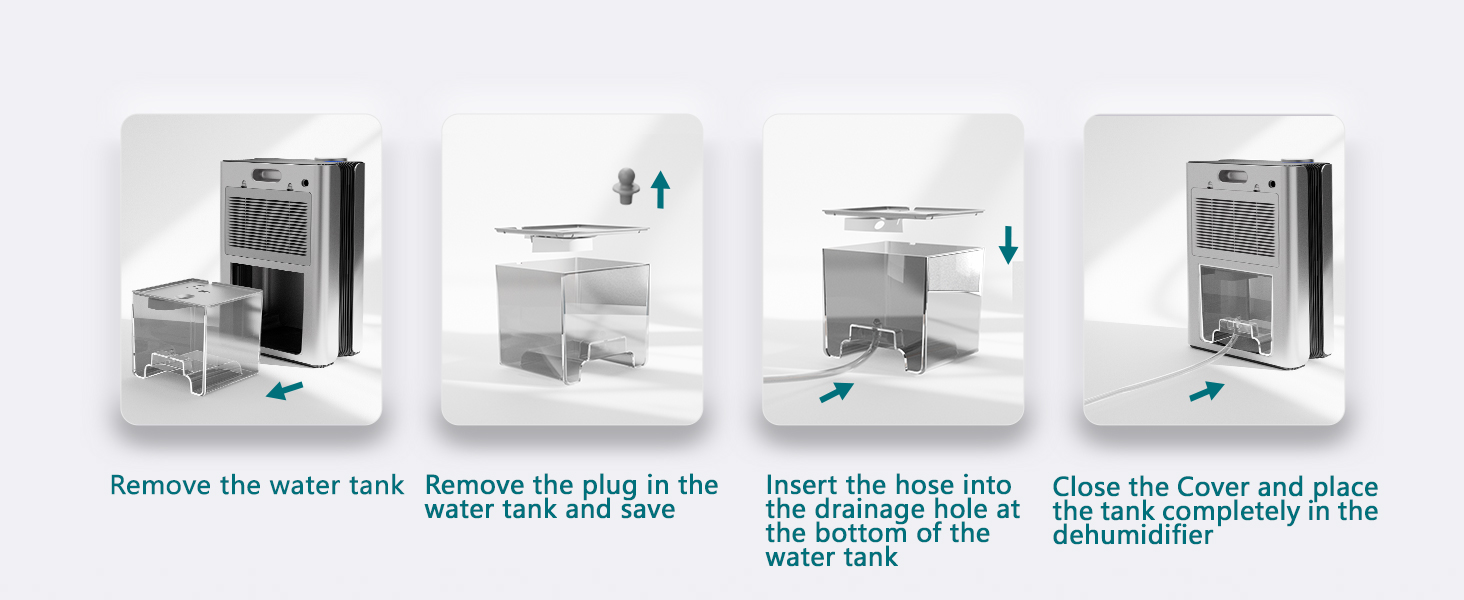
Figure 3.3: The dehumidifier displaying its colorful atmosphere lights.
3.4 Automatic Shut-off
The dehumidifier is equipped with an automatic shut-off feature for safety and convenience.
- When the water tank is full, the unit will automatically stop dehumidifying.
- A red indicator light will flash, and an audible beep will sound to alert you to empty the tank.
- The unit will resume operation once the water tank is emptied and reinserted correctly.

Figure 3.4: The dehumidifier indicating a full water tank with a red light.
4. Maintenance
Regular maintenance ensures the longevity and efficient operation of your dehumidifier.
4.1 Emptying the Water Tank
When the water tank is full, the unit will stop operating and alert you. Empty the tank as follows:
- Gently pull out the water tank from the front of the dehumidifier.
- Remove the tank lid.
- Pour out the collected water into a sink or drain.
- Replace the tank lid and slide the empty tank back into the dehumidifier until it clicks into place. The unit will then resume operation.
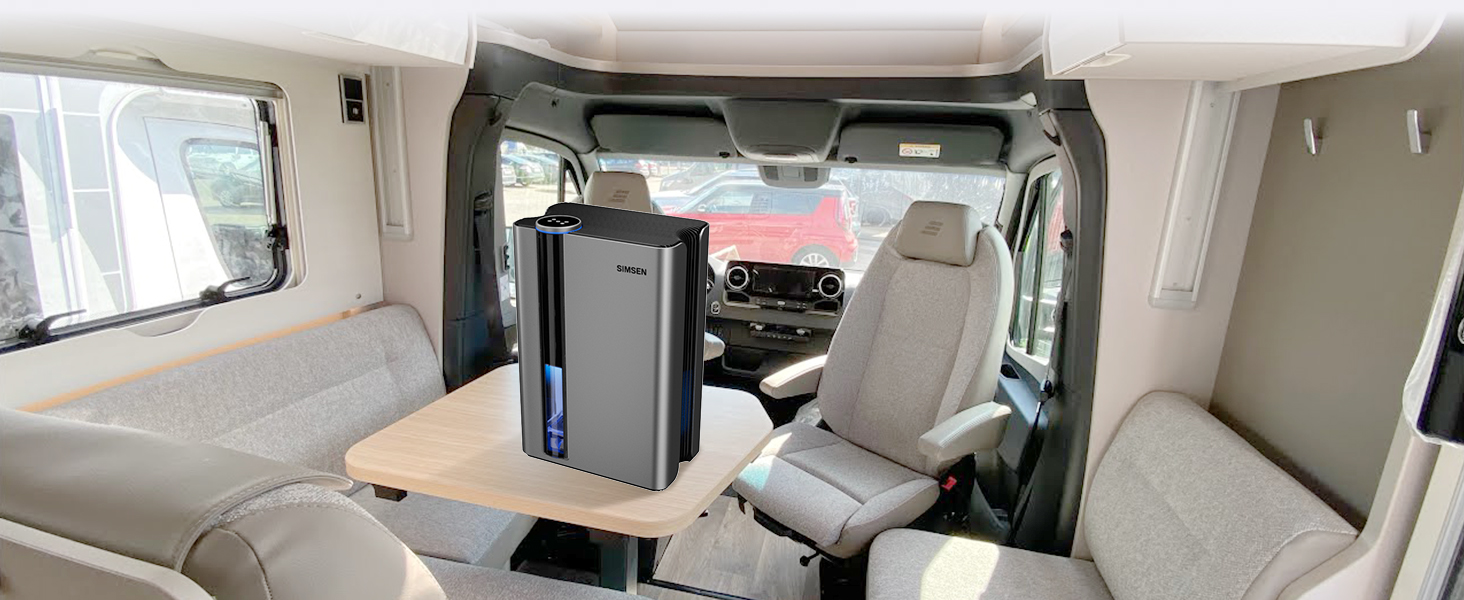
Figure 4.1: Manual water tank emptying process.
4.2 Cleaning the Detachable Filter
The detachable filter helps maintain air quality and unit efficiency. Clean it regularly, approximately every 2-4 weeks, depending on usage and air quality.
- Turn off and unplug the dehumidifier.
- Locate the filter cover on the back of the unit and open it.
- Carefully remove the filter.
- Use a soft brush or vacuum cleaner to remove dust and debris from the filter. For stubborn dirt, rinse the filter under cool running water.
- Allow the filter to air dry completely before reinserting it. Do not use a dryer or direct heat.
- Place the dry filter back into the unit and close the cover.

Figure 4.2: Steps for cleaning the activated carbon filter.
4.3 General Cleaning
- Wipe the exterior of the unit with a soft, damp cloth. Do not use abrasive cleaners or solvents.
- Ensure the air inlet and outlet grilles are free from dust and obstructions.
5. Troubleshooting
If you encounter issues with your dehumidifier, refer to the following common problems and solutions.
| Problem | Possible Cause | Solution |
|---|---|---|
| Dehumidifier does not turn on. | No power supply. Water tank is full or not properly inserted. Power outage. | Check if the power cord is securely plugged into a working outlet. Empty the water tank and ensure it is correctly reinserted. If there was a power outage, manually turn the unit back on. |
| Unit is running but not collecting water or dehumidifying effectively. | Room humidity is too low. Room temperature is too low. Air filter is clogged. Unit size is not suitable for the area. Doors/windows are open. | Dehumidifiers work best in higher humidity. Optimal operating temperature is above 41°F (5°C). Clean the air filter (refer to Section 4.2). Ensure the unit's coverage area (up to 800 sq ft) matches your space. Close all doors and windows in the area being dehumidified. |
| Red indicator light flashes and unit beeps. | Water tank is full. | Empty the water tank (refer to Section 4.1). |
| Unusual noise (e.g., rattling). | Unit not on a stable surface. Internal component issue. | Ensure the dehumidifier is placed on a flat, stable surface. If the noise persists, contact customer support. |
| Unit is too loud. | Operating in High Power Mode. | Switch to Quiet Sleep Mode for reduced noise (refer to Section 3.2). |
6. Specifications
Detailed technical specifications for the Simsen 95oz Dehumidifier.
| Feature | Specification |
|---|---|
| Brand | Simsen |
| Model Name | CT15 |
| Color | 01Space Grey |
| Floor Area Coverage | Up to 800 Square Feet |
| Water Tank Capacity | 95 Fluid Ounces (2.8 Liters) |
| Dehumidification Capacity | Up to 34oz (1.2 Liters) per Day (at 86°F, 80% RH) |
| Product Dimensions (D x W x H) | 7.05"D x 10.24"W x 15.31"H |
| Item Weight | 2.12 Pounds |
| Wattage | 58 watts |
| Number of Speeds | 2 (High Power, Sleep Mode) |
| Special Features | Filter, Colorful Night Lights, Sleep Mode, Power Mode, Auto Shut-off, Drain Hose |
| Material | Plastic |
| Included Components | Dehumidifier, Filter, Drain Hose, Manual |
7. Warranty Information
Simsen products are designed and manufactured to the highest quality standards. For specific warranty details regarding your Simsen 95oz Dehumidifier, please refer to the warranty card included in your product packaging or contact Simsen customer support directly. Keep your purchase receipt as proof of purchase for any warranty claims.
8. Customer Support
If you have any questions, concerns, or require technical assistance, please do not hesitate to contact Simsen customer support. You can find more information and contact details on the official Simsen brand store:
For a comprehensive guide, you may also refer to the official User Guide PDF available online:
Documents and downloads
Ask a question about this manual
Ask about setup, troubleshooting, compatibility, parts, safety, or missing instructions. Manuals+ will review the question and use this page’s manual context to help answer it.