
BAOFENG UV-5R
Contents
BAOFENG UV-5R 8W Ham Radio Instruction Manual
Model: UV-5R
1. Product Overview
The BAOFENG UV-5R 8W is a professional dual-band, dual-display, and dual-standby handheld ham radio designed for reliable long-range communication. Equipped with an extended 3800mAh USB rechargeable battery and a high-gain antenna, it offers enhanced performance and extended operational time. This device is suitable for various applications including outdoor adventures, emergency preparedness, and professional teamwork, ensuring clear and noise-free communication. It complies with FCC regulations, FCC ID: 2AJGM-UV5R.
2. Package Contents
Please verify that all items listed below are included in your package:
- 2 x BAOFENG UV-5R 8W Ham Radios
- 2 x 3800mAh Lithium Polymer Batteries
- 2 x Standard Antennas
- 2 x TD-771 High Gain Longer Antennas
- 2 x Earpieces with Microphone
- 2 x Desktop Charge Cradles
- 2 x USB Charging Cables
- 2 x Belt Clips
- 2 x Hand Straps
- 2 x User Manuals (this document)
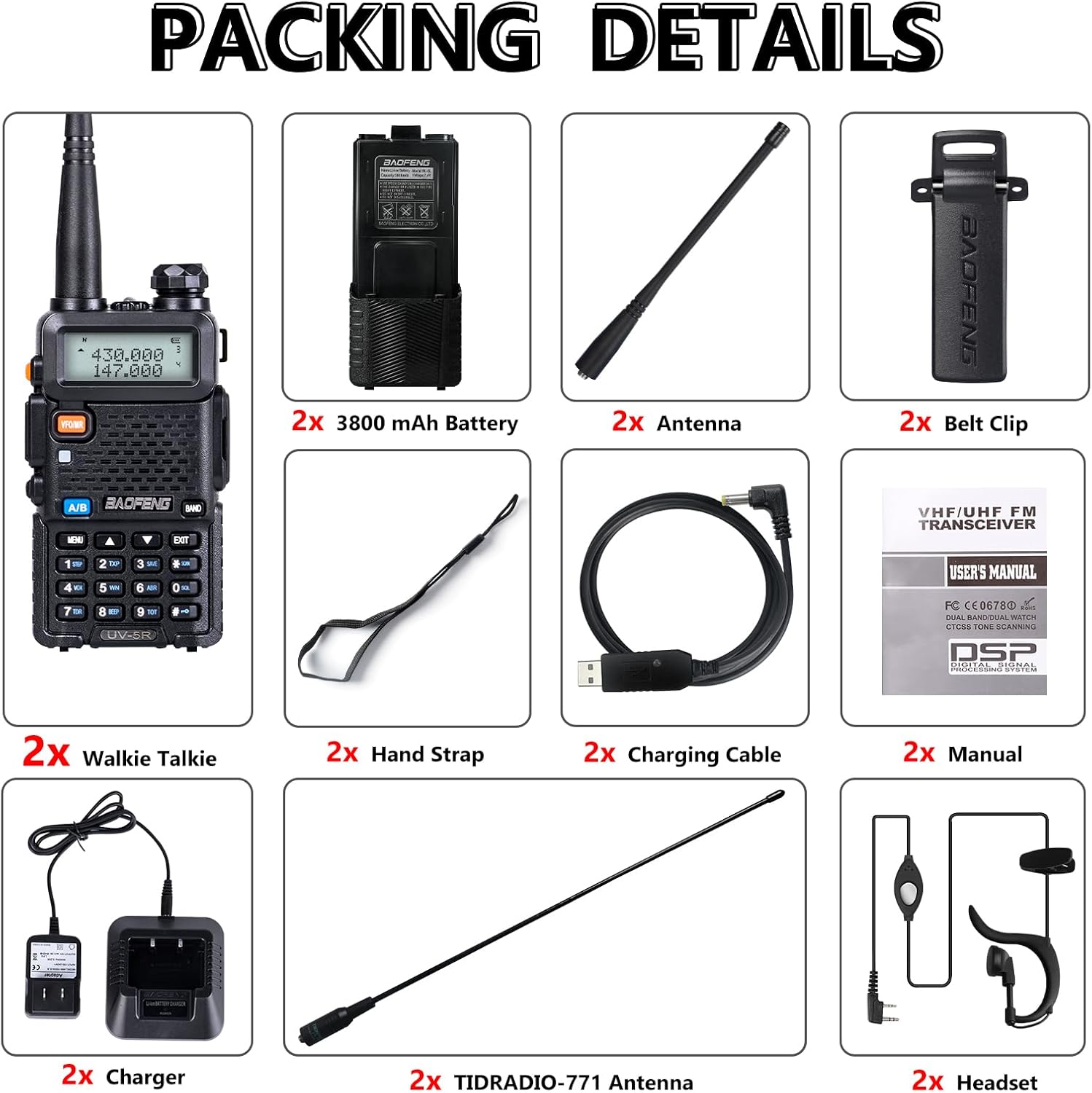
Figure 2.1: Complete package contents of the BAOFENG UV-5R 8W Ham Radio kit.
3. Key Features
- 8W High Power Output: Provides extended communication range compared to lower wattage radios.
- 3800mAh Extended Battery: Ensures long power storage capacity for prolonged use, offering up to 60 hours standby time.
- Dual Band Operation: Supports both VHF (136-174MHz) and UHF (400-480MHz) frequency ranges for versatile communication.
- TD-771 High Gain Antenna: Extends talk range by approximately 30% compared to standard antennas, improving signal reception.
- Multiple Charging Methods: Includes both a desktop charging cradle and USB charging cables for flexible power options.
- Clear Audio with Earpieces: Comes with earpieces for clear sound quality and privacy, featuring a K-type interface and anti-noise performance.
- Comprehensive Functions: Features include High/Low TX power selection, 128 channels, 50 CTCSS, 104 CDCSS, Dual Display, Dual Standby, AUTO Keypad Lock, VOX, Scan, Squelch, Monitor, and FM radio.
- FCC Compliant: Certified with FCC ID: 2AJGM-UV5R, adhering to Part 15B and Part 97 rules.

Figure 3.1: Illustration of the radio's 8 Watt maximum output capability.
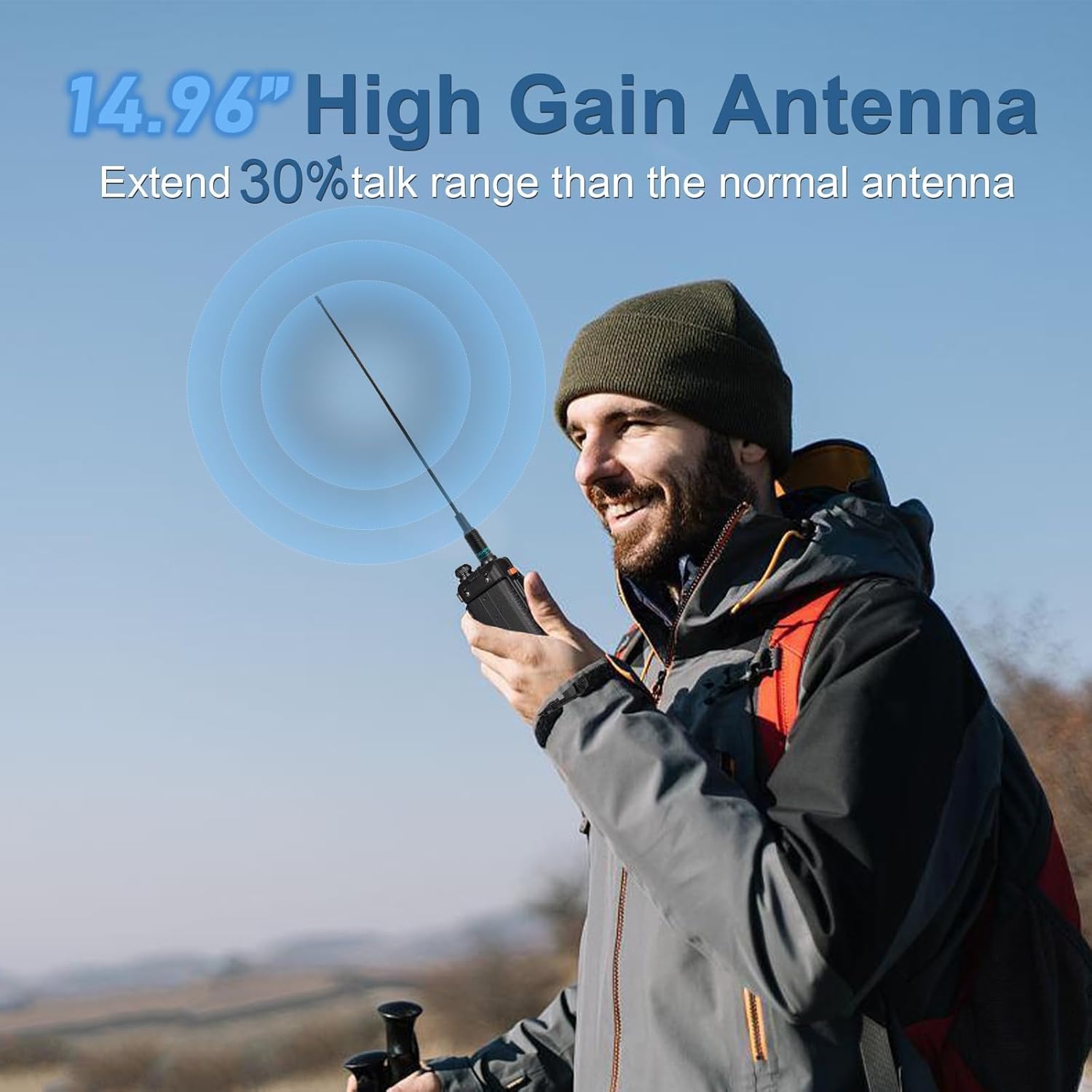
Figure 3.2: The 14.96-inch high gain antenna enhances communication range.
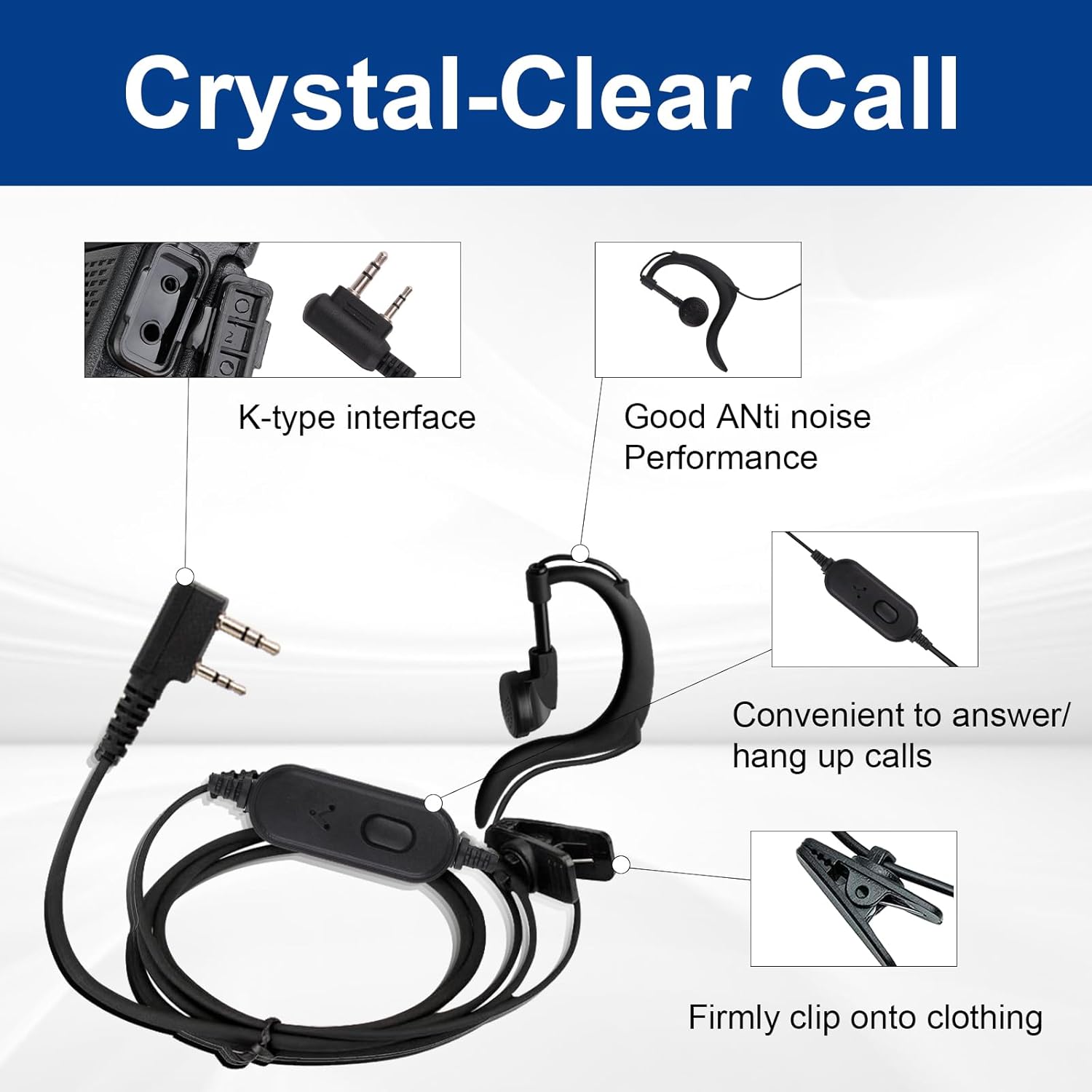
Figure 3.3: Earpiece details for clear and private communication.
Video 3.4: Demonstrates the Baofeng UV-5R's 8 Watt output and long-range capabilities, highlighting its performance in various scenarios.
4. Initial Setup
4.1 Attaching the Battery and Antenna
- Align the battery pack with the grooves on the back of the radio and slide it upwards until it clicks into place.
- Screw the desired antenna (standard or TD-771 high gain) clockwise onto the antenna connector at the top of the radio until it is finger-tight. Do not overtighten.
4.2 Charging the Battery
The 3800mAh Lithium Polymer battery can be charged using two methods:
- Using the Desktop Charge Cradle: Place the radio with the battery attached into the desktop charge cradle. Ensure the charging contacts align. The indicator light on the cradle will show charging status.
- Using the USB Charging Cable: Connect the USB charging cable directly to the battery pack's USB port. This allows charging via a power socket, car charger, power bank, or laptop.

Figure 4.1: Charging options for the UV-5R battery.
4.3 Programming the Radio
The BAOFENG UV-5R can be programmed via PC software or a mobile application for advanced channel and feature customization. A programming cable is required for PC programming.
- Refer to the included user manual (PDF) for detailed instructions on installing the programming software and drivers.
- Connect the radio to your computer using the programming cable.
- Follow the software interface to read, modify, and write radio settings.
5. Operating Instructions
Familiarize yourself with the radio's controls and display:

Figure 5.1: BAOFENG UV-5R Control Layout.
5.1 Basic Operation
- Power On/Off & Volume: Rotate the Knob clockwise to turn on the radio and adjust volume. Rotate counter-clockwise to turn off.
- Push-to-Talk (PTT): Press and hold this button on the left side to transmit. Release to receive.
- VFO/MR (Frequency/Channel Mode): Press this button to switch between Frequency Mode (VFO) for direct frequency input and Channel Mode (MR) for selecting pre-programmed channels.
- A/B Key: Switches between the upper (A) and lower (B) frequency displays, allowing you to monitor two frequencies simultaneously.
- BAND Key: Cycles through different frequency bands (VHF/UHF/FM radio).
- MENU Button: Enters the radio's menu system for configuration. Use the Up/Down arrow keys to navigate and MENU again to confirm.
- EXIT Button: Exits the current menu or function.
- Keypad: Used for direct frequency input, channel selection, and menu navigation.
5.2 Advanced Functions
- High/Low TX Power: Access through the menu to select between High (8W), Medium (5W), or Low (2W) transmit power. High power maximizes range, while low power conserves battery.
- CTCSS/CDCSS (Tone Squelch): Configure these tones in the menu to filter out unwanted signals and ensure private communication within a group.
- VOX (Voice Operated Transmit): Enables hands-free transmission when your voice is detected. Adjust sensitivity in the menu.
- Scan: Initiates scanning of frequencies or channels.
- FM Radio: The radio includes an FM broadcast receiver.
- Flashlight: Activate the built-in LED flashlight for illumination.
- Emergency Alarm: Activates an alarm signal for emergency situations.
6. Maintenance and Care
- Cleaning: Wipe the radio with a soft, damp cloth. Do not use harsh chemicals or abrasive cleaners.
- Battery Care: To prolong battery life, avoid overcharging or completely draining the battery. Store the radio and battery in a cool, dry place when not in use for extended periods.
- Antenna: Handle the antenna carefully. Bending or forcing it can damage the connector.
- Water Resistance: The radio is water-resistant, but not waterproof. Avoid submerging it in water.
- Storage: Store the radio in a clean, dry environment away from extreme temperatures and direct sunlight.
7. Troubleshooting
| Problem | Possible Cause | Solution |
|---|---|---|
| Radio does not power on. | Battery is low or not properly installed. | Charge the battery fully. Ensure the battery is securely attached. |
| Cannot transmit or receive. | Incorrect frequency/channel, antenna not connected, or squelch level too high. | Verify frequency/channel settings. Ensure antenna is securely attached. Adjust squelch level. |
| Poor audio quality. | Weak signal, interference, or earpiece issue. | Move to an area with better signal. Check for sources of interference. Ensure earpiece is fully plugged in and functional. |
| Battery drains quickly. | High transmit power setting, frequent transmission, or aging battery. | Use lower TX power when possible. Reduce transmission time. Consider replacing the battery if it's old. |
8. Technical Specifications
- Model: UV-5R
- Brand: BAOFENG
- Color: Black
- Item Weight: 2.4 pounds
- Package Dimensions: 10.08 x 8.39 x 2.64 inches
- Batteries: 2 Lithium Polymer batteries required (included)
- Number of Channels: 128
- Special Features: Battery Saver Mode, Call Alert, Emergency Alarm, Long Range, Rechargeable
- Transmit Frequency Range: VHF 144-148MHz, UHF 420-450MHz
- Receive Frequency Range: VHF 136-174 MHz, UHF 400-480 MHz
- Talking Range Maximum: 10 Kilometer
- Tuner Technology: VHF/UHF/FM
- Voltage: 7.4 Volts
- Water Resistance Level: Water Resistant
- FCC ID: 2AJGM-UV5R
9. Warranty and Support
BAOFENG provides a 30-day no-questions-asked warranty for the UV-5R 8W Ham Radio. For technical assistance, programming software, or any inquiries, please refer to the official BAOFENG support channels or the comprehensive user guide PDF available online.
For the complete user guide, please refer to the official PDF document: BAOFENG UV-5R User Guide (PDF)
Documents and downloads
Ask a question about this manual
Ask about setup, troubleshooting, compatibility, parts, safety, or missing instructions. Manuals+ will review the question and use this page’s manual context to help answer it.