
Amazon Echo Show 5 (3rd Gen) with Blink Mini
Echo Show 5 (3rd Gen) with Blink Mini User Manual
Model: Echo Show 5 (3rd Gen) | Brand: Amazon
Introduction
This manual provides comprehensive instructions for setting up, operating, maintaining, and troubleshooting your Echo Show 5 (3rd Gen) and Blink Mini bundle. The Echo Show 5 is a smart display with Alexa voice assistant capabilities, while the Blink Mini is a compact indoor security camera designed to enhance your home monitoring.
Setup Guide
Follow these steps to set up your Echo Show 5 and Blink Mini devices.
1. Unboxing and Initial Placement
Carefully remove all components from the packaging. Place your Echo Show 5 on a stable surface within reach of a power outlet and a strong Wi-Fi signal. Position the Blink Mini in your desired indoor location, ensuring it has a clear view and access to power.

Image: The Echo Show 5 (left) and Blink Mini (right) as they appear out of the box. The Echo Show 5 features a display screen and fabric-covered speaker, while the Blink Mini is a small, cube-shaped camera with a stand.
2. Powering On and Network Connection
- Echo Show 5: Connect the included power adapter to the Echo Show 5 and plug it into a wall outlet. The device will power on automatically. Follow the on-screen prompts to select your language, connect to your Wi-Fi network, and log in with your Amazon account. The device supports dual-band Wi-Fi (802.11a/b/g/n/ac).
- Blink Mini: Plug the Blink Mini into a power outlet using its provided USB cable and power adapter. The camera's blue light will flash, indicating it's ready for setup.
3. App Installation and Device Pairing
- Alexa App (for Echo Show 5): Download the Amazon Alexa app on your smartphone or tablet (compatible with Fire OS, Android, and iOS devices). Use the app to complete the Echo Show 5 setup, manage settings, and explore Alexa features.
- Blink Home Monitor App (for Blink Mini): Download the Blink Home Monitor app. Create a new account or log in. Tap the '+' icon to add a new device, select 'Blink Mini Camera', and follow the in-app instructions to scan the QR code on the camera and connect it to your Wi-Fi network.
- Linking Blink Mini to Echo Show 5: Once both devices are set up, open the Alexa app. Go to 'Devices', then 'Cameras'. Your Blink Mini should appear. If not, discover devices. You can then use voice commands like "Alexa, show me the [camera name]" on your Echo Show 5 to view the live feed from your Blink Mini.
Note: Amazon Wi-Fi simple setup can streamline the connection process for compatible devices.
Operating Instructions
Your Echo Show 5 and Blink Mini offer a range of functionalities for daily use and home monitoring.
Echo Show 5 Core Functions
- Voice Control with Alexa: Activate Alexa by saying "Alexa," followed by your command. You can ask for weather updates, set alarms and timers, play music, or control smart home devices.
- Touch Screen Interface: Navigate menus, adjust settings, and interact with content directly on the 5.5-inch touch screen.
- Media Playback: Stream music, shows, and podcasts from services like Amazon Music, Spotify, and Prime Video. The device features a 1.75-inch built-in speaker for clear audio.
- Smart Home Control: Control compatible smart devices such as lights and thermostats using voice commands or the on-screen smart home dashboard.
- Photo Display: Set the background to a rotating slideshow of your favorite photos. Prime members can utilize unlimited cloud photo storage for this feature.
- Video Calling: Use the built-in 2 MP camera to make video calls to friends and family who have the Alexa app or an Echo device with a screen.
- Privacy Controls: The Echo Show 5 includes a mic/camera off button and a built-in camera shutter for privacy.

Image: The Echo Show 5 screen displaying a movie scene with the time and temperature in the top left corner. This illustrates the device's capability to show visual content.

Image: The Echo Show 5 screen showing a smart home control interface with options for thermostat and bedroom light. This demonstrates the device's ability to manage connected smart devices.

Image: The Echo Show 5 screen displaying a collage of family photos, highlighting its use as a digital photo frame.

Image: Two individuals looking at an Echo Show 5 screen, which displays a video call in progress. This illustrates the device's video calling capability.
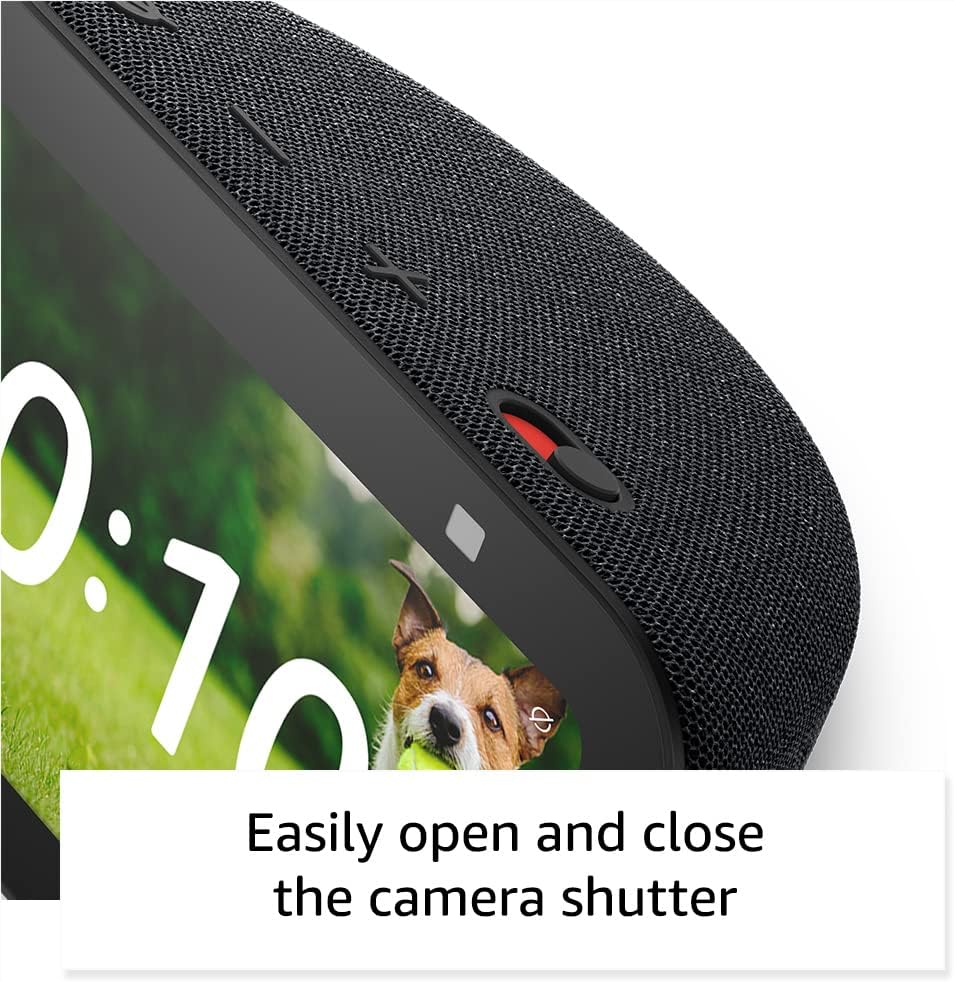
Image: A close-up view of the top right corner of the Echo Show 5, showing the physical camera shutter mechanism. This highlights a key privacy feature.
Blink Mini Camera Functions
- Live View: Access a live video feed from your Blink Mini camera at any time through the Blink Home Monitor app or by asking your Echo Show 5.
- Motion Detection: Configure motion detection zones and sensitivity in the Blink app to receive alerts when motion is detected.
- Two-Way Audio: Communicate with people or pets in the camera's view using the two-way audio feature in the Blink app.
Maintenance
Proper care ensures the longevity and optimal performance of your devices.
- Cleaning: Use a soft, lint-free cloth to gently wipe the screens and surfaces of both devices. Avoid abrasive cleaners, sprays, or harsh chemicals.
- Placement: Keep devices away from direct sunlight, heat sources, and excessive moisture. Ensure proper ventilation for the Echo Show 5.
- Software Updates: Ensure your devices are connected to Wi-Fi to receive automatic software updates, which provide new features and security enhancements.
Troubleshooting
If you encounter issues, try these common troubleshooting steps.
- Device Not Responding: Try unplugging the device from the power outlet, waiting 10 seconds, and then plugging it back in.
- Wi-Fi Connectivity Issues:
- Ensure your Wi-Fi router is on and working.
- Move the device closer to your Wi-Fi router.
- Restart your router and modem.
- Check Wi-Fi settings in the Alexa app (for Echo Show 5) or Blink app (for Blink Mini).
- Alexa Not Hearing Commands:
- Ensure the microphone is not muted (check the mic/camera off button on Echo Show 5).
- Speak clearly and at a normal volume.
- Reduce background noise.
- Blink Mini Live View Not Working:
- Check the camera's power connection.
- Verify Wi-Fi signal strength in the Blink app.
- Ensure the Blink app is up to date.
For more detailed troubleshooting, refer to the online help sections within the Alexa and Blink Home Monitor apps, or visit the Amazon support website.
Specifications
Key technical specifications for the Echo Show 5 (3rd Gen) and Blink Mini.
| Feature | Specification |
|---|---|
| Size (Echo Show 5) | 5.8"W x 3.6"D x 3.2"H (147mm x 91mm x 82mm) |
| Weight (Echo Show 5) | 16.1 oz (456 grams) |
| Display (Echo Show 5) | 5.5" touch screen |
| Camera (Echo Show 5) | 2 MP camera with built-in shutter |
| Audio (Echo Show 5) | Full range 1.75" built-in speaker |
| Wi-Fi Connectivity | Dual-band Wi-Fi (802.11a/b/g/n/ac) |
| Bluetooth Connectivity | A2DP support, AVRCP for voice control |
| Processor (Echo Show 5) | MediaTek MT 8169 B |
| Included in Box | Echo Show 5 (3rd Gen), Glacier White power adapter (22W)/cable (4.9ft), Quick Start Guide |
| Generation | Echo Show 5 (3rd Gen) - 2023 release |
| Language | Alexa speaks English and Spanish |
| Smart Home Compatibility | Wi-Fi, Bluetooth Low Energy Mesh, Matter |
Warranty and Support
Your Echo Show 5 (3rd Gen) and Blink Mini bundle comes with a limited warranty and access to customer support.
- Warranty: A 1-year limited warranty and service are included with your purchase. Optional 1-year, 2-year, and 3-year extended warranties are available for U.S. customers and sold separately.
- Software Security Updates: This device receives guaranteed software security updates for at least four years after its last availability for purchase as a new unit on Amazon websites.
- Customer Support: For assistance, visit the Amazon support website or contact customer service through the Alexa app.
Related documentsEcho Show 5 (3rd Gen) with Blink Mini


Ask a question about this manual
Ask about setup, troubleshooting, compatibility, parts, safety, or missing instructions. Manuals+ will review the question and use this page’s manual context to help answer it.