
briidea HASS-02
Briidea RV Air Conditioner Soft Starter Instruction Manual
Model: HASS-02
Brand: briidea
1. Introduction
The Briidea RV Air Conditioner Soft Starter (Model HASS-02) is designed to significantly reduce the startup current of your RV's air conditioner. This allows for more efficient operation, enabling you to run your AC unit with smaller generators or limited power sources, such as a 20A household hookup or a 30A RV park connection (for two units). By smoothing the compressor startup, it also reduces noise and extends the lifespan of your air conditioner.
This manual provides detailed instructions for the installation, operation, maintenance, and troubleshooting of your Briidea Soft Starter.
2. Safety Information
WARNING: Always disconnect power to your RV's air conditioner and the soft starter before attempting any installation, inspection, or maintenance. Failure to do so can result in serious injury or death.
- Ensure all electrical connections are secure and properly insulated.
- Do not attempt to modify the soft starter unit.
- This device is designed for RV air conditioners. Do not use it for other applications unless specified by the manufacturer.
- The soft starter features built-in overload and short circuit protection for safe operation.
- Do not swap the run and start windings during installation.
- Do not use an external capacitor; the unit has one built-in.

Figure 2.1: Internal components of the Briidea Soft Starter, highlighting its UL listed capacitor and features like dustproof, anti-corrosion, flame retardant, overload protection, and short circuit protection.
3. What's in the Box
Upon opening the package, verify that all the following components are included:
- Briidea RV Air Conditioner Soft Starter Unit
- Pre-wired Harness with Color-Coded Wires
- Electrical Connectors (various types for installation)
- Mounting Screws
- Zip Tie
- Instruction Manual (this document)

Figure 3.1: All components included in the Briidea Soft Starter package, ready for installation.
4. Specifications
| Feature | Detail |
|---|---|
| Brand Name | briidea |
| Model Info | HASS-02 |
| Item Weight | 1.79 pounds |
| Product Dimensions | 5 x 3 x 2 inches |
| Capacity | 1.25 Tons (up to 15,000 BTU) |
| Installation Type | Split System |
| Special Features | Soft Start, Reduces Startup Amps by 65%-70% |
| Color | White |
| Voltage | 110 Volts |
| Wattage | 2200W (for 15,000 BTU AC with small generator) |
| Material Type | ABS Plastic (Flame-retardant, Dust-proof) |
| Warranty Type | Limited |

Figure 4.1: Physical dimensions of the Briidea Soft Starter and an example of its compact installation within an RV air conditioner unit.
5. Setup and Installation
The Briidea Soft Starter is designed for easy installation. However, it is recommended to consult your specific RV air conditioner's wiring diagram for precise connections. The soft starter's five wires are color-coded for straightforward identification.
5.1 Pre-Installation Steps
- Disconnect Power: Crucially, turn off all power to your RV's air conditioner unit at the breaker. Verify power is off before proceeding.
- Access AC Unit: Open the cover of your RV's air conditioner unit to access the compressor and capacitor compartment.
- Identify Wires: Locate the compressor wires (typically Run, Start, and Common) and the run capacitor.
5.2 Wiring Instructions
Refer to the wiring diagram below for general guidance. Specific wire colors and configurations may vary slightly by AC manufacturer (e.g., Dometic, Coleman, Advent, GE, Atwood, Airxcel). Always cross-reference with your AC unit's manual.

Figure 5.1: General wiring diagram illustrating the connection of the Briidea Soft Starter to an RV air conditioner's compressor and run capacitor.
- Black Wire (L_IN Ø): Connect to the main incoming Line power (L1 or Hot) for the compressor.
- Yellow Wire (Ø_N_IN): Connect to the Neutral (N) or L2 power line.
- Blue Wire (Run Capacitor): Connect to the Run terminal of the compressor's run capacitor.
- Red Wire (L_IN Ø): Connect to the compressor's Start (S) terminal.
- Brown Wire (Compressor C): Connect to the compressor's Common (C) terminal.
Use the provided electrical connectors to make secure and insulated connections. Ensure no bare wires are exposed.
5.3 Mounting the Unit
Once wired, find a suitable location within the AC unit's compartment to mount the soft starter. Use the provided mounting screws to secure the unit. Ensure it is not obstructing any moving parts or ventilation paths.
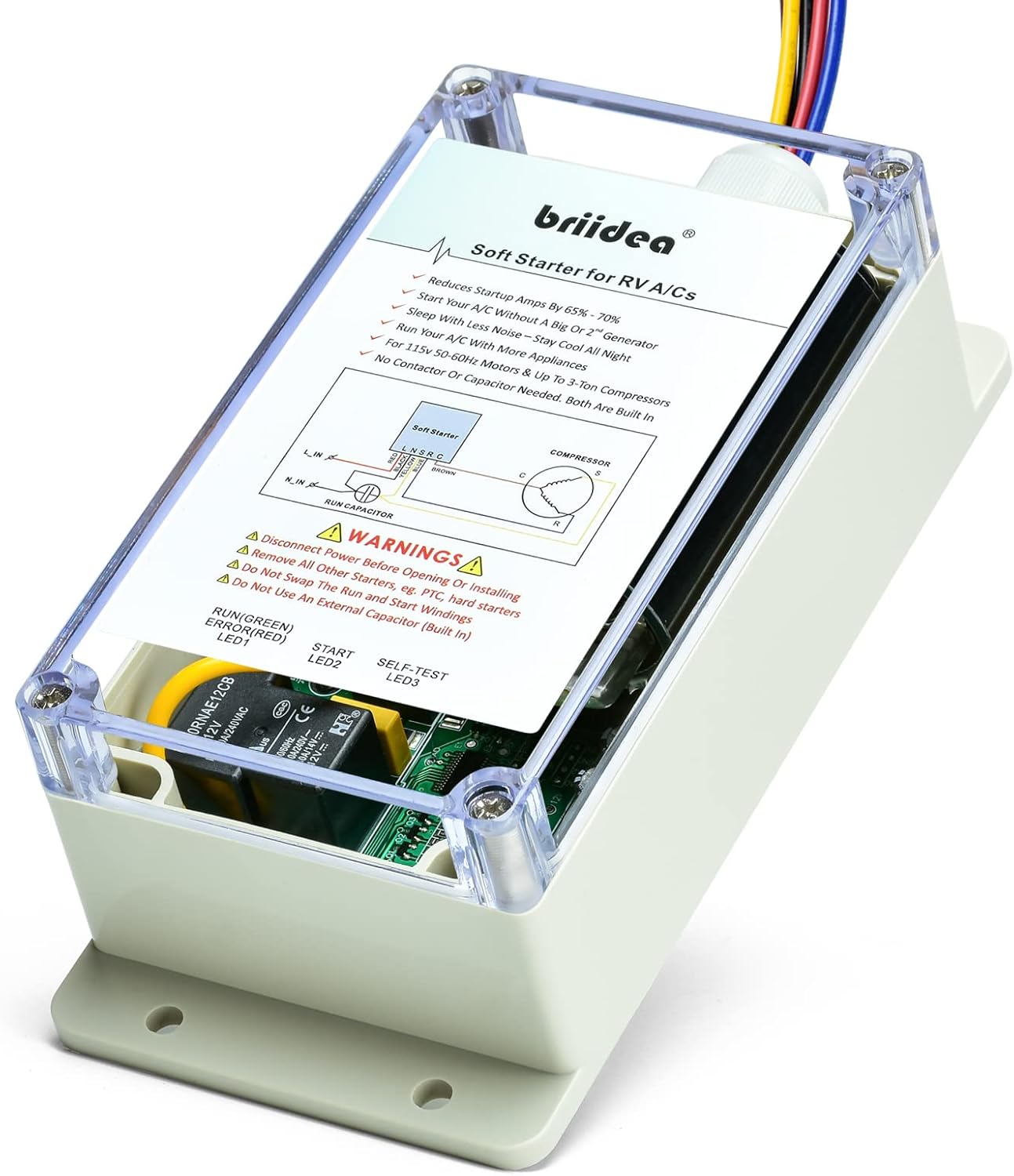
Figure 5.2: The Briidea Soft Starter unit, showcasing its compact design and clear cover for easy inspection of internal components and LED indicators.

Figure 5.3: The Briidea Soft Starter is compatible with a wide range of RV air conditioner brands, including Dometic, Coleman, Advent, GE, Atwood, and Airxcel.
6. Operation
Once installed, the Briidea Soft Starter operates automatically. It intelligently manages the startup current of your RV's air conditioner compressor.
6.1 How it Works
When your AC unit is turned on, the soft starter gradually ramps up the voltage and current to the compressor. This process, known as "soft starting," reduces the initial surge of electricity (Locked Rotor Amps or LRA) by 65%-70%. This significant reduction prevents high current spikes that can trip circuit breakers or overload smaller generators.

Figure 6.1: Illustration of how the Briidea Soft Starter enables a low-power 2200W generator to efficiently start a 15,000 BTU AC unit and other appliances simultaneously, which would otherwise be impossible.

Figure 6.2: The soft starter provides flexibility, allowing AC operation on a standard 20A household outlet or enabling two AC units to run concurrently on a 30A RV park connection (with two soft starters installed).
6.2 Benefits of Soft Starting
- Generator Compatibility: Run your 15,000 BTU AC with a 2200W generator, freeing up power for other appliances.
- Reduced Noise: The smooth startup significantly reduces the loud thud or clunk often associated with AC compressor engagement, leading to a quieter environment.
- Extended AC Lifespan: Less stress on the compressor and electrical components due to reduced inrush current can prolong the life of your AC unit.
- Flexible Power Options: Operate your AC on 20A household hookups or run multiple ACs on 30A RV park connections.

Figure 6.3: The soft starter's ability to reduce mechanical noise during compressor startup contributes to a more peaceful sleeping environment.
6.3 LED Indicators
The Briidea Soft Starter features LED indicators to provide operational status:
- RUN (Green) / ERROR (Red) LED1: Indicates normal operation (Green) or an error condition (Red).
- START LED2: Illuminates during the soft start sequence.
- SELF-TEST LED3: Indicates the unit is performing a self-test.

Figure 6.4: Detailed view of the LED indicators on the Briidea Soft Starter, providing visual feedback on its operational status.
7. Maintenance
The Briidea Soft Starter is designed for durability and requires minimal maintenance. Its ABS plastic enclosure is flame-retardant and dust-proof, offering robust protection.
- Periodic Inspection: Annually, or before extended trips, inspect the unit and its wiring connections for any signs of wear, corrosion, or loose connections.
- Cleaning: If necessary, gently wipe the exterior of the unit with a dry, soft cloth to remove dust or debris. Do not use harsh chemicals or abrasive cleaners.
- Environmental Protection: While dust-proof, ensure the AC unit's compartment remains as clean and dry as possible to maximize the lifespan of all components.

Figure 7.1: The Briidea Soft Starter's robust design ensures heat resistance and dustproof capabilities, contributing to its long-term reliability in various RV environments.
8. Troubleshooting
If you encounter issues with your Briidea Soft Starter, refer to the following common problems and solutions:
| Problem | Possible Cause | Solution |
|---|---|---|
| AC unit does not start or trips breaker. | Incorrect wiring; insufficient power supply; soft starter error. |
|
| Soft starter LED shows Red (Error). | Internal fault; wiring issue; compressor problem. |
|
| AC starts but still causes a significant power surge. | Soft starter not functioning correctly; AC unit issue. |
|
For issues not covered here, or if troubleshooting steps do not resolve the problem, please contact Briidea customer support.
9. Warranty and Support
9.1 Limited Warranty
The Briidea RV Air Conditioner Soft Starter (Model HASS-02) comes with a limited warranty. Please retain your proof of purchase for warranty claims. The warranty covers defects in materials and workmanship under normal use. It does not cover damage caused by improper installation, misuse, accidents, or unauthorized modifications.
For specific warranty terms and conditions, please refer to the documentation provided with your purchase or visit the official Briidea website.
9.2 Customer Support
If you require technical assistance, have questions about installation, or need to make a warranty claim, please contact Briidea customer support through the retailer where you purchased the product or via the official Briidea website. Provide your product model number (HASS-02) and a detailed description of the issue to expedite support.
Online Resources: For additional information, FAQs, and updated wiring diagrams for specific AC models, please visit the official Briidea brand store or product page on Amazon.
Ask a question about this manual
Ask about setup, troubleshooting, compatibility, parts, safety, or missing instructions. Manuals+ will review the question and use this page’s manual context to help answer it.