
1. Introduction
Welcome to the Bakcou Grizzly Electric Scooter user manual. This document provides essential information for the safe and effective operation, maintenance, and troubleshooting of your new electric scooter. Please read this manual thoroughly before operating the scooter to ensure proper usage and to maximize its lifespan.
The Bakcou Grizzly Electric Scooter is designed for robust performance across various terrains, featuring a powerful motor, long-lasting battery, and durable construction. Its unique design allows for quiet operation, making it suitable for diverse environments.
2. Safety Guidelines
Your safety is paramount. Adhere to all local laws and regulations regarding electric scooter use. Always wear a helmet and appropriate safety gear (gloves, knee pads, elbow pads) when riding.
- Pre-Ride Check: Before each ride, inspect tires for proper inflation and wear, check brake functionality, ensure all bolts and quick releases are tightened, and verify battery charge level.
- Riding Conditions: Avoid riding in heavy rain, snow, ice, or extremely wet conditions. Be cautious on uneven surfaces, gravel, and slippery roads.
- Weight Limit: Do not exceed the maximum load capacity of 260 lbs (118 kg).
- Age Restriction: This scooter is intended for adult use.
- Awareness: Always be aware of your surroundings, pedestrians, and other vehicles. Use hand signals when turning.
- Braking: Familiarize yourself with the Tektro dual-piston hydraulic brakes. Practice braking in a safe, open area before riding in traffic.
- Charging: Only use the original charger provided. Do not charge unattended.
3. Components Overview
Familiarize yourself with the main components of your Bakcou Grizzly Electric Scooter:

Figure 3.1: Full view of the Bakcou Grizzly Electric Scooter, showcasing its robust design and fat tires.
- Motor: Bafang 1000W Rear Hub Motor, providing powerful propulsion.
- Battery: 48V 21ah Samsung-cell Lithium-ion battery, located within the frame for protection and balance.
- Brakes: Tektro Dual-Piston Hydraulic Brakes for reliable stopping power.
- Tires: All-terrain fat tires (CST BFT 24" x 4" rear, 26" x 4" front) for superior grip and stability.
- Suspension: Full-suspension frame with GT MARK AIR & HLT-100 durable suspension for a smooth ride over rough terrain.
- Display: Full-color LCD display showing speed, battery level, mileage, and other ride data.
- Headlight: Integrated 400-lumen headlight for improved visibility.
- Rear Pannier Rack: For carrying cargo.
- Fenders: Front and rear fenders to protect against splashes.

Figure 3.2: Key performance features including the 400-lumen headlight, Tektro dual-piston brakes, and Bafang full-color LCD display.

Figure 3.3: Illustration of off-road power components: rear pannier rack, high-capacity 48V 21Ah lithium-ion battery, fenders, and Bafang 1000W rear-hub motor.
4. Setup
4.1 Unboxing and Initial Assembly
Your Bakcou Grizzly Electric Scooter comes partially assembled. Carefully remove all components from the packaging. Keep the packaging for future transport or storage.
- Handlebar Installation: Attach the handlebar to the stem, ensuring it is centered and tightened securely.
- Fender and Rack Attachment: If not pre-installed, attach the front fender and rear pannier rack using the provided hardware.
- Tire Inflation: Inflate tires to the recommended pressure (refer to tire sidewall for specific PSI, typically lower for fat tires).
- Brake Check: Verify that both front and rear brakes engage properly and stop the wheels effectively. Adjust if necessary.
4.2 Initial Battery Charging
Before first use, fully charge the battery. This typically takes 7-8 hours.
- Locate the charging port on the scooter frame.
- Connect the charger to the charging port, then plug the charger into a standard electrical outlet.
- The charger indicator light will typically show red during charging and turn green when fully charged.
- Disconnect the charger once charging is complete. Do not overcharge.
5. Operating the Scooter
5.1 Powering On/Off
- To power on, press and hold the power button on the LCD display until the screen illuminates.
- To power off, press and hold the power button again until the display turns off.
5.2 Display Functions
The full-color LCD display provides real-time information:
- Speed: Current riding speed.
- Battery Level: Indicates remaining battery charge.
- Mileage: Trip distance and total odometer.
- Assist Level: Shows the current power mode.
- Error Codes: Displays diagnostic codes if an issue arises.
5.3 Riding the Scooter
- Starting: Place one foot on the deck and push off with the other foot to gain initial momentum.
- Acceleration: Gently press the throttle lever to engage the motor. The scooter will accelerate smoothly.
- Braking: Use the brake levers on the handlebars to slow down or stop. Apply both brakes simultaneously for optimal stopping power.
- Turning: Lean into turns and use the handlebars for steering.

Figure 5.1: The Bakcou Grizzly Electric Scooter designed to conquer any landscape with its full-suspension frame and all-terrain fat tires.

Figure 5.2: The chainless design of the Bakcou Grizzly Electric Scooter allows for stealthy and quiet operation, ideal for backcountry adventures.
6. Maintenance
Regular maintenance ensures the longevity and safe operation of your scooter.
6.1 Battery Care
- Charge the battery regularly, even if not in use, to maintain its health.
- Store the scooter and battery in a cool, dry place, away from direct sunlight and extreme temperatures.
- Avoid completely draining the battery before recharging.
6.2 Cleaning
- Wipe down the scooter with a damp cloth after each ride, especially if ridden in dirty conditions.
- Do not use high-pressure water jets or immerse the scooter in water.
6.3 Tire and Brake Checks
- Regularly check tire pressure and inflate to recommended PSI.
- Inspect tires for wear, cuts, or punctures.
- Check brake pads for wear and replace if necessary. Ensure brake levers have proper tension and responsiveness.
6.4 General Inspection
- Periodically check all bolts and fasteners for tightness.
- Ensure the suspension components are clean and functioning smoothly.
7. Troubleshooting
This section addresses common issues you might encounter with your Bakcou Grizzly Electric Scooter.
| Problem | Possible Cause | Solution |
|---|---|---|
| Scooter does not power on | Low battery; Loose battery connection; Faulty power button | Charge battery fully; Check battery connections; Contact support if issue persists. |
| Motor not engaging/weak power | Low battery; Loose motor cable; Overload (exceeding weight limit); Error code on display | Charge battery; Check motor cable connection; Reduce load; Refer to display error codes for specific issues. |
| Brakes feel spongy or ineffective | Air in hydraulic lines; Worn brake pads; Misaligned calipers | Bleed brake lines (professional service recommended); Replace brake pads; Adjust brake calipers. |
| Unusual noises during operation | Loose components; Debris in wheels/motor; Worn bearings | Inspect all visible parts for looseness; Clean wheels and motor area; Contact support for bearing issues. |
| Reduced range | Under-inflated tires; Cold weather; Aggressive riding style; Aging battery | Inflate tires to correct PSI; Note that range decreases in cold; Ride more efficiently; Battery replacement may be needed over time. |
For issues not listed here or if solutions do not resolve the problem, please contact Bakcou customer support.
8. Specifications
Detailed technical specifications for the Bakcou Grizzly Electric Scooter:
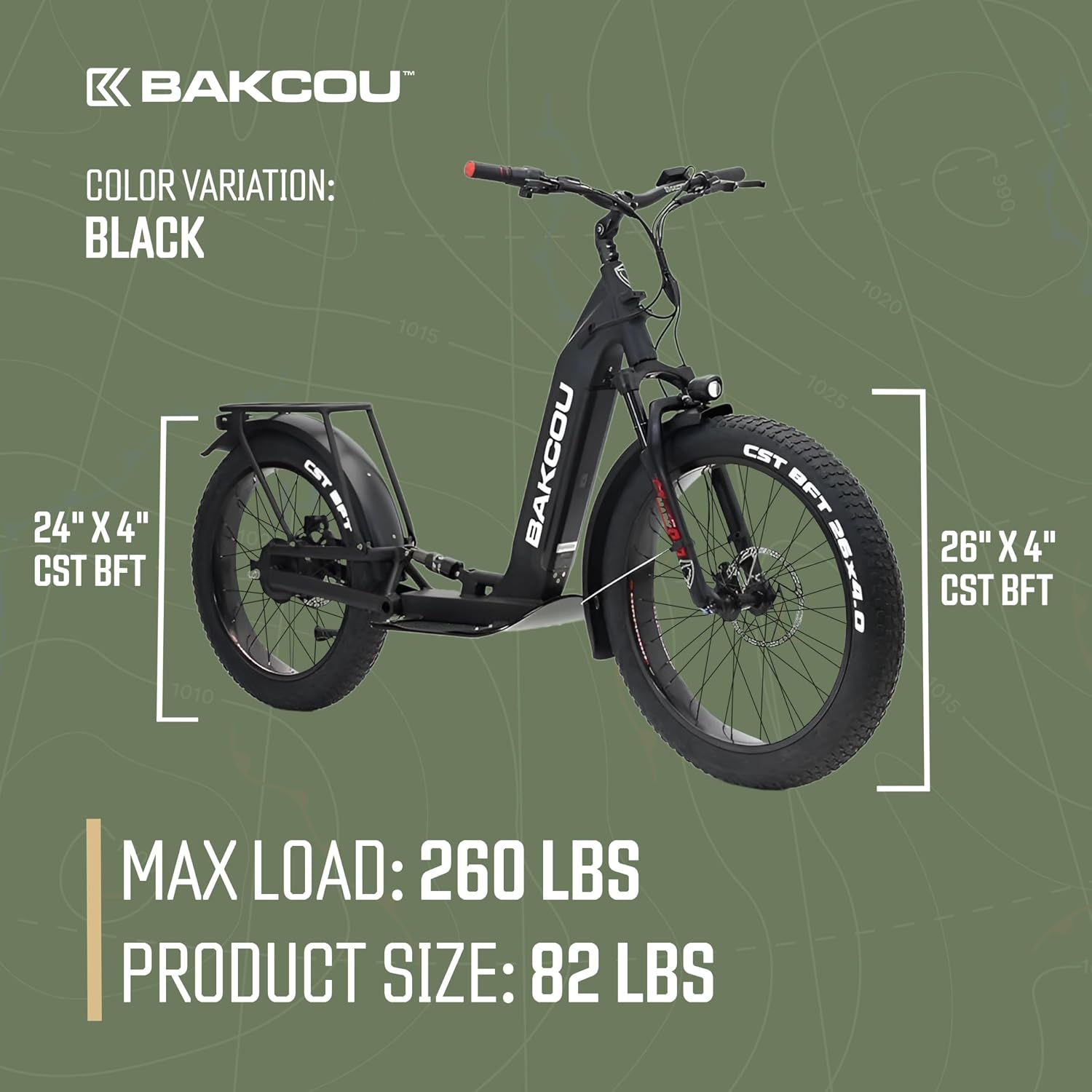
Figure 8.1: Dimensions and maximum load capacity of the Bakcou Grizzly Electric Scooter. Max Load: 260 lbs, Product Size: 82 lbs.
| Feature | Detail |
|---|---|
| Model Name | GRIZZLY-BLACK |
| Motor | Bafang 1000W Rear Hub Motor |
| Battery | 48V 21ah Samsung-cell Lithium-ion |
| Top Speed | 25+ mph |
| Maximum Distance Range | Approx. 20 Miles (varies with rider weight and terrain) |
| Charging Time | 7-8 Hours |
| Weight Limit | 260 Pounds (118 kg) |
| Product Weight | 82 lbs (37.2 kg) |
| Ground Clearance | 11 Inches |
| Frame Material | Aluminium Alloy |
| Brakes | Tektro Dual-Piston Hydraulic Brakes |
| Suspension | Dual Suspension (GT MARK AIR & HLT-100) |
| Wheel Size | Front: 26 Inches, Rear: 24 Inches (both 4" wide fat tires) |
| Headlight | 400-lumen integrated |
| Display | Full-color LCD |
| Included Components | Electric Scooter, Charger |
9. Warranty and Support
Bakcou stands behind the quality of its products. For specific warranty terms and conditions, please refer to the warranty card included with your purchase or visit the official Bakcou website.
For technical assistance, parts, or service inquiries, please contact Bakcou Customer Support:
- Website: www.bakcou.com (Note: This is a placeholder URL as no specific support URL was provided.)
- Email: Refer to your purchase documentation.
- Phone: Refer to your purchase documentation.
When contacting support, please have your scooter's model number (GRIZZLY-BLACK) and purchase date ready.
