
Bose 869583-1110
Bose S1 Pro+ All-in-one Powered Portable Bluetooth Speaker Wireless PA System User Manual
Model: 869583-1110
Introduction and Overview
The Bose S1 Pro+ is a versatile, portable, and powerful all-in-one PA system designed for musicians, DJs, and general audio playback. It offers a lightweight, wireless design, making it suitable for various environments. This system features a 3-channel mixer with independent EQ, reverb, and ToneMatch presets, accessible via intuitive OLED displays or the Bose app. Its rechargeable lithium-ion battery provides extended play time, and multiple positioning options with Auto EQ ensure optimal sound performance.
Key Features:
- Portability: Weighing 14.4 lbs with an ergonomic carry handle, designed for easy transport.
- Flexible Positioning: Can be placed vertically, tilted back, horizontally, or on a standard 35 mm speaker stand. Auto EQ adjusts sound based on orientation.
- Integrated Mixer: Features a 3-channel mixer with two channels for microphones/instruments and one for music playback.
- Wireless Capability: Supports optional mic/line and instrument wireless RF transmitters (sold separately) that pair effortlessly and can be stored/charged within the speaker.
- Long Battery Life: Rechargeable lithium-ion battery provides up to 11 hours of play time, varying with usage and volume.
- App Control: Full control over settings like volume, EQ, reverb, and ToneMatch library via the Bose app.
- Bluetooth Streaming: Ideal for streaming music for parties or events.
What's in the Box
Upon unboxing your Bose S1 Pro+ system, you should find the following components:
- S1 Pro+ System
- Power Cord
- Quick Start Guide
Setup
Setting up your Bose S1 Pro+ is straightforward, allowing you to quickly get your sound system ready for any performance or event.
Positioning Options:
The S1 Pro+ features Auto EQ, which automatically adjusts the sound profile for optimal performance based on its orientation. Choose the best position for your application:
- Vertical: For general audience coverage.
- Tilted Back: Ideal for personal monitoring when placed on the floor in front of a performer.
- Horizontal (Monitor Mode): Suitable for stage monitoring, providing a wide sound field.
- Speaker Stand: Compatible with standard 35 mm speaker stands for elevated sound projection.

Image: Bose S1 Pro+ in its vertical orientation, showcasing its compact design.

Image: A musician adjusting the Bose S1 Pro+ speaker placed in a tilted-back position on the floor, ideal for personal monitoring.
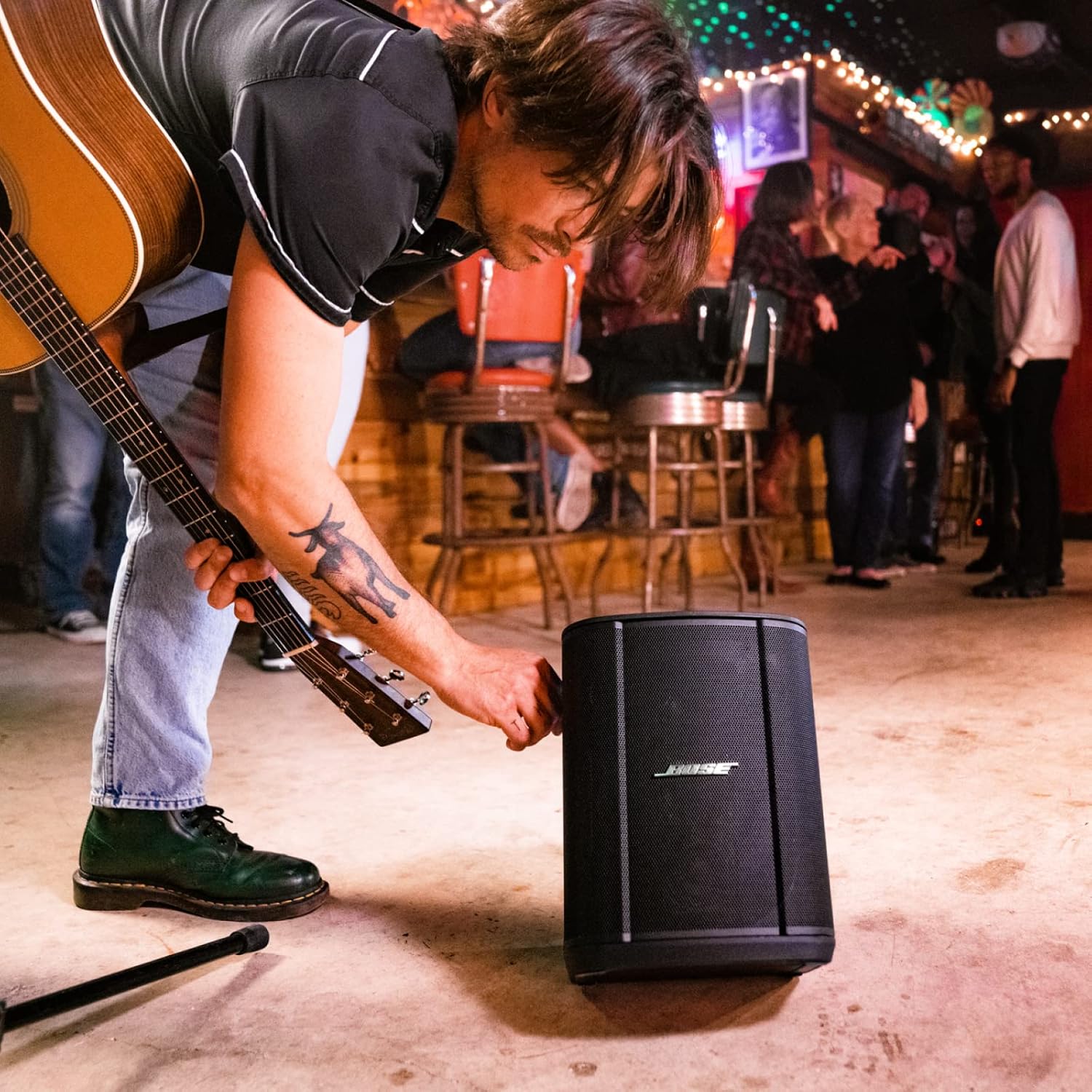
Image: The Bose S1 Pro+ speaker positioned horizontally, demonstrating its use as a floor monitor.

Image: The Bose S1 Pro+ speaker mounted on a standard speaker stand, illustrating its elevated setup for broader sound dispersion.
Connecting Inputs:
The S1 Pro+ features a 3-channel mixer. Channels 1 and 2 are designed for microphones and instruments, while Channel 3 is dedicated to music playback via Bluetooth or the 3.5mm AUX input.
- Connect microphones or instruments to the XLR/TRS combo jacks on Channels 1 and 2.
- For music playback, use Bluetooth or connect a device to the 3.5mm AUX input on Channel 3.
- Optional Bose wireless RF transmitters (sold separately) can be effortlessly paired and stored within the speaker for a cable-free setup.

Image: Rear panel of the Bose S1 Pro+ displaying the XLR/TRS combo inputs for channels 1 and 2, the AUX input, USB power port, and AC power input.
Operating Instructions
The Bose S1 Pro+ is designed for intuitive operation, whether you're adjusting settings directly on the unit or via the Bose app.
Powering On and Off:
To power on the S1 Pro+, connect the power cord or ensure the internal battery is charged. Press and hold the power button located on the rear panel until the indicator light illuminates.
Using the Integrated Mixer:
Each channel on the S1 Pro+ has dedicated controls for volume, EQ, and reverb. The OLED displays provide visual feedback for adjustments. ToneMatch presets can be applied to optimize sound for specific instruments or microphones.

Image: Side view of the Bose S1 Pro+ highlighting the three control knobs for volume, EQ, and reverb, along with their associated OLED displays.
Bose App Control:
For comprehensive control, download the Bose app. The app allows you to remotely adjust volume, EQ, reverb, and access the full ToneMatch library. This is particularly useful when the speaker is placed out of reach or for fine-tuning sound from your performance position.
Video: A product summary video demonstrating the features and controls of the Bose S1 Pro+ system, including app integration.
Bluetooth Pairing:
To pair a Bluetooth device, activate Bluetooth on your device and on the S1 Pro+. Select "Bose S1 Pro+" from your device's Bluetooth list. A successful connection will be indicated by an audible prompt and/or a status light on the speaker.
Battery Management:
The S1 Pro+ features a rechargeable lithium-ion battery. To charge, connect the system to an AC power outlet using the provided power cord. The battery indicator will show charging status. Battery life varies based on volume and content played, typically offering up to 11 hours at moderate levels and around 5 hours at performance volumes.
Maintenance
Proper maintenance ensures the longevity and optimal performance of your Bose S1 Pro+ system.
- Cleaning: Use a soft, dry cloth to clean the exterior surfaces. Avoid using harsh chemicals or abrasive cleaners.
- Storage: Store the unit in a cool, dry place away from direct sunlight and extreme temperatures. If storing for extended periods, ensure the battery is partially charged (around 50%) to preserve its health.
- Battery Care: Avoid fully discharging the battery frequently. Charge the battery regularly, even if the unit is not in constant use.
- Ventilation: Ensure proper ventilation around the unit during operation to prevent overheating. Do not block any vents.
Troubleshooting
If you encounter issues with your Bose S1 Pro+, refer to the following common troubleshooting steps:
| Problem | Possible Solution |
|---|---|
| No sound output |
|
| Bluetooth pairing issues |
|
| Short battery life |
|
| Distorted audio |
|
For more detailed troubleshooting or persistent issues, please refer to the official Bose support website or contact customer service.
Specifications
| Feature | Detail |
|---|---|
| Brand | Bose |
| Model Number | 869583-1110 |
| Mounting Type | Floor Standing |
| Power Source | Battery Powered |
| Connector Type | Aux |
| Material | Plastic |
| Item Weight | 14.4 Pounds |
| Number of Channels | 3 |
| Recommended Uses | Music instruments, Outdoor, Indoor |
| Product Dimensions (L x W x H) | 10.98 x 9.37 x 13.07 inches |
| Batteries | 1 Lithium Ion battery required (included) |
| Connectivity Technology | Bluetooth |
| Color | Black |
| Compatible Devices | Smartphone |
| UPC | 017817837361, 197105045217, 017817837347 |
Warranty and Support
For information regarding the product warranty, please refer to the warranty card included with your purchase or visit the official Bose support website. Bose provides customer support for product inquiries, technical assistance, and service requests.
Bose Support: www.bose.com/support
Related documents869583-1110


Ask a question about this manual
Ask about setup, troubleshooting, compatibility, parts, safety, or missing instructions. Manuals+ will review the question and use this page’s manual context to help answer it.